




A page can look perfectly organized while its HTML headings tell a different story. A large hero title may be a div, a small footer label may be an h2, and an Elementor template may output an extra h1 before the article begins.
That gap between visual design and rendered HTML causes most heading problems. The fix is to make each heading describe its section and give nested sections an understandable rank.
This guide explains how H1–H6 elements work, when multiple H1s or skipped levels create practical problems, how Elementor templates introduce unexpected headings, and how to inspect the structure visitors and search systems receive. It extends the HTML guidance in our Mastering On-Page SEO Elements visual guide with a focused heading audit.
Table of Contents
ToggleHeadings create a navigable content hierarchy
HTML headings label sections. They allow a reader to scan the page, predict what comes next, and move directly to a relevant passage. They also expose relationships that font size, weight, and spacing cannot communicate on their own.
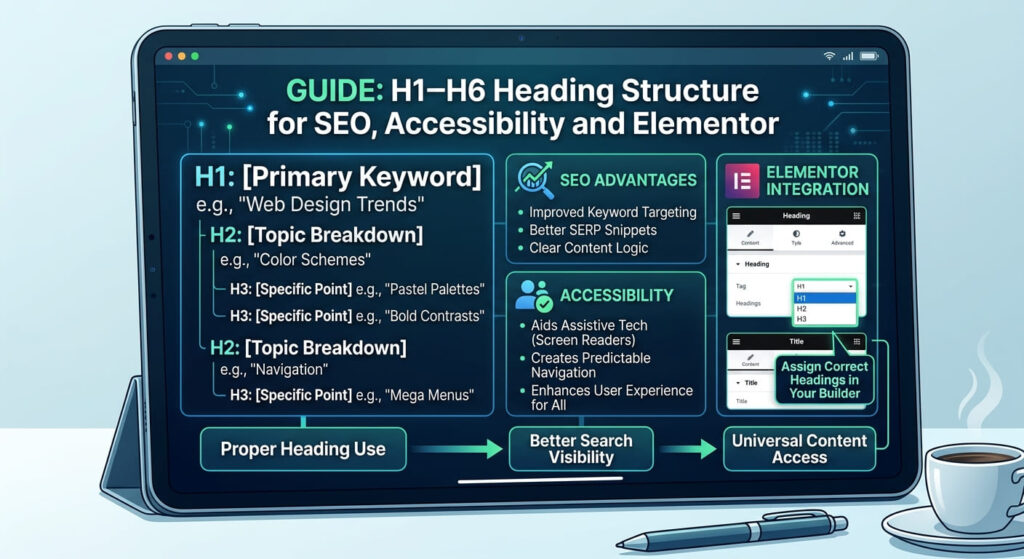
The WHATWG HTML Standard defines h1 through h6 as headings for sections. The number represents the level of the section: h1 is top-level, h2 is a subsection, h3 is a subsection within that h2, and the pattern continues through h6.
The W3C Web Accessibility Initiative explains that browsers and assistive technologies can use headings for in-page navigation. A screen-reader user may open a heading list and jump between sections. Misleading labels or ranks weaken that shortcut.
Search is a separate issue. Google recommends informative headings and a well-organized page because they help people navigate content. Google also states that headings do not need a magical number and that out-of-order headings are not a search-ranking problem by themselves. Treat logical structure as sound publishing and accessibility practice, not as a penalty-avoidance trick.
What H1 through H6 represent
Choose a heading rank from the section’s relationship to the surrounding content, not from the text’s desired appearance.
| Element | Structural role in an article | Common use |
|---|---|---|
h1 | Top-level subject | Page or article title |
h2 | Major section within the page | Main parts of a guide |
h3 | Subsection within an h2 | Method, example, or question inside a main part |
h4 | Subsection within an h3 | A narrower case or step group |
h5 | Subsection within an h4 | Deeply nested reference material |
h6 | Subsection within an h5 | Rare, deeply nested content |
Most blog posts need only an h1, several h2 elements, and selected h3 elements.
Visual prominence is controlled with CSS or Elementor typography settings. An h2 can be styled smaller than an h3 without changing its meaning. Elementor confirms that changing a widget’s HTML tag does not necessarily change its size or style.
Use this test: if a heading’s appearance were removed and only an indented outline remained, would its position still make sense? If not, adjust its HTML rank or move the section.
A logical article outline in HTML
Suppose a page teaches image optimization. The article title is the main subject. File formats and alternative text are major sections. Individual formats and writing rules sit inside those sections.
<h1>Image Optimization for WordPress</h1>

<h2>Choose an Image Format</h2>
  <h3>JPEG</h3>
  <h3>WebP</h3>
  <h3>AVIF</h3>

<h2>Write Useful Alternative Text</h2>
  <h3>Describe Informative Images</h3>
  <h3>Handle Decorative Images</h3>

<h2>Test the Published Page</h2>
The three format headings are siblings because each belongs directly to “Choose an Image Format.” The alternative-text headings start a new group beneath their own h2. “Test the Published Page” returns to h2, closing the preceding h3 subsection.
Heading text should identify the section’s topic or purpose. WCAG 2.2 Success Criterion 2.4.6 calls for descriptive labels. “AVIF compression settings” gives more direction than “More information.”
Use a keyword where it accurately names the section. Repetition in every heading weakens scanning.
Faulty outlines and what they communicate
Here is a rendered structure that can emerge when a theme, an Elementor hero, and the post body each add headings independently:
<h2>Latest Articles</h2>                 <!-- theme header -->
<h1>Image Optimization Guide</h1>       <!-- hero widget -->
<h1>Image Optimization for WordPress</h1><!-- Post Title widget -->

<h2>Choose an Image Format</h2>
  <h4>JPEG</h4>                         <!-- skipped subsection level -->
  <h4>WebP</h4>

<h2>Learn More</h2>                    <!-- footer label -->
No single line proves that the page will rank poorly. The defects are editorial and navigational:
The two
h1elements compete as the apparent main heading.“Latest Articles” appears before the main content and can obscure the page’s outline.
The jump from
h2toh4implies a missing level.“Learn More” does not identify the footer section’s topic.
A cleaner version would retain one article h1, change the hero duplicate to a paragraph, use h3 for the formats, and give any necessary footer heading a descriptive label.
Multiple H1 elements are valid HTML but require editorial judgment
HTML does not impose a universal one-H1-per-document rule, and Google does not treat multiple H1 elements as an automatic search violation. That does not make multiple H1s the best publishing choice for every WordPress article.
For a conventional post, one distinct h1 is the clearest pattern. It gives the document an obvious title, reduces ambiguity in heading lists, and makes templates easier to audit. That is a maintainability and user-experience recommendation, not a claim that a second h1 triggers a ranking penalty.
A document with independent content regions can have more than one top-level heading. Check whether each h1 introduces a separate subject. A marketing eyebrow, logo text, or duplicated mobile heading rarely does.
When two H1s repeat the same title, remove or retag the duplicate. When they describe different concepts, decide which concept is the page’s primary subject and whether the other belongs at h2 or outside the heading hierarchy.
When heading levels are skipped
W3C advises nesting headings by rank and avoiding skipped levels where possible. An h2 followed directly by an h4 suggests that an h3 subsection is missing. That can confuse a person using the heading structure to understand how content is grouped.
There is an important directional distinction:
Moving from
h2toh4opens a deeper subsection while skippingh3.Moving from
h4back toh2closes theh4and its parenth3, then begins a new major section. This is a normal return up the hierarchy.
Do not insert empty headings to fill numerical gaps. If a section belongs beneath an h2, make it h3. Otherwise, use suitable non-heading text.
W3C notes that ranks in fixed areas such as sidebars should remain consistent across pages. Do not make a footer label h5 merely because the current post ends with an h4.
Elementor creates headings beyond the post editor
The WordPress editor shows only part of the final page. Elementor templates, widgets, popups, and add-ons can all contribute elements to the rendered document.
Consider this setup:
The Single Post template contains a Post Title widget set to
h1.The post content begins with a manually entered
h1bearing the same title.A hero Heading widget above the content is also set to
h1.A related-posts widget outputs its label as
h2.
The editor may show one heading while the published page contains three H1s. Remove the body’s manual title when the template already supplies it. The hero can use a paragraph, div, or lower-ranked heading according to its role.
Elementor’s Heading widget offers an HTML Tag field with H1 through H6, div, span, and p. Set that field according to meaning, then use the Style tab for size, weight, and spacing. Do not select h2 merely because the theme makes it look attractive.
Check these Elementor locations during an audit:
Theme Builder → Single Post: Post Title and hero widgets.
Header and footer templates: logo text, navigation labels, newsletter titles, and column labels.
Reusable containers and global widgets: repeated headings can appear across many URLs.
Accordion and tab widgets: inspect whether each visible title is exposed as a heading, a button, or both.
Responsive variants: desktop and mobile versions may both remain in the DOM even when CSS hides one visually.
Third-party add-ons: widget defaults may differ from Elementor’s core widgets.
After changing a template, test more than one post because the edit may affect every page using it.
Check rendered headings rather than the editor
The browser’s rendered Document Object Model, or DOM, is the evidence that counts. It contains the theme, template, plugin, and content output after the page has loaded.
Inspect headings in browser developer tools
Open the published URL in a private window, then:
Right-click the visible page title and choose Inspect.
Confirm whether the element is
h1,h2, or another tag.Search the Elements panel for
<h1, then repeat for<h2through<h6.Note headings from the header, main article, sidebar, popup, and footer.
Check hidden responsive components and dynamically inserted widgets.
Browser accessibility tools can confirm that a visual label is recognized as a heading at the expected level.
Print a heading outline in the console
This browser-console snippet lists every native heading in DOM order:
[...document.querySelectorAll('h1,h2,h3,h4,h5,h6')].map((heading) => ({
  level: heading.tagName,
  text: heading.textContent.trim(),
  hidden: heading.offsetParent === null
}));
The result exposes duplicates and hidden variants. Check the accessibility tree for custom components using role="heading" and aria-level.
Read the outline as a person would
Copy the level and text into a short list. Remove the body copy. If the remaining outline describes the page accurately, the hierarchy is doing its job.
Flag a heading when:
its text does not identify the following section;
its level jumps downward without a parent subsection;
the same title appears at the same or competing levels;
a visual section title is not marked as a heading;
decorative or interface text is marked as a content heading;
a hidden duplicate remains exposed to assistive technology.
Automated tools can identify level jumps or empty headings, but human review must judge the content relationships.
Heading structure audit checklist
Use this sequence on a published WordPress page:
Identify the main page topic and its rendered
h1.Confirm that template and body content do not duplicate the title.
List every
h1–h6in DOM order.Check that each
h2starts a major section of the main subject.Check that each
h3belongs to the precedingh2, with deeper levels following the same logic.Replace downward rank jumps such as
h2toh4unless the structure has a defensible reason.Verify that heading text describes the section’s topic or purpose.
Separate structural rank from Elementor typography controls.
Inspect global headers, footers, sidebars, popups, and reusable widgets.
Test desktop and mobile output, including CSS-hidden duplicates.
Review the browser accessibility tree where custom widgets are involved.
Recheck representative pages after editing a Theme Builder template.
Record the template or widget responsible for each defect. Fixing the source is safer than patching headings page by page.
Questions about H1–H6 structure
How many H1 tags should a page have?
HTML and Google Search do not define one H1 as a universal ranking requirement. For a standard article, one descriptive H1 clearly identifies the main subject and avoids template duplication. Use multiple H1s only when the document has a defensible top-level structure.
Can a page use multiple H1 elements without an SEO penalty?
Yes. Multiple H1s do not create an automatic Google penalty. Their presence can still signal a template mistake or make the content hierarchy harder to interpret. Judge them by the structure they communicate, not by a penalty myth.
May heading levels be skipped?
Avoid downward skips such as h2 to h4 where possible because they imply a missing subsection level. Returning from h4 to h2 is acceptable: it closes nested subsections and begins a new major section. Google says semantic order is not a special search-ranking requirement, while W3C recommends logical nesting for accessibility.
Should visual size determine whether text is H2 or H3?
No. Rank describes the section’s place in the content hierarchy. Size and appearance belong to CSS, the theme, or Elementor’s typography controls. Pick the correct tag first, then style it.
How do I fix duplicate H1 headings in Elementor?
Inspect the published page to identify each H1’s source. Check the Single Post template, Post Title widget, hero Heading widget, and the first block in the article body. Keep the element that serves as the page title, then remove or retag duplicates through the widget’s HTML Tag setting. Test several posts after changing a global template.
Make the rendered hierarchy match the content
A strong heading structure is not a keyword pattern or a guaranteed ranking device. It is a compact map of the page. The H1 names the primary subject, H2s divide that subject into major sections, and deeper ranks express genuine nested relationships.
Elementor’s preview does not reveal the full document. Inspect the published DOM, account for global templates and responsive duplicates, and verify the heading list users receive.
For the broader relationship between titles, headings, metadata, HTML, and images, return to Mastering On-Page SEO Elements: Meta Tags, HTML, and Image Optimization Explained. Use this focused checklist whenever a template changes or a new widget begins contributing content to the rendered page.