

A useful article gets published, earns impressions and then slowly slips deeper into the archive. The writer has moved on, the navigation barely acknowledges it and newer posts compete for the same search intent. Nothing is technically broken, yet the page has become difficult for readers and crawlers to reach.
Internal linking strategy refers to the planned use of links between pages on the same website to create clear routes, explain page relationships and direct attention towards priority content. A sound strategy connects every indexable page to at least one relevant source page and gives each link a crawlable destination, descriptive anchor text and a reason to exist.
Internal links should be designed while the content architecture is planned, not scattered through an article after publication.
That planning-stage view is the central argument of this pillar. It treats links as structural decisions across a hierarchy of pillar pages, cluster posts and supporting pages, while specialist cluster posts will handle individual audit methods, tools and site types in greater detail.
Google says it uses links to discover pages and as a signal when judging relevance. It also states that every page you care about should receive a link from at least one other page on your site, while rejecting the idea of a magical ideal link count (Source: Google Search Central, 2025).
Post Summary
Internal linking strategy plans how pages on one site connect, which destinations receive attention and what each link tells readers and search systems.
Google uses links to find pages and assess relevance, but it publishes no ideal number of links per page.
The Contextual Route Framework checks four properties: destination, meaning, position and maintenance.
A pillar → cluster → supporting-page hierarchy creates clearer routes than isolated links added after publication.
Descriptive anchors and nearby text should set an accurate expectation for the destination.
Sitemaps support discovery, but they don’t replace crawlable internal navigation.
Internal links remain relevant to Google’s AI features because supporting pages must be indexed and easy to find.
Specialist subjects are covered in cluster posts as they go live.
Table of Contents
ToggleWhat an internal linking strategy means for search visibility
An internal linking strategy is a documented plan for connecting pages according to user need, editorial relationships and site priorities. It determines which pages act as hubs, which pages provide detail, how a visitor moves between them and whether a crawler can follow the same route through standard HTML links.
That definition is narrower than “add links to related articles”. Relevance is necessary, but strategy also covers hierarchy, destination quality, anchor wording, link placement, canonical consistency and maintenance after URLs change.
Internal links perform three jobs at once
Each useful internal link serves a reader, a crawler and the wider site structure. The balance changes by placement, but removing any one of those jobs usually weakens the link.
For readers, a link offers the next useful action. It can define an unfamiliar term, provide evidence, move from a broad guide to a detailed method or help compare two related choices.
For crawlers, a standard link exposes a URL that can enter a crawl queue. Google states that links are normally crawlable when they use an HTML <a> element with an href attribute pointing to a resolvable web address (Source: Google Search Central, 2025).
For the site structure, repeated link patterns show relationships. Google says it analyses linkages between pages and can use both the number of links needed to reach a page and the number of internal links pointing to it when inferring relative importance (Source: Google Search Central, 2025).
Discovery isn’t the same as indexing or ranking
A link can help Google find a URL. It can’t force Google to index the page, select it as canonical or rank it for a query.
This distinction prevents a common diagnostic error. If a linked page stays unindexed, adding ten more links isn’t a substitute for checking content quality, duplication, access controls, status codes, canonical signals and rendering.
Sitemaps illustrate the same limit. Google describes a sitemap as a discovery aid and says submission doesn’t guarantee crawling or indexing (Source: Google Search Central, 2025).
Treat internal links as routes and relationship statements, not ranking switches. The implication is practical: build the route, then validate the destination independently.
The Contextual Route Framework for internal links
The Contextual Route Framework is a four-part editorial model for deciding whether an internal link belongs on a page. It checks the destination, meaning, position and maintenance burden before the link is published.
The name matters less than the discipline. A link must pass all four checks; high relevance can’t rescue a broken destination, and a healthy URL can’t rescue misleading anchor text.
1. Destination: is this the right page to send the reader to?
The destination should fulfil the promise made by the source sentence. It should also be the preferred, indexable version of the URL rather than a redirect, parameter variant or duplicate.
Google recommends linking internally to the canonical URL. Consistent linking supports the preferred version, while links to duplicates can split reporting and send users through unnecessary routes (Source: Google Search Central, 2025).
Check the destination’s status, canonical and current purpose before adding it. A technically live 200 page can still be the wrong destination if its intent has changed.
2. Meaning: does the link explain the relationship?
Anchor text is the visible linked wording. Google advises that it should be descriptive, reasonably concise and relevant to both the source and destination pages; the words around the anchor supply further context (Source: Google Search Central, 2025).
Meaning is broader than keyword matching. “Internal link audit in Screaming Frog” makes a precise promise, while “learn more” transfers the work of interpretation to the reader.
W3C guidance reaches a similar result from an accessibility perspective: a link’s purpose should be determinable from its text alone or from that text together with programmatically associated context (Source: W3C, 2023).
3. Position: is the link available at the right moment?
Position changes the job. A main-menu link expresses persistent site-level importance; a breadcrumb shows hierarchy; an in-copy link explains a local relationship; a related-content card offers optional continuation.
The strongest position is the one that meets the reader’s next question without interrupting the current answer. A relevant link beside the sentence that creates the need has more editorial meaning than the same URL placed in a generic footer block.
Position also affects context for assistive technology. W3C notes that a link description can be supplied through the same sentence, paragraph, list item or table cell, and preceding context can reduce confusion for screen-reader users (Source: W3C, 2023).
4. Maintenance: can the route stay accurate?
Every internal link becomes a dependency. A migrated, merged or deleted destination can leave broken links, redirect chains or inaccurate promises across many source pages.
Maintenance starts with ownership. Record which page owns a topic, which source pages support it and what should happen to their links if the destination changes.
Use this four-step publishing check:
Open the final destination and confirm that it satisfies the source sentence.
Confirm a
200response and a self-referencing canonical on the preferred URL.Read the anchor and surrounding sentence without the page title; check whether the destination is predictable.
Record the link in the page brief or editorial inventory so later updates include its source pages.
Internal Linking Strategy
The hidden structure behind page discovery, topical relationships and useful reader journeys.
Plan the route before adding the link
Select a workflow stage to see its purpose, pass test and common failure.
Recommended editorial hierarchy
What official guidance actually supports
These figures and rules are drawn from current first-party documentation. They aren't ranking promises.
Search Console Links report data ceilings
Logarithmic display: bar length shows orders of magnitude so both limits remain visible. Search Console says the Links report is sampled, not a complete link inventory.
Interactive internal-link audit
Tick only the checks you have verified. The result is a completion aid, not a Google score.
Anchor-text clarity checker
Enter the visible words of an internal link. This local check flags generic wording; it doesn't predict rankings.
Evidence timeline and primary sources
The timeline separates foundational research from current platform guidance.
Authentic sources used
Google — Link best practices
Google Search Central: crawlable links, anchor text and internal links — updated 10 December 2025.
Google — AI features and websites
Google Search Central: AI Overviews, AI Mode and query fan-out — updated 10 December 2025.
Google — Sitemaps
Google Search Central: sitemap purpose and limits — updated 10 December 2025.
Google — JavaScript SEO
Google Search Central: crawling, rendering, indexing and link extraction — updated 10 December 2025.
Google — Crawl budget
Google crawling infrastructure: crawl-budget management — updated 22 July 2026.
Google Search Console — Links report
Search Console Help: report coverage, row limits and exports — checked 8 September 2026.
W3C — Link purpose
WCAG 2.2 Understanding SC 2.4.4 — W3C Recommendation published 5 October 2023.
Google Research — Original search paper
Brin and Page, The Anatomy of a Large-Scale Hypertextual Web Search Engine — 1998.
How internal links shape crawl paths, hierarchy and meaning
Internal links turn a set of URLs into a graph. In plain English, a graph is a network of pages connected by links; each page is a node and each link is a directed route from one node to another.
The graph model explains why folders alone don’t create search-visible hierarchy. A URL such as /seo/on-page/internal-links/ looks organised to a human, but Google says it relies on page linkages rather than URL structure to infer site structure (Source: Google Search Central, 2025).
Crawl discovery begins with reachable URLs
Googlebot finds URLs from pages it already knows, sitemaps and other sources. During JavaScript processing, Google parses href values, places discovered URLs in its crawl queue and can parse rendered links again after JavaScript runs (Source: Google Search Central, 2025).
This makes reachability a foundational test. A page available only after a user enters text in a search box, changes an unlinked filter or activates a scripted element might be visible to a person but absent from a normal crawl path.
Google’s ecommerce guidance gives a concrete hierarchy: menu to category, category to subcategory, then subcategory to product. It also warns that Googlebot doesn’t normally submit searches into a site’s search box to find products (Source: Google Search Central, 2025).
The same principle applies to publishers. A category or pillar should link to its clusters, clusters should link to supporting explanations, and relevant lower-level pages should link back to the most useful hub.
Hierarchy is expressed through recurring link patterns
One link identifies a relationship. A consistent set of links creates an architecture.
A pillar page signals breadth by routing readers to specialist cluster posts. A cluster signals its role by linking back to the pillar and sideways only where another cluster answers the reader’s next question. Supporting pages connect narrow tasks to the relevant cluster rather than linking to every top-level guide.
Link depth is a diagnostic, not a universal target
Click depth is the number of internal link steps needed to reach a page from a chosen starting point, usually the home page. A high number can expose buried content, but no official rule says every important page must sit within a fixed number of clicks.
Context changes the interpretation. A legal archive page may belong deeper than a current service page; an ecommerce product within a large catalogue can require more steps than a cornerstone editorial guide.
Use depth comparatively inside the same site. If two pages have equal business and editorial importance but one is several levels deeper, inspect whether the difference reflects a deliberate structure or neglect.
Build a crawlable hierarchy in five passes:
List the indexable pages that must be discoverable from normal navigation.
Assign each page a structural role: hub, cluster, supporting detail, utility or conversion destination.
Draw the intended parent-child routes between those roles.
Add cross-links only where a reader’s task continues across branches.
Crawl the finished site and compare the observed routes with the planned map.
Internal Linking Strategy Workflow
From page roles and site architecture to crawl validation, measurement and maintenance.
Drag to pan · wheel or pinch to zoom · use Lightbox for a larger view
Building an internal linking strategy around search intent
An internal linking strategy works best when the destination continues the user’s task rather than repeating the source page. Search intent is the job a person expects a result to help them complete, such as learning a concept, following a method or comparing options.
Topic similarity alone is a weak selection rule. Two pages can share many words yet compete for the same query, while two pages with different vocabulary can form a useful sequence.
Assign one primary job to every indexable page
Start with a page inventory containing the URL, title, primary intent, format, structural role and preferred destination status. This prevents editors from choosing links through memory or a site-search result alone.
The primary job should be specific enough to separate nearby pages. “Internal linking” is a topic; “find orphan pages in a WordPress blog” is a task.
When two URLs claim the same job, linking them together doesn’t resolve the overlap. Decide whether to merge them, differentiate them or keep one out of search before designing more routes.
Link from a resolved question to the next unresolved question
An article should answer its main query before sending readers elsewhere. Early links that divert users before the answer can make a page feel like a directory instead of a useful destination.
Place a specialist link after the broad explanation creates a natural need for detail. For example, a pillar can explain what orphan pages are, then point to a cluster that covers crawl setup, filters and repair steps.
This sequence also improves extractability. A passage remains useful on its own, and the link extends it rather than carrying the entire explanation.
Separate structural links from editorial links
Structural links appear through templates: menus, breadcrumbs, taxonomy archives and footer areas. They provide stable orientation and repeated access.
Editorial links sit inside page-specific copy. They express why two pieces of content belong together at that exact point.
Don’t ask one type to do the other’s job. A breadcrumb can’t explain a nuanced relationship between sibling topics, while a single contextual link doesn’t replace dependable site navigation.
Plan links before drafting cluster content
A content brief should name the upstream hub, downstream supporting pages and any legitimate sibling route. Writers can then compose the anchor and context as part of the explanation rather than inserting a phrase during upload.
Use this workflow for each new page:
Define the page’s primary job and the query intent it resolves.
Select the pillar or cluster that should introduce the page.
Name the page this new URL should link back to for broader context.
Identify up to the fewest necessary sibling routes based on the reader’s next task.
Draft each anchor inside a sentence that explains the relationship.
Publish only after the source and destination both pass the destination check.
Anchor text and context that set an accurate expectation
Anchor text should predict the destination, not advertise SEO intent. The best wording is specific enough to make sense when read alone and natural enough to belong in the sentence.
Google advises site owners to resist cramming every related keyword into an anchor and warns against chaining links beside one another because each loses surrounding context (Source: Google Search Central, 2025).
Exact-match anchors aren’t a publishing quota
Exact-match anchor text uses the destination’s target phrase word for word. It can be accurate, but accuracy is the test; repetition isn’t the goal.
A page about detecting orphan content could receive natural anchors such as “find orphan pages”, “orphan-page audit” and “pages with no internal links”. Each describes the same destination from a different sentence context.
Forced variation can be as awkward as forced repetition. Don’t replace a precise term with a vague synonym merely to make an anchor-text spreadsheet look diverse.
Surrounding copy carries relationship detail
The sentence before and around a link can state whether the destination defines, demonstrates, compares or operationalises the current point. That relationship helps readers decide whether following the link is worth the interruption.
❌ Bad — Improve your site structure with our [guide here].
✅ Better — Use the [orphan-page audit workflow] to find indexable URLs that receive no crawlable internal links.
Repeated components need accessible names
Cards labelled “Read more” can rely on associated context when the implementation exposes that context programmatically. A unique descriptive label remains easier to scan, especially in a list of links presented by assistive technology.
W3C recommends meaningful link wording and says links with different purposes and destinations should have different text, while links to the same destination should use consistent identification (Source: W3C, 2023).
For image-only links, Google can use the image’s alt attribute as anchor text. The text alternative must therefore describe the destination’s purpose when the image is the only linked content (Source: Google Search Central, 2025).
Anchors should survive extraction from the paragraph
Search interfaces, screen readers and content-analysis tools can present anchors away from their original visual design. Test the text in that stripped-down state.
An anchor doesn’t need to repeat the full page title. It needs enough meaning to distinguish the destination from other links on the page.
Run this anchor review:
Export or copy the anchors from the page without their styling.
Read each anchor alone and predict its destination.
Read its full sentence and identify the relationship being expressed.
Replace generic labels where neither view provides enough meaning.
Remove adjacent links that divide one sentence into several unclear choices.
Internal-link types and the job each one should perform
Different internal-link placements express different relationships. Treating every link as equivalent hides whether a page lacks orientation, hierarchy, contextual support or continuation paths.
The table separates six common link types by user job, structural meaning and the evidence you should inspect.
| Internal-link type | Primary reader job | Structural meaning | Suitable use | Validation evidence |
|---|---|---|---|---|
| Main navigation | Reach major site areas | Persistent top-level priority | Core services, categories and main editorial hubs | Crawl confirms every item resolves directly to its canonical URL |
| Breadcrumb | Understand location and move upward | Parent-child hierarchy | Deep categories, products and nested editorial sections | Breadcrumb route matches the intended content hierarchy |
| Contextual body link | Continue a question at the point of need | Page-specific semantic relationship | Definitions, methods, evidence and related tasks | Anchor plus sentence predicts the destination accurately |
| Hub or index link | Scan a controlled set of resources | One-to-many topic coverage | Pillar pages, category indexes and resource centres | Every listed destination is current, distinct and reachable |
| Related-content card | Continue after the main answer | Optional sibling relationship | Genuine next tasks or closely related reading | Card title identifies a distinct destination; no duplicate route without purpose |
| Pagination link | Move through a sequence | Ordered collection relationship | Archives, category listings and multi-page collections | Every component page has a crawlable URL and sequence route |
Choose the link type through this short sequence:
Use navigation for destinations required across a site or section.
Use breadcrumbs for a stable parent-child route.
Use contextual links when the surrounding copy must explain the relationship.
Use a hub when readers need to scan a curated topic set.
Use related cards only after checking that each destination offers a distinct next step.
Link equity, PageRank and the limits of the “link juice” idea
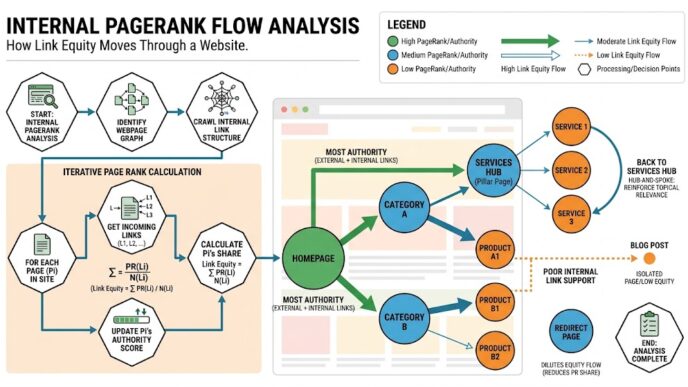
Internal links can influence how importance moves through a site’s link graph, but “link juice” is too crude to guide editorial decisions. It encourages counting links while ignoring relevance, destination quality, duplication and reader need.
PageRank is a graph-based method described in Google’s original 1998 search-engine paper. The model treated links as weighted citations and used the link structure of the web to calculate a quality ranking for pages (Source: Brin and Page, 1998).
Historical PageRank explains the graph, not modern ranking in full
The original model helps explain why incoming links and the links available on a source page affect graph distribution. It doesn’t provide a reliable calculator for current Google rankings.
Google Search now uses many systems, and its public guidance doesn’t expose a score showing how much ranking value passes through each internal link. Claims that a specific page “sends 23% more link equity” need an explicit, reproducible measurement model; otherwise they create false precision.
Use PageRank as a structural lens. Pages receiving routes from prominent, well-connected parts of the site are positioned differently from pages reached through one buried archive link.
More incoming links can indicate relative importance
Google’s ecommerce documentation states that, as a general rule, more internal links to a page can indicate higher relative importance within the site. It pairs this with click distance and page relationships, not a fixed quota (Source: Google Search Central, 2025).
This doesn’t mean sitewide links should point to every priority URL. A template link repeated across thousands of pages has a different editorial role from a body link placed because the destination answers the current question.
Count is evidence about architecture, not a verdict on quality.
Priority pages need differentiated routes
Give priority pages links from sources that can explain why the destination matters. A pillar can introduce a cluster, a high-performing evergreen page can route to an updated specialist answer, and a navigation component can preserve availability.
The mix is stronger than raw repetition because each placement performs a distinct job. Review importance through three questions: Can users reach the page? Do relevant sources endorse it contextually? Does the wider hierarchy recognise its role?
Apply graph thinking without pretending to calculate Google’s private systems:
Identify pages that matter to the site but receive few meaningful internal routes.
Find authoritative source pages with a genuine topical reason to link.
Add the route inside copy that explains the destination’s contribution.
Remove duplicate template links that add no new user path.
Re-crawl and verify the planned change in incoming links and depth.
Auditing orphan pages, broken routes and wasted crawl paths
An internal-link audit compares the routes you intended with the routes that users and crawlers can actually follow. It should diagnose causes, not produce a large spreadsheet that gets admired and forgotten.
Start with three datasets: a crawler export, a list of canonical indexable URLs and Google Search Console evidence. No single source is complete.
Orphan pages require more than one dataset
An orphan page has no discoverable internal link from the crawl starting points used for the audit. A crawler can’t report a URL it never encountered unless you supply that URL from another source.
Compare crawl URLs with XML sitemap entries, analytics landing pages, CMS exports and Search Console pages. A URL present outside the crawl but absent from the crawl graph is an orphan candidate, not an automatic publishing priority.
Some candidates should be linked. Others should be redirected, merged, excluded from search or removed because the page has no continuing purpose.
Broken links and redirects change the route
A broken internal link sends users and crawlers to a failing status. A redirect can preserve a route after a move, but internal links should point to the final canonical destination once the migration is stable.
Google’s crawl-budget guidance advises avoiding long redirect chains and using 404 or 410 responses for content that has been permanently removed. It also recommends current sitemaps and accurate lastmod values for updated content (Source: Google, 2026).
One redirect isn’t the same as a failure. The audit priority is to remove unnecessary hops, repair loops and update links where the final destination is known.
Canonical inconsistency can disguise link concentration
Search Console groups link data by canonical URL, and duplicate source-to-target links can be combined. Its Links report is a sample rather than a full list, with on-screen tables limited to 1,000 rows (Source: Google Search Console, 2026).
This is why Search Console can’t replace a full-site crawl. It shows Google’s sampled view and helps confirm which pages Google recognises as heavily linked, while a crawler shows the links available in the retrieved site version.
Check internal links against the canonical target. If links point to HTTP, trailing-slash variants, parameters or old paths that resolve elsewhere, normalise them at the source.
Crawl budget matters at large scale
Crawl budget describes the URLs Googlebot can and wants to crawl on a site within a period. It deserves close attention on large or rapidly changing sites, but it shouldn’t become the explanation for every indexing issue on a small publication.
Google ties crawl capacity to server health and crawl demand to factors such as popularity, user value, uniqueness and freshness. Its July 2026 guidance recommends reducing duplicate URLs, soft 404 pages, long redirect chains and inefficient responses rather than chasing a standalone “budget score” (Source: Google, 2026).
Internal linking contributes by making priority routes direct and consistent. It can’t compensate for millions of duplicate faceted URLs or persistent server errors.
Pro Tip: In Google Search Console, open Links → Internal links → Top linked pages → More, then select a priority URL to inspect recognised source pages. Use the report as sampled confirmation; Google states that it isn’t a complete list.
Run the audit in seven steps:
Crawl the canonical site from the home page with JavaScript rendering matched to the site’s delivery method.
Export indexable
200HTML URLs, internal inlinks, outlinks, depth, canonicals and redirect chains.Compare the crawl set with sitemaps, CMS exports, Search Console and analytics landing pages.
Classify unmatched URLs as link, merge, redirect, exclude or remove.
Repair broken routes and update redirected internal destinations to their final canonical URLs.
Add contextual links only from pages that explain a real relationship.
Re-crawl the same configuration and confirm that each intended change appears in the graph.
Tools and validation paths for WordPress and Elementor
WordPress stores the page, Elementor builds its layout, a crawler retrieves the output and Search Console shows part of Google’s observed link graph. Those are different views of the same route.
WordPress and Elementor: build a standard crawlable link
In the WordPress block editor or Elementor text editor, select descriptive words and set the preferred destination URL. For buttons, cards and image links, confirm that the rendered component produces an anchor element with an href value rather than relying only on a click event.
Open the published page, inspect the element in the browser and check the final HTML. Google says JavaScript-inserted links can be crawlable when they use the recommended anchor markup, yet server-side or pre-rendered output is useful because not every bot runs JavaScript (Source: Google Search Central, 2025).
Avoid linking to preview URLs, editor parameters or staging domains. Copy the canonical public URL from the published destination.
Screaming Frog: compare intended and observed architecture
Use a configured crawl to inspect response codes, depth, inlinks, outlinks, canonicals and rendered HTML. The exact interface can change by version, so save the crawl configuration with the audit date and use the vendor’s current documentation for version-specific controls.
The pass condition is structural: every priority indexable page appears in the crawl, receives at least one intended internal route and resolves without an avoidable redirect. Any page missing from the crawl fails the reachability test until another dataset proves and explains its route.
Don’t use a universal depth threshold. Compare pages within the same structural role and investigate unexplained outliers.
Google Search Console: validate Google’s sampled view
Search Console’s Links report can confirm whether Google has found internal links to a URL and which pages it lists as sources. The report combines duplicates and may retain links discovered in the past, including links that have since been removed (Source: Google Search Console, 2026).
Use URL Inspection for a specific page when you need Google’s indexed or live-test view. If a JavaScript component supplies important links, Google explicitly recommends checking rendered HTML with URL Inspection (Source: Google Search Central, 2025).
The pass condition isn’t a chosen inlink count. A priority page passes when the intended route exists in the rendered page, your crawler finds it and Google can retrieve the source without blocking.
Pro Tip: Keep one saved crawl configuration as the baseline for each site. A before-and-after comparison passes only when scope, rendering and exclusions match; otherwise the difference can’t be attributed to the link changes.
Validate an Elementor link through this workflow:
Publish or update the source page and clear the site’s relevant cache.
Open the public page outside the Elementor editor.
Inspect the linked component and confirm an
<a href="...">element points to the preferred public URL.Follow the link and confirm the destination returns the intended page without an unnecessary redirect.
Crawl the source URL and confirm the link appears in the crawler’s outlinks.
For a priority route, use Search Console URL Inspection to review the retrieved or live rendered HTML

Internal linking for AI Overviews, AI Mode and agentic retrieval
Internal linking has no special AI-search version. Google’s published guidance says the same SEO foundations apply to AI Overviews and AI Mode, including making content easy to find through internal links (Source: Google Search Central, 2025).
A page must be indexed and eligible to appear with a snippet before it can be shown as a supporting link in those Google AI features. No internal-link pattern guarantees selection.
Query fan-out raises the value of complete topic routes
Google says AI Overviews and AI Mode can use query fan-out, issuing multiple related searches across subtopics and data sources while generating a response (Source: Google Search Central, 2025).
That documented behaviour supports a careful editorial inference: a site with distinct, indexable pages for related subquestions gives search systems more eligible destinations than one overloaded page or a set of disconnected posts. Internal links help those pages become discoverable and explain their editorial relationships, but Google hasn’t stated that a cluster link directly causes AI citation.
Keep the distinction visible. The documented facts are query fan-out, index eligibility and internal findability; the cluster recommendation is a reasoned publishing response.
Self-contained passages still need useful onward routes
Agentic systems can retrieve passages rather than asking a user to read a full site in sequence. Each section should therefore answer one question directly before depending on a link.
An internal link can then provide the next layer: procedure, evidence, comparison or definition. If the source passage makes no sense without opening the link, both human readers and retrieval systems receive an incomplete answer.
This creates a useful writing rule: answer first, route second.
AI visibility doesn’t require an AI-only file
Google states that sites don’t need a new machine-readable AI file, special markup or special schema to appear in AI Overviews or AI Mode. It points site owners back to crawl access, internal findability, textual content and established Search controls (Source: Google Search Central, 2025).
Spend the effort on pages that deserve to be indexed and on routes that help people reach them. An invented AI-specific link ratio adds complexity without official support.
Use this AI-search readiness check:
Confirm the page answers a distinct subquestion in visible text.
Confirm it is indexable, canonical and eligible for a search snippet.
Link to it from a page that explains the relationship in descriptive language.
Keep the source passage useful before the link is followed.
Check Search Console for indexing and search performance without claiming that reported web traffic isolates every AI-feature visit.
Internal-link mistakes and the exact repair for each one
Most internal-link failures come from a mismatch between route and purpose. The URL exists, but the reader promise, technical destination or structural role is wrong.
Repair the mismatch rather than adding another plugin rule.
Adding links only after publication
Post-publish linking depends on memory and tends to favour recent or already prominent pages. New clusters receive links from the article being edited but lack planned routes from older hubs.
Fix it in the brief. Name the parent, child and legitimate sibling relationships before drafting, then update the source pages during the same publishing task.
Linking every repeated keyword
Repeatedly linking the same phrase to the same destination interrupts reading and adds no distinct route. It can also produce a page covered in visual noise.
Choose the point where the destination answers the strongest next question. Add another link only when it serves readers arriving at a materially different section or component.
Using vague anchors across unrelated destinations
“Read more”, “guide” and “here” reveal little in a link list. Reusing them for different destinations also weakens accessibility and scanning.
Replace the generic label with the destination’s job: “audit orphan pages”, “compare breadcrumb patterns” or “repair redirect chains”. Keep the surrounding sentence informative.
Pointing links through redirects
Redirects are useful during migrations, but permanent internal routes should be updated to the final canonical URL. Leaving old destinations creates avoidable requests and hides whether the content relationship has been reviewed.
Export redirected inlinks, map each old URL to its final destination and update source pages. Investigate chains and loops before bulk replacement.
Creating circular clusters with no clear hub
Linking every post to every other post produces density without hierarchy. Readers can’t tell which page provides the broad model and which pages handle specialist tasks.
Assign roles first. The pillar introduces the field, clusters own distinct subtopics and supporting pages solve narrow tasks; cross-links exist only where the user’s next action crosses those roles.
Treating an XML sitemap as navigation
A sitemap helps discovery, especially on large, new or media-heavy sites. Google says well-linked sites can have most pages found through navigation and that a sitemap doesn’t guarantee indexing (Source: Google Search Central, 2025).
Keep the sitemap accurate, but build internal routes to every page that matters. A URL found only in XML is a warning about the user journey even if a crawler eventually discovers it.
Automating links without editorial review
Automation can surface candidate source pages and insert rules at scale. It can also link ambiguous phrases, choose competing destinations or preserve relationships after a target page changes purpose.
Use automated suggestions as a queue. A human editor should approve destination fit, context, placement and duplication before publishing.
Repair a weak page in six steps:
Define the page’s current primary job and preferred canonical URL.
Find source pages where that job answers a genuine next question.
Remove or update links whose anchors promise a different destination.
Replace redirected, broken and duplicate variants with the final canonical URL.
Confirm that the page sits under a recognisable hub or navigation route.
Re-crawl the sources and destination, then record the change date.
The Internal Linking Strategy cluster: specialist guides
The Internal Linking Strategy cluster turns the planning model into focused implementation guides. Each cluster owns one defined task so the pillar can explain the whole architecture without duplicating every tool workflow.
These topics are planned. They remain unlinked until a confirmed live URL exists.
Link equity distribution and internal PageRank analysis
This cluster will explain how graph metrics model relative importance, how source-page connectivity affects internal calculations and why third-party scores aren’t Google measurements. It will include a reproducible crawl-based comparison rather than a claimed ranking formula.
Anchor-text variation and link context
This guide will focus on descriptive anchors, natural variation, accessibility and surrounding copy. Its job is to help editors improve meaning without treating exact-match percentages as targets.
Site silos, hubs and content-cluster architecture
This cluster will compare strict silos with connected hub-and-spoke structures. It will show when cross-topic links improve a user journey and when they blur page ownership.
Crawl budget and internal-link efficiency
This guide will separate large-site crawl management from routine small-site indexing diagnosis. It will connect redirect chains, duplicate paths, faceted URLs, server response and priority routes to Google’s current crawl guidance.
Topical relevance and page relationships
This cluster will show how to map page jobs, topic boundaries and next questions before choosing links. It will focus on relationship logic rather than keyword overlap.
Orphan-page detection and repair
This guide will combine crawler data, sitemaps, CMS exports, analytics landing pages and Search Console. It will classify each orphan candidate as link, merge, redirect, exclude or remove.
Link depth and click-path analysis
This cluster will explain how to compare depth inside page groups without applying a universal click rule. It will include planned-versus-observed architecture checks.
Pillar, cluster and supporting-page linking
This guide will turn the hierarchy into brief templates and publishing tasks. It will define parent, child and selective sibling routes for new and existing content.
Navigation links, breadcrumbs and contextual links
This cluster will compare template-level and page-specific placements. It will help site owners choose a link type based on orientation, hierarchy, explanation or continuation.
Internal-link audits with Google Search Console, Screaming Frog and Ahrefs
This operational guide will define what each tool can and can’t prove. It will include consistent crawl configuration, sampled Search Console evidence and interpretation of third-party graph metrics.
WordPress and Elementor internal-link workflows
This guide will cover the editor, buttons, cards, images and rendered HTML. It will focus on canonical public URLs and standard anchor markup that crawlers and assistive technology can recognise.
The complete set will sit within the AI SEO Journal On-Page SEO Hub as each specialist page is published and verified.
Questions practitioners ask about internal links
How many internal links should a page have?
There is no official ideal number. Google says no magical link count exists, so include the links readers need and remove repeated or unrelated routes that make the page hard to use (Source: Google Search Central, 2025).
Does internal linking improve rankings?
Internal links help Google find pages, understand relevance and infer relative importance within a site. They can support search visibility, but a link doesn’t guarantee indexing or a ranking gain because page quality, canonical selection and many other systems still apply.
What is the best anchor text for an internal link?
Use concise wording that predicts the destination and fits the surrounding sentence. Exact-match text is suitable when it fits the copy, but Google advises against forcing related keywords into anchors (Source: Google Search Central, 2025).
Should every page link back to its pillar page?
A cluster or supporting page should link to the pillar when the broader guide helps the reader understand the subject or choose a next step. Utility pages and unrelated content don’t need a pillar link merely to satisfy a template rule.
Are breadcrumb links enough for internal SEO?
Breadcrumbs provide hierarchy and an upward route, but they don’t express every contextual relationship. Use them with main navigation, hub links and body links where those placements perform distinct reader jobs.
How do I find orphan pages?
Compare a site crawl with sitemaps, CMS exports, Search Console and analytics landing pages. A URL found in those sources but missing from the crawl is an orphan candidate that needs a link, merge, redirect, exclusion or removal decision.
Should internal links open in a new tab?
Internal content links should normally preserve the user’s expected browser behaviour rather than forcing a new window. W3C lists advance warning for new windows as an accessibility advisory technique, so use a new tab only for a defined user need and disclose it (Source: W3C, 2023).
Do internal links help pages appear in AI Overviews?
Internal links help make pages findable, which Google lists among the SEO foundations for AI Overviews and AI Mode. The page must still be indexed and eligible for a snippet, and no link pattern guarantees inclusion (Source: Google Search Central, 2025).
Building Internal Linking That Compounds
Internal linking compounds when each new page strengthens an intentional route rather than adding another isolated URL. The gain comes from accumulated clarity: readers know where to go next, crawlers can reach priority pages and editors can see which page owns each part of the subject.
The Contextual Route Framework keeps that work grounded. Check the destination, meaning, position and maintenance burden before publishing any link. If one part fails, fix the route instead of compensating with more links.
Plan the hierarchy as pillar → cluster → supporting page, then allow selective cross-links where a real task crosses branches. Keep anchors descriptive, point to canonical URLs and confirm that rendered HTML contains standard crawlable links. Use crawl data to see the full observed graph and Search Console to inspect Google’s sampled view.
AI search doesn’t replace these foundations. Google’s AI features still depend on indexed, eligible pages, and its query fan-out documentation strengthens the case for distinct pages that answer related subquestions without proving that cluster links cause citation.
Structure first. Links follow.
The specialist cluster posts will extend this pillar with focused workflows for anchors, orphan pages, crawl paths, PageRank analysis and WordPress implementation. Follow the On-Page SEO Hub as those pages go live.
This week, open your site’s content inventory, assign every indexable page a hub, cluster, supporting, utility or conversion role, then crawl the site and flag every priority page that lacks an intended crawlable route from its assigned parent.
References
Google Search Central. “Link best practices for Google.” Google for Developers, 2025.
https://developers.google.com/search/docs/crawling-indexing/links-crawlable
Supports: crawlable anchor markup, descriptive anchor text, link context, internal-page discovery and the absence of an ideal link count.Google Search Central. “AI features and your website.” Google for Developers, 2025.
https://developers.google.com/search/docs/appearance/ai-features
Supports: AI Overview and AI Mode eligibility, query fan-out, internal findability and the absence of special AI markup requirements.Google Search Central. “SEO Starter Guide: The Basics.” Google for Developers, 2025.
https://developers.google.com/search/docs/fundamentals/seo-starter-guide
Supports: foundational guidance on site organisation, descriptive links and search-friendly content.Google Search Central. “How to specify a canonical URL with rel=canonical and other methods.” Google for Developers, 2025.
https://developers.google.com/search/docs/crawling-indexing/consolidate-duplicate-urls
Supports: canonical signal strength, signal consolidation and linking consistently to preferred canonical URLs.Google Search Central. “Learn about sitemaps.” Google for Developers, 2025.
https://developers.google.com/search/docs/crawling-indexing/sitemaps/overview
Supports: sitemap purpose, discovery limits and the relationship between sitemaps and comprehensive internal linking.Google Search Central. “Understand the JavaScript SEO basics.” Google for Developers, 2025.
https://developers.google.com/search/docs/crawling-indexing/javascript/javascript-seo-basics
Supports: Google’s crawl-render-index sequence, link extraction fromhrefvalues and rendered-link validation.Google. “Crawl Budget Management.” Google for Developers, 2026.
https://developers.google.com/crawling/docs/crawl-budget
Supports: current crawl-budget guidance on redirects, soft 404s, sitemaps, response efficiency and crawl allocation factors.Google Search Console. “Links report.” Google Search Console Help, 2026.
https://support.google.com/webmasters/answer/9049606
Supports: internal-link report paths, canonical grouping, duplicate handling, sampling and table limits.Google Search Central. “Help Google understand your ecommerce website structure.” Google for Developers, 2025.
https://developers.google.com/search/docs/specialty/ecommerce/help-google-understand-your-ecommerce-site-structure
Supports: hierarchy through navigation, click paths, link counts, search-box limits and site-structure interpretation.W3C Web Accessibility Initiative. “Understanding Success Criterion 2.4.4: Link Purpose (In Context).” WCAG 2.2, 2023.
https://www.w3.org/WAI/WCAG22/Understanding/link-purpose-in-context.html
Supports: meaningful link purpose, programmatically determined context, consistent identification and new-window warnings.Sergey Brin and Lawrence Page. “The Anatomy of a Large-Scale Hypertextual Web Search Engine.” Computer Networks, 1998.
https://research.google/pubs/the-anatomy-of-a-large-scale-hypertextual-web-search-engine/
Supports: the historical PageRank model and the use of hyperlink structure in Google’s original search-engine design.