

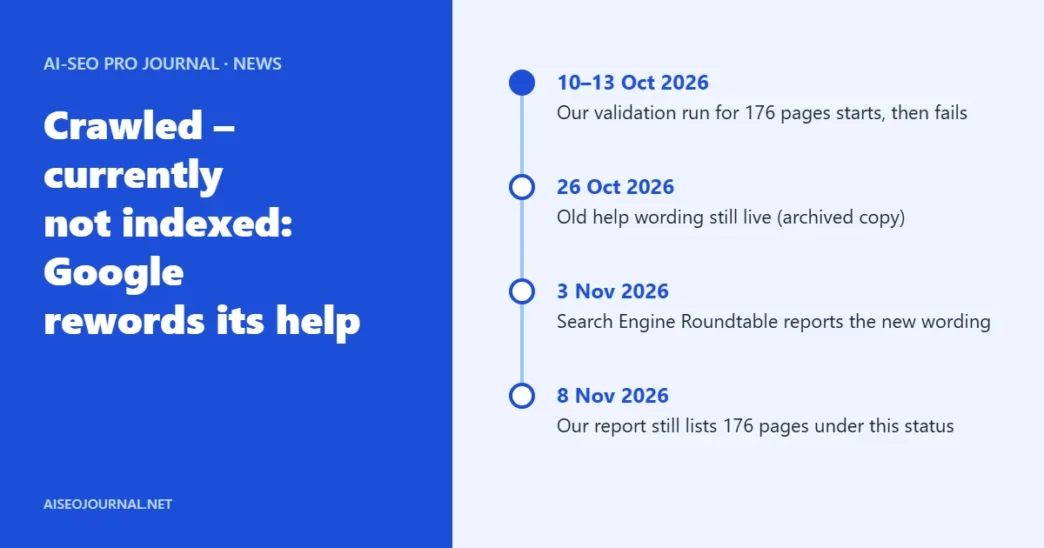
On 8 November 2026, our own Search Console showed 176 pages as “Crawled – currently not indexed”. That is nearly half of the 374 pages Google listed as not indexed on aiseojournal.net. A few days earlier, Google had quietly changed the help text for that exact status [1].
The new text is calmer. It also says less. This article shows what changed, what it does not tell you, and what we are doing with our own 176 pages.
If you only do one thing
Open the Page indexing report and list the pages under this status. Pick the five that earn you money or leads. Run each through URL Inspection. Fix those first. Leave the rest for later.
Table of Contents
ToggleWhat did Google change in the help text?
Search Engine Roundtable reported the edit on 3 November 2026 [1]. The old wording said a page “may or may not be indexed in the future” and told you not to resubmit it for crawling [1]. The new wording has three parts [1] [2]:
- Google says it does not index all pages across the web.
- It says the status does not necessarily point to an issue that needs attention.
- For pages that matter, it tells you to use the URL Inspection tool. It points to the indexing issue form only after you have ruled out causes on your own site, and only if you suspect a site-wide bug.
The status itself is unchanged. Google still describes it as a page that was crawled but not indexed [2].
What does the new text leave out?
It does not mention content quality. That stands out, because Google has linked this status to quality in earlier statements, according to Search Engine Roundtable [1]. It also gives no waiting time and no fix list.
So read the new text for what it is. It tells you not to panic. It does not tell you the pages are fine. A calm status can still hide thin or duplicate pages.
Worth knowing: We read Google’s current help page on 8 November 2026. We could not open the archived old version ourselves, so the old wording above comes from Search Engine Roundtable.
What does our own report show?
We checked the Page indexing report for aiseojournal.net on 8 November 2026. These are the figures on the screen:
| Reason | Pages |
|---|---|
| Crawled – currently not indexed | 176 |
| Excluded by noindex tag | 177 |
| Not found (404) | 14 |
| Page with redirect | 5 |
| Alternate page with proper canonical tag | 2 |
| Total not indexed | 374 |
The report also shows that a validation run for the 176 pages started on 10 October and failed on 13 October. The most recent crawl dates on the example URLs run from 19 September to 24 October. The examples include ordinary articles and one category page.
From our own site: Not every row is a problem. The noindex, 404 and redirect rows are different statuses, and we are checking each of them separately. The 176 are the real question. Google read those pages and chose not to keep them. We do not yet know why for each page, and we will not guess.
What are we doing about our 176 pages?
- Sort them. Export the 176 URLs and split them into posts we plan to keep, posts we plan to merge, and pages such as category pages.
- Inspect the keepers. Run the important ones through URL Inspection and read what Google reports.
- Improve before resubmitting. A failed validation means Google looked again and said no. Resubmitting the same page will not change the answer.
- Merge the thin ones. Pages that repeat another page on the site are the first candidates.
What should you do?
- Do not ignore the status. Google says it may be harmless. Check it anyway for your important pages.
- Use URL Inspection on pages that matter. That is the step Google now names itself [2].
- Ask why Google might skip the page. Is it thin? Is it close to another page on your site? Does it add something new?
- Avoid repeated validation requests. Fix the page first, then validate once.
For a wider look at how pages get into the index, see our technical SEO fundamentals guide.
Frequently asked questions
What does "Crawled – currently not indexed" mean?
Google visited the page but did not add it to its index. Google says it does not index every page it finds, and that this status does not always mean something is wrong.
Did Google change the meaning of the status?
No. The status is the same. Search Engine Roundtable reported on 3 November 2026 that the help text was reworded and that it now advises using URL Inspection for important pages.
Should I resubmit pages in this status?
Not before you have changed something. If Google has already looked at the page and left it out, the same page is likely to get the same result.
Is this status a penalty?
Google’s help text does not describe it as one. It says the status does not necessarily indicate an issue that needs attention.
How can I check one page?
Paste its address into the URL Inspection tool in Search Console. It shows what Google last crawled and whether the page is on Google.