

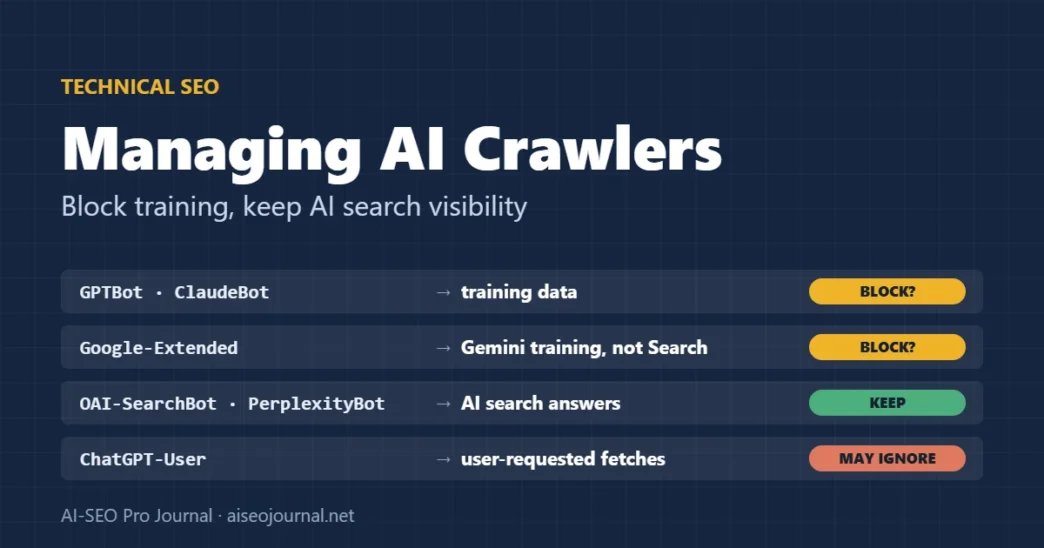
Most AI companies now run several crawlers, not one, and they do different jobs. OpenAI documents GPTBot for collecting training data and OAI-SearchBot for ChatGPT search, and it treats the two as independent: blocking one does not block the other [1]. Anthropic, Apple and Google make the same split [2] [6] [3]. A single Disallow line copied from a forum can block AI search visibility you wanted to keep, or leave training access open that you meant to close.
This guide sorts the main AI crawlers by what they do, gives robots.txt rules for the common decisions, explains what robots.txt cannot do, and sets out what llms.txt is and is not. It belongs to our technical SEO fundamentals guide and builds on our robots.txt best practices.
Key takeaways
- AI crawlers do three different jobs: collecting training data, powering AI search answers, and fetching pages a user asked about. Decide on each separately.
- You can block training and stay visible in AI search: for example, disallow GPTBot but allow OAI-SearchBot.
- Google-Extended controls Gemini training and grounding, not Google Search or AI Overviews. To leave AI Overviews and AI Mode, use the separate Search generative AI control in Search Console.
- A shared robots.txt token for AI training is coming. Google, Microsoft and Anthropic have backed it, but support arrives through 2027, so keep your named rules for now.
- User-initiated fetchers, such as ChatGPT-User and Perplexity-User, may not follow robots.txt.
- robots.txt is a request, not access control. Your CDN or firewall may already be treating AI bots differently from what your robots.txt says.
llms.txtis a proposal, not a standard. Google says you do not need special AI text files for its AI features.
Table of Contents
ToggleWhat do AI crawlers actually do?
They fall into three groups, and each has its own trade-off:
- Training crawlers collect content to train AI models. Blocking them has no effect on search visibility, according to each company’s documentation [1] [3] [6].
- Search and answer crawlers index pages so an AI product can cite and link them. Blocking them removes you from that product’s answers.
- User-initiated fetchers visit a page because a user asked the assistant to read it. They are not crawlers in the usual sense, and several companies say they may not apply robots.txt.
Which AI crawlers should you know?
| Token in robots.txt | Company | Job | If you block it |
|---|---|---|---|
| GPTBot | OpenAI | Training | Content not used for training OpenAI’s models [1] |
| OAI-SearchBot | OpenAI | ChatGPT search | Not shown in ChatGPT search answers (navigational links may still appear) [1] |
| ChatGPT-User | OpenAI | User-initiated fetches | robots.txt rules may not apply [1] |
| ClaudeBot | Anthropic | Training | Future content excluded from training [2] |
| Claude-SearchBot | Anthropic | Search quality | Not indexed for Claude’s search [2] |
| Claude-User | Anthropic | User-initiated fetches | Claude cannot retrieve your pages for users [2] |
| Google-Extended | Gemini training and grounding (a token, not a crawler) | No effect on Google Search inclusion or ranking [3] | |
| PerplexityBot | Perplexity | Perplexity search (not training) | Not surfaced in Perplexity results [5] |
| Perplexity-User | Perplexity | User-initiated fetches | Generally ignores robots.txt [5] |
| Applebot-Extended | Apple | Training (a token, not a crawler) | Pages can still appear in Apple search features [6] |
| CCBot | Common Crawl | Open web archive, widely used as training data | Not collected by Common Crawl [7] |
| meta-externalagent | Meta | Training and product indexing | Not crawled for those uses; Meta’s user-requested fetcher may bypass robots.txt [8] |
Anthropic also supports the non-standard Crawl-delay rule if you want to slow ClaudeBot rather than block it [2]. Apple says Applebot does not follow crawl-delay [6].
Does blocking Google-Extended remove you from AI Overviews?
No. Google says Google-Extended does not affect a site’s inclusion in Google Search and is not a ranking signal [3]. AI Overviews and AI Mode are part of Search. Google-Extended covers training of future Gemini models and grounding in the Gemini app and Vertex AI [3].
So if you want to keep appearing in AI Overviews but keep your content out of Gemini training, disallow Google-Extended and leave Googlebot alone. Our Google AI Overviews guide covers the Search side.
What if you want out of AI Overviews instead? Google now has a dedicated setting for that. The Search generative AI control sits in Search Console under Settings. It keeps your links and content out of AI Overviews, AI Mode and generative AI features in Discover. Google says it is not a ranking signal for the rest of Search, and it does not limit AI training. It reached all websites worldwide as of 31 August 2026, and the default is “Include” [12]. Google’s AI features page still lists the older tools for shaping what Search shows from your pages: Googlebot rules, nosnippet, data-nosnippet, max-snippet and noindex [4]. Note that noindex removes the page from Search entirely.
What is the new shared AI training signal?
On 30 October 2026, Google said it plans to support one shared robots.txt control for AI training, built on IETF work, and expects to do so in 2027 along with other AI providers [13]. Microsoft said Bing will honour it from 1 February 2027 [14]. Sites would use a policy token, __usage_ai-training, instead of listing each company’s crawler [14]. If a site opts out with the token and does not mention Google-Extended, Google plans to treat that as disallowing Google-Extended [13].
Two cautions. It is a draft, not a standard, and it covers training only. And it is not live at Google yet. Keep the named rules in this guide until support arrives. Bing also split AI training from AI grounding. Grounding can be set only per page, not in robots.txt [14]. Our explainer on the new AI training opt-outs has the full dates and examples.
What robots.txt rules should you use?
Pick the decision that fits, then copy the matching block. Each rule applies only to the user agent named above it.
Deciding on AI crawler access
- TrainingGPTBot, ClaudeBot, Google-Extended, Applebot-Extended, CCBot: allow or block
- AI searchOAI-SearchBot, Claude-SearchBot, PerplexityBot: usually allow
- User fetchesChatGPT-User, Perplexity-User: may ignore robots.txt
- Write rulesOne group per user agent
- TestWait a day; check status codes, CDN rules and logs
Block AI training, stay in AI search
This is the most common choice for publishers who want citations and traffic from AI answers but not to supply training data.
User-agent: GPTBot
Disallow: /

User-agent: ClaudeBot
Disallow: /

User-agent: Google-Extended
Disallow: /

User-agent: Applebot-Extended
Disallow: /

User-agent: CCBot
Disallow: /

User-agent: meta-externalagent
Disallow: /
OAI-SearchBot, Claude-SearchBot, PerplexityBot, Googlebot and Bingbot are not named, so the default rules for all crawlers still apply to them.
Block all known AI crawlers
Add the search crawlers to the list above: OAI-SearchBot, Claude-SearchBot and PerplexityBot. Understand the cost first: OpenAI says sites that opt out of OAI-SearchBot will not be shown in ChatGPT search answers [1]. Perplexity says the same of PerplexityBot [5]. User-initiated fetchers may still visit [1] [5].
Allow everything
Do nothing. A robots.txt with no AI-specific rules allows every crawler that follows it. That is also what an empty User-agent: * group with only your normal admin rules means.
What can't robots.txt do?
It cannot enforce anything. The robots.txt standard, RFC 9309, says the rules are not a form of access authorisation, and that the protocol is not a substitute for real security measures [9]. Well-behaved crawlers follow it. Others, and user-initiated fetchers by design, may not.
The opposite problem is just as common: something in front of your site may already be blocking or limiting bots that your robots.txt allows. In July 2025 Cloudflare announced it was changing its default to block AI crawlers unless they pay content creators [11]. Many hosts run CDN or firewall rules of their own.
From our own site: On 7 November 2026 we requested an aiseojournal.net article with each AI crawler’s user agent, from an ordinary desktop connection. OAI-SearchBot, ClaudeBot, PerplexityBot, CCBot and meta-externalagent all received the full page. GPTBot’s user agent received HTTP 429 (“too many requests”) with an empty body on four of six requests, from our host’s CDN. Our robots.txt has no AI rules at all, so a server-level rule was limiting GPTBot that we had never written into robots.txt. Real GPTBot traffic comes from OpenAI’s published IP ranges and may be treated differently, but the test shows why you should check what your CDN does, not just what your robots.txt says.
How do you test what AI crawlers get from your site?
- Read your live robots.txt at
/robots.txt, and check it in Search Console’s robots.txt report for Googlebot. - Request a page with each user agent, for example
curl -I -A "GPTBot" https://example.com/page/, and compare status codes with a normal browser request. A 403 or 429 means something other than robots.txt is acting. - Check your CDN and firewall settings for bot management, AI crawler or rate-limiting rules.
- Read your server logs for the user agents in the table above, and verify real visits against each company’s published IP lists [1] [5] [7], because user agents are easy to fake.
What is llms.txt, and do you need one?
llms.txt is a proposal by Jeremy Howard, first published in September 2024. It suggests a Markdown file at your site root that gives language models a short summary of the site and a list of links to key content, mainly for use at inference time rather than training [10]. It is not part of the robots.txt standard and does not block or allow anything.
Do you need one? For Google, no. Google’s documentation for its AI features says you don’t need to create new machine-readable files, AI text files or markup to appear in AI Overviews or AI Mode [4]. Its main use so far is on documentation sites: Perplexity’s own developer documentation, for example, links an llms.txt index for AI agents [5]. A well-structured file does little harm. Treat it as optional, and do not expect it to change how crawlers treat your site or your AI search visibility.
Professional tip: If you publish an
llms.txt, keep it in sync with your sitemap. A file that lists merged or redirected URLs, as ours would have after this month’s clean-up, points AI tools at the wrong pages.
Help me write robots.txt rules for AI crawlers.
My current robots.txt: [paste it]
My decisions:
- AI training (GPTBot, ClaudeBot, Google-Extended, Applebot-Extended, CCBot, meta-externalagent): [allow / block]
- AI search and answers (OAI-SearchBot, Claude-SearchBot, PerplexityBot): [allow / block]
- Google Search and Bing: keep allowed

1. Write the complete new robots.txt, keeping my existing rules unchanged.
2. Put each AI user agent in its own group with the rule I chose.
3. List anything in my current file that conflicts with these decisions.
Use only the user-agent tokens listed above. Do not invent new bot names or claim what any bot does beyond what I wrote.
Frequently asked questions
Will blocking GPTBot remove my site from ChatGPT?
No. GPTBot is OpenAI’s training crawler. ChatGPT search uses OAI-SearchBot, which you control separately. Block GPTBot to opt out of training while staying eligible for ChatGPT search answers.
Does blocking Google-Extended affect my Google rankings?
No. Google says Google-Extended does not affect inclusion in Google Search and is not a ranking signal. It controls Gemini training and grounding only.
Can I block AI crawlers completely with robots.txt?
Only those that choose to follow it. robots.txt is not access control, and user-initiated fetchers such as ChatGPT-User and Perplexity-User may not apply it. Use server or CDN rules if you need enforcement.
Do I need an llms.txt file?
No. It is an unofficial proposal, and Google says you don’t need special AI text files for AI Overviews or AI Mode. It is optional and will not change how crawlers treat your site.
How do I stop appearing in AI Overviews and AI Mode?
Use the Search generative AI control in Search Console (Settings). It keeps your content out of AI Overviews, AI Mode and generative AI in Discover without affecting regular Search ranking. Blocking Google-Extended does not do this.
How long do robots.txt changes take for AI crawlers?
Allow about a day. OpenAI and Perplexity say changes can take up to 24 hours, and crawlers may cache robots.txt for that long.
Decide on each job, then check what really happens
Write down your decision for training, AI search and user fetches separately, add the matching robots.txt rules, and wait a day. Then test each user agent against a live page and read your CDN settings, because your server’s behaviour matters more than your intentions. For the wider crawl and indexing checklist, return to the technical SEO fundamentals guide.
Sources
- OpenAI — Overview of OpenAI crawlers
- Anthropic (Claude Help Center) — Does Anthropic crawl data from the web, and how can site owners block the crawler?
- Google Search Central — List of Google’s common crawlers (Google-Extended)
- Google Search Central — AI features and your website
- Perplexity — Perplexity crawlers
- Apple — About Applebot, 4 September 2026
- Common Crawl — CCBot
- Meta — Meta web crawlers
- IETF — RFC 9309: Robots Exclusion Protocol, September 2022
- llmstxt.org (Jeremy Howard) — The /llms.txt file, first published 3 September 2024
- Cloudflare — Content Independence Day: no AI crawl without compensation, 1 July 2025
- Search Console Help — Search generative AI control
- Google Search Central blog — Supporting a shared AI training control for websites, 30 October 2026
- Microsoft Bing blog — Your content, your choice: clearer preferences for training and grounding, 30 October 2026