
Last Updated: 7 June 2026 Originally Published: 18 October 2025 By Shaiful Mozumder | Reviewed by David Brown
Most WordPress sites have a sitemap. Most of those sitemaps have never been submitted to Google Search Console. And a significant number include noindexed pages, exclude important content, or contain errors that GSC has been quietly flagging for months — with nobody checking.
A sitemap Google has never been told about does almost nothing for indexing speed. It sits on your server, technically correct, practically invisible.
This post goes deeper than the WordPress SEO: The Complete Guide to Optimising Your WordPress Site in 2026 could on this specific layer: sitemap configuration as a crawl prioritisation tool — not just a list of URLs — and how GSC sitemap data surfaces indexing problems most WordPress owners never find until rankings stall.
The angle most sitemap guides miss: submitting your sitemap to GSC is not a one-time task. It’s an ongoing diagnostic — the sitemap report tells you which pages Google is choosing not to index, and why.
Post Summary
- An XML sitemap is a structured file that tells Googlebot which URLs exist on your site and when they were last updated — it accelerates crawl discovery but does not guarantee indexing
- Rank Math and Yoast both generate WordPress XML sitemaps automatically; the default settings include content types that should often be excluded
- Submitting a sitemap to Google Search Console is a two-minute task; the submission report that follows is where the diagnostic value lives
- A sitemap with noindexed pages included is sending Google a contradictory signal — “index this page” and “don’t index this page” simultaneously
- AI crawlers including GPTBot and Anthropic’s ClaudeBot read your sitemap to discover content for training and citation — a well-configured sitemap improves AI engine content discovery, not just Google’s
- AI audit prompt: “Review my sitemap at [URL]. Identify any URL patterns that suggest noindexed pages, excluded post types, or missing content categories. Flag any structural issues.”
Table of Contents
ToggleWhy a Sitemap Nobody Has Told Google About Is Nearly Useless
Googlebot discovers URLs through three mechanisms: following links from already-indexed pages, processing submitted sitemaps, and reading direct URL submissions in GSC (Source: Google Search Central, 2024).
Of these three, sitemap submission is the most reliable for systematic discovery of new or updated content — but only if Google knows the sitemap exists.
WordPress generates sitemaps automatically through Rank Math and Yoast. Neither plugin submits the sitemap to GSC on your behalf. That step requires a human to log into Google Search Console, navigate to Sitemaps, and submit the URL manually.
Most WordPress site owners skip it. They assume the sitemap is working because it exists at yoursite.com/sitemap.xml. The GSC Sitemaps report — which shows submission status, last read date, and discovered vs indexed URL count — confirms whether Google has actually processed the file.
Open Google Search Console → Sitemaps now. If your sitemap URL is not listed with a green “Success” status and a recent Last read date, Google has not been told it exists.
What a WordPress XML Sitemap Actually Is
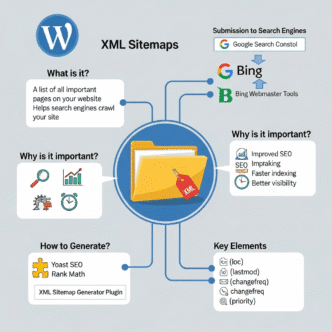
An XML sitemap — XML standing for Extensible Markup Language, a structured text format that both humans and machines can read — is a file that lists the URLs on your website along with optional metadata: when each page was last modified, how frequently it changes, and its relative priority (Source: Sitemaps.org, 2016).
Google does not use the priority or changefreq fields as direct ranking signals (Source: Google Search Central, 2024). What it does use: the lastmod date, when accurate, to prioritise crawling recently updated content over static pages.
Rank Math generates your sitemap at yoursite.com/sitemap_index.xml — a parent file that links to individual sitemaps per content type: posts, pages, categories, tags, and custom post types. Yoast generates its sitemap at yoursite.com/sitemap_index.xml with the same structure.
The practical implication: your sitemap is not a single file. It’s a nested structure. When you submit the index sitemap URL to GSC, Google processes each child sitemap separately — which is why the GSC Sitemaps report shows URL counts per sitemap type, not a single total.
Pro Tip: In Rank Math → Sitemap Settings → General Sitemap, enable “Include Images” to add image URLs to your sitemap — this improves image search discovery for posts with original images. Disable “Include Date-Based Archives,” “Include Author Sitemaps,” and any custom post type that is noindexed or has no SEO value. A shorter, cleaner sitemap with fewer irrelevant URLs processes faster and sends a clearer crawl signal than a bloated sitemap covering every URL type on your site.
How to Create and Submit Your WordPress XML Sitemap
The creation step is automatic if Rank Math or Yoast is installed. The configuration and submission steps are where most WordPress owners stop short.
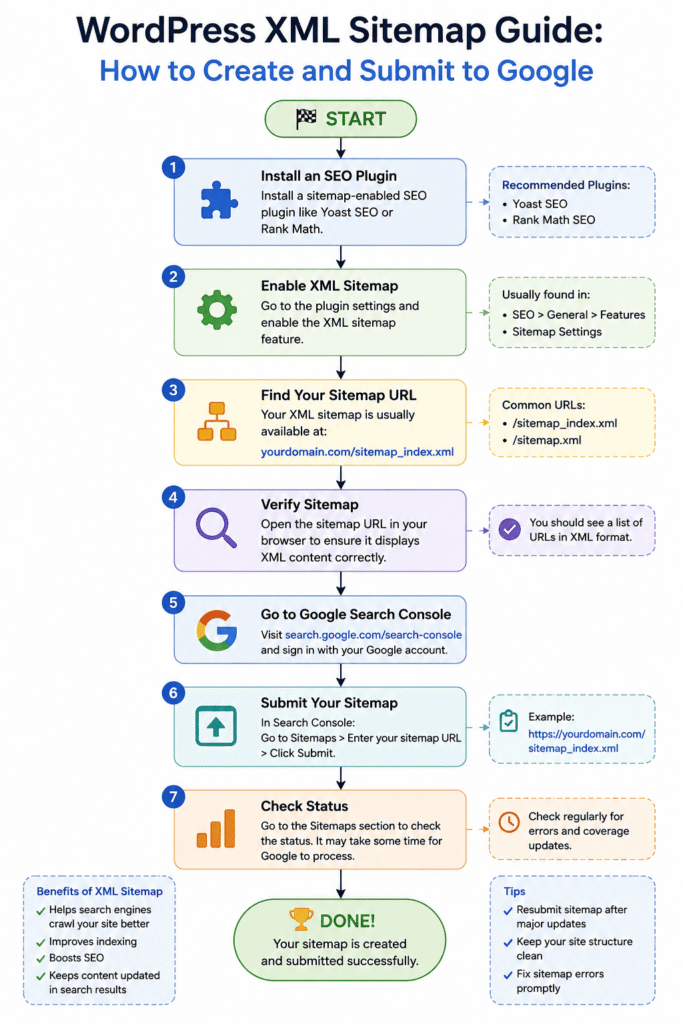
Step 1 — Confirm your sitemap is active. Navigate to yoursite.com/sitemap_index.xml in a browser. If the page loads with a structured list of child sitemap URLs, the sitemap is active. If it returns a 404, check that Rank Math or Yoast has sitemaps enabled: Rank Math → Sitemap Settings → Sitemap Status toggle; Yoast → General → Features → XML Sitemaps.
Step 2 — Configure which content types are included. The default Rank Math and Yoast sitemap settings include content types that should often be excluded: tag archives, author pages, and any custom post type set to noindex. Including noindexed URLs in a sitemap creates a direct contradiction — the sitemap says “here is a URL worth crawling” while the meta robots tag says “do not index this page.” Google’s response is to skip the page — but the contradiction consumes crawl budget (Source: Google Search Central, 2024).
Step 3 — Submit to Google Search Console. Log in to GSC → select your property → Sitemaps → Add a new sitemap → enter sitemap_index.xml → Submit. The submission triggers Google’s next crawl of the file.
Step 4 — Submit to Bing Webmaster Tools. Bing’s crawler — also used by Microsoft Copilot — processes sitemap submissions independently of Google. Submit the same sitemap URL at Bing Webmaster Tools → Sitemaps. This adds your content to Bing’s index and improves discoverability by AI engines that use Bing’s index as a data source.
Step 5 — Check the GSC Sitemaps report after 48 hours. The report shows: URLs submitted (total in the sitemap) vs URLs indexed (total Google chose to index). A large gap between submitted and indexed is your primary diagnostic signal.
| Sitemap Status | What It Means | Action Required |
|---|---|---|
| Success — submitted = indexed | Sitemap processed, all URLs indexed | None — monitor monthly |
| Success — large submitted/indexed gap | Google choosing not to index some URLs | Audit excluded URLs in GSC Coverage report |
| Couldn’t fetch | GSC cannot access the sitemap URL | Check robots.txt is not blocking sitemap |
| Has errors | Sitemap contains invalid URLs or formatting issues | View error details in GSC and fix in plugin settings |
| Not submitted | Sitemap exists but GSC has not been told | Submit the sitemap_index.xml URL immediately |
Reading the GSC Sitemap Report as a Diagnostic Tool
The submitted vs indexed gap is where the real diagnostic value sits — and most WordPress owners never check it.
Working on a UK lifestyle blog using WordPress and Yoast, the GSC sitemap report showed 34 posts excluded from the indexed count. The cause: a Yoast noindex setting had been applied to a category, which carried through to all posts assigned to that category. The posts existed in the sitemap. Google was reading them. Google was declining to index them because the meta robots tag said not to.
We corrected the noindex setting and resubmitted the sitemap. The expectation was that all 34 posts would be crawled and indexed within a few days. They weren’t. Google prioritised the 12 posts that had inbound internal links and indexed those within 5 days. The remaining 22 — which had no internal links pointing to them — were crawled over the following three weeks. The sitemap told Google where the pages were. Internal links told Google they were worth prioritising.
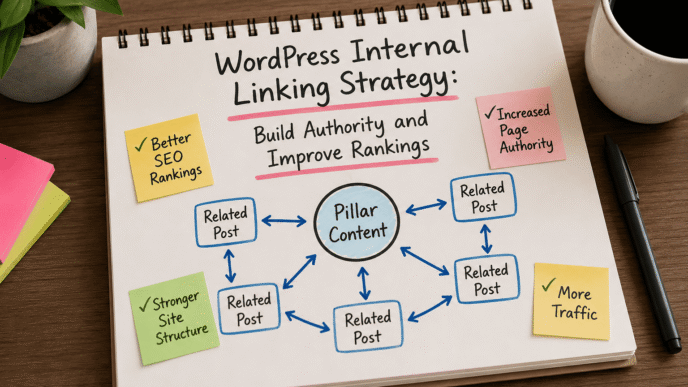
That finding reinforces the connection between sitemap configuration and the WordPress internal linking architecture covered in our sibling cluster post: a sitemap without internal link support produces slower indexing, regardless of how cleanly configured it is.
Three GSC Coverage report statuses that indicate sitemap-related problems: “Submitted URL marked noindex” — direct conflict between sitemap inclusion and meta robots; “Crawled — currently not indexed” — Google has seen the page but chosen not to index it, often a content quality signal; “Discovered — currently not indexed” — Google knows the URL exists but has not yet crawled it, usually a crawl budget or internal link signal issue.
AI Crawlers and Your WordPress Sitemap
Google is not the only bot reading your sitemap in 2026.
GPTBot (OpenAI’s crawler), ClaudeBot (Anthropic’s crawler), and PerplexityBot all use XML sitemaps to discover content for AI training datasets and real-time citation retrieval (Source: OpenAI, 2024). A well-configured sitemap that accurately represents your indexed content improves your site’s discoverability by these engines — the same sitemap errors that slow Google indexing also reduce AI engine content discovery.
Two sitemap configurations directly relevant to AI crawlability: first, ensure your sitemap does not block these crawlers via robots.txt — check that Disallow: / rules in robots.txt do not apply to GPTBot or ClaudeBot if you want your content cited in AI responses. Second, the lastmod date accuracy matters more for AI crawlers than for Google — GPTBot uses lastmod signals to prioritise recently updated content for re-crawling (Source: OpenAI, 2024).
If you want your WordPress content surfacing in ChatGPT, Perplexity, or Claude responses, a correctly submitted, noindex-free, lastmod-accurate sitemap is the foundational technical requirement — before content quality, before schema, before anything else.
Use this AI prompt to audit your sitemap structure: “Review the sitemap at [YOUR SITEMAP URL]. Identify URL patterns that suggest noindexed pages, missing content types, or duplicate URL variants. Flag any lastmod dates that appear static or inaccurate. Output a structured audit with: Issue | Affected URLs | Recommended Fix.”
Frequently Asked Questions
What is an XML sitemap for WordPress?
An XML sitemap for WordPress is a structured file — automatically generated by plugins like Rank Math or Yoast SEO — that lists every important URL on your site along with metadata including the last modified date. It tells Google and other search engine crawlers which pages exist and when they were last updated, accelerating crawl discovery for new or updated content. The sitemap does not guarantee indexing — Google decides independently which URLs to index based on content quality and site signals.
How do you open a WordPress XML sitemap?
Type yoursite.com/sitemap_index.xml directly into a browser address bar. If Rank Math or Yoast has sitemaps enabled, the file loads as a structured list of child sitemap URLs covering posts, pages, and other content types. You can click each child sitemap URL to see the individual URLs it contains. If the file returns a 404, navigate to Rank Math → Sitemap Settings or Yoast → General → Features and confirm the XML sitemap toggle is enabled.
How do you use an XML sitemap for SEO?
Submit the sitemap index URL to Google Search Console (GSC → Sitemaps → Add a new sitemap) and to Bing Webmaster Tools. Then monitor the GSC Sitemaps report for the gap between submitted URLs and indexed URLs — a large gap indicates indexing problems that need diagnosing in the GSC Coverage report. Ongoing sitemap use means checking this report monthly, updating the sitemap configuration when you add new content types, and ensuring noindexed pages are excluded from the sitemap to avoid contradictory crawl signals.
WordPress XML Sitemap: Your Next Step
A sitemap that exists but has never been submitted to GSC, includes noindexed pages, or has a large submitted-to-indexed gap is not doing the job most WordPress owners assume it is. Configuration and submission take less than ten minutes. The GSC diagnostic data they unlock is available immediately and surfaces indexing problems that would otherwise go undetected for months.
The full technical SEO context sits in the WordPress SEO: The Complete Guide to Optimising Your WordPress Site in 2026. For the internal linking layer that determines how quickly Google prioritises newly indexed pages, see WordPress Internal Linking Strategy: Build Authority and Improve Rankings.
Open Google Search Console now → Sitemaps. If your sitemap URL is not listed with a green Success status and a last read date within the past 30 days, submit sitemap_index.xml today before your next piece of content goes live.
References
Google. Sitemaps Overview.” Google Search Central, 2024. https://developers.google.com/search/docs/crawling-indexing/sitemaps/overview Supports: Google’s three URL discovery mechanisms and how sitemap submission accelerates crawl discovery.
Google. “Build and Submit a Sitemap.” Google Search Central, 2024. https://developers.google.com/search/docs/crawling-indexing/sitemaps/build-sitemap Supports: Sitemap file format requirements, lastmod usage, and the priority/changefreq fields not being direct ranking signals.
Google. Manage Your Sitemaps Using the Sitemaps Report.” Google Search Central, 2024. https://developers.google.com/search/docs/crawling-indexing/sitemaps/sitemaps-report Supports: GSC Sitemaps report status types and the submitted vs indexed diagnostic gap.
Rank Math. How to Set Up Rank Math Sitemap.” Rank Math Documentation, 2024. https://rankmath.com/kb/configure-sitemaps/ Supports: Rank Math sitemap configuration settings including content type inclusion and exclusion.
Yoast. “XML Sitemaps — Yoast SEO.” Yoast Documentation, 2024. https://yoast.com/help/xml-sitemaps-in-the-yoast-seo-plugin/ Supports: Yoast sitemap generation structure and noindex category inheritance behaviour.
OpenAI. “GPTBot — Web Crawler Documentation.” OpenAI, 2024. https://platform.openai.com/docs/gptbot Supports: GPTBot using XML sitemaps for content discovery and lastmod signals for re-crawl prioritisation.
Sitemaps.org. “Sitemap Protocol.” Sitemaps.org, 2016. https://www.sitemaps.org/protocol.html Supports: XML sitemap protocol definition, file structure, and supported metadata fields.