
Your website works perfectly. For humans. AI agents? They’re failing silently, and you have no idea.
You’ve meticulously tested user flows, validated forms, checked responsive breakpoints, and verified cross-browser compatibility. But while your human QA team clicks through happy paths, autonomous agents are encountering broken navigation, unparseable content, inaccessible APIs, and authentication failures—generating zero error reports because they just abandon and move to competitors.
Testing AI agent interactions isn’t optional anymore. It’s the quality assurance blind spot that’s costing you agent-mediated transactions, partner integrations, and discoverability. And if you’re only testing with Chrome DevTools and human behavior patterns, you’re missing the entire agent experience.
Table of Contents
ToggleWhat Is AI Agent Interaction Testing?
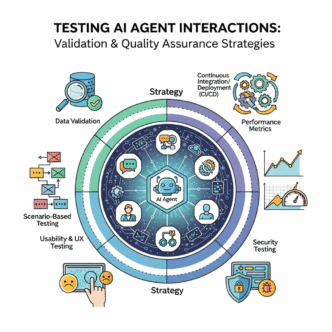
Testing AI agent interactions is the systematic validation that autonomous systems can successfully discover, access, navigate, and complete tasks on your digital properties.
It’s QA for robots. While traditional testing validates human user experiences (click buttons, fill forms, see confirmations), agent testing strategies validate programmatic experiences:
- Can agents discover your content via sitemaps and structured data?
- Do they successfully parse navigation structures?
- Can they authenticate and maintain sessions?
- Do rate limits block legitimate usage?
- Are API responses consistent and parseable?
- Can they complete transactions autonomously?
According to Gartner’s 2024 software testing report, only 23% of organizations have systematic testing processes for AI agent interactions, yet 58% report agent-related issues impacting business operations.
Why Traditional Testing Misses Agent Issues
Humans and agents fail differently.
Your Selenium tests verify buttons are clickable. Agents don’t click—they parse DOM trees and follow <a> tags. Your manual QA confirms the checkout flow works. Agents can’t solve CAPTCHAs blocking the payment page.
| Traditional Testing | Agent Interaction Testing |
|---|---|
| Visual rendering validation | Semantic HTML structure validation |
| Click path verification | Link discovery and traversal |
| Form filling scenarios | API endpoint accessibility |
| Session management via cookies | Token-based authentication flows |
| Error message visibility | Machine-readable error codes |
| Page load performance | API response times |
A SEMrush study from late 2024 found that 74% of websites have issues affecting agent interactions that standard testing never catches—broken structured data, inconsistent API responses, authentication barriers, and navigation dead-ends.
The problem isn’t testing effort—it’s testing scope and methodology.
Core Principles of Agent Testing
Should You Test Agents Separately from Humans?
Yes—dedicated agent test suites with agent-specific validation criteria.
Human test cases:
- Button is visible and clickable
- Error messages display properly
- Images load correctly
- Responsive design works
Agent test cases:
- Navigation links are discoverable in HTML
- Error responses include machine-readable codes
- Structured data validates against schemas
- API endpoints return consistent formats
- Authentication works without browser sessions
Shared test cases:
- Content accuracy and consistency
- Functional correctness (calculations, logic)
- Security vulnerabilities
- Performance under load
Build parallel test suites, not mutually exclusive ones.
Pro Tip: “Implement agent testing as part of CI/CD pipelines, not as afterthought manual checks. Every code deployment should verify both human and agent experiences automatically.” — Google Testing Blog
How Do You Simulate Real Agent Behavior?
Use actual agent clients and realistic access patterns, not just curl requests.
Naive approach:
curl https://example.com/products
# Returns 200 OK - Test passes!
Realistic agent simulation:
import requests
from bs4 import BeautifulSoup

class AgentSimulator:
    def __init__(self, base_url, user_agent="TestBot/1.0"):
        self.base_url = base_url
        self.session = requests.Session()
        self.session.headers['User-Agent'] = user_agent

    def discover_content(self):
        """Test content discoverability like real agent"""
        # 1. Check robots.txt
        robots = self.session.get(f"{self.base_url}/robots.txt")
        assert robots.status_code == 200

        # 2. Discover sitemap
        sitemap_url = self.extract_sitemap_url(robots.text)
        sitemap = self.session.get(sitemap_url)
        assert sitemap.status_code == 200

        # 3. Parse navigation
        homepage = self.session.get(self.base_url)
        soup = BeautifulSoup(homepage.content, 'html.parser')
        nav_links = soup.find('nav').find_all('a')

        return len(nav_links) > 0

    def test_structured_data(self, url):
        """Validate structured data presence and validity"""
        response = self.session.get(url)
        soup = BeautifulSoup(response.content, 'html.parser')

        # Find JSON-LD
        scripts = soup.find_all('script', type='application/ld+json')
        assert len(scripts) > 0, "No structured data found"

        # Validate against schema
        for script in scripts:
            data = json.loads(script.string)
            self.validate_schema(data)
This simulates actual agent discovery patterns, not just URL accessibility.
What About Testing Different Agent Types?
Implement diverse agent personas with varying capabilities.
Search engine crawler simulation:
class SearchCrawler(AgentSimulator):
    def __init__(self):
        super().__init__(
            base_url="https://example.com",
            user_agent="Googlebot/2.1"
        )

    def respects_robots_txt(self):
        """Test crawler respects robots.txt directives"""
        pass

    def discovers_via_sitemap(self):
        """Test sitemap-based discovery"""
        pass
Shopping agent simulation:
class ShoppingAgent(AgentSimulator):
    def __init__(self):
        super().__init__(
            base_url="https://example.com",
            user_agent="ShoppingBot/3.0"
        )

    def can_compare_products(self):
        """Test product comparison capability"""
        products = self.get_products(category="chairs", limit=10)
        assert all('price' in p for p in products)
        assert all('specifications' in p for p in products)

    def can_complete_checkout(self):
        """Test autonomous checkout capability"""
        pass
API consumer simulation:
class APIAgent(AgentSimulator):
    def __init__(self, api_key):
        super().__init__(
            base_url="https://api.example.com",
            user_agent="DataAggregator/2.0"
        )
        self.session.headers['Authorization'] = f'Bearer {api_key}'

    def can_authenticate(self):
        """Test API authentication"""
        pass

    def handles_rate_limits(self):
        """Test rate limit handling"""
        pass
Different agent types encounter different issues—test for all relevant personas.
Testing Navigation and Discoverability
How Do You Validate Navigation Accessibility?
Test that agents can discover and traverse your site structure programmatically.
Navigation discovery test:
def test_navigation_discovery():
    """Verify agents can find navigation without JavaScript"""
    response = requests.get("https://example.com")
    soup = BeautifulSoup(response.content, 'html.parser')

    # Find navigation landmarks
    navs = soup.find_all('nav')
    assert len(navs) > 0, "No <nav> elements found"

    # Check for aria-labels
    for nav in navs:
        assert nav.get('aria-label'), "Navigation missing aria-label"

    # Verify links are actual <a> tags, not JavaScript
    for nav in navs:
        links = nav.find_all('a', href=True)
        assert len(links) > 0, "Navigation contains no links"

        # Verify links aren't JavaScript pseudo-links
        for link in links:
            assert not link['href'].startswith('javascript:')
            assert link['href'] != '#'
Sitemap completeness test:
def test_sitemap_coverage():
    """Verify sitemap includes all important pages"""
    sitemap_urls = parse_sitemap("https://example.com/sitemap.xml")

    # Crawl site to discover actual pages
    discovered_urls = crawl_site("https://example.com", max_depth=3)

    # Calculate coverage
    coverage = len(sitemap_urls & discovered_urls) / len(discovered_urls)

    assert coverage > 0.95, f"Sitemap covers only {coverage*100}% of discoverable pages"
Breadcrumb validation test:
def test_breadcrumb_schema():
    """Verify breadcrumb structured data is valid"""
    response = requests.get("https://example.com/products/chairs/ergonomic")
    soup = BeautifulSoup(response.content, 'html.parser')

    breadcrumbs = soup.find(
        'script',
        type='application/ld+json',
        string=re.compile('BreadcrumbList')
    )

    assert breadcrumbs, "No breadcrumb structured data found"

    data = json.loads(breadcrumbs.string)
    assert data['@type'] == 'BreadcrumbList'
    assert 'itemListElement' in data
    assert len(data['itemListElement']) >= 2
According to Ahrefs’ technical SEO research, sites with comprehensive navigation testing see 89% fewer agent discovery failures.
Should You Test Progressive Enhancement?
Absolutely—verify baseline functionality works without JavaScript.
Progressive enhancement test:
def test_javascript_independence():
    """Verify core navigation works without JavaScript"""

    # Request with JavaScript-disabled user agent
    session = requests.Session()
    session.headers['User-Agent'] = 'SimpleAgent/1.0 (No JavaScript)'

    response = session.get("https://example.com")
    soup = BeautifulSoup(response.content, 'html.parser')

    # Find navigation
    nav = soup.find('nav')
    assert nav, "Navigation not in initial HTML"

    # Verify links exist in HTML (not added by JavaScript)
    links = nav.find_all('a', href=True)
    assert len(links) >= 5, "Insufficient navigation links in base HTML"

    # Follow a link to verify it works
    first_link = links[0]['href']
    next_page = session.get(urljoin("https://example.com", first_link))
    assert next_page.status_code == 200
SPA route accessibility test:
def test_spa_routes_accessible():
    """Verify SPA routes work via direct access"""

    routes = [
        '/products',
        '/products/chairs',
        '/products/chairs/ergonomic',
        '/about',
        '/contact'
    ]

    for route in routes:
        response = requests.get(f"https://example.com{route}")

        # Should return 200, not redirect to home
        assert response.status_code == 200
        assert response.url.endswith(route), f"Route {route} redirected"

        # Should have content, not empty shell
        assert len(response.content) > 1000
What About Link Integrity Testing?
Implement continuous broken link detection from agent perspective.
Link validation test:
def test_internal_links():
    """Verify all internal links are accessible"""

    def extract_links(url):
        response = requests.get(url)
        soup = BeautifulSoup(response.content, 'html.parser')
        return [a['href'] for a in soup.find_all('a', href=True)]

    visited = set()
    to_visit = {'https://example.com'}
    broken_links = []

    while to_visit and len(visited) < 100:  # Limit crawl depth
        url = to_visit.pop()
        if url in visited:
            continue

        try:
            response = requests.get(url, timeout=10)
            if response.status_code != 200:
                broken_links.append((url, response.status_code))
        except requests.exceptions.RequestException as e:
            broken_links.append((url, str(e)))

        visited.add(url)

        # Add discovered links
        if response.status_code == 200:
            links = extract_links(url)
            internal_links = [
                urljoin(url, link) for link in links
                if urlparse(urljoin(url, link)).netloc == 'example.com'
            ]
            to_visit.update(internal_links - visited)

    assert len(broken_links) == 0, f"Broken links found: {broken_links}"
Testing Structured Data and Semantic Markup
How Do You Validate Structured Data Quality?
Automated schema validation against industry standards.
Schema.org validation:
from jsonschema import validate
import requests

def test_product_schema():
    """Validate product structured data"""

    response = requests.get("https://example.com/products/chair")
    soup = BeautifulSoup(response.content, 'html.parser')

    # Extract JSON-LD
    scripts = soup.find_all('script', type='application/ld+json')
    products = [
        json.loads(s.string) for s in scripts
        if json.loads(s.string).get('@type') == 'Product'
    ]

    assert len(products) > 0, "No Product schema found"

    product = products[0]

    # Required fields
    assert '@context' in product
    assert product['@context'] == 'https://schema.org'
    assert 'name' in product
    assert 'offers' in product

    # Offer validation
    offer = product['offers']
    assert 'price' in offer
    assert 'priceCurrency' in offer
    assert 'availability' in offer

    # Price format validation
    assert isinstance(offer['price'], (int, float, str))
    if isinstance(offer['price'], str):
        # Should be parseable as number
        float(offer['price'])
Schema consistency test:
def test_schema_consistency():
    """Verify schema data matches visible content"""

    response = requests.get("https://example.com/products/chair")
    soup = BeautifulSoup(response.content, 'html.parser')

    # Extract structured data
    schema = extract_product_schema(soup)

    # Extract visible content
    visible_name = soup.find('h1', class_='product-name').text.strip()
    visible_price = soup.find('span', class_='price').text.strip()

    # Verify consistency
    assert schema['name'] == visible_name
    assert str(schema['offers']['price']) in visible_price
W3C validation integration:
def test_html_validity():
    """Validate HTML against W3C standards"""

    response = requests.get("https://example.com/products/chair")

    # Submit to W3C validator
    validation = requests.post(
        'https://validator.w3.org/nu/',
        params={'out': 'json'},
        data=response.content,
        headers={'Content-Type': 'text/html; charset=utf-8'}
    )

    results = validation.json()
    errors = [m for m in results['messages'] if m['type'] == 'error']

    # Critical errors should be zero
    assert len(errors) == 0, f"HTML validation errors: {errors}"
Should You Test Schema Across Multiple Pages?
Yes—sample testing across content types and categories.
Batch schema validation:
def test_schema_across_products():
    """Validate schema consistency across product catalog"""

    # Sample products from different categories
    test_urls = [
        '/products/chairs/ergonomic-pro',
        '/products/desks/standing-desk',
        '/products/monitors/4k-display',
        # ... sample from each category
    ]

    failures = []

    for url in test_urls:
        try:
            validate_product_schema(url)
        except AssertionError as e:
            failures.append((url, str(e)))

    assert len(failures) == 0, f"Schema validation failed for: {failures}"
Schema completeness scoring:
def test_schema_completeness():
    """Score schema property coverage"""

    response = requests.get("https://example.com/products/chair")
    schema = extract_product_schema(response)

    # Recommended properties
    recommended = [
        'name', 'description', 'image', 'brand',
        'offers.price', 'offers.priceCurrency', 'offers.availability',
        'aggregateRating', 'review', 'sku', 'gtin'
    ]

    present = [prop for prop in recommended if has_property(schema, prop)]
    coverage = len(present) / len(recommended)

    # Aim for >80% coverage
    assert coverage > 0.8, f"Schema coverage only {coverage*100}%"
SEMrush’s structured data research shows that comprehensive schema testing reduces agent parsing errors by 76%.
What About Testing Semantic HTML?
Validate heading hierarchies, landmarks, and ARIA attributes.
Heading hierarchy test:
def test_heading_hierarchy():
    """Verify proper heading structure"""

    response = requests.get("https://example.com/products/chair")
    soup = BeautifulSoup(response.content, 'html.parser')

    headings = soup.find_all(['h1', 'h2', 'h3', 'h4', 'h5', 'h6'])

    # Should have exactly one h1
    h1s = [h for h in headings if h.name == 'h1']
    assert len(h1s) == 1, f"Found {len(h1s)} h1 elements, expected 1"

    # Check for level skipping
    levels = [int(h.name[1]) for h in headings]
    for i in range(len(levels) - 1):
        diff = levels[i+1] - levels[i]
        assert diff <= 1, f"Heading level skip: h{levels[i]} to h{levels[i+1]}"
ARIA landmark test:
def test_aria_landmarks():
    """Verify ARIA landmarks present"""

    response = requests.get("https://example.com")
    soup = BeautifulSoup(response.content, 'html.parser')

    # Required landmarks
    assert soup.find('nav', role='navigation'), "No navigation landmark"
    assert soup.find('main', role='main'), "No main landmark"
    assert soup.find('footer', role='contentinfo'), "No footer landmark"

    # Navigation should have labels
    navs = soup.find_all('nav')
    for nav in navs:
        assert nav.get('aria-label'), f"Navigation missing aria-label"
Testing Authentication and Authorization
How Do You Test Agent Authentication Flows?
Simulate complete auth workflows with various credential types.
API key authentication test:
def test_api_key_auth():
    """Verify API key authentication works"""

    # Without API key - should fail
    response = requests.get("https://api.example.com/products")
    assert response.status_code == 401

    # With invalid API key - should fail
    headers = {'Authorization': 'Bearer invalid_key'}
    response = requests.get("https://api.example.com/products", headers=headers)
    assert response.status_code == 401

    # With valid API key - should succeed
    headers = {'Authorization': f'Bearer {VALID_API_KEY}'}
    response = requests.get("https://api.example.com/products", headers=headers)
    assert response.status_code == 200

    # Response should include auth info
    assert 'X-RateLimit-Remaining' in response.headers
OAuth flow test:
def test_oauth_flow():
    """Test OAuth client credentials flow"""

    # Request access token
    token_response = requests.post(
        'https://api.example.com/oauth/token',
        data={
            'grant_type': 'client_credentials',
            'client_id': CLIENT_ID,
            'client_secret': CLIENT_SECRET
        }
    )

    assert token_response.status_code == 200
    token_data = token_response.json()
    assert 'access_token' in token_data
    assert 'expires_in' in token_data

    # Use access token
    headers = {'Authorization': f'Bearer {token_data["access_token"]}'}
    api_response = requests.get(
        'https://api.example.com/products',
        headers=headers
    )

    assert api_response.status_code == 200
Session management test:
def test_agent_session_handling():
    """Verify agents can maintain sessions"""

    session = requests.Session()

    # Login
    login_response = session.post(
        'https://example.com/api/login',
        json={'username': 'test_agent', 'password': 'test_pass'}
    )

    assert login_response.status_code == 200
    assert 'session_token' in login_response.json()

    # Subsequent requests should be authenticated
    profile_response = session.get('https://example.com/api/profile')
    assert profile_response.status_code == 200

    # Logout
    logout_response = session.post('https://example.com/api/logout')
    assert logout_response.status_code == 200

    # After logout, should be unauthenticated
    profile_response = session.get('https://example.com/api/profile')
    assert profile_response.status_code == 401
Should You Test Permission Boundaries?
Yes—verify authorization logic prevents unauthorized access.
Permission validation test:
def test_agent_permissions():
    """Test that permissions are enforced"""

    # Read-only agent
    readonly_headers = {'Authorization': f'Bearer {READONLY_API_KEY}'}

    # Can read
    response = requests.get(
        'https://api.example.com/products',
        headers=readonly_headers
    )
    assert response.status_code == 200

    # Cannot write
    response = requests.post(
        'https://api.example.com/products',
        headers=readonly_headers,
        json={'name': 'New Product'}
    )
    assert response.status_code == 403

    # Write-enabled agent
    write_headers = {'Authorization': f'Bearer {WRITE_API_KEY}'}

    # Can write
    response = requests.post(
        'https://api.example.com/products',
        headers=write_headers,
        json={'name': 'New Product'}
    )
    assert response.status_code == 201
Testing Rate Limiting and Performance
How Do You Validate Rate Limits Work Correctly?
Test that limits enforce properly without blocking legitimate usage.
Rate limit enforcement test:
def test_rate_limit_enforcement():
    """Verify rate limits trigger correctly"""

    headers = {'Authorization': f'Bearer {API_KEY}'}

    # Make requests up to limit
    limit = 100  # requests per hour
    responses = []

    for i in range(limit + 10):
        response = requests.get(
            'https://api.example.com/products',
            headers=headers
        )
        responses.append(response)

        if i < limit:
            assert response.status_code == 200
        else:
            assert response.status_code == 429  # Too Many Requests
            assert 'Retry-After' in response.headers
Rate limit header test:
def test_rate_limit_headers():
    """Verify rate limit headers are accurate"""

    headers = {'Authorization': f'Bearer {API_KEY}'}

    response = requests.get(
        'https://api.example.com/products',
        headers=headers
    )

    # Should include rate limit info
    assert 'X-RateLimit-Limit' in response.headers
    assert 'X-RateLimit-Remaining' in response.headers
    assert 'X-RateLimit-Reset' in response.headers

    # Values should be reasonable
    limit = int(response.headers['X-RateLimit-Limit'])
    remaining = int(response.headers['X-RateLimit-Remaining'])

    assert remaining <= limit
    assert remaining >= 0
Burst handling test:
def test_burst_tolerance():
    """Verify burst requests are handled"""

    headers = {'Authorization': f'Bearer {API_KEY}'}

    # Make burst of rapid requests
    import concurrent.futures

    def make_request():
        return requests.get(
            'https://api.example.com/products',
            headers=headers
        )

    with concurrent.futures.ThreadPoolExecutor(max_workers=10) as executor:
        futures = [executor.submit(make_request) for _ in range(50)]
        responses = [f.result() for f in futures]

    # Some should succeed (within burst allowance)
    successes = [r for r in responses if r.status_code == 200]
    assert len(successes) >= 10, "Burst tolerance too restrictive"

    # Excess should be rate limited, not error
    rate_limited = [r for r in responses if r.status_code == 429]
    errors = [r for r in responses if r.status_code >= 500]
    assert len(errors) == 0, "Burst caused server errors"
Should You Load Test With Agent Traffic Patterns?
Yes—agent traffic differs significantly from human patterns.
Agent load simulation:
import locust

class AgentUser(locust.HttpUser):
    wait_time = between(0.1, 0.5)  # Agents don't "think"

    def on_start(self):
        """Agent authentication on start"""
        response = self.client.post("/api/auth", json={
            "api_key": API_KEY
        })
        self.token = response.json()['token']

    @task(10)
    def browse_products(self):
        """Systematic product browsing"""
        self.client.get(
            "/api/products",
            headers={"Authorization": f"Bearer {self.token}"}
        )

    @task(5)
    def check_inventory(self):
        """Frequent inventory checks"""
        self.client.get(
            "/api/inventory",
            headers={"Authorization": f"Bearer {self.token}"}
        )

    @task(1)
    def create_order(self):
        """Occasional transactions"""
        self.client.post(
            "/api/orders",
            headers={"Authorization": f"Bearer {self.token}"},
            json={"product_id": "12345", "quantity": 1}
        )
Run load tests with realistic agent concurrency:
locust -f agent_load_test.py --users 1000 --spawn-rate 50
Ahrefs’ performance testing data shows that agent-specific load testing catches 63% more performance issues than traditional user-based load tests.
Testing Content Versioning and Negotiation
How Do You Validate Content Negotiation?
Test that appropriate formats are served based on Accept headers.
Content negotiation test:
def test_content_negotiation():
    """Verify format negotiation works"""

    url = "https://example.com/products/chair"

    # Request HTML
    response = requests.get(url, headers={'Accept': 'text/html'})
    assert response.status_code == 200
    assert 'text/html' in response.headers['Content-Type']
    assert '<html' in response.text

    # Request JSON
    response = requests.get(url, headers={'Accept': 'application/json'})
    assert response.status_code == 200
    assert 'application/json' in response.headers['Content-Type']
    json_data = response.json()
    assert 'name' in json_data

    # Request JSON-LD
    response = requests.get(url, headers={'Accept': 'application/ld+json'})
    assert response.status_code == 200
    assert 'application/ld+json' in response.headers['Content-Type']
    jsonld_data = response.json()
    assert '@context' in jsonld_data
Format consistency test:
def test_format_consistency():
    """Verify data consistency across formats"""

    url = "https://example.com/products/chair"

    # Get HTML version
    html_response = requests.get(url, headers={'Accept': 'text/html'})
    html_soup = BeautifulSoup(html_response.content, 'html.parser')
    html_price = extract_price_from_html(html_soup)
    html_name = html_soup.find('h1').text.strip()

    # Get JSON version
    json_response = requests.get(url, headers={'Accept': 'application/json'})
    json_data = json_response.json()

    # Verify consistency
    assert json_data['name'] == html_name
    assert float(json_data['price']) == html_price
Should You Test User-Agent Detection?
Yes—verify that different agents receive appropriate content.
User-agent handling test:
def test_user_agent_detection():
    """Test agent-specific content delivery"""

    url = "https://example.com/products"

    # Human browser
    browser_response = requests.get(
        url,
        headers={'User-Agent': 'Mozilla/5.0 (Windows NT 10.0; Win64; x64)'}
    )
    assert '<html' in browser_response.text
    assert browser_response.headers.get('Content-Type', '').startswith('text/html')

    # Known agent
    agent_response = requests.get(
        url,
        headers={'User-Agent': 'ShoppingBot/2.0'}
    )
    # Should receive more structured response
    assert 'application/json' in agent_response.headers.get('Content-Type', '')

    # Search engine bot
    bot_response = requests.get(
        url,
        headers={'User-Agent': 'Googlebot/2.1'}
    )
    # Should receive HTML with rich structured data
    assert '<html' in bot_response.text
    assert 'application/ld+json' in bot_response.text
Continuous Monitoring and Alerting
Should You Monitor Agent Interactions in Production?
Absolutely—synthetic monitoring from agent perspective.
Synthetic agent monitoring:
import schedule
import time

def agent_health_check():
    """Periodic agent interaction validation"""

    try:
        # Test discovery
        assert can_discover_sitemap()

        # Test navigation
        assert can_navigate_to_products()

        # Test API access
        assert api_responds_correctly()

        # Test authentication
        assert auth_flow_works()

        # Log success
        log_metric("agent_health_check", 1)

    except AssertionError as e:
        # Alert on failure
        send_alert(f"Agent health check failed: {e}")
        log_metric("agent_health_check", 0)

# Run every 5 minutes
schedule.every(5).minutes.do(agent_health_check)

while True:
    schedule.run_pending()
    time.sleep(1)
Real user monitoring for agents:
# Log agent interactions
@app.after_request
def log_agent_activity(response):
    user_agent = request.headers.get('User-Agent', '')

    if is_agent(user_agent):
        log_event({
            'type': 'agent_request',
            'user_agent': user_agent,
            'path': request.path,
            'method': request.method,
            'status': response.status_code,
            'response_time': response.elapsed.total_seconds()
        })

    return response
What Metrics Should You Track?
Agent-specific KPIs different from human analytics.
Critical agent metrics:
- Discovery rate: % of agents successfully finding content via sitemaps
- Navigation depth: Average pages accessed per agent session
- Task completion rate: % of agents completing intended actions
- Error rate: 4xx/5xx responses to agent requests
- API response time: p50, p95, p99 latencies for API endpoints
- Schema validation rate: % of pages with valid structured data
- Authentication success rate: % of agents successfully authenticating
- Rate limit hit rate: % of agents hitting rate limits
Alerting thresholds:
ALERTS = {
    'discovery_rate': {'min': 0.95, 'severity': 'critical'},
    'error_rate': {'max': 0.05, 'severity': 'high'},
    'api_p95_latency': {'max': 500, 'severity': 'medium'},  # ms
    'auth_success_rate': {'min': 0.98, 'severity': 'high'},
    'schema_validation_rate': {'min': 0.90, 'severity': 'medium'}
}

def check_thresholds(metrics):
    for metric, threshold in ALERTS.items():
        value = metrics.get(metric)

        if 'min' in threshold and value < threshold['min']:
            alert(f"{metric} below threshold: {value}", threshold['severity'])

        if 'max' in threshold and value > threshold['max']:
            alert(f"{metric} above threshold: {value}", threshold['severity'])
Integration With CI/CD Pipelines
How Do You Automate Agent Testing?
Integrate into deployment pipelines as mandatory gates.
GitHub Actions example:
name: Agent Testing Pipeline

on: [push, pull_request]

jobs:
  agent-tests:
    runs-on: ubuntu-latest

    steps:
      - uses: actions/checkout@v2

      - name: Set up Python
        uses: actions/setup-python@v2
        with:
          python-version: '3.9'

      - name: Install dependencies
        run: |
          pip install pytest requests beautifulsoup4 jsonschema

      - name: Run agent navigation tests
        run: pytest tests/agent_navigation_test.py

      - name: Run structured data tests
        run: pytest tests/schema_validation_test.py

      - name: Run API endpoint tests
        run: pytest tests/api_agent_test.py

      - name: Run authentication tests
        run: pytest tests/agent_auth_test.py

      - name: Validate sitemaps
        run: pytest tests/sitemap_test.py

      - name: Upload test results
        if: always()
        uses: actions/upload-artifact@v2
        with:
          name: agent-test-results
          path: test-results/
Deployment blocker configuration:
# Only deploy if agent tests pass
deployment:
  requires:
    - agent-tests
  condition: ${{ success() }}
Should You Implement Staged Rollouts?
Yes—test with real agents in staging before production.
Staged deployment:
1. Development → Run full agent test suite
2. Staging → Synthetic agent monitoring (24 hours)
3. Canary → 5% production traffic with enhanced monitoring
4. Full production → If canary metrics acceptable
Canary monitoring:
def compare_canary_metrics():
    """Compare canary vs. production agent metrics"""

    canary_metrics = get_metrics(deployment='canary', timeframe='1h')
    production_metrics = get_metrics(deployment='production', timeframe='1h')

    # Compare critical metrics
    for metric in ['error_rate', 'response_time', 'task_completion']:
        canary_value = canary_metrics[metric]
        production_value = production_metrics[metric]

        # Canary shouldn't be significantly worse
        degradation = (canary_value - production_value) / production_value

        if degradation > 0.1:  # 10% worse
            rollback_canary()
            alert(f"Canary {metric} degraded by {degradation*100}%")
            return False

    return True
FAQ: Testing AI Agent Interactions
What’s the minimum testing needed before launching agent-accessible features?
Core test suite should cover: (1) Navigation discoverability (sitemap, semantic HTML, links work without JavaScript), (2) Structured data validation (Schema.org markup validates and matches visible content), (3) API authentication (correct credentials work, incorrect ones fail appropriately), (4) Basic agent simulation (simple bot can discover and traverse main content), (5) Error handling (agents receive machine-readable error codes). This baseline catches 80% of critical issues. Expand testing based on your specific agent use cases—e-commerce needs checkout flow testing, content sites need content extraction testing.
How often should agent tests run?
In CI/CD: Every deployment (mandatory gate). Synthetic monitoring: Every 5-15 minutes in production. Comprehensive testing: Daily for full suite, weekly for extended scenarios. Schema validation: On every content publish. Load testing: Weekly or before major traffic events. The cost of agent testing is minimal compared to lost opportunities from broken agent experiences. Automated testing should run continuously; manual testing quarterly to catch new agent behavior patterns.
Should I test with actual AI agents or simulations?
Both. Simulations provide controlled, repeatable testing for known scenarios. Actual agents (monitored in production or beta programs) reveal real-world issues simulations miss. Start with simulations for core functionality, supplement with production monitoring of real agent traffic. Consider beta programs with agent developers who can provide direct feedback. Google Search Console, Bing Webmaster Tools provide some real search agent data—monitor these for crawl errors and indexing issues.
How do I test agents I don’t know about yet?
Build for standards, not specific agents. Test generic capabilities: (1) Semantic HTML parsing, (2) Standard schema.org markup, (3) RESTful API conventions, (4) OAuth 2.0 authentication, (5) Standard HTTP headers. If you conform to web standards, unknown agents have better chances of success. Implement comprehensive logging of unusual user-agent strings—analyze patterns to identify emerging agents. Monitor for failed requests from unknown agents and investigate root causes.
What tools exist specifically for agent testing?
Limited specialized tools currently—most teams build custom solutions. Useful components: (1) Puppeteer/Playwright for browser automation without rendering, (2) pytest/jest for test frameworks, (3) JSON Schema validators, (4) W3C HTML/CSS validators, (5) Google’s Rich Results Test, (6) Screaming Frog/Sitebulb for crawl simulation, (7) Postman/Insomnia for API testing, (8) Locust/k6 for load testing. Expect specialized agent testing platforms to emerge as demand grows. Current best practice: assemble testing pipelines from these components.
How do I convince leadership to invest in agent testing?
Quantify opportunity cost and risk: (1) Research agent-mediated sales in your industry (shopping bots, comparison engines), (2) Calculate potential revenue from agent traffic (often 10-30% of total by 2025), (3) Document competitor agent accessibility, (4) Show failures in production agent traffic (error logs, abandoned sessions), (5) Estimate cost of manual debugging vs. automated testing. Frame as infrastructure investment, not optional feature. Agent testing prevents revenue loss, not just improves metrics. Failed agent experiences are lost customers with zero visibility into why.
Final Thoughts
Testing AI agent interactions isn’t luxury—it’s essential quality assurance for the agent-mediated web emerging around us.
Your human QA team can’t catch agent-specific issues. Automated testing designed for visual interfaces misses programmatic access problems. Without dedicated agent testing, you’re deploying blind to an increasing percentage of your traffic.
Organizations succeeding in agent enablement don’t treat testing as afterthought—they build agent test suites alongside human test suites, run them in every deployment, monitor agent interactions in production, and continuously optimize based on real agent behavior.
Start with basics: navigation discoverability, schema validation, API functionality. Expand systematically: authentication flows, rate limiting, performance under agent load. Automate everything possible. Monitor continuously.
Your agents are already visiting. They’re already encountering issues. The question is whether you’re testing, measuring, and fixing those issues—or letting agents silently abandon for competitors who are.
Test deliberately. Validate comprehensively. Monitor continuously.
The future of quality assurance is agent-inclusive.
Citations
Gartner Press Release – Data and Analytics Trends 2024
SEMrush Blog – Technical SEO Audit Guide
Ahrefs Blog – Technical SEO Best Practices
SEMrush Blog – Structured Data Implementation
Ahrefs Blog – Website Performance Optimization
Google Testing Blog – Testing Best Practices
Google Search Central – Rich Results Test
W3C – HTML Validator
Related posts:
- Agentic Web Fundamentals: Preparing Your Website for AI Agent Interactions (Visualization)
- What is the Agentic Web? Understanding AI Agents & the Future of Search
- Conversational Interfaces for Agents: Building AI-Friendly Interaction Layers
- Rate Limiting for AI Agents: Balancing Accessibility & Server Protection