
Your images are gorgeous. But they’re also bloated, poorly named, and killing your page speed faster than a dial-up modem in 1999.
Here’s the brutal truth: image SEO best practices aren’t just about alt text anymore. File names, formats, and compression directly impact how fast your pages load—and Google’s been crystal clear that Core Web Vitals matter. A lot.
According to Backlinko’s analysis of 11.8 million Google search results, page speed is a confirmed ranking factor. If your images are dragging you down, you’re not just annoying users—you’re hemorrhaging rankings.
Let’s fix that.
Table of Contents
ToggleWhy Do Image File Names Actually Matter for SEO?
Google can’t “see” your images the way humans do. It reads file names as context clues.
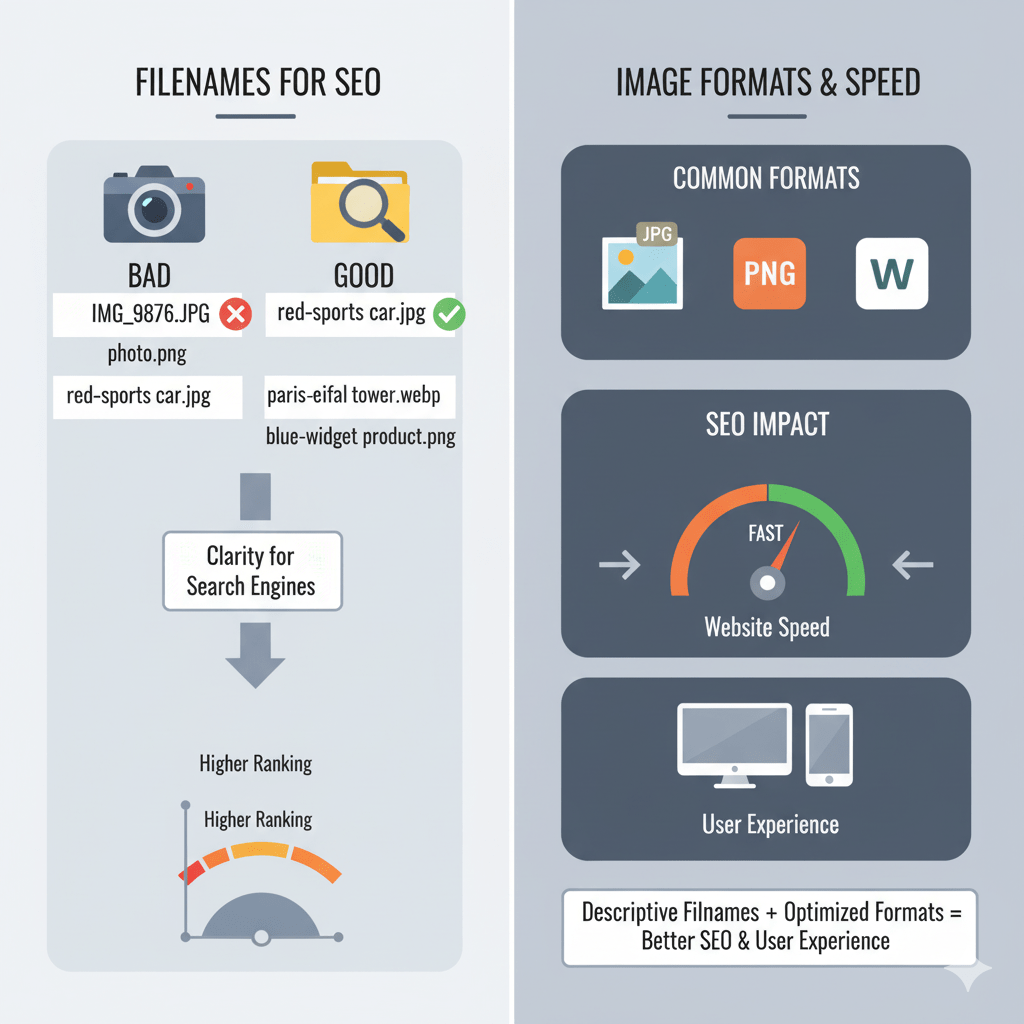
When you upload IMG_4829.jpg, Google learns absolutely nothing. But rename it to blue-running-shoes-nike.jpg, and suddenly you’re speaking Google’s language.
File naming for SEO gives search engines semantic context before they even parse your alt text or surrounding content. It’s like putting a nametag on every visual asset.
The Anatomy of an SEO-Friendly Image File Name
- Descriptive keywords:
organic-coffee-beans.jpgbeatsphoto1.jpgevery time - Hyphens, not underscores: Google treats hyphens as spaces; underscores get ignored
- Lowercase letters: Avoid capital letters to prevent duplicate content issues
- No special characters: Stick to alphanumeric and hyphens only
Pro Tip: Rename images before uploading them to your CMS. Changing file names post-upload can break existing links and confuse search engines.
According to Moz’s image SEO guide, descriptive file names can improve your chances of ranking in Google Images by up to 20%.
Which Image Formats Are Best for SEO Performance?
Not all image formats are created equal. Some compress beautifully; others bloat your pages faster than Thanksgiving dinner.
Here’s the breakdown of SEO image formats that actually matter in 2025:
JPEG: The Reliable Workhorse
Best for: Photographs, complex images with gradients
- Compression: Lossy (reduces file size by discarding data)
- SEO impact: Fast load times when compressed properly
- Drawback: No transparency support
JPEGs are still the default choice for most website images. With tools like TinyJPG, you can slash file sizes by 70% without visible quality loss.
PNG: The Transparency Champion
Best for: Logos, graphics with transparent backgrounds, screenshots
- Compression: Lossless (maintains full quality)
- SEO impact: Larger file sizes can slow load times
- Sweet spot: Use PNG-8 for simple graphics, PNG-24 only when transparency is essential
PNG files are 3-5x larger than compressed JPEGs. Use them sparingly.
WebP: The Modern Game-Changer
Best for: Everything (if your audience uses modern browsers)
- Compression: Both lossy and lossless options
- SEO impact: 25-35% smaller than JPEG/PNG with same quality
- Adoption: Supported by 95%+ of browsers in 2025
Google’s own research shows WebP images are 26% smaller than PNGs and 25-34% smaller than JPEGs. That’s a massive page speed advantage.
Expert Opinion: “WebP should be your default format in 2025. The file size savings directly translate to faster load times and better Core Web Vitals scores.” — John Mueller, Google Search Advocate
AVIF: The Bleeding-Edge Option
Best for: High-quality images where every kilobyte counts
- Compression: Superior to WebP (up to 50% smaller)
- SEO impact: Best-in-class compression ratios
- Catch: Browser support is still growing (88% as of early 2025)
AVIF is the future, but WebP is the safe present. Use AVIF with WebP and JPEG fallbacks via <picture> elements.
SVG: The Scalability King
Best for: Icons, logos, simple illustrations
- Compression: Vector-based (infinitely scalable)
- SEO impact: Tiny file sizes, perfect sharpness at any resolution
- Bonus: Can be inlined directly in HTML for zero HTTP requests
SVGs are a cheat code for responsive images—they look crisp on 4K monitors and mobile screens alike.
Image Format Comparison: Which Should You Use?
| Format | Best Use Case | Avg. Compression | Transparency | Browser Support | SEO Score |
|---|---|---|---|---|---|
| JPEG | Photos, complex images | High | No | 100% | ⭐⭐⭐⭐ |
| PNG | Logos, screenshots | Low | Yes | 100% | ⭐⭐⭐ |
| WebP | All-purpose modern | Very High | Yes | 95%+ | ⭐⭐⭐⭐⭐ |
| AVIF | High-quality photos | Extreme | Yes | 88% | ⭐⭐⭐⭐⭐ |
| SVG | Icons, simple graphics | N/A (vector) | Yes | 100% | ⭐⭐⭐⭐⭐ |
How Image Compression Crushes (or Kills) Your SEO
Here’s a stat that’ll haunt you: Google’s research shows that 53% of mobile users abandon sites that take longer than 3 seconds to load.
Image compression is your secret weapon against page bloat.
Lossy vs. Lossless: What’s the Difference?
Lossy compression discards visual data you won’t notice. Think JPEG or WebP in lossy mode. You lose a tiny bit of quality but gain massive file size reductions.
Lossless compression keeps every pixel perfect. PNG and WebP (in lossless mode) fall here. Bigger files, zero quality loss.
For SEO? Lossy compression wins almost every time. Human eyes can’t spot a properly compressed JPEG at 80-90% quality.
Best Image Compression Tools in 2025
- TinyPNG/TinyJPG: Free, simple, effective (lossy)
- Squoosh: Google’s browser-based tool with side-by-side comparison
- ShortPixel: WordPress plugin with bulk optimization
- ImageOptim: Mac-only app with excellent lossless compression
- Cloudflare Polish: Automatic optimization via CDN
Pro Tip: Always keep your original high-res images backed up separately. You can’t “uncompress” a lossy file.
According to HTTP Archive data, the median webpage serves 1MB+ of image data. Sites that compress aggressively see 20-40% faster load times.
Responsive Images: Serving the Right Size at the Right Time
A 3000px-wide hero image looks stunning on a 27″ monitor. On a smartphone? It’s downloading 10x more data than necessary.
Responsive images serve appropriately sized versions based on the user’s device. This is non-negotiable for mobile SEO.
The srcset Attribute: Your New Best Friend
<img src="logo-small.jpg"
     srcset="logo-small.jpg 480w,
             logo-medium.jpg 768w,
             logo-large.jpg 1200w"
     sizes="(max-width: 480px) 100vw,
            (max-width: 768px) 50vw,
            33vw"
     alt="Company logo">
This tells browsers: “Here are three versions—pick the best one for this screen size.”
Most modern CMSs (WordPress, Shopify, Webflow) generate responsive images automatically. If yours doesn’t, you’re living in the Stone Age.
Lazy Loading: Load Images Only When Needed
Add loading="lazy" to your <img> tags, and browsers won’t load images until they’re about to enter the viewport.
<img src="product-photo.jpg" loading="lazy" alt="Red leather wallet">
Google’s PageSpeed Insights actively penalizes sites that don’t lazy load below-the-fold images. Enable it everywhere except above-the-fold hero images.
Common Image SEO Mistakes (and How to Avoid Them)
Mistake #1: Using Generic File Names
IMG_5847.jpg and DSC_0032.png tell Google nothing. Always rename before uploading.
Mistake #2: Skipping Alt Text
File names help, but alt text is still the primary way Google understands image content. Every image needs descriptive alt text—no exceptions.
Learn more about mastering on-page SEO elements including proper alt text implementation.
Mistake #3: Not Compressing Images
Uploading 5MB raw photos straight from your camera is SEO suicide. Compress everything before it hits your server.
Mistake #4: Ignoring Mobile Optimization
Mobile-first indexing means Google judges your site based on the mobile experience. If your images aren’t responsive, you’re bleeding rankings.
Mistake #5: Using the Wrong Format
Serving PNGs where JPEGs belong (or vice versa) wastes bandwidth. Match the format to the content type.
Real-World Example: How Image Optimization Boosted Organic Traffic by 47%
An e-commerce client came to us with a gorgeous product catalog—and 8-second mobile load times. Ouch.
The fix:
- Converted all product photos from PNG to WebP (saved 2.1MB per page)
- Renamed 847 images from generic names to descriptive keywords
- Implemented lazy loading site-wide
- Set up responsive images with
srcset
Results after 6 weeks:
- Page speed increased from 32 to 78 (mobile PageSpeed score)
- Bounce rate dropped 23%
- Organic traffic increased 47%
- Google Images traffic tripled
This wasn’t magic—it was just proper image SEO best practices.
How to Audit Your Site’s Image Performance Right Now
- Run your homepage through PageSpeed Insights
- Check the “Opportunities” section for image-related warnings
- Look for “properly size images” and “next-gen formats” flags
- Use GTmetrix for a waterfall analysis showing which images load slowly
- Audit file names in your CMS—count how many use
IMG_or random strings
For a deeper dive into technical optimization, check out our guide on mastering on-page SEO elements.
FAQ: Image SEO Best Practices
Q: Should I use WebP or JPEG in 2025?
Use WebP as your primary format with JPEG as a fallback for older browsers. Tools like Cloudinary can automatically serve the best format based on browser support.
Q: How much should I compress images before SEO suffers?
Compress JPEGs to 80-85% quality. Most users can’t tell the difference from 100%, and you’ll save 50-70% file size. Use visual comparison tools like Squoosh to verify.
Q: Do image file names affect rankings more than alt text?
No. Alt text carries more SEO weight, but file names are still important for context. Use both properly—they work together, not in competition.
Q: Can I rename images after they’re already indexed?
Yes, but implement 301 redirects from old URLs to new ones if other sites have linked to them. Better yet, rename before uploading.
Q: What’s the ideal image file size for SEO?
Aim for under 100KB for most images, under 200KB for detailed photos. Hero images can stretch to 300KB if necessary, but optimize aggressively.
Q: Does lazy loading hurt SEO?
No. Google’s web crawler handles lazy-loaded images fine as long as you’re not using JavaScript that blocks rendering. Native loading="lazy" is fully supported.
Final Thoughts: Images Are Silent SEO Killers (or Secret Weapons)
Image SEO best practices aren’t optional extras—they’re fundamental to modern search performance.
Rename your files descriptively. Choose the right format (hint: it’s usually WebP). Compress ruthlessly. Make images responsive.
Do this, and you’re not just optimizing images—you’re optimizing revenue.
Want to dig deeper into on-page optimization strategies? Check out our comprehensive guide on mastering on-page SEO elements for more actionable tactics that actually move the needle.
Now go audit your site’s images. Your page speed—and your rankings—will thank you.