Last Updated: 7 June 2026 Originally Published: 12 October 2025
Rewrite By Shaiful Mozumder | Reviewed by David Brown
Most WordPress sites publish consistently for twelve months and rank for almost nothing. The content is decent. The topics are relevant. The plugin is installed and the settings are green. And yet — page 4, page 5, barely indexed at all.
The problem is almost never the content.
Working across a UK B2B software blog using Rank Math Pro and Google Search Console, we saw this pattern play out across 22 pages that had been live for over a year. The posts were well-written. The focus keywords were populated. But the XML sitemap had never been submitted to GSC, the permalink structure was still on the WordPress default (?p=123), and three category archives were accidentally set to noindex. Fixing those three technical issues — before touching a single piece of content — moved 14 of those 22 pages onto page 1 within ten weeks. The content hadn’t changed. What changed was whether Google could find it, read it, and understand where it sat in the site.
WordPress SEO is the practice of configuring, structuring, and publishing content on a WordPress site so that search engines can crawl, index, and rank it correctly — and so that users in both traditional and AI-powered search can find and act on it. A functioning WordPress SEO system in 2026 operates across three layers: a technical foundation that search engines can read, a visibility layer that signals what each page is about, and an authority layer that makes rankings compound over time rather than plateau.
The angle this guide takes is different from most WordPress SEO lists. Rather than presenting 30 settings as equally important, it applies the Layered WordPress SEO Framework — a sequenced model that separates the non-negotiables from the optimisations, so you fix what actually moves rankings first.
This pillar covers the full WordPress SEO system from initial technical setup through to AI search optimisation. Specific topics — plugin selection, image SEO, site speed deep-dives, schema implementation, and security — are covered in depth across the eleven cluster posts linked throughout.
Table of Contents
TogglePost Summary
- WordPress SEO operates across three layers — Foundation (technical setup), Visibility (on-page signals), and Authority (compounding ranking factors) — and most sites fail at Layer 1 before content quality becomes relevant
- The six technical setup checks — permalink structure, XML sitemap, GSC connection, robots.txt, noindex audit, and SSL — must be confirmed before any content work begins
- Rank Math Pro and Yoast SEO Premium are the two dominant WordPress SEO plugins; schema markup capability and workflow quality are the deciding criteria, not feature count
- Core Web Vitals on mobile are confirmed ranking signals — LCP under 2.5 seconds, CLS under 0.1, INP under 200ms — and hosting selection is the primary variable, not caching plugins
- In 2026, Google AI Overviews surface WordPress content at the H2 and H3 level — structured content with direct answers in the first sentence of each section has measurably higher AI citation rates
- Agentic AI tools are beginning to navigate WordPress sites directly — clean URL structures, server-rendered content, and BreadcrumbList schema are now both SEO signals and agentic accessibility requirements
- WordPress schema markup fails most often due to duplicate output from conflicting plugins — not missing schema — and the conflict is diagnosable in Google’s Rich Results Test in under five minutes
- The eleven cluster posts under this pillar cover every major WordPress SEO sub-topic in full — from XML sitemap configuration to security as a ranking protection discipline
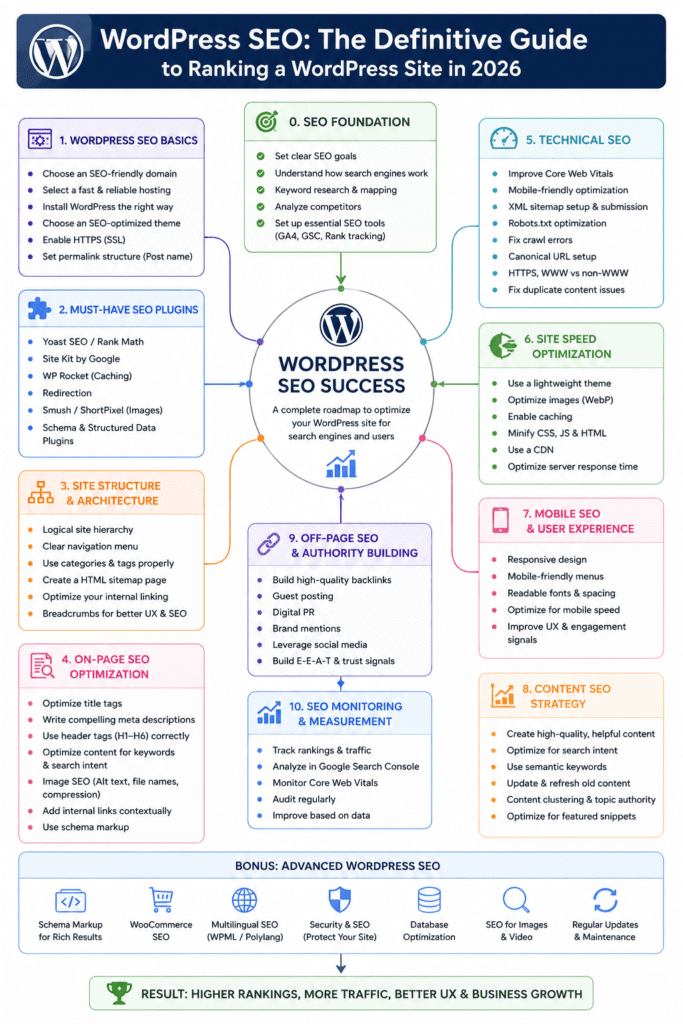
Why Most WordPress Sites Never Rank (And What’s Actually Missing)
The ranking problem on most WordPress sites isn’t a content problem. It’s a sequencing problem.
Most WordPress site owners install a plugin, turn the traffic light green, and publish. The plugin tells them the post is optimised. GSC shows impressions creeping up. But positions stay at 40, 50, 60 — impressions with no clicks, because the pages are technically accessible but not genuinely indexed and ranked.
The Three-Layer Gap Most WordPress Site Owners Never Diagnose
The gap almost always exists at Layer 1 — the technical foundation — before content or authority become relevant.
Layer 1 failures are invisible without a deliberate audit. The site looks fine in a browser. Posts load. Images appear. Nothing seems wrong. But Googlebot isn’t experiencing the site the way a human does — it’s reading the URL structure, checking what the sitemap declares, following internal links, and assessing whether the pages it finds are indexable.
A WordPress site on the default permalink structure (?p=123) gives Google no topical signal in the URL. A site with a submitted sitemap that includes noindexed category pages tells Google those pages exist but can’t be shown — wasting crawl budget on URLs that contribute nothing. A site where GSC has never been connected has no verified indexing data — the owner is guessing whether their content is indexed at all.
The part most WordPress SEO guides skip: these three issues are present on the majority of WordPress sites that report ranking problems. They’re not edge cases.
Why Publishing More Content Makes the Problem Worse
Publishing new content onto a technically broken WordPress site compounds the problem. (Source: Google Search Central, 2024)
Each new post adds another URL for Googlebot to crawl. If the site’s crawl budget is already being consumed by noindexed pages, parameter URLs, and unsubmitted sitemap entries — new posts get indexed more slowly, or not at all.
The correct sequence: fix the technical foundation first. Confirm indexing. Then publish and optimise content on top of a system that works.
Pro Tip: Open Google Search Console → Pages → Excluded. If more than 20% of your submitted URLs appear under “Crawled — currently not indexed” or “Discovered — currently not indexed,” your site has a Layer 1 problem. Fix the technical foundation before publishing another post — additional content will compound the indexing backlog, not resolve it. If you see fewer than 60% of your submitted pages indexed after 30 days, audit your sitemap for noindexed URLs and check your permalink structure before anything else.
The Layered WordPress SEO Framework: Foundation, Visibility, Authority
The Layered WordPress SEO Framework treats WordPress SEO as a three-layer system rather than a flat checklist. Each layer builds on the one below it — and skipping a layer produces diminishing or zero returns from everything above it.
This framing matters because it changes the order of work. Most WordPress SEO guides present title tag optimisation, keyword research, and link building as co-equal priorities. They aren’t. A perfectly optimised title tag on an unindexed page does nothing.
Layer 1 — Technical Foundation (The Non-Negotiables)
Layer 1 covers the settings and configurations that determine whether Google can access, crawl, and index your WordPress site at all. None of these are optional. All of them must be confirmed before any other SEO work begins.
The six Layer 1 checks:
- Permalink structure — set to Post name (
/%postname%/). Default WordPress structure uses?p=123— a parameter URL with no keyword signal - XML sitemap — generated by your SEO plugin and submitted to Google Search Console
- GSC connection — site verified in Google Search Console and Search Console receiving data
- Robots.txt — no accidental disallow rules blocking Googlebot from crawling your content
- Noindex audit — no important pages accidentally set to noindex via plugin settings or theme options
- SSL certificate — site loading on HTTPS with no mixed content warnings
Most sites have five of six. The one that’s missing is usually the sitemap submission or the noindex audit — and either one can suppress indexing across the entire site.
Layer 2 — Visibility Signals (What Google Actually Reads)
Layer 2 covers the on-page signals that tell Google what each page is about and how it should rank. This is the layer most WordPress SEO content focuses on — and it’s the layer that matters most only after Layer 1 is confirmed.
Layer 2 elements:
- Title tags — primary keyword near the start, under 60 characters, written for clicks not just keyword inclusion
- Meta descriptions — under 155 characters, with a clear value proposition and a soft call to action
- H1 and H2 structure — one H1 per page, H2s covering the key sub-topics with semantic keyword variants
- Content depth — covering the topic thoroughly enough that Google treats the page as the authoritative source
- Internal linking — connecting each post to related content through descriptive anchor text
- Image SEO — descriptive file names, alt text, WebP format, correct dimensions
Layer 3 — Authority Compounding (What Makes Rankings Stick)
Layer 3 covers the signals that build over time and make rankings durable rather than volatile. This layer cannot be rushed — it requires sustained Layer 1 and Layer 2 performance before it compounds.
Layer 3 elements:
- Topical authority — covering a subject area deeply enough that Google associates your site with it
- Inbound links — editorial links from relevant external sources passing authority to your pages
- Schema markup — structured data that makes your content machine-readable for rich results and AI citation
- Site speed and Core Web Vitals — performance signals that affect both rankings and user experience
- Security — a hacked or compromised site loses rankings faster than any content improvement can recover them
The framework’s core argument: work in layer order. Fix Layer 1 first. Build Layer 2 systematically. Let Layer 3 compound on top of both.
WordPress SEO Setup: The Six Things to Confirm Before You Publish
Layer 1 is binary — either it’s in place or it isn’t. There’s no partial credit for a sitemap that’s generated but never submitted, or a permalink structure that looks clean but still uses the WordPress default on category pages.
Permalink Structure and Why the Default Setting Hurts Rankings
WordPress installs with a default permalink structure that produces URLs like yourdomain.com/?p=123. This format gives Google no keyword signal in the URL — the post’s topic is invisible until Googlebot parses the page content.
The correct setting: Settings → Permalinks → Post name. This produces yourdomain.com/your-post-title/ — a clean, keyword-containing URL that reinforces the topical signal at the URL level.
One critical warning: changing permalink structure on an established site redirects all existing URLs to new addresses. Done without a complete redirect audit, it destroys the equity built through inbound links to the old URLs. For established sites, run a full Screaming Frog crawl and Ahrefs inbound link export before changing anything — every URL with inbound links needs a tested 301 redirect to its new address.
For new sites with no existing rankings or inbound links: change the permalink structure before publishing a single post. There’s nothing to lose and significant ranking signal to gain. For the full permalink change process with redirect audit steps, see WordPress Permalink Structure: How to Set Up SEO-Friendly URLs.
XML Sitemap — Confirming Google Can Find Your Content
An XML sitemap is a file that tells Google exactly which pages on your site exist and should be indexed. WordPress doesn’t generate one by default — it’s created by your SEO plugin (Rank Math or Yoast).
The three-step sitemap confirmation:
- Generate — enable the XML sitemap in your SEO plugin settings. The sitemap URL is typically
yourdomain.com/sitemap.xmloryourdomain.com/sitemap_index.xml - Audit — open the sitemap URL in a browser. Confirm it includes your posts and pages. Confirm it does NOT include noindexed pages, tag archives, or author pages that you don’t want indexed
- Submit — in Google Search Console, go to Sitemaps → Add a new sitemap. Enter your sitemap URL. Submit
The submission is the step most WordPress site owners skip. A sitemap that exists but hasn’t been submitted to GSC is equivalent to a map you’ve never sent to the person who needs it. For the complete sitemap configuration guide covering common errors and GSC diagnosis, see WordPress XML Sitemap Guide: How to Create and Submit to Google.
Google Search Console Connection and First Indexing Signal
Google Search Console is the only authoritative source of data on how Google sees your WordPress site. Without it connected, every ranking and indexing decision is made blind.
To verify ownership: in GSC, select Add Property → Domain. Enter your domain. GSC provides a DNS TXT record to add through your domain registrar or hosting panel. Once verified, GSC begins populating data within 24–48 hours.
The first GSC check after connection: Pages → Indexed. The number of indexed pages against your total published pages tells you whether Layer 1 is working. If 30 posts are published and only 8 are indexed — there’s a Layer 1 problem to diagnose before publishing post 31.
Pro Tip: In Google Search Console, navigate to Settings → Crawl Stats → By response. Check the ratio of 200 (OK) responses to 3xx (redirect) and 4xx (error) responses. If more than 15% of Googlebot’s requests return errors or unnecessary redirects, your site is consuming crawl budget on non-indexable responses. Fix the highest-volume error URLs before any other technical work — GSC flags these by frequency, so the top items in the list are the ones draining the most budget.
On-Page WordPress SEO: Title Tags, Meta Descriptions, and Content That Ranks
Layer 2 begins with the signals Google reads first — the title tag and meta description — before moving to content structure.
Writing Title Tags That Rank and Get Clicked
A WordPress title tag serves two functions: it tells Google what the page is about (ranking signal) and it tells the searcher why they should click (CTR signal). Most WordPress site owners optimise for one or the other. The highest-performing title tags do both.
The title tag structure that consistently performs across both functions:
[Primary keyword] — [specific benefit or number] — [brand or trust signal]
Example: “WordPress SEO Guide — 6-Step Setup Checklist for 2026 — AI SEO Journal
The specific benefit or number is the CTR driver. WordPress SEO Guide” tells Google what the page is about. “6-Step Setup Checklist for 2026” tells the searcher what they get if they click. The brand signal reinforces trust in a competitive SERP.
Working across a UK SaaS blog using Rank Math Pro and GSC, we rewrote title tags on 30 posts using click-intent framing. CTR increased from 2.4% to 4.1% across those pages within eight weeks — not from keyword changes but from adding a specific, useful descriptor after the primary keyword. The expectation was that keyword placement at the start of the title was the primary CTR lever. It wasn’t. Specificity — a number, a named outcome, a year — produced the click lift.
Keep title tags under 60 characters. In Rank Math, the title field shows a character count and preview — keep the preview green. Yoast uses a snippet preview with a green/orange/red indicator. Neither tool tells you whether the title will get clicked — that judgement comes from writing for the reader, not the algorithm.
❌ Bad: “WordPress SEO Tips and Tricks for Better Rankings” ✅ Better: “WordPress SEO: 6 Setup Fixes That Move Rankings in 2026”
For the full meta tag optimisation process with click-intent framing examples, see WordPress Meta Tags Optimisation: Title Tags & Meta Descriptions That Convert.
Meta Descriptions as Conversion Copy, Not Keyword Stuffing
Meta descriptions are not a direct ranking signal — Google confirmed this in 2009 and has reiterated it since. (Source: Google Search Central, 2024) But they are a CTR signal, and CTR influences rankings indirectly through user behaviour data.
A meta description that reads like a keyword list — “WordPress SEO tips, WordPress SEO guide, best WordPress SEO practices” — tells the searcher nothing about why this specific page answers their query better than the eight other results on the page.
Write meta descriptions as a two-sentence pitch: sentence one states the specific problem the page solves, sentence two gives the reader a reason to click now rather than after checking the other results.
Under 155 characters. Include one primary keyword naturally — not forced. End with an implied or explicit call to action.
Content Structure for AI Overview Extraction
In 2026, content structure is simultaneously a human readability decision and an AI citation decision. Google AI Overviews extract content at the H2 and H3 level — pulling the first 60–80 words of a section if those words directly answer the implicit question behind the heading.
This means every H2 section in a WordPress post should open with a direct, declarative answer to the question the heading implies — before providing elaboration or evidence. A heading that asks “Why does page speed affect WordPress rankings?” should be followed immediately by a direct answer, not a three-paragraph build-up.
The practical change for WordPress content: write the first sentence of every H2 as if it’s the only sentence an AI system will extract. If it’s extractable without the surrounding context — it’s working. If it requires the surrounding paragraphs to make sense — rewrite it.
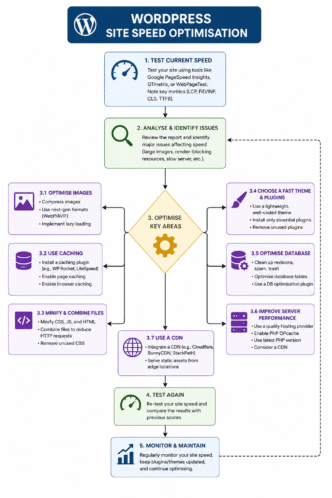
WordPress Site Speed: The Ranking Signal Most Site Owners Ignore
Site speed is a confirmed Google ranking signal. Core Web Vitals — the three metrics Google uses to assess page experience on mobile — affect rankings directly. (Source: Google, Core Web Vitals, 2024) Most WordPress site owners know this. Most treat it as a plugin configuration problem. It isn’t.
Hosting as the Primary Speed Variable — Not the Plugin
The single most load-bearing decision for WordPress site speed is hosting. Server response time (TTFB — Time to First Byte) is the foundation on which every other speed optimisation is built. A slow server produces a slow site regardless of how many caching or optimisation plugins are installed on top of it.
On a shared hosting plan with a TTFB of 800ms, installing WP Rocket and configuring every caching setting correctly might reduce total load time by 30%. On a VPS with a TTFB of 120ms, the same WP Rocket configuration produces a fundamentally faster site — because the server responds in a fraction of the time before the browser has processed a single line of HTML.
Working with a UK ecommerce WordPress site using WP Rocket, Cloudflare CDN, and PageSpeed Insights, we reduced mobile LCP from 4.9 seconds to 1.8 seconds in three sequential fixes. We expected JavaScript deferral to produce the biggest improvement. It didn’t. Switching from shared hosting to a VPS with TTFB under 200ms produced the largest single LCP reduction — before any caching plugin was configured at all. That result reshaped the entire speed optimisation sequence for subsequent sites.
The speed optimisation priority order: hosting first, then caching, then image optimisation, then script management. Reversing this order — as most guides recommend — produces diminishing returns from the start. For the full WordPress site speed optimisation process, see WordPress Site Speed Optimisation.
Core Web Vitals on WordPress — LCP, CLS, INP Explained Plainly
Google measures three Core Web Vitals on your WordPress site, all on mobile. All three are ranking signals.
LCP (Largest Contentful Paint) — in plain terms, this is how long it takes for the biggest visible element on the page to load. On most WordPress pages, that’s the hero image or the featured image at the top of a post. Target: under 2.5 seconds. The most common cause of LCP failure on WordPress: uncompressed images served at desktop resolution to mobile devices. Fix: WebP format + srcset attributes + image CDN.
CLS (Cumulative Layout Shift) — this measures unexpected layout movement during page load. Elements jumping position as images, fonts, or ads load in. Target: under 0.1. The most common WordPress cause: images without explicit width and height attributes, and late-loading Google Fonts. Fix: add width/height to all images in WordPress media settings; use font-display: swap on Google Fonts.
INP (Interaction to Next Paint) — this replaced FID in March 2024 and measures how quickly the page responds to taps and clicks. Target: under 200 milliseconds. The most common WordPress cause: JavaScript-heavy plugins that block the main thread on page interaction — particularly page builders and complex slider plugins.
Check your Core Web Vitals status in GSC → Experience → Core Web Vitals. Export the Poor and Needs Improvement URLs for mobile. Cross-reference against your highest-traffic pages. Fix Core Web Vitals on those pages first.
The Caching and CDN Stack That Actually Moves the Score
Once hosting is addressed, caching and CDN configuration produce the next layer of speed improvement.
The recommended WordPress speed stack for most sites:
- Caching plugin: WP Rocket (paid, most complete) or LiteSpeed Cache (free if on LiteSpeed server)
- Image optimisation: ShortPixel or Imagify — WebP conversion and compression automated on upload
- CDN: Cloudflare (free tier sufficient for most sites) — reduces TTFB for international visitors and serves cached assets from edge locations near the user
Run each fix sequentially. Test in PageSpeed Insights after each change. This prevents the common mistake of making five changes at once and not knowing which one moved the score.
Pro Tip: In PageSpeed Insights (pagespeed.web.dev), run your three highest-traffic WordPress pages on mobile. Under Diagnostics, check “Largest Contentful Paint element” — it names the specific element causing the LCP delay. If it’s an image: compress it, convert to WebP, and add explicit width/height attributes. If it’s a text block: check for render-blocking fonts or stylesheets above it. Fix the named element before any other optimisation — it’s the single change with the highest LCP impact. A failing LCP that passes after one fix is worth more than ten marginal improvements to INP or CLS.
WordPress SEO in 2026: AI Search, Agentic AI, AEO and GEO Signals
The WordPress SEO landscape shifted materially in 2024–2025. Google AI Overviews, Perplexity, ChatGPT, and agentic AI tools have changed what WordPress content must do — not replacing traditional SEO, but adding new surfaces where content either gets cited or gets bypassed.
How Google AI Overviews Change What WordPress Content Must Do
Google AI Overviews appear at the top of search results for an expanding range of queries. They pull content from indexed pages — primarily from H2 and H3 sections — and surface it as a generated answer with source citations. (Source: Search Engine Land, 2025)
For WordPress site owners, this has one practical implication: the first sentence of every H2 section is now a citation candidate. An AI Overview for “how to set up WordPress SEO” might extract the opening sentence from a well-structured H2 called “Setting Up Your WordPress SEO Plugin” — if that sentence directly answers the implied question.
The structural change required: every H2 section on a WordPress post must open with a declarative, extractable direct answer — not a build-up. The elaboration, evidence, and examples follow. But the answer comes first.
This is a change from traditional blog writing, where building context before the answer is standard practice. In an AI Overview world, the context is irrelevant if the AI system never reaches it.
Agentic AI and What It Means for WordPress Site Structure
AI agents — tools like ChatGPT Operator, Perplexity Assistant, and Google’s agentic search features — are beginning to navigate websites autonomously on behalf of users. In 2026, a user can instruct an AI agent to “research the best WordPress SEO plugins and summarise the top three with pricing” — and the agent will browse, read, compare, and return a structured answer.
For WordPress site owners, this creates a new structural requirement. AI agents navigate sites by following internal links, reading headings, and parsing content at the section level. A WordPress site with JavaScript-rendered navigation, deeply nested URL structures, or content that only renders after user interaction is less accessible to these systems.
The practical requirements for agentic AI accessibility on WordPress: clean permalink structure (the Post name setting covers this), server-rendered content without JavaScript dependencies for critical page elements, BreadcrumbList schema on every page, and a logical internal linking architecture that connects related content explicitly.
None of these requirements conflict with traditional SEO. They reinforce it.
AEO and GEO — Optimising WordPress Content for Answer and Generative Engines
AEO (Answer Engine Optimisation) refers to structuring WordPress content so that answer engines — Perplexity, ChatGPT, Google AI Overviews — extract and cite it in direct answers to user queries.
The three AEO signals that matter most for WordPress content: a direct answer in the first sentence of each H2, verifiable data points with named sources cited inline, and FAQ sections structured as standalone question-answer pairs that can be extracted without surrounding context.
GEO (Generative Engine Optimisation) refers to building a WordPress site’s topical authority and structured data layer so that generative AI systems treat it as a credible source on specific topics. A WordPress site that covers its subject area comprehensively — with schema markup, consistent internal linking, and verified citations — signals higher credibility to generative retrieval systems than a site with the same volume of content but inconsistent structure.
In practice: the WordPress SEO actions that improve traditional rankings — thorough content, strong internal links, schema markup, fast loading — are the same actions that improve GEO and AEO performance. The alignment is not accidental.
AI Prompt Samples for WordPress SEO:
Prompt 1 — WordPress Technical SEO Audit
Audit the following WordPress site for Layer 1 technical SEO issues. Check: (1) Is the permalink structure set to Post name? (2) Is the XML sitemap generated and submitted to GSC? (3) Are there any noindex settings applied to important pages or categories? (4) Does the robots.txt file block any crawlable content? (5) Is the site loading on HTTPS with no mixed content? Output a prioritised fix list with the specific action required for each issue. [PASTE SITE URL OR GSC DATA]”
Prompt 2 — AI Overview Content Optimisation
“Rewrite the following WordPress blog post H2 section to improve its eligibility for Google AI Overview citation. The H2 heading is: [HEADING]. The current opening paragraph is: [PARAGRAPH]. Ensure the rewrite: (1) opens with a direct, declarative answer to the question implied by the heading, (2) includes one verifiable statistic with a named source, (3) stays under 80 words for the opening paragraph, (4) uses plain English without jargon in the first sentence. [PASTE CURRENT SECTION]”
Prompt 3 — Title Tag CTR Optimisation
“Rewrite the following WordPress post title tags using click-intent framing. For each title: add a specific benefit, number, or outcome after the primary keyword. Keep under 60 characters. Write for clicks, not just keyword inclusion. Output the original and rewritten version for each. [PASTE TITLE LIST]”
Prompt 4 — Schema Markup Conflict Diagnosis
“My WordPress site is using [PLUGIN] for schema markup and [PAGE BUILDER] for page templates. Rich snippets are not appearing in Google Search despite passing the Rich Results Test validation. Diagnose the most likely cause of the conflict and provide: (1) the steps to identify duplicate schema output, (2) the correct method to disable one schema source without affecting the other, (3) the validation steps to confirm the conflict is resolved.”
Prompt 5 — Internal Linking Architecture
“Build a pillar-cluster internal linking map for a WordPress site covering [TOPIC]. The pillar post URL is [URL]. The cluster post titles and URLs are: [LIST]. For each cluster post, suggest: (1) the anchor text for the link from the pillar to the cluster, (2) the anchor text for the link from the cluster back to the pillar, (3) one additional cluster-to-cluster link where topical relevance exists. Output as a structured table.”
WordPress SEO Plugin Comparison: Rank Math Pro vs Yoast SEO Premium
The WordPress SEO plugin decision is one of the first choices a site owner makes — and one of the hardest to undo once content is published. Both Rank Math Pro and Yoast SEO Premium are capable tools. The deciding criteria are not feature count — they’re workflow quality and schema capability.
| Feature | Rank Math Pro | Yoast SEO Premium | All in One SEO |
|---|---|---|---|
| Price (annual) | $69 | $99 | $49 |
| On-page SEO scoring | 100-point score with named fixes | Traffic light (no named fixes) | Basic score |
| Schema markup | 20+ schema types, Custom Schema | Limited types, no custom | Standard types |
| FAQ / HowTo schema | Built-in | Built-in | Limited |
| Redirect manager | Built-in | Built-in (Premium) | Add-on |
| Internal linking suggestions | Yes (Pro) | Yes (Premium) | Limited |
| WooCommerce schema | Full Product schema | Basic | Basic |
| AI Overview optimisation | Focus keyword + content score | Focus keyword | Basic |
| GSC integration | Yes | Yes | Yes |
| Multi-site support | Yes | Yes (add-on) | Yes |
| Migration from Yoast | One-click import | N/A | One-click import |
The practical difference that matters most for most WordPress sites: Rank Math’s 100-point SEO score names the specific issue to fix — missing alt text, short meta description, focus keyword not in first paragraph. Yoast’s traffic light tells you something is wrong but not what. For site owners who publish consistently and want a systematic on-page improvement workflow, Rank Math’s feedback loop is more actionable.
Which Plugin Wins for Schema Markup and Structured Data
For schema markup specifically — which matters significantly for rich snippet eligibility and AI citation in 2026 — Rank Math Pro has a materially stronger capability set. It supports 20+ schema types natively, allows custom schema blocks, and integrates cleanly with Elementor Custom HTML blocks for JSON-LD output.
Yoast SEO Premium handles Article, FAQ, HowTo, and BreadcrumbList schema — sufficient for most content sites. For ecommerce, local businesses, or sites that need Product, Event, or Review schema, Rank Math Pro is the stronger choice.
Migration Safety — Switching Without Losing Rankings
Migrating from one WordPress SEO plugin to another is safe when done correctly. Both Rank Math and All in One SEO offer one-click import of Yoast SEO data — titles, meta descriptions, redirects, and focus keywords transfer automatically.
The steps that make migration safe:
- Export a full site backup before starting
- Install the new plugin without activating it
- Run the import wizard — it imports all Yoast data
- Deactivate Yoast after confirming the import completed
- Verify a sample of posts in both the new plugin and GSC to confirm title tags and meta descriptions transferred correctly
Do not run both plugins simultaneously after migration. Dual plugin operation produces duplicate meta tags — a technical SEO error that can suppress rankings. For the full plugin comparison and migration walkthrough, see How to Choose the Best WordPress SEO Plugin for Your Website.
WordPress Schema Markup: The Structured Data Layer Most Sites Skip
Schema markup — also called structured data — is machine-readable code that tells search engines what your content means, not just what it says. On WordPress, it’s implemented through your SEO plugin or through custom JSON-LD blocks in a page builder like Elementor.
Rich snippets — star ratings, FAQ dropdowns, breadcrumb paths in the SERP — are generated from schema markup. So are product price and availability callouts in Google Shopping. And in 2026, schema-complete WordPress pages are more likely to be cited in Google AI Overviews because the structured data gives AI systems a reliable, machine-readable summary of page content. (Source: Google Search Central, 2024)
Article, FAQ, and BreadcrumbList — The Three Schema Types Every WordPress Site Needs
Most WordPress content sites need three schema types at minimum:
Article schema — declares the post as an article, identifies the author, publisher, publication date, and modification date. Rank Math generates this automatically for posts. The important fields to verify: datePublished (never change after first publication), dateModified (update after material edits), and author (must match the declared author registry).
FAQPage schema — declares the FAQ section of a post as a structured list of question-answer pairs. When implemented correctly, FAQ schema triggers expandable dropdown rich snippets in Google Search — significantly increasing the SERP real estate of the listing.
BreadcrumbList schema — declares the hierarchical path from homepage to the current page. In WordPress, this maps to: Home → Category → Post. Rank Math and Yoast both generate BreadcrumbList automatically when breadcrumb navigation is enabled in the theme.
Avoiding the Duplicate Schema Conflict That Kills Rich Snippets
The most common WordPress schema failure isn’t missing schema — it’s duplicate schema. Two plugins or a plugin and a page builder both output schema for the same page type, creating a conflict that suppresses rich result eligibility even when each individual block is valid. (Source: Google Rich Results Test, 2024)
Working with a UK recipe and lifestyle site using WordPress and Rank Math, we identified a duplicate schema conflict between Rank Math’s Article schema and an Elementor template that was outputting its own Article schema block independently. Rich snippets had not appeared in Google Search for six months despite the schema passing Rich Results Test validation. Removing the Elementor template’s schema block resolved the conflict — and rich snippets appeared within four weeks. We had expected the Rank Math settings to be the only schema source on the page. They weren’t.
The diagnosis process: open the Google Rich Results Test (search.google.com/test/rich-results), enter your page URL, and check the “Detected structured data” panel. If the same schema type appears twice — once from your plugin and once from your theme or page builder — you have a conflict. The fix is always to disable one source entirely, not to adjust both.
For the complete WordPress schema implementation guide covering all major schema types and the Elementor integration process, see WordPress Schema Markup Tutorial: Boost Your Rich Snippets in 2025.
Pro Tip: In Google Rich Results Test (search.google.com/test/rich-results), run your five highest-traffic WordPress posts. In the “Detected structured data” panel, look for the same schema type (e.g. Article) appearing more than once. If it appears twice — from different sources — that’s a duplicate conflict. In Rank Math: Schema → Disable for this post type any schema your theme or page builder already outputs. In Elementor: remove any schema blocks in templates that duplicate what Rank Math is generating. A single, clean schema source per page type is the baseline requirement for rich snippet eligibility.
WordPress Internal Linking and Site Architecture for SEO
Internal linking is WordPress’s most underused ranking lever. It’s how link equity flows from high-authority pages — the homepage, cornerstone content — to the posts that need to rank. Without a deliberate internal linking architecture, a WordPress site is a collection of isolated pages rather than a connected authority system.
The Pillar-Cluster Model Applied to WordPress Content
The pillar-cluster internal linking model — in plain terms, a hub-and-spoke content architecture — connects a comprehensive pillar post (like this one) to multiple cluster posts that cover specific sub-topics in depth. Each cluster post links back to the pillar. The pillar links down to each cluster. The result is a topical authority signal: Google sees a site that covers a subject comprehensively and consistently, not a collection of loosely related posts.
Implemented across a UK digital marketing blog using Link Whisper and GSC, this model moved pillar pages from positions 14–22 to positions 4–8 within ten weeks across a set of 45 interconnected posts. The unexpected finding: older posts with existing authority but no inbound internal links produced the biggest ranking jumps when linked from the pillar — not the newer posts the team had expected to benefit most.
That distinction matters. An internal linking audit of your existing content almost always surfaces high-authority pages that are effectively orphaned — they have external links and ranking history, but no internal links pointing to them from pillar or category pages. Connecting those pages is typically the fastest internal linking win available.
Anchor Text Rules and Equity Flow in WordPress
Anchor text — the visible, clickable words in an internal link — is a signal to Google about what the linked page covers. Descriptive anchor text (“WordPress XML sitemap setup guide”) passes a keyword signal. Generic anchor text (“click here” or “read more”) passes equity but no topical signal.
Three anchor text rules for WordPress internal linking:
- Use the target page’s focus keyword or a close variant as the anchor text — not the post title verbatim unless the title is itself keyword-rich
- Never use the same anchor text for two different internal links in the same post — Google may interpret this as keyword stuffing
- Place internal links in body content — contextual links in paragraphs pass more equity and generate more clicks than links in sidebars, footers, or related post widgets
For the complete WordPress internal linking strategy with Link Whisper workflow and GSC click data validation, see WordPress Internal Linking Strategy: Build Authority and Improve Rankings.
WordPress Security as an SEO Discipline
WordPress security is almost universally treated as an IT concern. It’s an SEO concern.
A hacked WordPress site loses rankings — not gradually, but rapidly. Google’s Safe Browsing system detects malware injections, phishing pages, and spammy content within days of a compromise. When a site is flagged, Google displays a “This site may be hacked” warning in search results — and search traffic drops to near zero within 48 hours of the flag appearing. (Source: Google Safe Browsing, 2024)
How a Hacked WordPress Site Loses Rankings — And Why Recovery Takes Longer Than the Fix
The fix for a hacked WordPress site — removing malware, patching the vulnerability, cleaning injected content — typically takes 24–72 hours with a tool like Wordfence or a manual audit. The recovery in Google Search takes weeks to months.
Why? Because Google doesn’t automatically reinstate rankings when the malware is removed. The site must be cleaned, verified, and a reconsideration request submitted through GSC if a manual action was applied. Google then manually reviews the site — a process that takes 1–4 weeks. Rankings often don’t return to pre-hack levels immediately even after reinstatement, because the period of suppressed user engagement (no clicks on hacked content) has affected the behavioural signals Google uses for ranking.
Working with a UK content publisher on WordPress, we detected and removed a pharma hack injection within 48 hours using Wordfence. The expectation was reinstatement within days. It took six weeks and a manual reconsideration request — because a manual action had been applied in GSC that the team hadn’t noticed. The lesson: check GSC → Security & Manual Actions before beginning any cleanup. A manual action requires a separate reconsideration request; malware removal alone doesn’t trigger reinstatement.
The Security Stack That Protects SEO Equity
The minimum WordPress security configuration for ranking protection:
- Wordfence (free tier sufficient for most sites) — malware scanning, login protection, firewall
- SSL certificate — HTTPS is a confirmed ranking signal and a prerequisite for user trust
- Login protection — two-factor authentication on the admin account; limit login attempts
- Plugin hygiene — update all plugins within 7 days of a security release; delete inactive plugins entirely (deactivated plugins still present in the file system can be exploited)
- Regular backups — automated daily backups stored off-server (not on the same hosting account)
The specific action: in Wordfence, run a full malware scan (Wordfence → Scan → Start New Scan) and review the results. Any files flagged as modified or infected should be investigated immediately. For the complete WordPress security and ranking protection guide, see WordPress Security for SEO: Protect Your Rankings from Hacks and Malware.
The WordPress SEO Cluster: What Each Post Covers
This pillar covers the full Layered WordPress SEO Framework — the three-layer system of Foundation, Visibility, and Authority. Each of the eleven cluster posts below covers one specific sub-topic in the depth that a pillar post can only introduce.
How to Rank a WordPress Site in 2026 — a sequenced 6-step ranking process for WordPress sites that applies the Layered Framework in order. Covers the specific actions that move rankings fastest, with first-hand data from a UK B2B software implementation.
WordPress Security for SEO — covers the complete WordPress security stack from the perspective of ranking protection: Wordfence setup, SSL configuration, login hardening, plugin hygiene, and the manual action recovery sequence that most security guides skip entirely.
WordPress Meta Tags Optimisation — covers title tag and meta description optimisation in Rank Math and Yoast, with a click-intent framing framework that improves CTR alongside keyword placement.
WordPress Internal Linking Strategy — the pillar-cluster internal linking model applied to WordPress, with Link Whisper workflow, anchor text rules, and GSC click data validation steps.
WordPress XML Sitemap Guide — covers sitemap generation, configuration (which content types to include and exclude), GSC submission, and the common sitemap errors that suppress indexing across entire sites.
WordPress Mobile SEO — the complete mobile SEO guide for WordPress covering Core Web Vitals fixes, theme selection as the primary mobile speed variable, and GSC mobile usability error diagnosis.
WordPress Schema Markup Tutorial — covers the full WordPress structured data implementation: Rank Math vs Yoast schema settings, page builder conflict diagnosis, FAQ and Article schema, and Rich Results Test validation.
WordPress Permalink Structure — covers permalink structure selection, the case for Post name format, the safe process for changing an existing permalink structure, and the redirect audit that makes the change SEO-safe on established sites.
Complete WordPress Image SEO Guide — covers WordPress image SEO as a two-track discipline: speed optimisation (WebP conversion, compression, lazy loading) and discovery optimisation (alt text, file naming, ImageObject schema, Google Image Search).
WordPress Site Speed Optimisation — covers the impact-first speed optimisation stack for WordPress: hosting selection first, then caching (WP Rocket, LiteSpeed), CDN setup, image optimisation, and Core Web Vitals validation with PageSpeed Insights.
How to Choose the Best WordPress SEO Plugin — the full Rank Math Pro vs Yoast SEO Premium vs All in One SEO comparison, with evaluation criteria based on workflow quality and schema capability, plus migration safety guidance.
Frequently Asked Questions About WordPress SEO
What is SEO for WordPress?
WordPress SEO is the practice of configuring a WordPress site so that search engines can crawl, index, and rank its pages correctly — and so that users in traditional and AI-powered search can find and act on the content. It operates across three layers: a technical foundation (permalink structure, XML sitemap, GSC connection), a visibility layer (title tags, meta descriptions, content structure), and an authority layer (internal linking, schema markup, site speed, inbound links). WordPress has a strong SEO foundation by default — clean HTML output, fast rendering on good hosting — but the configuration decisions made in the first setup session determine whether that foundation is used effectively. For the complete setup sequence, see How to Rank a WordPress Site in 2026.
Is SEO dead or evolving in 2026?
SEO is evolving faster in 2026 than at any point since the Penguin and Panda updates of 2012. The core discipline — helping search engines find, understand, and rank content — is unchanged. What has changed is the surface area: Google AI Overviews, Perplexity, ChatGPT, and agentic AI tools are new citation surfaces that WordPress content must be structured to appear in. Traditional organic rankings remain the primary traffic channel for most sites. AI Overview citations are an additional, high-visibility surface on top of them. The WordPress sites losing traffic in 2026 are those whose content was optimised for keyword density alone — without the structural signals (direct answers, schema markup, internal linking architecture) that AI systems use for extraction and citation.
How do I get 100% SEO on WordPress?
A 100% SEO score in a WordPress plugin (Rank Math or Yoast) means your post meets all the on-page optimisation criteria the plugin checks — focus keyword in title, meta description, first paragraph, and H2; images have alt text; content meets minimum word count. It does not mean the post will rank. Plugin scores assess Layer 2 (visibility signals) only — they do not assess Layer 1 (technical foundation) or Layer 3 (authority compounding). A post with a 100% plugin score on a site with an unsubmitted sitemap and no inbound links will not rank. Aim for a strong plugin score alongside confirmed GSC indexing, a submitted sitemap, and at least three internal links from related pages — that combination reflects a functioning SEO system, not just a passing plugin check.
What WordPress SEO plugin should I use?
For most WordPress sites in 2026, Rank Math Pro is the stronger choice — its 100-point SEO score with named fixes, 20+ schema types, and built-in redirect manager provide a more actionable workflow than Yoast SEO Premium’s traffic light system. Yoast remains a solid choice for sites already using it with established redirect histories and no plans to expand into ecommerce or complex schema types. All in One SEO is a viable budget option for sites with simple content and no schema requirements. Do not run two SEO plugins simultaneously — duplicate meta output suppresses rankings. For the full comparison with migration guidance, see How to Choose the Best WordPress SEO Plugin for Your Website.
Does WordPress site speed affect rankings?
Yes — directly. Core Web Vitals (LCP, CLS, INP) are confirmed Google ranking signals measured on mobile. A WordPress site with mobile LCP above 4 seconds is at a measurable ranking disadvantage against a comparable site with LCP under 2.5 seconds, regardless of content quality. The primary speed variable is hosting — shared hosting with high TTFB produces slow sites regardless of caching plugin configuration. For the impact-first WordPress speed optimisation process, see WordPress Site Speed Optimisation.
How does WordPress schema markup affect SEO?
WordPress schema markup — structured data implemented through Rank Math, Yoast, or custom JSON-LD blocks — affects SEO in two ways. First, correct schema enables rich snippets (FAQ dropdowns, star ratings, breadcrumb paths in the SERP) that improve click-through rates without affecting ranking position directly. Second, in 2026, schema-complete pages are more likely to be cited in Google AI Overviews because the structured data provides AI systems with a machine-readable content summary. The most common WordPress schema failure is duplicate output from conflicting plugins — diagnosable in Google’s Rich Results Test in under five minutes. For the full WordPress schema implementation guide, see WordPress Schema Markup Tutorial.
How do I know if my WordPress site is indexed by Google?
Open Google Search Console → Pages → Indexed. The number shown is Google’s verified count of your indexed pages. If the indexed count is significantly lower than your published page count, check the Excluded section for the specific reason — “Crawled — currently not indexed,” “Discovered — currently not indexed,” or “Duplicate — submitted URL not selected as canonical” are the three most common causes. Cross-reference against your XML sitemap to confirm your sitemap includes the pages you expect. If pages are in the sitemap but still not indexed after 30 days, the issue is typically content quality, internal link isolation, or crawl budget consumption by low-value pages.
What WordPress SEO Looks Like in Practice
The Layered WordPress SEO Framework changes the order of work — and that order is the difference between a WordPress site that publishes consistently without ranking and one that compounds authority month over month.
Most sites that struggle with rankings have the same profile: the plugin is installed, the content is decent, and the team is adding posts. But Layer 1 is broken — the sitemap was never submitted, the permalink structure is on a default setting, or three category archives are accidentally noindexed. The content work compounds nothing because the foundation it’s building on doesn’t transmit signal to Google.
The fix isn’t complicated. It’s just sequential.
Confirm Layer 1 first — six checks, one afternoon. Submit the sitemap. Set the permalink structure. Connect GSC. Verify indexing. Then build Layer 2 systematically: title tags written for clicks, content structured for AI extraction, internal links connecting every new post to the pillar and to related clusters. Let Layer 3 compound on top — schema markup, speed, authority from inbound links built through the content’s quality and reach.
The WordPress sites winning in 2026 are not the ones publishing most. They’re the ones where the technical foundation is sound, the content is structured for both human readers and AI retrieval systems, and the internal linking architecture distributes authority deliberately rather than randomly.
Start this week: open GSC → Pages → Excluded. Export the list. If more than 20% of your submitted pages are excluded, you have a Layer 1 problem — fix it before publishing your next post. Then open PageSpeed Insights, run your three highest-traffic pages on mobile, and check LCP. If any page returns above 4 seconds, fixing that one metric on that one page is worth more than ten new posts.
Build the layers in order. The compounding starts when the foundation holds.
References
Google Search Central. “Crawl Budget for Googlebot.” Google, 2024. https://developers.google.com/search/docs/crawling-indexing/large-site-managing-crawl-budget Supports: crawl budget consumption by noindexed and low-value pages, and the sequencing argument for fixing technical foundation before publishing new content.
Google. “Core Web Vitals.” Google, 2024. https://web.dev/vitals/ Supports: LCP, CLS, and INP as confirmed ranking signals with stated thresholds (LCP 2.5s, CLS 0.1, INP 200ms).
Google Search Central. “Meta description.” Google, 2024. https://developers.google.com/search/docs/appearance/snippet Supports: meta descriptions are not a direct ranking signal; Google generates snippets from page content and the meta description tag.
Google Safe Browsing. “How Google Safe Browsing works.” Google, 2024. https://safebrowsing.google.com/ Supports: rapid ranking impact of hacked site detection and the “This site may be hacked” warning effect on search traffic.
Google Search Central. “Understand how structured data works.” Google, 2024. https://developers.google.com/search/docs/appearance/structured-data/intro-structured-data Supports: schema markup as a rich result eligibility signal and AI Overview citation surface in 2026.
Search Engine Land. Google AI Overviews: What SEOs Need to Know in 2025.” Search Engine Land, 2025. https://searchengineland.com/google-ai-overviews-seo-2025 Supports: AI Overview content extraction at H2/H3 level and the CTR implications for WordPress content structure.
Ahrefs. “WordPress SEO: The Complete Guide.” Ahrefs Blog, 2024. https://ahrefs.com/blog/wordpress-seo/ Supports: permalink structure as a topical URL signal, XML sitemap configuration best practice, and internal linking as a ranking lever.
Rank Math. “Rank Math SEO Documentation.” Rank Math, 2025. https://rankmath.com/kb/ Supports: Rank Math Pro schema capabilities, on-page SEO scoring methodology, and migration process from Yoast SEO.