Your website is moving. URLs are changing. Pages are consolidating. And you’re about to discover whether you understand redirects—or whether you’re about to lose half your organic traffic.
301 redirects SEO implementation separates professionals from amateurs faster than any other technical task. Get it right, and Google seamlessly transfers 90-99% of your link equity to new URLs. Get it wrong, and months of SEO work evaporates overnight through redirect chains, loops, or worse—no redirects at all.
According to Search Engine Journal’s 2024 migration study, 42% of site migrations experience significant traffic loss due to redirect implementation errors. These aren’t minor mistakes—they’re catastrophic failures stemming from fundamental misunderstandings about how redirects work and why they matter.
Picture this: You spend six months building authority for 500 blog posts. Then you redesign your site, changing URL structure. Without proper 301 redirects, every backlink pointing to old URLs hits dead ends. Every ranking you built? Gone. Every bit of link equity? Wasted. All because of missing redirects.
This guide ensures that never happens to you.
Table of Contents
ToggleUnderstanding Redirect Types
301 Permanent Redirects
A 301 redirect tells browsers and search engines “this page has permanently moved to a new location.” It’s the redirect type for SEO because it passes maximum link equity—90-99% according to Google’s official documentation.
Status Code: 301 Moved Permanently
Old URL: example.com/old-page
New URL: example.com/new-page
When Googlebot encounters a 301, it eventually stops crawling the old URL and transfers all ranking signals to the new one. This includes backlinks, authority, and ranking history. The old URL essentially becomes an alias pointing permanently to the new destination.
Use 301 redirects for permanent URL changes, site migrations, domain changes, consolidating duplicate content, and retiring old pages with valuable backlinks.
302 Temporary Redirects
A 302 redirect signals temporary relocation. Search engines continue indexing the original URL, don’t transfer link equity, and expect the redirect to be removed eventually.
Status Code: 302 Found (Temporary Redirect)
302s serve legitimate purposes—A/B testing alternate pages, seasonal campaigns, temporary maintenance redirects, and mobile-specific redirects (though responsive design is better).
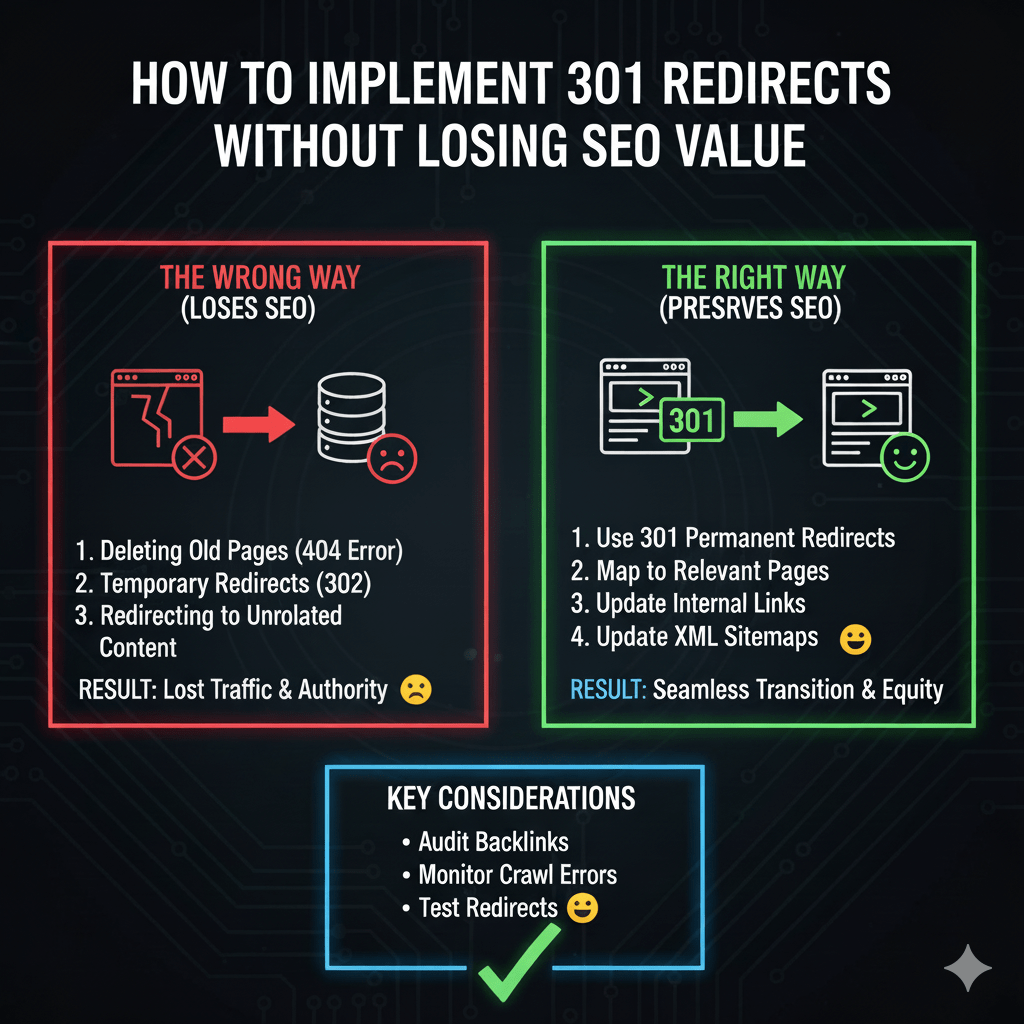
The critical mistake: using 302 when you mean 301. If a redirect is permanent, it must be 301. Using 302 for permanent changes prevents link equity transfer and confuses search engines about which URL to index.
307 and 308 Redirects
307 (Temporary Redirect) and 308 (Permanent Redirect) are modern alternatives to 302 and 301 respectively, with stricter rules about preserving HTTP methods (POST vs GET).
For SEO purposes, 301 and 308 are functionally equivalent—both pass link equity for permanent redirects. Most implementations use 301 due to broader compatibility and familiarity.
Why 301 Redirects Matter for SEO
Link Equity Preservation
Every backlink pointing to your pages carries authority. When URLs change without redirects, that authority disappears. With proper 301 redirects, authority transfers to new URLs.
Research by Moz in 2024 confirms Google treats 301 redirects as strong signals to consolidate all ranking factors from old URLs to new ones. While minor losses occur (5-10%), proper implementation preserves the vast majority of SEO value.
Your technical SEO fundamentals must include redirect strategy as core architecture—not an afterthought during migrations.
User Experience Protection
Redirects aren’t just for search engines—they protect user experience. Someone clicks a bookmark or follows an old link expecting your content. Without redirects, they hit 404 errors and leave frustrated.
Proper redirects ensure users reach relevant content regardless of which URL they use. This maintains traffic, reduces bounce rates, and preserves the value of every marketing effort that drove people to old URLs.
Ranking Signal Consolidation
Sites naturally accumulate URL variations over time—HTTP vs HTTPS, www vs non-www, trailing slashes vs none. Each variation potentially splits ranking signals.
Strategic 301 redirects consolidate variations to one canonical URL, concentrating authority rather than fragmenting it across duplicates.
Redirect Mapping Strategy
Comprehensive URL Inventory
Before implementing redirects, inventory every URL on your site. Export from Search Console, crawl with Screaming Frog, review sitemaps, check analytics for traffic-generating URLs, and audit backlink profiles for linked-to URLs.
This inventory becomes your redirect map—matching old URLs to appropriate new destinations. Missing URLs in your inventory means missing redirects in implementation.
For large sites with thousands of pages, prioritize URLs with backlinks, organic traffic, or strong rankings. Not every URL deserves a redirect—focus resources where impact is greatest.
Strategic Destination Mapping
Redirect mapping requires judgment. The destination URL should be the most relevant alternative to the old URL’s content.
Good: old-site.com/seo-tips → new-site.com/blog/seo-strategies
Bad: old-site.com/seo-tips → new-site.com (homepage)
Homepage redirects are lazy and wasteful. They destroy user experience and waste link equity on pages that don’t match user intent. Only use homepage redirects when no relevant alternative exists.
For deleted content without alternatives, consider restoring it if it has valuable backlinks. The cost of creating similar content might be lower than losing link equity through 404s or poor redirect choices.
One-to-One vs Many-to-One Redirects
One-to-one redirects map old URLs directly to equivalent new URLs—ideal when restructuring maintains content but changes URLs.
Many-to-one redirects consolidate multiple old URLs to one new URL—useful when merging duplicate content or retiring product variations.
One-to-one:
old-site.com/blog/post1 → new-site.com/articles/post1

Many-to-one:
old-site.com/blue-shoes → new-site.com/shoes
old-site.com/red-shoes → new-site.com/shoes
old-site.com/green-shoes → new-site.com/shoes
Document your logic. Future team members need to understand why redirects were implemented to maintain them correctly.
How to Implement 301 Redirects
Server-Level Redirects (Apache)
Server-level redirects are fastest and most SEO-friendly. For Apache servers, edit .htaccess file:
# Single URL redirect
Redirect 301 /old-page.html https://example.com/new-page

# Redirect entire directory
RedirectMatch 301 ^/old-directory/(.*) https://example.com/new-directory/$1

# Redirect www to non-www
RewriteEngine On
RewriteCond %{HTTP_HOST} ^www\.example\.com [NC]
RewriteRule ^(.*)$ https://example.com/$1 [L,R=301]
Place .htaccess in your site’s root directory. Test thoroughly before deploying—syntax errors can crash your entire site.
Server-Level Redirects (Nginx)
Nginx uses different syntax in the server configuration file:
# Single URL redirect
location = /old-page {
    return 301 https://example.com/new-page;
}

# Redirect www to non-www
server {
    server_name www.example.com;
    return 301 https://example.com$request_uri;
}
Nginx redirects require server access and configuration file editing—typically not available on shared hosting.
WordPress 301 Redirect Plugins
Redirection Plugin is the most popular WordPress solution for managing redirects without touching server files. Install from the WordPress plugin directory, navigate to Tools > Redirection, and add redirects through the interface.
Source URL: /old-page
Target URL: /new-page
The plugin logs 404 errors automatically, helping you discover needed redirects. It also tracks redirect hits, showing which old URLs still receive traffic.
Other options include Rank Math (includes redirect manager), Yoast Premium (redirect feature), and Simple 301 Redirects. Your technical SEO implementation should include redirect management strategy appropriate to your platform.
PHP-Based Redirects
For dynamic redirects based on logic, PHP offers flexibility:
<?php
// Simple redirect
header("HTTP/1.1 301 Moved Permanently");
header("Location: https://example.com/new-page");
exit();
?>
Place PHP redirects at the top of files before any HTML output. They’re useful for conditional redirects based on user agents, geolocation, or other factors.
JavaScript Redirects (Not Recommended for SEO)
JavaScript redirects work but aren’t ideal for SEO:
window.location.replace("https://example.com/new-page");
Google can process JavaScript redirects but they’re slower than server-level redirects and may not pass full link equity. Use server-level redirects whenever possible.
Avoiding Redirect Chains and Loops
What Are Redirect Chains?
Redirect chains occur when URL A redirects to URL B, which redirects to URL C. Each hop wastes time and dilutes link equity.
Chain:
example.com/page1 → example.com/page2 → example.com/page3

Should be:
example.com/page1 → example.com/page3
example.com/page2 → example.com/page3
Google follows chains but recommended limit is 3-5 hops maximum. Beyond that, crawlers may give up. Even within limits, chains waste crawl budget and slow page loads.
Preventing Redirect Loops
Redirect loops happen when redirects circle back to themselves:
Loop:
example.com/page1 → example.com/page2
example.com/page2 → example.com/page1
Browsers detect loops quickly and display “too many redirects error.” This catastrophic failure makes pages completely inaccessible.
Prevent loops by testing redirects thoroughly before deployment, documenting all redirect rules to spot conflicts, using redirect testing tools to verify chains, and maintaining a redirect inventory preventing duplicate rules.
Fixing Existing Chains
Audit your site using Screaming Frog or similar tools flagging redirect chains. Update redirect rules to point directly to final destinations:
Before fix:
URL A → URL B → URL C

After fix:
URL A → URL C
URL B → URL C
This improves speed, passes more link equity, and reduces server load. According to Ahrefs’ redirect research, eliminating chains can improve crawl efficiency by 30-40%.
Domain Migration Redirects
Planning Cross-Domain Redirects
Moving from old-domain.com to new-domain.com requires systematic redirect implementation. Every important old URL needs a redirect to the appropriate new URL.
# Redirect entire domain
RewriteEngine On
RewriteCond %{HTTP_HOST} ^old-domain\.com [NC]
RewriteRule ^(.*)$ https://new-domain.com/$1 [L,R=301]
This redirects all pages maintaining the URL path structure. If your new domain uses different paths, you need individual redirect rules mapping old to new.
Protocol and Subdomain Redirects
Migrating HTTP to HTTPS or www to non-www requires global redirects:
# Force HTTPS
RewriteCond %{HTTPS} off
RewriteRule ^(.*)$ https://%{HTTP_HOST}%{REQUEST_URI} [L,R=301]

# Force non-www
RewriteCond %{HTTP_HOST} ^www\.example\.com [NC]
RewriteRule ^(.*)$ https://example.com/$1 [L,R=301]
Implement these before content-specific redirects to avoid chain creation. Consolidate protocol and subdomain variations first, then handle URL path changes.
Monitoring Migration Success
After migration, monitor Search Console for crawl errors, check Index Coverage report for new URL indexation, track rankings for target keywords, compare organic traffic pre and post-migration, and verify backlinks resolve to new URLs correctly.
Expect 2-4 weeks for full migration processing. Rankings may fluctuate temporarily—this is normal. Sustained traffic loss beyond 20% suggests redirect problems requiring investigation.
Redirect Best Practices for Migrations
Pre-Migration Testing
Test redirects in staging environments before production deployment. Verify every critical URL redirects correctly, check for chains and loops, confirm proper status codes (301 not 302), and test on multiple browsers and devices.
Create a test spreadsheet with 50-100 important URLs. Test each manually or use automation scripts verifying redirects work as planned.
Timing and Rollout
Deploy redirects during low-traffic periods to minimize user impact if problems occur. Avoid major holidays or peak business periods.
For large sites, consider phased rollouts—migrate 10% of content, monitor results, adjust if needed, then migrate remaining content. This reduces risk of catastrophic failures affecting your entire site simultaneously.
Post-Migration Cleanup
After migration completes and rankings stabilize, audit for redirect removal opportunities. Redirects should remain permanently, but chains created during migration need fixing.
Update internal links pointing to old URLs directly to new URLs. This reduces redirect hops and improves site performance:
<!-- Before cleanup -->
<a href="https://example.com/old-url">Link</a>
<!-- Redirect added: old-url → new-url -->

<!-- After cleanup -->
<a href="https://example.com/new-url">Link</a>
<!-- Direct link, no redirect needed -->
Internal linking cleanup reduces server load and improves crawl efficiency.
Common 301 Redirect Mistakes
Using 302 Instead of 301
The most common error: implementing temporary 302 redirects when permanent 301s are needed. This prevents link equity transfer and confuses search engines about which URL to index.
Always verify redirect status codes using browser developer tools or redirect checkers. If the redirect is permanent, it must be 301 (or 308).
Redirecting Everything to Homepage
Lazy homepage redirects destroy user experience and waste link equity:
Bad:
old-site.com/products/shoes → new-site.com
old-site.com/blog/seo-tips → new-site.com
old-site.com/about → new-site.com
Each old URL should redirect to the most relevant new page. Homepage redirects are last resort when no relevant alternative exists.
Forgetting to Update Sitemaps
After implementing redirects, update XML sitemaps to include only new URLs. Remove old URLs from sitemaps—they shouldn’t be in there if they redirect elsewhere.
Submit updated sitemaps to Search Console, helping Google discover new URLs faster and understand the site structure changes.
Ignoring Redirect Performance
Redirects add latency. Each redirect requires an additional HTTP request before final content loads. This impacts Core Web Vitals and user experience.
Minimize redirects where possible. Use them when necessary for SEO but eliminate unnecessary redirects through good URL planning from the start.
Fixing “Too Many Redirects” Error
Diagnosing the Problem
“Too many redirects error” indicates a redirect loop. Browser developer tools show the redirect chain before the error occurs.
Common causes include conflicting redirect rules in .htaccess, plugin conflicts creating competing redirects, and server configuration fighting with CMS redirects.
Resolution Steps
Disable redirect plugins temporarily to isolate plugin-based loops. Check .htaccess for conflicting rules, verify DNS and server settings aren’t causing conflicts, and test using a different browser to rule out browser cache issues.
For WordPress, temporarily rename .htaccess to see if server-level redirects cause the problem. If the site works without .htaccess, rebuild redirect rules carefully to identify the conflict.
Clear browser cache and cookies—cached redirects can appear as loops even after fixing the underlying issue.
Monitoring Redirect Health
Regular Redirect Audits
Quarterly audits using Screaming Frog or similar tools identify redirect problems before they impact rankings. Check for redirect chains longer than 2 hops, redirect loops, 301s that should be updated to direct links, and redirects pointing to 404s or other redirects.
Export redirect data and compare against your redirect inventory. Identify orphaned redirects no longer needed and chains created through multiple site changes.
Search Console Monitoring
Google Search Console’s Coverage report shows crawl errors including redirect issues. Filter for redirect-related errors and investigate any unexpected patterns.
URL Inspection tool tests individual redirects, showing how Google processes them. Use this to verify critical redirects work correctly from Google’s perspective.
Analytics Tracking
Monitor organic traffic for redirected URLs in Google Analytics. Significant traffic to old URLs indicates external links still pointing to old destinations—a good sign your redirects are catching traffic that would otherwise be lost.
Track landing pages to verify new URLs receive expected traffic. If new URLs underperform compared to old URLs’ historical traffic, investigate potential redirect problems.
Real-World Redirect Success
A mid-sized publisher redesigned their site, changing URL structure from example.com/date/post-title to example.com/category/post-title for 2,400 articles. They implemented comprehensive 301 redirects mapping every old URL to its new location.
Results after 12 weeks: 3% organic traffic increase (despite migration), 98% of old URL rankings transferred to new URLs, zero 404 errors for previously published content, and bounce rate remained stable throughout transition.
Their success factors included comprehensive redirect mapping for all 2,400 URLs, testing redirects in staging before production, updating internal links to new URLs post-migration, monitoring Search Console daily during transition, and keeping detailed documentation of redirect logic.
The 3% traffic increase (rather than the typical post-migration decline) came from improved site structure and better URL semantics. Proper redirects preserved existing value while new structure created new opportunities.
FAQ: 301 Redirects SEO
How much link equity do 301 redirects pass?
Google’s official position is that 301 redirects pass the same link equity as direct links—essentially 100%. Historically there was a 10-15% “loss” but Google eliminated that penalty years ago. Current best practice assumes 301 redirects transfer 90-99% of link equity, with minor losses from the additional HTTP request but not from policy-based discounting.
How long should I keep 301 redirects in place?
Permanently. Once implemented, 301 redirects should remain indefinitely. Over time, search engines update their indexes and external sites may update links, but redirects should stay as safety nets. Removing redirects risks losing link equity from slow-updating external links and creates 404 errors for bookmarked URLs.
Can too many redirects hurt SEO?
Excessive redirects on individual URL paths (chains) hurt SEO by wasting crawl budget and diluting link equity. But having many different redirects across your site (thousands of individual 1-hop 301s) doesn’t harm SEO—it’s actually necessary for large sites managing URL changes over time. Focus on eliminating chains, not reducing total redirect count.
Do I need redirects for URLs with no backlinks?
Technically no, but practically yes for URLs with any historical traffic or indexation. Redirects cost little to implement but provide safety nets for forgotten bookmarks, cached search results, and potential future backlinks. Only skip redirects for truly unimportant pages that never ranked, never received traffic, and have zero backlinks.
What’s the difference between 301 and 308 redirects?
Both indicate permanent redirects and pass link equity equally. 308 is newer and more technically precise about preserving HTTP methods (POST requests stay POST), while 301 can change methods (POST becomes GET). For typical SEO use cases, they’re functionally identical. Use 301 unless you have specific technical reasons requiring 308’s stricter method preservation.
Final Verdict: Redirects Done Right
301 redirects SEO implementation is non-negotiable for any URL changes, migrations, or consolidations. The difference between success and failure comes down to systematic planning, proper implementation, and thorough testing.
Your redirect strategy needs comprehensive URL mapping, proper 301 status codes (never 302 for permanent changes), elimination of chains and loops, appropriate destination selection (never lazy homepage redirects), post-implementation monitoring, and permanent redirect maintenance.
Test everything. Document everything. Monitor everything. Redirects are permanent infrastructure requiring the same care as your original URL structure.
Master redirects as part of comprehensive technical SEO fundamentals, and you’ve eliminated one of the highest-risk aspects of site management. Mess them up, and months of SEO work evaporates in days.
Your competitors make redirect mistakes. They create chains. They use 302s incorrectly. They forget redirects entirely during migrations. This creates opportunity—not through their failures, but through your meticulous implementation protecting every ounce of hard-earned authority.