


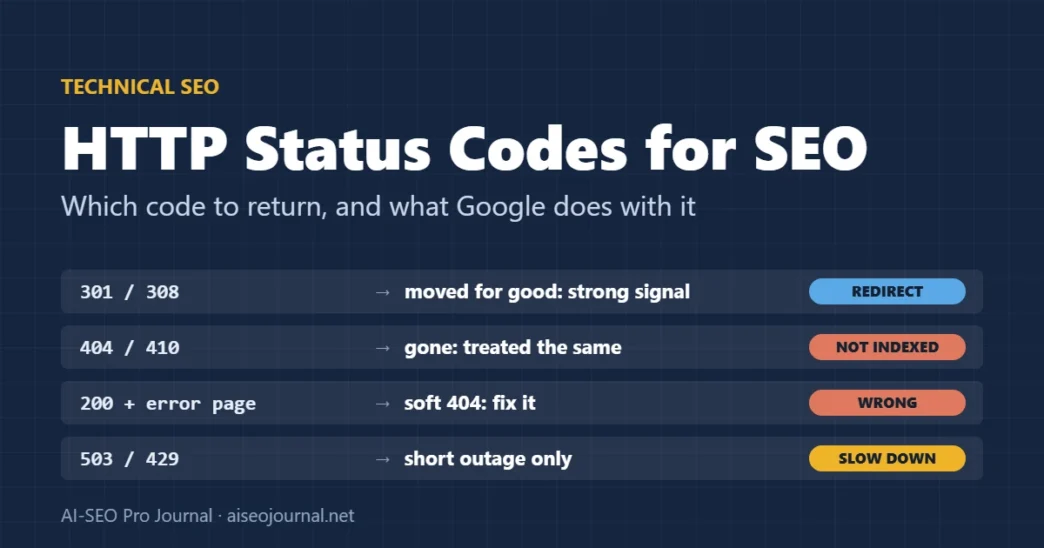
Google treats every 4xx status code except 429 the same way: the content is not indexed, and the URL is crawled less and less often [1]. A 410 “Gone” is not faster or stronger than a 404 in Google’s documentation. The codes that do behave differently are 200 on an error page (a soft 404), the 5xx family and 429, which slow down crawling of the whole site, and the redirect codes, which tell Google which URL should be canonical.
This guide is a decision reference: which status code to return for removed, moved, temporarily unavailable and overloaded pages, what Google does with each, and how to find the URLs on your site that answer wrongly. It is part of our technical SEO fundamentals guide.
Key takeaways
- Use 404 or 410 for content that is gone; Google treats them the same.
- Use a 301 or 308 when a page has moved for good; 302 and 307 are weak canonical signals.
- A page that says “not found” but returns 200 is a soft 404. Return a real 404 instead.
- Use 503 or 429 only for short outages. Google keeps 5xx URLs for a while, then drops them if the errors persist.
- 401 and 403 do not slow Google’s crawling; they only block it.
- Check the Page indexing report and a crawl, because a site can return the wrong code without anyone noticing.
Table of Contents
ToggleHow does Google treat each HTTP status code?
By class: 2xx means the content can be considered for indexing, 3xx means “follow and consider the target”, 4xx means “not indexed”, and 5xx or 429 means “slow down and try again later” [1].
| Status code | What Google does | Use it when |
|---|---|---|
| 200 OK | Considers the content for indexing; no guarantee it is indexed [1] | The page exists and has real content |
| 301 / 308 | Follows it; a strong signal that the target should be canonical [1] | The page has moved permanently |
| 302 / 303 / 307 | Follows it; a weak canonical signal, so the old URL may stay in results [1] [4] | The move is temporary |
| 404 / 410 | Treated the same: not indexed, crawled less often over time [1] | The content is gone and there is no close replacement |
| 401 / 403 | Not indexed; must not be used to limit crawl rate [1] | The page needs a login or is forbidden |
| 429 | Treated as a server error: crawling slows down [1] | Too many requests, for a short time |
| 500 / 502 / 503 | Crawling slows; indexed URLs kept for a while, then dropped if errors persist [1] | Something is broken or under maintenance |
Google follows up to ten redirect hops by default [1], but every hop adds a request and a chance of failure. Point old URLs straight at the final page.
Which status code should a deleted page return?
A 404 or a 410, if nothing on the site replaces it. Google treats them identically [1], so pick whichever your platform returns more easily. Search Console’s help says a 404 is fine when a page was removed without a replacement, and that moved pages should get a 301 instead [3].
If a closely related page exists, redirect to it with a 301. Do not redirect everything to the home page: visitors land somewhere they did not ask for, and the redirect tells search engines nothing about where the content went.
From our own site: During our November 2026 content clean-up, we set more than 100 overlapping posts to draft and pointed each old URL at the guide that replaced it with a single 301 (no chains). On 8 November 2026, Search Console’s Page indexing report for aiseojournal.net listed 14 URLs as “Not found (404)”, 5 as “Page with redirect”, and none as redirect errors, soft 404s or server errors. One problem only showed up in testing: two drafted URLs kept returning a cached 404 from our page cache for a while after their redirects were saved. They only switched to the correct 301 after we purged the cache.
What is a soft 404, and how do you fix it?
A soft 404 is a page that tells the visitor something is missing, or shows almost nothing, but returns status 200. Search Console reports it when a 2xx page looks like an error or empty page [1]. Google’s advice is to return a real 404 for pages that do not exist, and to add real content to pages that do [3].
Common causes:
- Custom “not found” templates that return 200. Check the status code of a made-up URL on your site.
- Empty search, tag or category pages. Return 404, or keep them out of the index with
noindex. - Single-page apps that show “not found” with JavaScript. Google suggests redirecting to a URL that returns a real 404, or adding
noindexwith JavaScript on error views [5]. - Out-of-range archive pages. Page 999 of a blog that has 20 pages should not return a full page.
Professional tip: Test this on your own site now. Request
/this-page-does-not-exist/,/page/999/and an empty site search, and look at the status code, not the page. On aiseojournal.net the first returns 404 and the empty search returns 200 withnoindex, both correct./page/999/returns 200 with the home page’s posts and a canonical tag pointing at the home page: the canonical limits the damage, but a 404 would be cleaner.
Which status code should you use during maintenance or overload?
503 Service Unavailable, ideally with a Retry-After header, for planned maintenance. Use 429 or 503 when the server is overloaded. Google’s crawl-rate guidance says that returning 500, 503 or 429 tells its crawlers to slow down. It also says not to do this for longer than one or two days: if the same URL keeps returning these codes on multiple days, it may be dropped from the index [2]. Retry-After can give the wait either in seconds or as a date [2] [6].
Two mistakes to avoid. Never serve a maintenance page with status 200, because a 200 tells Google the content can be considered for indexing [1], and the maintenance message could replace your real content. And never use 401 or 403 to slow crawling: Google says these do not limit crawl rate [1].
Which status code to return
- Page exists200 with real content
- Moved for good301 or 308 to the closest page
- Moved for now302 or 307
- Gone, no replacement404 or 410 (treated the same)
- Down or overloaded503 or 429, one or two days at most
How do you find pages returning the wrong status code?
- Page indexing report. In Search Console, read the “Why pages aren’t indexed” reasons: Not found (404), Soft 404, Server error (5xx), Redirect error, Blocked (401/403) and Page with redirect [3]. Open each reason to see example URLs.
- URL Inspection. Run a live test on a few example URLs to see the status Google receives now.
- Crawl the site. List every internal link that returns 3xx, 4xx or 5xx. Fix links to point at the final URL instead of relying on redirects.
- Test edge cases by hand: a made-up URL, an empty category, an out-of-range page number and an empty search.
- Check after every migration or cache change. Caches can keep serving an old status code, as ours did.
Our guide to fixing crawl errors in Search Console walks through each report in more detail, and our 301 redirect guide covers setting up redirects without chains.
Below is a crawl export from my website: one row per URL with the HTTP status code, the redirect target (if any), and the page title.
1. List every URL that returns 3xx and say whether it redirects straight to a 200 page or through a chain.
2. List every 4xx and 5xx URL, and every internal link pointing at one, so I can fix the links.
3. Flag likely soft 404s: 200 pages whose title or word count suggests an error, empty category or empty search page.
4. For each problem, suggest the correct status code (301, 404/410, 503) using only the data given.
Do not guess traffic or rankings, and do not invent URLs.

[paste crawl export]
Frequently asked questions
Is a 410 better than a 404 for SEO?
Not in Google Search. Google’s documentation says all 4xx errors except 429 are treated the same: the content is not indexed and the URL is crawled less often over time. Use whichever your platform returns more easily.
Do 404 errors hurt my rankings?
A 404 on a page that no longer exists is normal and expected. It becomes a problem only when important pages return 404 by mistake, or when your own internal links point at 404 pages.
What is the difference between a 301 and a 302 for SEO?
A 301 (or 308) is a strong signal that the target should be the canonical URL. A 302 (or 307) is a weak signal, so the old URL may stay in search results. Use 301 when a move is permanent.
How long can a site return 503 before it loses rankings?
Google says to use 500, 503 or 429 for no more than one or two days. If the same URLs keep returning these codes on multiple days, they may be dropped from the index.
What causes a soft 404?
A page that shows an error or very little content but returns status 200. Common causes are custom not-found pages that return 200, empty category or search pages, and single-page apps that show errors with JavaScript.
Check your status codes before your next release
Test the four edge-case URLs on your site, read the Page indexing report reasons, and fix anything that returns 200 when it should return 404, or 404 when it should redirect. Then make the same checks part of every migration and cache change. For the wider technical checklist, return to the technical SEO fundamentals guide.
Sources
- Google — How HTTP status codes affect Google’s crawlers
- Google Search Central — Reduce the Google crawl rate
- Search Console Help — Page indexing report
- Google Search Central — Redirects and Google Search
- Google Search Central — Understand the JavaScript SEO basics
- IETF — RFC 9110: HTTP Semantics, June 2022 (Retry-After)