




A crawler can report every URL it discovers and still miss the pages you most need to investigate. The reason is structural: a crawler normally reaches pages by following links, while a genuine orphan page has no crawlable internal path leading to it.
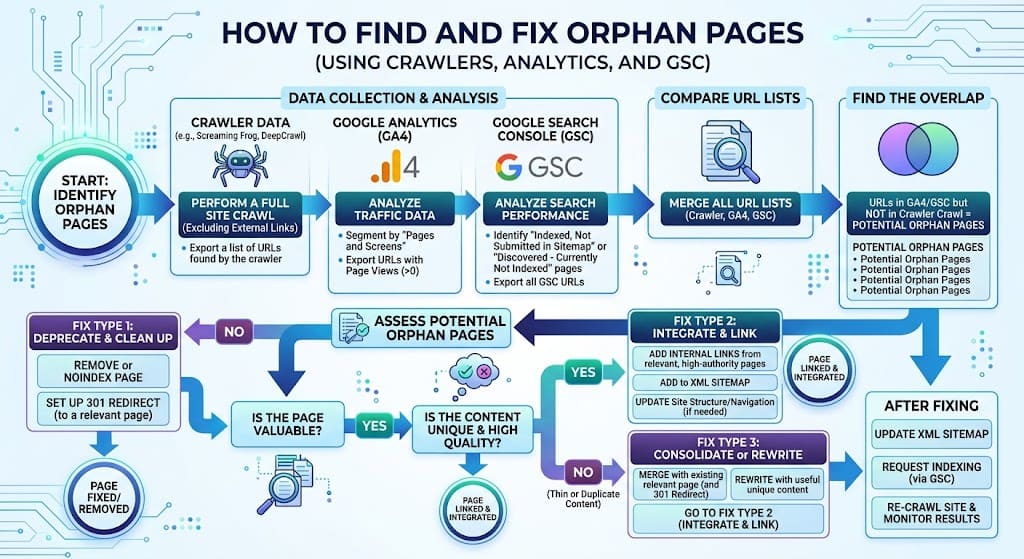
An orphan page is therefore best treated as a URL-inventory problem, not a crawler-filter problem. The practical method is to compare several URL sets—crawl data, XML sitemaps, CMS exports, analytics landing pages and Google Search Console records—then investigate the URLs that appear outside the internal link graph.
This article focuses on that reconciliation process: how to find orphan pages, remove false positives, classify confirmed cases and assign one action to each URL. It extends the broader architecture covered in Internal Linking Strategy: The Hidden Power of On-Page SEO without turning into a full site-audit or content-pruning guide.
Table of Contents
TogglePost Summary
An orphan page exists outside the crawlable internal link graph, even if Google or users can still reach it from other sources.
A normal crawl cannot discover a genuine orphan unless another data source supplies the URL.
XML sitemaps, CMS exports, analytics and Search Console each reveal URLs the crawler can miss.
URL normalisation is necessary before comparing datasets because redirects, parameters and canonical variants can create false positives.
Each confirmed orphan should receive one primary disposition: link, merge, redirect, exclude or remove.
A validation recrawl should confirm whether the repair created the intended crawlable route.
How Do You Find Orphan Pages Reliably?
You find orphan pages by comparing URLs that exist with URLs that your site’s internal links expose.
A crawler gives you the second set. Other systems help construct the first.
The basic model is:
Known website URLs
        MINUS
URLs reached through internal links
        =
Orphan-page candidates
The result is only a candidate list. A URL can appear outside the crawl graph because of a redirect, a canonical variant, a campaign page, an expired URL or a crawl-configuration error.
What qualifies as an orphan page?
For an SEO audit, a practical orphan-page definition is:
A live page that serves a current purpose but has no crawlable internal link path from the site’s normal linked structure.
This definition separates useful orphan pages from historical URLs and technical artefacts.
A page can still exist in an XML sitemap or receive search traffic without being internally linked. Google documents sitemaps as a mechanism for supplying information about URLs, while crawlable links are a separate discovery mechanism (Source: Google Search Central, n.d.).
That distinction explains why sitemap presence does not prove internal connectivity.
Can an indexed page still be orphaned?
Yes.
Index status and internal-link status measure different things. A search engine may have learned about a URL from an XML sitemap, an external link or an earlier version of the site.
A page can therefore remain known to Google after its internal links have disappeared.
The audit question is not:
Does Google know this URL?
It is:
Can the current website reach this URL through crawlable internal links?
Which Datasets Reveal URLs a Crawler Can Miss?
No single dataset gives a dependable orphan inventory. Each source sees the website from a different angle.
| Dataset | What it contributes | Main limitation |
|---|---|---|
| Internal crawl | URLs reached through crawlable links | Cannot independently discover genuine orphans |
| XML sitemap | URLs submitted for discovery | Can contain redirects, duplicates or outdated URLs |
| CMS export | Published content known to the publishing system | Can include pages not intended for search |
| Analytics | URLs that received tracked visits | Misses pages with no recorded visits |
| Search Console | URLs Google has processed or reported in available datasets | Should not be treated as a complete site inventory |
| Backlink data | Destination URLs found through external links | Third-party coverage differs by provider |
The useful signal comes from disagreement between these sets.
Crawler data defines the connected graph
Start with a properly configured crawl.
The crawler should follow the same internal routes that you expect a search engine to discover. Google recommends standard crawlable <a> elements with resolvable href values for links that search systems need to follow (Source: Google Search Central, n.d.).
A crawl can become misleading if:
- JavaScript-dependent links are not rendered;
- robots rules block required resources;
- the crawl starts from the wrong section;
- parameters create duplicate paths;
- authentication hides content;
- canonical and redirect behaviour is misunderstood.
A URL reported with zero discovered inlinks is useful evidence, but the audit still needs another source proving that the page exists.
XML sitemaps expose URLs outside the link graph
An XML sitemap can reveal pages that the crawl did not reach.
Consider this hypothetical comparison:
CRAWL
/category/
/internal-linking/
/click-depth/

SITEMAP
/category/
/internal-linking/
/click-depth/
/orphan-page-audit/
/orphan-page-audit/ becomes a candidate because the sitemap knows about it while the internal crawl does not.
Google describes sitemaps as a way to provide information about pages and other files that search engines should know about (Source: Google Search Central, n.d.).
A sitemap entry does not mean the page deserves an internal link. It means the URL warrants investigation.
CMS exports expose publishing-system inventory
A CMS can contain published pages that disappeared from menus, hubs or contextual links during editing or redesign.
For WordPress, a useful export can include:
- published posts;
- published pages;
- relevant custom post types;
- canonical URL;
- publication status;
- parent or category assignment.
The CMS dataset answers a different question from the crawler:
What content does the publishing system believe exists?
Comparing that inventory with crawl data can expose pages that were never added to the intended architecture.
Analytics exposes pages that users still reach
Analytics landing-page reports can reveal pages receiving visits despite being absent from the internal crawl.
A URL might receive traffic from:
- organic search;
- bookmarks;
- referral links;
- email;
- advertising;
- direct visits.
Such traffic does not prove the page should stay. It does prove that removing or redirecting it without review could affect users.
Search Console exposes URLs Google has encountered
Search Console can contribute landing pages and indexing-related URL records that are absent from a crawler export.
Treat those records as evidence that Google knows about a URL, not as proof that Search Console contains every URL on the site.
A useful comparison is:
Crawler URLs
     +
Sitemap URLs
     +
CMS URLs
     +
Analytics URLs
     +
Search Console URLs
            ↓
      Normalised inventory
            ↓
   Compare with crawl graph
            ↓
     Orphan candidates
How Should URL Sets Be Reconciled?
Reconciliation fails if the datasets use different representations of the same destination.
Before comparing them, normalise the URLs.
Resolve protocol and hostname differences
These can represent different raw strings:
http://example.com/page/
https://example.com/page/
https://www.example.com/page/
If the site redirects all variants to one preferred URL, the audit should compare the preferred destination rather than count each raw form as a separate page.
Google recommends permanent redirects and canonical signals when consolidating duplicate URLs (Source: Google Search Central, n.d.).
Account for trailing slashes and case
Depending on server configuration, these may behave differently:
/example
/example/
/Example/
Do not assume they are equivalent. Check the actual response and preferred canonical.
Separate parameters from canonical destinations
A parameter URL such as:
/product/?colour=bluemay represent a filter, tracking variation or duplicate view of:
/product/If the parameter URL canonicalises elsewhere, linking to it merely to remove an orphan flag would create a new internal-routing problem.
Resolve redirects before classifying pages
A historical URL can appear in analytics or Search Console long after it has been redirected.
Hypothetical example:
/seo-checklist-2025/
        ↓ 301
/seo-audit-checklist/
The old URL is not a page that needs a new internal link. Internal references should point to the preferred destination where appropriate.
Group canonical duplicates
Google documents canonicalisation as the process of selecting a representative URL among duplicate or closely similar URLs (Source: Google Search Central, n.d.).
When several candidate URLs canonicalise to one destination, evaluate the canonical destination first.
Without this step, the audit can produce an inflated orphan count.
Which Orphan Candidates Are False Positives?
The highest-value part of an orphan audit is often removing URLs that should never enter the repair queue.
Redirected historical URLs
These belong in redirect validation, not orphan-page repair.
Check:
- status code;
- destination;
- redirect chain;
- whether current internal links still point to the old URL.
Canonicalised variants
If a URL points to another canonical page, confirm whether the variant has any legitimate independent purpose before treating it as an orphan.
Campaign landing pages
Advertising or email landing pages may be intentionally absent from normal navigation.
Their treatment depends on the campaign and indexing policy. Do not add sitewide links solely to satisfy an SEO crawler.
Utility pages
Account pages, confirmation pages and functional endpoints can exist outside the editorial architecture.
Their purpose determines whether they need search visibility.
Deleted or expired content still present in historical datasets
Analytics and Search Console can retain references to URLs that no longer represent live content.
Check the current HTTP response before adding anything to the orphan list.
Crawl-configuration failures
A page can appear disconnected because the crawler failed to execute the route that exposes it.
This is especially relevant when navigation or content links depend on JavaScript rendering.
Verify important candidates in the rendered site before assigning a disposition.
How Should a Confirmed Orphan Page Be Fixed?
A confirmed orphan does not automatically need another link.
Classify the page first, then assign one primary action.
| Page condition | Primary action | Reason |
|---|---|---|
| Valuable, distinct and current | Link | Restore it to the internal graph |
| Useful but substantially duplicated | Merge | Consolidate overlapping content |
| Replaced by a better current URL | Redirect | Send users and crawlers to the successor |
| Required for users but not intended for search | Exclude | Keep the function without treating it as search content |
| Obsolete with no useful successor | Remove | Eliminate an unnecessary URL |
Link valuable pages back into the architecture
Choose source pages according to page role and reader need.
A useful cluster article can receive a link from:
- its parent pillar;
- a relevant content hub;
- a related sibling article;
- another page where it answers the reader’s next question.
One crawlable link can technically connect a previously isolated node, but page importance should determine whether more routes are appropriate.
Do not invent a fixed internal-link quota.
Merge overlapping orphan content
An orphan may exist because two pages compete for the same job.
Hypothetical example:
/how-to-find-orphan-pages/
/orphan-page-seo-guide/
If both answer essentially the same intent, combining useful material into one canonical page can make the architecture easier to maintain.
The decision should be based on content purpose, traffic, backlinks, search intent and business value rather than orphan status alone.
Redirect pages with a clear successor
Use a redirect when the old page no longer needs to exist and another URL fulfils the same user need.
Google recommends permanent server-side redirects such as 301 or 308 when a page has permanently moved (Source: Google Search Central, n.d.).
Update internal links to the final destination rather than relying on the redirect as a permanent internal route.
Exclude pages that should remain outside search
Some pages need to stay accessible but do not belong in organic search.
The correct control depends on the objective. Indexing directives, robots controls, authentication and canonicalisation solve different problems.
Do not treat them as substitutes for one another.
Remove pages with no continuing purpose
Removal fits pages that are obsolete, unnecessary and unsupported by meaningful traffic, backlinks or business requirements.
If a relevant replacement exists, redirection deserves separate consideration.
The orphan audit should identify the page’s purpose before deletion.
How Do You Validate an Orphan-Page Repair?
A repair is incomplete until a recrawl confirms the intended route.
Recrawl from the normal start URL
Run the site crawl again using the same relevant configuration.
A repaired page should now be discoverable through a crawlable path if its disposition was Link.
Hypothetical route:
Homepage
   ↓
On-Page SEO Hub
   ↓
Internal Linking Pillar
   ↓
Orphan Pages Article
The crawler should record both the destination and the source URL that linked to it.
Check the destination response
Confirm that the repaired destination:
- returns the intended HTTP status;
- does not create an unnecessary redirect hop;
- uses the expected canonical;
- remains accessible to the crawler.
Compare the URL sets again
Repeat the reconciliation.
A useful result is not “zero unmatched URLs”. Some legitimate campaign, utility or excluded URLs can remain outside the main internal graph.
The aim is zero unexplained orphan candidates among pages that should participate in the site’s search-facing architecture.
Keep evidence of the disposition
A repair queue becomes easier to maintain when every confirmed orphan has a recorded decision:
URL
Status
Canonical
Traffic signal
Backlink signal
Page purpose
Disposition
Source page for new link
Validation status
This record prevents the same URL from being repeatedly flagged without context.
Editorial FAQs About Orphan Pages
Can an indexed page be an orphan page?
Yes. A page can be known to Google while having no current crawlable internal link. Sitemaps, external links and historical crawling can expose a URL independently of the present internal architecture.
Index status therefore does not prove that a page is internally connected.
Are URLs found only in an XML sitemap automatically orphan pages?
No. A sitemap-only URL is an orphan candidate, not a confirmed orphan.
Check its response status, canonical destination, content purpose and internal-link path before assigning a repair action.
Can Screaming Frog find orphan pages by itself?
A normal crawler cannot independently discover a page that has no route leading to it. Orphan analysis becomes useful when crawler data is compared with additional URL sources such as sitemaps, CMS exports, analytics or Search Console.
The crawler then identifies which externally supplied URLs are absent from the internal graph.
Should every orphan page receive an internal link?
No. A confirmed orphan can require linking, merging, redirection, exclusion or removal.
The correct action depends on whether the page is useful, unique, current and intended to participate in the site’s search-facing architecture.
Does adding an internal link guarantee indexing?
No. A crawlable internal link can improve discoverability and connect the page to the site’s architecture, but indexing remains a separate search-engine decision.
Google states that meeting technical requirements does not guarantee crawling, indexing or serving in search results (Source: Google Search Central, n.d.).
Turn the Orphan Report Into a Repair Queue
An orphan-page audit should end with decisions, not a spreadsheet full of zero-inlink URLs.
Build the inventory from several sources, normalise the URLs, compare them with the crawl graph and remove false positives. For every confirmed orphan, record one primary action: link, merge, redirect, exclude or remove.
Then recrawl the site and confirm that pages marked for reintegration can be reached through their intended internal routes.
For the broader framework governing those relationships, use the parent guide on internal linking strategy to place repaired pages within the correct pillar, cluster and contextual-link structure.
References
- Links Crawlable by Google — Google Search Central, n.d.
https://developers.google.com/search/docs/crawling-indexing/links-crawlable - Learn About Sitemaps — Google Search Central, n.d.
https://developers.google.com/search/docs/crawling-indexing/sitemaps/overview - Canonicalisation: Consolidate Duplicate URLs — Google Search Central, n.d.
https://developers.google.com/search/docs/crawling-indexing/consolidate-duplicate-urls - Redirects and Google Search — Google Search Central, n.d.
https://developers.google.com/search/docs/crawling-indexing/301-redirects - Technical Requirements for Google Search — Google Search Central, n.d.
https://developers.google.com/search/docs/essentials/technical