



An image can load perfectly for a visitor yet remain difficult for Google to discover. It may sit in a CSS background, depend on a script that exposes no stable URL, or appear on a page whose surrounding text says little about the subject.
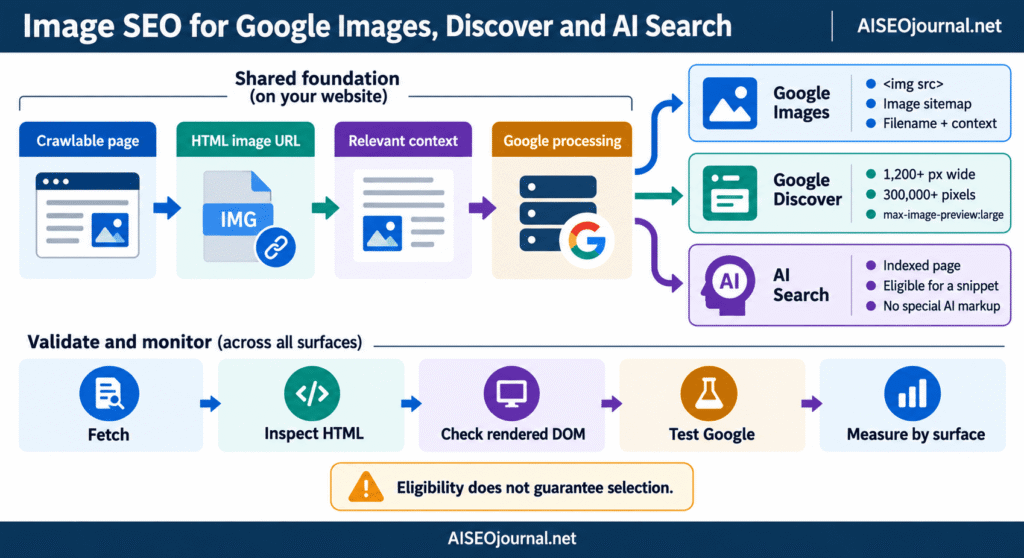
Image SEO starts before filenames and alt attributes. Google first needs access to the page and image resource. It then uses markup, page context and visual analysis to understand the file. Eligibility and presentation change by surface: Google Images, a Discover card and a generative AI feature do not select visuals through one shared formula.
This guide separates those stages and provides a practical validation process. It extends the image section of our Mastering On-Page SEO Elements visual guide without repeating our broader WordPress image-optimisation checklist.
Table of Contents
ToggleOne image can serve three search surfaces
Google Images is a visual search result set. Discover is a personalised feed based partly on a person’s interests and activity. Google’s generative AI features, including AI Overviews and AI Mode, draw on pages in the Search index and can present supporting images where they help answer a query.
The technical foundation overlaps, but each surface has a different entry condition and presentation model.
| Surface | First requirement | Image-specific focus | What publishers can control |
|---|---|---|---|
| Google Images | Google can crawl the page and image | Discoverable image URL, useful context and supported markup | HTML placement, access, filenames, nearby text, image sitemap and structured data |
| Google Discover | The page is indexed and meets Discover policies | Relevant, high-quality large image suitable for a feed preview | Image size, crop, max-image-preview, preferred-image signals and editorial quality |
| Google AI features | The page is indexed and eligible for a Search snippet | Helpful images that support the page’s information | Standard Search and image SEO practices; no separate AI image markup is required |
Eligibility does not guarantee selection. Google states this explicitly for Search and Discover. Optimisation removes avoidable barriers and improves the signals available to its systems; it cannot reserve a placement.
Google discovers images through crawlable HTML and URLs
Google’s image SEO documentation says it finds images in the src attribute of an img element, including an img nested inside picture. It does not index CSS background images.
This markup exposes a stable image resource:
<img
  src="/images/london-seo-audit-dashboard.jpg"
  width="1400"
  height="764"
  alt="SEO audit dashboard comparing indexed and excluded pages">
This version presents the same visual as decoration rather than an indexable HTML image:
<div class="hero" style="background-image:url('/images/seo-dashboard.jpg')">
  <h1>Technical SEO audit</h1>
</div>
CSS backgrounds remain suitable for textures, gradients and decorative photography. Use an HTML image when the visual carries information, identifies the article or should be eligible for image search.
Discovery also depends on access. The page must be crawlable, the image URL must return the expected file, and robots rules must not block Googlebot-Image. Login walls, hotlink protection, expiring URLs and CDN rules can stop retrieval even when a browser displays a cached copy.
Keep a stable image URL when the same file appears on several pages. Google’s guidance says consistent references allow caching and reuse. Generating a new query-string URL on every request can make one asset look like a stream of different resources.
Responsive markup needs an img fallback
Responsive delivery lets browsers choose a suitable file for the screen and pixel density. Google supports srcset and picture, but its documentation recommends retaining an img fallback with a src value.
<picture>
  <source
    type="image/avif"
    srcset="seo-audit-800.avif 800w, seo-audit-1400.avif 1400w">
  <source
    type="image/webp"
    srcset="seo-audit-800.webp 800w, seo-audit-1400.webp 1400w">
  <img
    src="seo-audit-1400.jpg"
    srcset="seo-audit-800.jpg 800w, seo-audit-1400.jpg 1400w"
    sizes="(max-width: 800px) 100vw, 1400px"
    width="1400"
    height="764"
    alt="Rendered HTML audit workflow for a WordPress page">
</picture>
The sources offer alternate encodings, while img src supplies a fallback URL and the text alternative. Width and height reserve space before download. Format choice and compression require their own performance checks; neither changes the discovery requirement for crawlable markup.
Lazy loading needs the same review. A placeholder in src with the real URL hidden in data-src relies on JavaScript to rewrite the DOM. Native loading="lazy" keeps the real resource in src and reduces that dependency. Inspect the rendered DOM and test the page rather than assuming a gallery or optimisation plugin exposes every image correctly.
Page context carries more meaning than a filename
Google says it uses page content, captions, titles, alt text and computer vision to understand an image. Placement beside a specific passage creates a clearer relationship than a detached gallery with no labels.
A filename supplies what Google calls a light clue. elementor-rendered-html-audit.jpg communicates more than IMG_7421.jpg, but renaming cannot repair an unrelated landing page or inaccessible file. Use short descriptive filenames before upload, then avoid changing established URLs without redirects.
Surrounding copy should identify what the reader is viewing and why it supports the section. A caption can add attribution, a date, a measured value or context that is visible to every reader. Alt text serves a different job: it provides a text alternative according to the image’s purpose. The next cluster post covers those decisions in detail, including decorative and functional images.
Repeated keywords across the filename, title attribute, caption, alt text and paragraph do not produce a stronger signal. They produce repetitive copy. Assign each field a real task and describe the subject in natural language.
Image sitemaps support discovery, not ranking promises
An image sitemap can disclose image URLs that Google might not find through ordinary crawling. This is useful for JavaScript galleries, image-heavy archives and files hosted on a separate CDN.
Google permits image URLs from another domain inside image:loc. Verify the CDN property in Search Console so crawl errors can be reported. Each sitemap entry connects a page URL with one or more images:
<url>
  <loc>https://example.com/rendered-seo-audit/</loc>
  <image:image>
    <image:loc>https://cdn.example.com/images/rendered-audit.jpg</image:loc>
  </image:image>
</url>
The sitemap is a discovery aid. It does not make an image indexable when the landing page is blocked, the image returns an error or the file violates policy. It also does not replace visible placement on a relevant page.
WordPress image sitemap support depends on the active SEO plugin and sitemap configuration. Check the generated XML directly. Confirm that canonical page URLs and final image URLs appear, return 200, and do not redirect through temporary optimisation paths.
Preferred-image signals influence preview selection
Google selects result previews automatically, drawing from several sources. Its image documentation lists two ways to specify a preferred representative image:
primaryImageOfPageonWebPage, or animageproperty attached to the page’s main entity in structured dataan Open Graph
og:imagemeta tag
The selected file should represent the page rather than the site logo. Google advises against generic or text-heavy preview images and extreme aspect ratios. Structured data must describe visible page content and follow the rules for its supported type.
<meta property="og:image"
      content="https://example.com/images/image-seo-guide-1400x788.jpg">
{
"@context": "https://schema.org",
"@type": "BlogPosting",
"headline": "Image SEO for Google Images, Discover and AI Search",
"image": "https://example.com/images/image-seo-guide-1400x788.jpg"
}These signals express preference. They do not force Google Images, Discover or a text result to use that file.
Discover needs a large usable preview
Google’s Discover guidance says indexed content that meets Discover policies is automatically eligible. No special tag or structured-data type is required.
For a stronger large-image candidate, Google recommends:
a width of at least 1,200 pixels;
more than 300,000 total pixels;
a 16:9 presentation that keeps the subject usable when cropped;
permission for a large preview through
max-image-preview:largeor AMP;a relevant, high-quality file rather than a logo or text-heavy generic graphic.
The preview directive can be placed in a robots meta tag:
<meta name="robots" content="max-image-preview:large">The robots meta tag specification defines max-image-preview values of none, standard and large. A restrictive site-wide SEO setting can prevent the large presentation even when the image has sufficient dimensions.
Discover also evaluates the page and headline. A large image cannot compensate for misleading preview text, thin reporting or content outside a person’s interests. Google describes Discover traffic as less predictable than keyword-led Search traffic, so plan it as an additional channel rather than a fixed publishing forecast.
Google AI features use established Search foundations
Google’s guidance for generative AI features says existing SEO practices remain relevant to AI Overviews and AI Mode. A page must be indexed and eligible for a Search snippet. Google recommends supporting useful text with relevant images and videos, then points publishers back to its standard image and video SEO documentation.
There is no separate AIOverviewImage schema type, AI image sitemap or special file-naming formula. Creating hidden summaries, repeating fan-out queries or adding invented AI markup does not establish eligibility. Crawlable pages, stable resources, understandable content, valid structured data and policy compliance remain the working requirements.
Visuals should add information that the text benefits from: a labelled process, comparison screenshot, original chart, product view or documented result. A generic stock image may decorate a page but supplies little evidence for a technical claim.
A surface-aware publishing check
Run these checks on the published URL, not only inside the WordPress Media Library or Elementor editor.
Confirm that the page is crawlable and indexable.
Open the final image URL and verify a successful response with the expected MIME type.
Inspect the HTML response for an
img srcor animgfallback insidepicture.Check that robots.txt, CDN rules and security plugins allow Googlebot-Image to fetch the resource.
Inspect the rendered DOM for lazy-loading replacements, missing URLs or duplicate images.
Place the image beside text that identifies its subject and purpose.
Use a short descriptive filename for new uploads; preserve established URLs or redirect them when migration is required.
Confirm that structured data and
og:imagereference a representative final URL.Check the image sitemap when the site depends on galleries, scripts or a separate CDN.
For Discover candidates, verify the dimensions, crop and
max-image-preview:largedirective.Test supported structured data with Google’s Rich Results Test.
Use URL Inspection to compare the indexed state with a live test after publishing changes.
Search Console’s performance reports can separate the Google Images search type from ordinary Web results where data is available. Discover has its own performance report once the property reaches Google’s reporting threshold. Measure each surface independently; a fall in one report does not prove the image disappeared from every Search feature.
Questions about Google image SEO
How does Google discover images on a webpage?
Google finds image URLs primarily through the src attribute of img, including an img fallback within picture. It can also discover additional files through image sitemaps. The page and image must remain accessible to the relevant crawler.
Does Google index CSS background images?
Google’s image SEO documentation says it does not index CSS images. Use an HTML img element when a visual carries page content or should be eligible for Google Images. Retain CSS backgrounds for decorative design.
Do image sitemaps improve image rankings?
An image sitemap helps Google discover files it might otherwise miss. It does not guarantee indexing or a ranking position. The landing page, image response, relevance and policy eligibility still apply.
What image size supports Google Discover?
Google recommends images at least 1,200 pixels wide, above 300,000 total pixels and suitable for a 16:9 crop. The page should permit large previews through max-image-preview:large or use AMP. Eligibility does not guarantee that Discover will show the page.
Is separate schema required for images in AI Overviews?
No. Google’s generative AI guidance directs publishers to standard Search, image SEO and structured-data practices. Pages must be indexed and eligible for a Search snippet; no dedicated AI Overview image schema is documented.
Make the image discoverable before refining its labels
The publishing sequence starts with access and HTML. Expose a stable URL through img src, retain a fallback inside responsive picture markup, allow crawling and place the file on a relevant indexable page. Add an image sitemap where ordinary crawling may miss resources.
Context and preview signals come after discovery. Use nearby text, an accurate filename, an appropriate text alternative, representative structured data and og:image. Discover candidates also need a large usable preview and permission for Google to display it. Google’s AI features require the same Search foundation rather than a separate markup layer.
For the wider relationship between metadata, HTML, headings and image elements, return to Mastering On-Page SEO Elements: Meta Tags, HTML, and Image Optimization Explained.