

Click depth measures how many link transitions separate a page from the crawl’s starting URL. A page at depth 1 is reached directly from the start page; a page at depth 4 requires four link hops along the shortest discovered route.
For SEO work, the useful question isn’t whether every important page sits within an arbitrary number of clicks. It’s whether high-priority pages are deeper than comparable pages serving similar user tasks.
This article shows how to measure click depth SEO correctly, distinguish click depth from URL structure, account for the crawl’s starting point and diagnose unexpectedly deep pages without treating the familiar “three-click rule” as a search-engine requirement. It forms part of the wider Internal Linking Strategy: The Hidden Power of On-Page SEO framework.
Table of Contents
TogglePost Summary
Click depth is the number of link hops on the shortest discovered crawlable path from a chosen start URL to a destination.
URL directory depth and click depth are different measurements.
The selected start URL changes the measured depth, so crawl configuration affects interpretation.
A universal three-click maximum is not a documented Google ranking rule.
Compare depth among pages with similar roles rather than applying one sitewide benchmark.
Fix deep priority pages by creating useful crawlable routes, not by adding unrelated links.
What Is Click Depth in SEO?
Click depth is the minimum number of internal-link transitions required to reach a page from a defined starting URL.
A simplified website might look like this:
Homepage                       Depth 0
   │
   ├── Services                Depth 1
   │      │
   │      └── Technical SEO    Depth 2
   │              │
   │              └── Audit    Depth 3
   │
   └── Blog                    Depth 1
If the crawler starts from the homepage, the audit page has a click depth of 3.
The measurement is based on the shortest crawlable route discovered, not every possible route.
Suppose the same audit page is also linked directly from the homepage:
Homepage
   ├── Services → Technical SEO → Audit
   └─────────────────────────────→ Audit
Its shortest discovered path is now:
Homepage → AuditSo its measured click depth becomes 1.
This is why link graphs matter more than directory appearance.
Click depth describes reachability, not URL appearance
Consider:
https://example.com/resources/seo/technical/audits/Its path contains several directory-like segments, but the homepage could link directly to it.
The page could therefore have:
URL directory depth: visually deep
click depth: 1
The reverse can also happen:
https://example.com/report/A short URL could require several internal-link transitions to reach.
URL structure and link structure answer different questions.
How Do Shortest Crawl Paths Affect the Measurement?
A crawler models internal links as a directed graph.
Each page acts as a node. Each crawlable internal hyperlink forms an edge connecting one node to another.
The crawler can then identify the shortest path from the starting node to a destination.
Hypothetical example:
HOME
 │
 ├── A ── B ── PRODUCT
 │
 └── C ───────── PRODUCT
Two routes exist:
Home → A → B → Product
Depth = 3

Home → C → Product
Depth = 2
The shortest known depth is 2.
That value doesn’t tell you whether every path is efficient. It tells you the minimum discovered distance.
Click Depth and Crawl Paths
Measure how easily priority pages can be reached, compare page groups, and diagnose deep routes without relying on a universal three-click rule.
Interactive Crawl Path Explorer
Choose a page type and compare its shortest crawl path from the homepage. The example is diagnostic, not a ranking forecast.
Click Depth vs URL Depth
Long URL, shallow click path
/resources/seo/technical/audits/
Possible click depth: 1
Short URL, deep click path
/report/
Possible click depth: 5
Peer Group Benchmark
Compare like with like. A deep priority page is more concerning when similar pages are consistently shallower.
Depth Diagnosis Matrix
| Page | Role | Depth | Comparable range | Assessment |
|---|---|---|---|---|
| Service A | Primary service | 1 | 1–2 | Expected |
| Service B | Primary service | 2 | 1–2 | Expected |
| Service C | Primary service | 5 | 1–2 | Investigate |
| Old article | Archive | 5 | 4–6 | Context needed |
Start URL Effect
The same destination can receive a different depth score depending on the crawl seed.
Breadcrumb Reality Check
Breadcrumbs usually link a page back to ancestors. They do not automatically create a shorter forward path from the homepage to that page.
What to Fix First
- Important pages missing from their hub
- Priority pages reachable only through pagination
- Routes that pass through avoidable redirects
- Peer outliers with much deeper paths
- Pages dependent on weak or outdated entry points
Recommended Workflow
Record the seed used for every comparison.
Compare services with services, products with products, and archives with archives.
Look for pagination dependence, missing hubs, redirect hops, or weak contextual routes.
Link from the correct parent, hub, category, or contextual source.
Confirm the intended path is now discoverable.
Treat the result as an architecture measurement, not a ranking prediction.
Why shortest path alone can hide weak architecture
A high-priority page can have one shallow route and several poor routes.
For example:
Homepage → Sitemap-like hub → Productmay give the product a shallow calculated depth, while ordinary visitors reach it through:
Homepage
   ↓
Shop
   ↓
Category
   ↓
Subcategory
   ↓
Pagination
   ↓
Product
Both paths contain useful diagnostic information.
The minimum depth is still valid, but reviewing representative user and crawl routes gives more context than relying on one number.
Internal links must be crawlable
Depth measurements depend on links the crawler can discover.
Google documents that standard <a> elements with resolvable href attributes are a reliable format for crawlable links (Source: Google Search Central, n.d.).
A visually clickable element that the crawler cannot interpret as a link may not create the route expected by the designer.
Why Does the Start URL Change Click Depth?
Click depth has no meaning without a starting point.
A crawl beginning at the homepage produces one set of distances. A crawl beginning inside a category produces another.
Consider this hypothetical structure:
Homepage
   ↓
Resources
   ↓
SEO Hub
   ↓
Internal Linking
   ↓
Click Depth Article
Starting from the homepage:
Click Depth Article = depth 4Starting from /resources/:
Click Depth Article = depth 3Starting from /seo-hub/:
Click Depth Article = depth 2The page did not change. The measurement context did.
Use a crawl start that matches the diagnostic question
For a sitewide architecture audit, the homepage is usually a logical seed because it represents the site’s principal entry point.
For a section-specific audit, a category or hub page can provide useful supplementary measurements.
Record the start URL whenever comparing crawl-depth exports. Otherwise, two reports can show different values without indicating any architecture change.
Multiple seed URLs can distort comparisons
Some crawler configurations introduce several starting URLs through:
URL lists;
XML sitemap ingestion;
saved crawl sources;
analytics integration;
Search Console integration.
Those sources can be useful for discovery, but they should not silently redefine the graph used for depth analysis.
If a crawler treats externally supplied URLs as crawl seeds, a genuine deep page could appear shallower than it is from normal site navigation.
Separate URL discovery from path measurement when the tool allows it.
Is the Three-Click Rule an Official SEO Requirement?
No universal three-click maximum is documented by Google as a ranking requirement.
The familiar recommendation that every page should be reachable within three clicks can serve as a usability heuristic on some websites, but it should not be converted into a sitewide SEO rule.
A large ecommerce site, documentation portal or publisher can contain legitimate structures where certain specialised pages require more transitions than top-level commercial or navigational pages.
The better question is:
Is this page deeper than its role and importance justify?
Compare like with like
Suppose an ecommerce crawl produces these hypothetical results:
| Page group | Typical role | Observed depth range |
|---|---|---|
| Main categories | Primary product discovery | 1–2 |
| Subcategories | Narrow product discovery | 2–3 |
| Priority products | Commercial destinations | 2–4 |
| Archived editorial content | Historical information | 4–7 |
A priority product at depth 7 deserves attention because it differs substantially from comparable products.
An archived article at depth 6 does not automatically require the same response.
The benchmark comes from page role and site architecture, not a universal threshold.
Avoid comparing unrelated page groups
A category page, checkout utility, evergreen guide and paginated archive do different jobs.
Putting them into one depth distribution can produce misleading priorities.
Segment the crawl by:
template;
content type;
commercial importance;
taxonomy;
intended user journey;
indexability.
Then compare similar pages.
How Should Deep Priority Pages Be Diagnosed?
A high click-depth value is a signal for investigation, not proof of a problem.
Start with the path itself.
Examine the shortest discovered route
A crawler may show:
Homepage
   ↓
Blog
   ↓
Archive
   ↓
Page 4
   ↓
Article
If the article is an important evergreen asset, this route suggests the content depends heavily on archive pagination.
Check whether a relevant hub, parent guide or contextual article should link directly to it.
Compare the page with its peers
Suppose ten core service pages sit at depths 1–2, while one equivalent service is at depth 5.
That outlier deserves more attention than a depth-5 article inside an intentionally deep archive.
A useful working table is:
| Page | Role | Depth | Comparable range | Diagnostic result |
|---|---|---|---|---|
| Service A | Primary service | 1 | 1–2 | Expected |
| Service B | Primary service | 2 | 1–2 | Expected |
| Service C | Primary service | 5 | 1–2 | Investigate |
| Old article | Archive | 5 | 4–6 | Expected |
This avoids turning depth into an isolated score.
Identify the route failure
Common structural causes include:
a page missing from its relevant hub;
orphan-like dependence on pagination;
outdated category relationships;
broken or redirected internal links;
important content linked only from old articles;
missing parent-child relationships;
crawlable navigation paths that require unnecessary intermediate pages.
Each cause needs a different repair.
Do Breadcrumbs Reduce Click Depth?
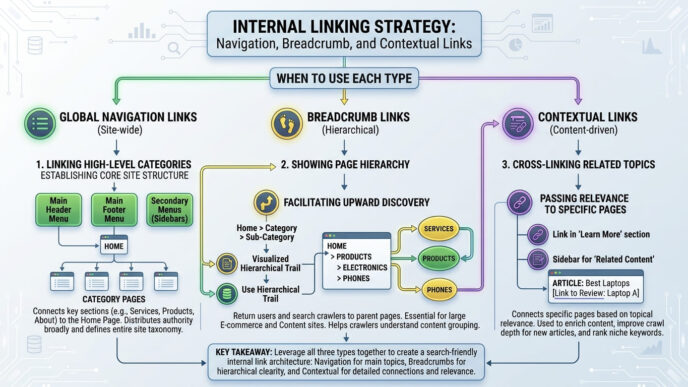
Breadcrumbs can create additional internal routes from a page to its ancestors, but they do not automatically reduce the depth required to reach the page from the crawl start.
Consider:
Home
 ↓
Category
 ↓
Subcategory
 ↓
Product
A breadcrumb on the product page might link:
Home > Category > Subcategory > ProductThose links help the product page connect back towards higher-level pages.
They do not create a direct forward path from Home to Product.
For the product to become shallower from the homepage, a new crawlable route must exist towards the product.
Breadcrumbs still contribute structural information
Breadcrumbs can communicate hierarchy to users and create internal links among related levels of the site.
Google also supports BreadcrumbList structured data for describing breadcrumb trails in search-related markup (Source: Google Search Central, n.d.).
But breadcrumb markup itself does not create an HTML crawl path. Structured data and crawlable internal links serve different purposes.
How Can Deep Pages Be Given Better Crawl Paths?
The repair should create a route that makes sense for users and the site hierarchy.
Link from the correct parent or hub
If a page belongs to a defined content group, its hub is a strong structural source.
Example:
On-Page SEO Hub
      ↓
Internal Linking Pillar
      ↓
Click Depth Article
The relationship gives the page a stable route based on topic ownership.
Add contextual links where the next question fits
Suppose an article discusses how internal links expose important pages.
A contextual sentence could direct readers to a detailed click-depth analysis because that is the next technical question.
The route is useful because the two tasks are connected.
Repair links that pass through redirects
A path such as:
Page A → Old URL → 301 → Page Bcan often be shortened operationally to:
Page A → Page BGoogle recommends updating internal links to point to the final destination when URLs change rather than depending unnecessarily on redirects (Source: Google Search Central, n.d.).
Review pagination-dependent discovery
Editorial archives and ecommerce listings can push pages deeper as inventory grows.
A page that remains strategically important should not depend solely on increasingly distant pagination.
Possible routes include:
evergreen hubs;
relevant category pages;
parent guides;
contextual links;
curated collections.
Choose the route according to page purpose rather than manufacturing links for the depth metric.
Validate the change with a recrawl
After editing the architecture, run the crawler again from the same starting URL.
Compare:
BEFORE
Homepage → Hub → Archive → Page 3 → Target
Depth 4

AFTER
Homepage → Hub → Target
Depth 2
This hypothetical comparison demonstrates a measured architectural change.
It does not demonstrate a ranking gain.
FAQs About Click Depth and Crawl Paths
What is click depth in SEO?
Click depth is the number of crawlable internal-link transitions on the shortest discovered path between a defined starting URL and a destination page.
A page linked directly from the crawl start has depth 1.
Is click depth the same as URL depth?
No. Click depth describes link distance, while URL depth usually refers to the apparent directory structure of the URL.
A long URL can have shallow click depth if a high-level page links directly to it.
Is the three-click rule an official Google rule?
No. Google does not document a universal requirement that every page must sit within three clicks of the homepage.
Use page role, importance and comparison with similar pages to interpret depth instead of enforcing one maximum across the site.
Does the crawler’s start URL affect click depth?
Yes. Click depth is measured relative to a starting node, so changing the start URL changes the calculated distances.
Record the crawl seed when comparing reports over time.
Do breadcrumbs make a page shallower?
Not automatically. Breadcrumb links usually connect the current page back to ancestor pages. They do not by themselves create a shorter route from an ancestor towards the current page.
A shorter forward crawl path requires an appropriate internal link from another reachable source.
Use Depth as a Relative Architecture Signal
Click depth becomes useful when it answers a specific architectural question.
Measure from a consistent start URL, inspect shortest paths, distinguish link depth from URL structure and compare pages that perform similar jobs. A high number by itself does not justify a change.
Prioritise pages whose depth conflicts with their role: a primary service buried behind several intermediate pages, a key product reachable only through pagination, or an important cluster article missing from its parent hub.
Then create the shortest useful route—not the shortest route at any cost.
For the wider framework behind those connections, use the Internal Linking Strategy: The Hidden Power of On-Page SEO pillar to align crawl paths with page relationships and user journeys.
References
Links Crawlable by Google — Google Search Central, n.d.
https://developers.google.com/search/docs/crawling-indexing/links-crawlableSEO Starter Guide — Google Search Central, n.d.
https://developers.google.com/search/docs/fundamentals/seo-starter-guideBreadcrumb Structured Data — Google Search Central, n.d.
https://developers.google.com/search/docs/appearance/structured-data/breadcrumbRedirects and Google Search — Google Search Central, n.d.
https://developers.google.com/search/docs/crawling-indexing/301-redirectsGoogle Search Essentials: Technical Requirements — Google Search Central, n.d.
https://developers.google.com/search/docs/essentials/technical