


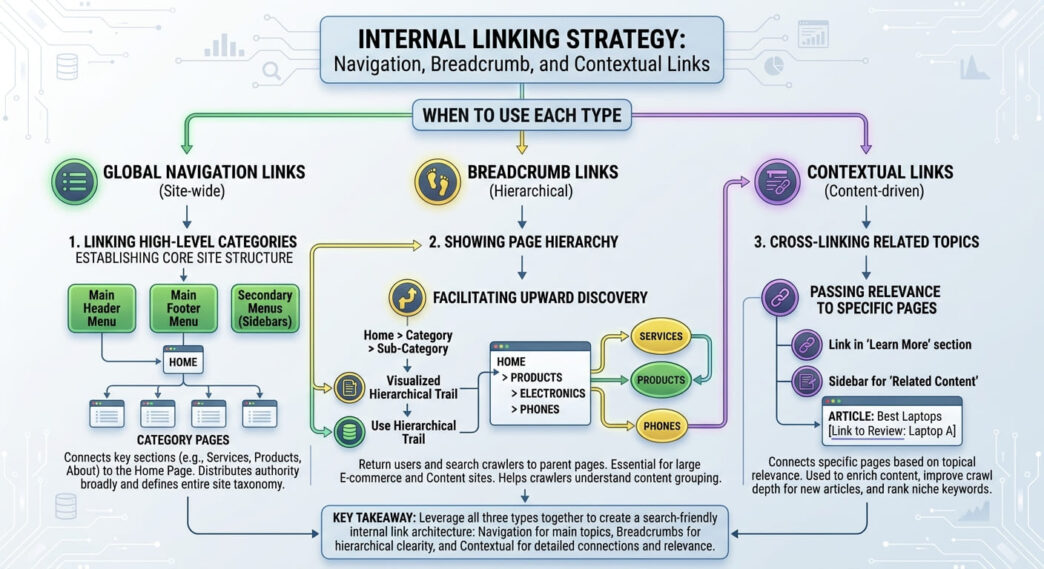
Internal links can appear in a main menu, breadcrumb trail, article paragraph, related-content card or footer, but those placements are not interchangeable. Each one helps users move through a website in a different way.
The practical challenge is choosing the right types of internal links for the job. Main navigation provides persistent access to major destinations. Breadcrumbs communicate hierarchy. Contextual links explain local relationships inside the content. Related-content modules offer optional continuation, while footer links provide persistent secondary access.
This article compares those placements by user purpose rather than assigning artificial SEO weights to them. It extends the wider framework in Internal Linking Strategy: The Hidden Power of On-Page SEO by showing where different internal-link types fit on an actual page.
Table of Contents
TogglePost Summary
Main navigation should prioritise destinations users repeatedly need across the site.
Breadcrumbs show where the current page sits within a hierarchy and provide routes back to ancestor levels.
Contextual links connect the current passage with a directly relevant destination.
Related-content cards support optional next steps but do not automatically replace useful links inside the body copy.
Footer links work well for persistent secondary destinations but should not become a dumping ground for every URL.
Mobile layouts need the same essential navigation relationships even when menus are collapsed or visually simplified.
What Are the Main Types of Internal Links?
Internal links are links between pages on the same website, but their placement affects the relationship users perceive.
A useful classification is:
| Internal-link type | Primary job | Typical location |
|---|---|---|
| Main navigation | Persistent access | Header/menu |
| Utility navigation | Access to supporting functions | Header/top bar |
| Breadcrumb | Hierarchical orientation | Above main content |
| Contextual link | Explain a local content relationship | Body copy |
| Related-content link | Optional continuation | End or side of content |
| Footer link | Persistent secondary access | Site footer |
These categories overlap in technical implementation. Most are ordinary HTML links. The difference is primarily editorial and navigational.
Google recommends creating a logical site structure and linking important pages from relevant pages using crawlable links (Source: Google Search Central, n.d.).
The placement question therefore becomes:
What does the user need this link to do at this point?
That test is more useful than treating every internal link as an identical unit.
When Should a Page Appear in Main Navigation?
Main navigation provides persistent access.
It normally contains destinations important to a large proportion of visitors rather than every page the site would like search engines to crawl.
For a service website, the navigation might look like:
Home
Services
Industries
Results
Insights
About
Contact
Each item represents a major destination or task.
A detailed article about one narrow technical issue usually does not need a permanent place in the main menu.
Use main navigation for recurring user needs
A page is a strong navigation candidate when several conditions apply:
many users are likely to need it;
it represents a major section or task;
it remains relevant across multiple parts of the site;
users would reasonably expect to find it from most pages;
the destination is stable enough to justify persistent exposure.
For example, a clothing manufacturer may place:
Services
Products
For Startups
Sustainability
About
Contact
in the primary navigation.
An individual guide about fabric shrinkage testing may belong within the relevant content section instead.
Main navigation should not become an index of the entire site
Adding every category, article, product group and campaign page to a global menu can make the interface harder to scan.
Persistent navigation carries a usability cost because it appears repeatedly.
A better question than “Would this page benefit from a menu link?” is:
Do users need persistent access to this destination from a large part of the site?
If the answer is no, another link type may fit better.
Utility navigation serves a different role
Utility links often cover tasks such as:
Login
Account
Help
Track Order
Language
Accessibility
They may appear near the main navigation, but they serve supporting functions rather than primary content discovery.
Separating primary and utility navigation can make the site’s information hierarchy easier to understand.
Are Breadcrumbs Enough for Internal Linking?
No. Breadcrumbs are useful internal links, but they solve a narrower problem: hierarchical orientation.
A breadcrumb might show:
Home > Core AI-SEO Guides > On-Page SEO Hub > Current ArticleThis tells the reader:
where the page sits;
which broader section contains it;
which ancestor levels can be revisited.
Google describes breadcrumbs as a way of indicating a page’s position in the site hierarchy (Source: Google Search Central, n.d.).
Breadcrumbs mainly connect upwards
Consider:
Home
  ↓
SEO Guides
  ↓
On-Page SEO
  ↓
Internal Linking Article
On the article, the breadcrumb can provide links back to:
Home
SEO Guides
On-Page SEO
Those are useful upward relationships.
But the breadcrumb does not automatically provide contextual routes to:
Anchor Text Guide
Orphan Pages Guide
Click Depth Guide
Internal Link Audit
Those destinations may require body links, related-content modules or another form of navigation.
Breadcrumbs do not replace contextual links
Suppose an article says:
Pages buried several levels below important entry points may deserve a click-depth review.
A contextual link on click-depth review gives the reader a direct route to the detailed explanation.
A breadcrumb cannot express that local relationship because its job is hierarchy, not sentence-level context.
Breadcrumbs should reflect real structure
A breadcrumb trail should represent the structure users can understand rather than introducing arbitrary levels purely for SEO.
Example:
Home
   >
Core AI-SEO Guides
   >
On-Page SEO Hub
   >
Article
If the pillar itself is not part of the site’s visible breadcrumb hierarchy, inserting it only into the breadcrumb for perceived SEO value can create a mismatch between navigation and site structure.
When Should You Use Contextual Internal Links?
Contextual links appear within the main content and connect the current discussion to another useful destination.
Their primary job is local explanation.
Example:
Pages with no crawlable internal route require a different diagnostic process; see the guide to finding and fixing orphan pages.
The reader can understand why that link is present before clicking it.
Context should create the need for the destination
A useful contextual link often follows this pattern:
Current statement
      ↓
Unanswered detail or next task
      ↓
Relevant internal destination
Hypothetical example:
Article about internal-link architecture
      ↓
Discussion of how far a page sits from the homepage
      ↓
Click-depth article
The destination continues the reader’s task.
Body links can express relationships that navigation cannot
Global navigation says:
This destination is important across the website.
Breadcrumbs say:
This page belongs under these ancestors.
A contextual link says:
This destination helps with the specific subject you are reading right now.
That distinction is important when planning internal-link placement.
Avoid inserting links merely because keywords match
Two pages can contain similar phrases without serving the same reader task.
Before placing a contextual link, check:
Does the destination answer a question created by this passage?
Is it the best page for that question?
Can the reader predict what happens after clicking?
Does the link improve the paragraph rather than interrupt it?
If those conditions are weak, the link may belong elsewhere—or may not be needed.
Can Related-Content Cards Replace Contextual Links?
Not in every situation.
Related-content cards are useful for optional continuation.
They commonly appear as:
Related reading

• Internal Anchor Text and Link Context
• How to Find and Fix Orphan Pages
• Click Depth and Crawl Paths
They give readers additional options without interrupting the article.
Related cards work well when several next steps are valid
At the end of a general internal-linking article, one reader may want anchor guidance while another needs an orphan-page audit.
A related-content module can present both options.
Inside a paragraph discussing orphan detection, however, a specific contextual link can be more precise.
Compare the two roles
| Situation | Contextual link | Related card |
|---|---|---|
| A paragraph creates one obvious next question | Strong fit | Possible but less direct |
| Several related articles are equally useful | Can become cluttered | Strong fit |
| Destination needs explanation | Strong fit | Limited context |
| Optional end-of-article exploration | Useful | Strong fit |
| Sitewide persistent access | Poor fit | Poor fit |
Related cards and contextual links can coexist because they solve different navigation problems.
Do not assume cards are automatically crawlable
A visual card still needs a usable link.
Google’s crawlable-link guidance recommends standard anchor elements with resolvable href attributes (Source: Google Search Central, n.d.).
A JavaScript interaction that looks clickable but does not expose a crawlable destination may not behave like a conventional internal link.
What Role Do Footer Links Play?
Footer links provide persistent secondary access.
Common examples include:
About
Contact
Privacy Policy
Terms
Accessibility
Careers
Support
Sitemap
Depending on the business, the footer can also contain important service or category links.
Footer and body links do not provide identical context
A footer link appears across many pages because it belongs to the site template.
A contextual body link is attached to a particular passage.
For example:
Footer:
Technical SEO

Body:
See how crawl paths expose unexpectedly deep priority pages.
Both may point to related destinations, but the surrounding information is different.
It is therefore unhelpful to treat footer links and contextual links as interchangeable merely because their href values are identical.
Template links still have a purpose
Global template links should not be dismissed as having “no SEO value”.
They provide genuine navigation and can expose destinations throughout the site.
The practical issue is whether the placement matches the destination’s role.
A footer containing 150 loosely organised links may be difficult for users to navigate. A compact footer containing persistent secondary destinations can be much more coherent.
Should Breadcrumbs and Navigation Appear on Mobile?
Essential relationships should remain available on mobile, although their visual presentation can change.
Desktop navigation might display:
Services | Industries | Results | Insights | About | ContactMobile navigation may collapse that into:
☰ MenuThe links can remain accessible after the menu opens.
Hidden presentation is not the same as removed navigation
Responsive design often changes how navigation appears.
The important distinction is between:
links that remain available through an accessible mobile control;
links that disappear entirely from the mobile experience.
If important destinations exist in desktop navigation but are removed on mobile, users on smaller screens receive a different navigation structure.
Breadcrumbs need mobile consideration too
A long breadcrumb can overwhelm a narrow screen:
Home > Core AI-SEO Guides > On-Page SEO Hub >
Internal Linking Strategy > Current Article
Responsive options include wrapping the trail, shortening visual labels where meaning remains clear, or applying a mobile presentation that preserves useful orientation.
Do not remove hierarchy solely because desktop-style breadcrumbs do not fit in one line.
Test keyboard and touch behaviour
Navigation should work beyond visual appearance.
W3C guidance emphasises meaningful link purpose and accessible interaction, particularly where users need to understand a link from its text or surrounding context (Source: W3C, n.d.).
For mobile menus, check:
touch targets;
menu expansion;
focus behaviour;
visible labels;
link destination clarity;
keyboard operation where applicable.
How Should Different Link Placements Be Combined on One Page?
A typical content page may use several internal-link types simultaneously.
An annotated layout can look like this:
┌────────────────────────────────────┐
│ MAIN NAVIGATION                    │
│ Home | Guides | Tools | News       │
│ Persistent access                  │
├────────────────────────────────────┤
│ BREADCRUMB                         │
│ Home > Guides > On-Page SEO        │
│ Hierarchical orientation           │
├────────────────────────────────────┤
│ ARTICLE                            │
│                                    │
│ Paragraph with a contextual link   │
│ to a directly relevant guide.      │
│                                    │
│ Another section...                 │
│                                    │
├────────────────────────────────────┤
│ RELATED CONTENT                    │
│ Article A | Article B | Article C  │
│ Optional continuation              │
├────────────────────────────────────┤
│ FOOTER                             │
│ About | Contact | Privacy | Help   │
│ Persistent secondary access        │
└────────────────────────────────────┘
No single placement has to perform every job.
Use a placement-purpose matrix
| Placement | Main purpose | Best for | Poor fit for |
|---|---|---|---|
| Main navigation | Persistent access | Major sections/tasks | Narrow article-level relationships |
| Utility navigation | Supporting tasks | Login, help, account | Primary editorial hierarchy |
| Breadcrumb | Hierarchy | Ancestor navigation | Related-topic discovery |
| Contextual link | Local relationship | Specific next question | Global access |
| Related content | Optional continuation | Several relevant next reads | Precise sentence-level explanation |
| Footer | Persistent secondary access | Legal, contact, support, selected hubs | Replacing meaningful body links |
This avoids searching for one universally “best” internal-link type.
How Do You Select the Right Internal-Link Type?
Use the reader’s immediate need as the first filter.
A compact decision process is:
Does the destination need persistent access across the site?
        │
        ├── Yes → Main or utility navigation
        │
        └── No
             ↓
Does the link explain where the current page sits?
        │
        ├── Yes → Breadcrumb
        │
        └── No
             ↓
Does the current passage create a specific need for it?
        │
        ├── Yes → Contextual link
        │
        └── No
             ↓
Is it one of several useful next destinations?
        │
        ├── Yes → Related-content module
        │
        └── No
             ↓
Is persistent secondary access justified?
                 ├── Yes → Footer
                 └── No → Link may not be necessary
The model is editorial rather than mathematical.
It does not claim that one placement receives a fixed search-engine weighting.
Editorial FAQs About Types of Internal Links
Are breadcrumbs enough for internal linking?
No. Breadcrumbs help communicate hierarchy and provide routes to ancestor pages, but they do not replace contextual links, main navigation or related-content links.
Each placement serves a different user need.
Do footer links and body links provide the same context?
No. Footer links are normally template-based and provide persistent secondary access. Body links are surrounded by page-specific text that can explain why a destination is relevant at that moment.
Both can be useful without performing identical jobs.
When should a page enter the main navigation?
A page is a good candidate when it represents a major destination or recurring task needed by a significant portion of visitors across the site.
Narrow supporting articles usually fit better within hubs, contextual links or related-content modules.
Should breadcrumbs appear on mobile?
Breadcrumbs can remain useful on mobile because hierarchy does not disappear on smaller screens.
Their presentation may need to wrap, shorten or adapt, but essential orientation should remain understandable and usable.
Can related-content cards replace contextual links?
Sometimes, but not universally. Related cards work well when several next destinations are useful.
When a paragraph creates one specific next question, a contextual link can communicate that relationship more precisely.
Give Every Link Placement One Clear Job
A well-connected page does not rely on one internal-link type.
Use main navigation for persistent access, breadcrumbs for hierarchy, contextual links for local explanation, related-content modules for optional continuation and footer links for persistent secondary destinations.
The test is not which placement carries the greatest theoretical SEO weight. It is whether the placement matches the relationship the reader needs at that point.
Review one important page on your site and label every internal link by purpose. If several placements are trying to do the same job—or an important relationship has no suitable link at all—the page has a clearer internal-linking problem to fix.
For the broader framework that connects these placement decisions across an entire site, see Internal Linking Strategy: The Hidden Power of On-Page SEO.
References
Links Crawlable by Google — Google Search Central, n.d.
https://developers.google.com/search/docs/crawling-indexing/links-crawlableSEO Starter Guide — Google Search Central, n.d.
https://developers.google.com/search/docs/fundamentals/seo-starter-guideBreadcrumb Structured Data — Google Search Central, n.d.
https://developers.google.com/search/docs/appearance/structured-data/breadcrumbUnderstanding Success Criterion 2.4.4: Link Purpose (In Context) — W3C Web Accessibility Initiative, n.d.
https://www.w3.org/WAI/WCAG22/Understanding/link-purpose-in-context.html