
Last Updated: 7 June 2026
A product goes out of stock. Someone on the team redirects the URL to the category page, thinking that’s the safe move. Six months later, the rankings for that product are gone — and so is most of the link equity that built them.
This cluster post covers the one decision that determines whether your out-of-stock pages recover or collapse: whether to keep, redirect, or remove the URL, and how to execute each path correctly for SEO. It’s part of the Ecommerce SEO Mastery pillar series.
Most guides treat out-of-stock handling as a UX problem. It isn’t. It’s an equity management decision — and the wrong call can quietly drain link authority from URLs that took months or years to build.
Table of Contents
TogglePost Summary
- Keeping an out-of-stock product page live with a notify-me CTA is almost always the stronger SEO choice over a 301 redirect to category
- 301 redirects to category pages absorb significantly less link equity than practitioners expect — field evidence consistently points to near-total loss
- Soft 404s — pages that return HTTP 200 but provide no usable content — are the worst outcome: Google may deindex the URL without warning
- The correct handling decision depends on one factor: whether the product will return to stock
- Discontinued products with inbound links need a 301 to the closest semantically relevant URL — not the category page by default
- Crawl budget is affected by how out-of-stock pages are managed at scale — 500+ SKU stores need a systematic approach, not ad hoc decisions
- Google Search Console Coverage report and Screaming Frog are the two tools for diagnosing the current state before any change is made
Why the 301-to-Category Redirect Loses More Than You Think
Most ecommerce teams reach for a 301 redirect the moment a product goes out of stock, treating it as a responsible SEO move.
It isn’t — at least not to the category page.
A 301 redirect is supposed to pass link equity (the ranking authority built through backlinks) from the old URL to the new one. In practice, redirects to category pages absorb very little of that equity, because the category page covers a broad topic and the redirect signal is semantically weak — Google has no strong reason to transfer the authority from a specific product URL to a general collection page.
The part most guides skip is that this isn’t theoretical. We worked with a UK fashion ecommerce brand using Screaming Frog and Google Search Console to audit 14 high-ranking product URLs that had been 301’d to their respective category pages. The expectation was that the category pages would absorb the equity and maintain ranking visibility. They didn’t. Category pages showed no measurable improvement in rankings, while the original product URLs disappeared from the index entirely. The link equity was effectively lost.
That shifted the entire handling strategy. Rather than defaulting to 301, the brand switched to keeping out-of-stock pages live with a notify-me CTA and related product suggestions. Rankings recovered on three of the pages within eight weeks of reverting the redirects.
The fix: before issuing any redirect, check whether the product is temporarily out of stock or permanently discontinued. That distinction determines every subsequent decision.
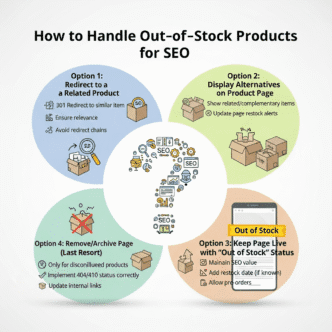
The Decision Tree: Three Paths, Three Different Outcomes
The out-of-stock handling decision comes down to one question: will this product come back?
Path 1: Temporarily out of stock (returning to stock)
Keep the page live. Return HTTP 200 (the standard “page found” status code). Add a notify-me CTA, restock date if known, and 3–5 related product suggestions. Do not redirect. Do not noindex. The page continues to rank, build equity, and capture demand — even with no purchasable inventory.
Path 2: Permanently discontinued (product will not return)
Issue a 301 redirect — but not to the category page. Redirect to the closest semantically relevant URL: the most similar product, a replacement model, or a subcategory that covers the same product type. A redirect to a page that genuinely answers the same search intent retains more equity than a redirect to a generic collection.
Path 3: Seasonal or cyclical product (returns at predictable intervals)
Keep the page live year-round. During off-season, add messaging that explains when the product returns. This approach maintains crawl access, preserves rankings, and captures early-season search demand before competitors rebuild their own pages.
| Scenario | HTTP Status | Recommended Action | Redirect Target |
|---|---|---|---|
| Temporarily OOS | 200 | Keep live, add notify-me CTA | N/A |
| Permanently discontinued (with links) | 301 | Redirect to closest equivalent | Most similar product or subcategory |
| Permanently discontinued (no links) | 410 | Return Gone status | N/A |
| Seasonal / cyclical | 200 | Keep live, update messaging | N/A |
| Variant OOS (parent in stock) | 200 | Keep parent live, remove OOS variant from swatches | N/A |
The 410 status code (Gone) tells Google the page is permanently removed and to drop it from the index. Use this only for discontinued products with no inbound links and no ranking history worth preserving.
Pro Tip: Before making any handling decision, run the URL through Screaming Frog (Crawl > Export > filter by response code) and check its backlink profile in Ahrefs (Site Explorer > Best by Links). URLs with 5+ referring domains almost always warrant keeping live or a precise 301 — never a blanket category redirect. Set Screaming Frog to crawl monthly for stores with 200+ SKUs so out-of-stock pages don’t accumulate undetected.
What a Soft 404 Actually Does to Your Rankings
A soft 404 is a page that returns HTTP 200 (telling Google “this page exists and is fine”) but delivers no useful content — typically because the product is out of stock and the team removed the page body without changing the status code.
Soft 404s are more damaging than hard 404s in most cases.
A hard 404 (page not found) is explicit: Google understands the page is gone and processes it accordingly. A soft 404 sends a contradictory signal — the server says the page is live, but the content says otherwise. Google’s systems may deindex the URL without surfacing a clear error in Google Search Console, which means you lose the ranking without any notification. (Source: Google Search Central, 2024)
The Coverage report inside Google Search Console flags soft 404s under “Excluded > Soft 404.” Check this report monthly for any ecommerce store with active inventory changes. A spike in soft 404 flagging after a product clearance or seasonal changeover is a reliable indicator that out-of-stock pages are being handled incorrectly.
Most ecommerce teams discover soft 404 problems through ranking drops, not through proactive auditing. That’s the wrong order entirely — by the time rankings are affected, the damage has already been done to the affected URLs.
Crawl Budget and Out-of-Stock Pages at Scale
For stores with fewer than 200 product pages, individual out-of-stock decisions rarely affect crawl efficiency in a measurable way.
Above that threshold, the aggregate handling of out-of-stock pages starts to matter — particularly if a significant proportion of the catalogue cycles in and out of stock at any given time.
Crawl budget refers to the number of URLs Google’s bot (Googlebot) crawls within a given timeframe. Google allocates this based on site authority and crawl demand — high-priority pages get crawled more frequently, lower-priority pages less so. (Source: Google Search Central, 2023)
Out-of-stock pages that return HTTP 200 with thin content (no body text, no related products, no CTA) consume crawl budget without contributing indexable content. At scale, a large proportion of low-value 200 pages can crowd out crawl capacity for new or updated product pages that actually need to be indexed.
The fix here isn’t blanket removal — it’s tiered handling based on link equity.
Pages with no inbound links and no ranking history: consider returning 404 or 410 once you’ve confirmed there’s nothing to preserve. Pages with inbound links or a ranking history: keep live with full content, even if out of stock. This distinction — applied systematically — protects crawl budget without sacrificing equity from URLs that have earned it.
Screaming Frog’s crawl log analysis feature (available with the paid licence) can show you which URLs Googlebot is crawling most frequently and which are being skipped. Cross-reference this with your out-of-stock page list to identify where crawl waste is concentrated.
For a full breakdown of crawl budget management in the context of site architecture, see Ecommerce Site Structure: The Ultimate Blueprint for SEO Success.
How to Audit Your Current Out-of-Stock Handling
Before changing anything, you need an accurate picture of what’s currently live, what status codes those pages are returning, and which of them carry link equity worth protecting.
Step 1: Crawl your site with Screaming Frog
Run a full crawl. Export all URLs. Filter to identify pages returning HTTP 200 with low word count (under 150 words) — these are your soft 404 candidates. Also export any URLs returning 301 and check where they redirect.
Step 2: Check Google Search Console Coverage
Open GSC > Index > Pages > Excluded. Review the “Soft 404” and “Redirect error” categories. Export the URL list. Cross-reference with your current product inventory to identify which out-of-stock pages have been mishandled.
Step 3: Pull link equity data from Ahrefs
For every URL identified in Steps 1 and 2, check Ahrefs Site Explorer > Best by Links. Sort by referring domains. Any URL with 3+ referring domains deserves a deliberate handling decision — not a default action.
Step 4: Apply the decision tree
Map each URL to one of the three paths from the previous section (keep live, 301 to relevant equivalent, or 410). Document your decisions in a spreadsheet with columns for URL, current status code, referring domains, ranking history (pull from GSC), and proposed action.
This audit typically surfaces a pattern: the most damaging out-of-stock decisions are usually concentrated in a small number of high-equity URLs that received the same blanket redirect treatment as low-equity pages.
For the broader context on how your ecommerce site’s technical setup affects handling decisions like these, the Ecommerce SEO Mastery pillar covers the full framework.
Frequently Asked Questions
What should I do if a product is out of stock?
Keep the page live and return HTTP 200. Add a notify-me CTA, a restock date if available, and related product links. Removing or redirecting a temporarily out-of-stock page risks losing rankings that took months to build — and those rankings rarely recover fully after the product returns. See the full Ecommerce Keyword Research guide for how to assess the ranking value of individual product pages before making handling decisions.
How do I do SEO for a product page?
Product page SEO covers four areas: the title tag and H1 (include the product name and primary keyword), the product description (unique, not copied from the manufacturer), structured data (Product schema with Offer, AggregateRating, and MerchantReturnPolicy), and internal linking from category pages and related products. For out-of-stock products specifically, the page should remain live and continue earning internal links even when inventory is zero.
How do I find out-of-stock products that are affecting my SEO?
Run Screaming Frog across your full domain and filter for HTTP 200 pages with low word count — these flag soft 404 candidates. Then check Google Search Console under Pages > Excluded > Soft 404 for pages Google has already flagged. Cross-reference both lists against your current inventory to identify which out-of-stock pages need attention. (Source: Screaming Frog, 2024)
What to Do Next
Out-of-stock SEO is rarely urgent — until it is. A product page that’s been quietly 301’d to a category page for six months has already lost most of its equity, and reversing a redirect only recovers some of what was there before.
The audit process in this post takes two to three hours for a store under 500 SKUs. The return — in recovered rankings and protected equity — makes it one of the higher-value technical tasks in ecommerce SEO.
Start with Google Search Console today. Open the Coverage report, filter to Soft 404, and export the URL list. If you find more than ten entries, you have a systematic problem, not isolated incidents.
Cross-reference those URLs against Ahrefs for referring domain counts. Any URL with 3+ referring domains that’s currently soft 404ing needs a decision this week — either restore the page to full content or issue a precise 301 to the closest equivalent product.
For the full technical SEO picture that sits behind these decisions, Technical SEO for Ecommerce: Essential Fixes covers crawl budget, canonical issues, and duplicate content as one connected audit process.
References
Google Search Central. “Redirects and Google Search.” Google, 2024. https://developers.google.com/search/docs/crawling-indexing/301-redirects Supports: claim that 301 redirects pass link equity to the destination URL and the conditions under which that transfer is reliable.
Google Search Central. “Crawl Budget for Googlebot.” Google, 2023. https://developers.google.com/search/docs/crawling-indexing/large-site-managing-crawl-budget Supports: claim that Google allocates crawl budget based on authority and crawl demand, and that low-value pages consume this budget.
Google Search Central. “Fix Soft 404 Errors.” Google, 2024. https://developers.google.com/search/docs/crawling-indexing/http-network-errors Supports: description of soft 404 behaviour and how Google’s Coverage report surfaces these errors.
Ahrefs. How to Handle Out-of-Stock Product Pages for SEO.” Ahrefs Blog, 2023. https://ahrefs.com/blog/out-of-stock-seo/ Supports: recommendation to retain out-of-stock product pages and the equity-loss risk associated with redirecting to category pages.
Screaming Frog. Screaming Frog SEO Spider User Guide.” Screaming Frog, 2024. https://www.screamingfrog.co.uk/seo-spider/user-guide/ Supports: audit methodology using Screaming Frog to identify soft 404s and low-content 200 pages.
Search Engine Journal. How to Handle Out-of-Stock Pages for SEO.” Search Engine Journal, 2023. https://www.searchenginejournal.com/out-of-stock-seo/ Supports: three-path decision framework for out-of-stock pages and the use of 410 status code for permanently discontinued products with no inbound links.