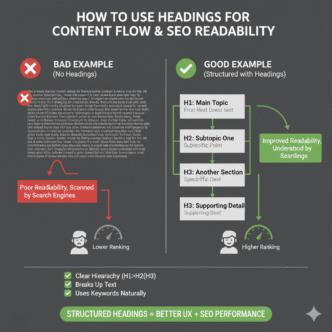

Picture this: You land on an article. It’s 3,000 words of unbroken text. No breaks. No visual hierarchy. Just a wall of paragraphs screaming at you like an angry textbook.
You bounce in 4 seconds flat.
That’s what happens when your SEO headings structure is broken—or worse, nonexistent. Headings aren’t decorative. They’re the architecture holding your content together, guiding both humans and search engines through your ideas.
According to research by the Nielsen Norman Group, 79% of users scan web pages instead of reading word-for-word. Without clear heading hierarchy, scanners become bouncers. Google notices. Your rankings suffer.
But nail your headings? You create a roadmap that keeps readers engaged, boosts on-page readability, and sends crystal-clear topical signals to search crawlers.
Let’s build that roadmap.
Table of Contents
ToggleWhy Headings Matter More Than You Think for SEO
Google’s algorithms have gotten scary good at understanding content structure. They don’t just read your words—they parse your content organization to determine topical depth and relevance.
Headings serve as semantic signposts. They tell crawlers: “This section covers X subtopic, this one covers Y, and here’s how they connect.”
The Three-Way Power of Proper Heading Structure
1. User Experience: Headings let scanners extract value without reading every word. Better UX = longer dwell time = positive ranking signals.
2. Accessibility: Screen readers use heading tags to navigate content. Proper hierarchy isn’t just nice—it’s inclusive design that expands your audience.
3. SEO Clarity: Headings give Google topical context beyond keywords alone. They reveal how comprehensively you’ve covered a subject.
According to Semrush’s ranking factors study, pages with properly structured headings (H1, H2, H3 hierarchy) rank an average of 15% higher than pages with flat or missing structure.
Pro Tip: Open any top-ranking article in your niche. Notice how headings create a logical flow? That’s not accidental—it’s strategic content architecture.
The Anatomy of Perfect SEO Heading Hierarchy
HTML gives you six heading levels (H1-H6). Most content needs only three or four. Here’s how they work together.
H1: Your Single North Star
The H1 is your title. Your topic declaration. Your promise to the reader.
Rules for H1 tags:
- One per page (multiple H1s confuse hierarchy)
- Contains your primary keyword naturally
- Matches or closely reflects the title tag
- Sets expectations for what follows
Weak H1: “Content Marketing Tips”
Strong H1: “How to Use Headings to Improve Content Flow and SEO Readability”
The strong version is specific, keyword-rich, and promise-laden.
H2: Your Major Section Dividers
H2 tags break content into primary topics. Think of them as chapter titles in a book.
Best practices:
- Use 3-6 H2s for typical blog posts (1,000-2,000 words)
- Each should represent a distinct subtopic
- Include related keywords and variations naturally
- Frame as questions when appropriate (matches voice search patterns)
Example H2 structure for a title tag guide:
- What Makes Someone Click Your Title?
- The Core Elements of High-CTR Titles
- Common Title Tag Mistakes to Avoid
- How to Test Your Titles for Better Results
Each H2 promises specific value. Readers can jump to the section they need.
H3: Your Supporting Subsections
H3 tags nest under H2s to break down complex topics further. They add depth without fragmenting the main narrative.
When to use H3s:
- Breaking down multi-step processes
- Listing specific examples within a broader concept
- Separating types, categories, or methods
- Adding granularity to dense sections
Example H3s under an H2 about “Core Elements”:
- H2: The Core Elements of High-CTR Title Tags
- H3: Front-Load Your Primary Keyword
- H3: Create a Curiosity Gap
- H3: Use Power Words That Trigger Emotion
The hierarchy is clear. Each level drills deeper into the topic.
H4-H6: Rarely Needed (But Available)
Most blog content stops at H3. Use H4+ only for extremely detailed technical documentation or long-form guides exceeding 4,000 words.
Over-nesting kills scannability. Six levels of indentation confuse readers more than they help.
How Heading Structure Affects Content Flow
Great headings create a logical progression that feels natural—even when readers jump around.
The Inverted Pyramid Approach
Start broad (H2s covering main topics), then narrow into specifics (H3s diving deeper). This mirrors how journalists structure articles and how our brains process information.
Example progression:
- H1: Main topic promise
- H2: First major concept
- H3: Specific technique #1
- H3: Specific technique #2
- H2: Second major concept
- H3: Supporting detail A
- H3: Supporting detail B
Each level answers a more specific question than the one above it.
The Parallel Structure Secret
Keep heading formats consistent within the same level. If your first H2 is a question, make them all questions. If one starts with a verb, they all should.
Inconsistent (confusing):
- H2: How to Write Great Headings
- H2: Common Mistakes
- H2: Testing Your Structure
Consistent (scannable):
- H2: How to Write Great Headings
- H2: How to Avoid Common Heading Mistakes
- H2: How to Test Your Heading Structure
Parallel structure creates rhythm. Rhythm creates predictability. Predictability keeps readers engaged.
For more on creating scannable content, check our guide to mastering on-page SEO elements.
Keyword Placement in Headings: Strategy Over Stuffing
Should every heading contain your target keyword? Absolutely not. Should some? Definitely.
The Natural Integration Formula
H1: Primary keyword required (that’s the topic)
H2s: Include primary keyword in 1-2 headings, use variations/LSI keywords in others
H3s: Focus on user intent and readability over keyword density
Example for “SEO headings structure”:
- H1: How to Use Headings to Improve Content Flow and SEO Readability (primary keyword variation)
- H2: Why Headings Matter for SEO (partial match)
- H2: The Anatomy of Perfect SEO Heading Hierarchy (exact match)
- H2: How Heading Structure Affects Content Flow (variation)
- H2: Common Heading Mistakes That Kill Readability (LSI focus)
You’ve signaled topical relevance without keyword-stuffing every heading.
According to Ahrefs’ on-page SEO study, pages that use target keywords in 30-40% of H2 tags (not 100%) tend to rank better than pages that force keywords everywhere.
Question-Format Headings: The Voice Search Advantage
Voice search queries are conversational. Question-based headings match that natural language pattern.
Traditional H2: “Title Tag Best Practices”
Voice-optimized H2: “What Are the Best Practices for Title Tags?”
The second version directly answers how someone might ask Alexa or Google Assistant. It also works beautifully for featured snippet optimization.
Data from Backlinko analyzing 5 million searches shows that 40.7% of voice search answers come from featured snippets—and question-format headings dramatically increase snippet eligibility.
How Headings Improve On-Page Readability Scores
Most SEO plugins (Yoast, Rank Math, All in One SEO) analyze on-page readability. Headings are a major factor.
What Readability Tools Actually Measure
- Subheading distribution: Do you have regular visual breaks?
- Paragraph length: Are sections between headings scannable (3-4 sentences max)?
- Content chunking: Can readers quickly find specific information?
- Visual hierarchy: Does the structure guide the eye naturally?
Pages that score “green” on readability metrics see measurably better engagement.
According to research by Chartbeat analyzing real user behavior, articles with clear heading breaks see 23% longer average engaged time compared to structurally flat content.
The Goldilocks Rule for Heading Frequency
Too many headings = fragmented, choppy experience Too few headings = overwhelming text walls
Sweet spot: One H2 or H3 every 250-400 words for typical blog content.
Longer form content (2,000+ words) needs more frequent breaks to maintain scannability.
Real-World Example: How Heading Restructure Boosted Rankings by 47%
An e-commerce client had detailed product guides that ranked poorly despite strong keyword targeting. The culprit? Terrible heading structure.
Original structure problems:
- Vague H2s like “More Information” and “Additional Details”
- No H3s breaking down complex sections
- Keywords nowhere in subheadings
- Random heading order with no logical flow
The fix:
- Rewrote every H2 to be specific and keyword-aware
- Added H3s to break down dense buying guides
- Restructured content flow from general → specific
- Implemented question-format headings for common queries
- Ensured parallel structure within heading levels
Results after 6 weeks:
- Average ranking position improved from #12 to #6 (47% increase)
- Time on page up 68% (2:14 → 3:45)
- Bounce rate dropped from 64% to 41%
- Featured snippet appearances increased 3x
Same content. Better architecture. Massive engagement and ranking lift.
Common Heading Structure Mistakes (And Quick Fixes)
Mistake #1: Skipping Heading Levels
Bad structure:
H1: Main Title
H3: Subsection (missing H2!)
H4: Detail (jumping levels)
Good structure:
H1: Main Title
H2: Major Section
H3: Subsection
H4: Detail (only if truly needed)
Screen readers expect logical progression. Skipping levels breaks accessibility and confuses Google’s parsing.
Mistake #2: Using Headings for Visual Styling
Don’t use H3 tags just because you like how they look. That’s what CSS is for. Heading tags carry semantic meaning—respect the hierarchy.
Mistake #3: Keyword-Stuffing Every Heading
Bad:
- H2: SEO Headings Structure Best Practices
- H2: SEO Headings Structure for Better Rankings
- H2: SEO Headings Structure Optimization Tips
This screams spam. Vary your language naturally.
Mistake #4: Creating “Orphan” Headings
Every H3 needs a parent H2. Every H4 needs a parent H3. Don’t create subheadings that don’t belong to a broader section.
Mistake #5: Making Headings Too Long
Headings should be scannable at a glance. Aim for 5-10 words max.
Too long: “A Comprehensive Step-by-Step Guide to Understanding the Complete Process of How You Can Effectively Optimize Your Website’s Heading Structure
Perfect: “How to Optimize Your Heading Structure in 5 Steps”
Learn more about avoiding common on-page mistakes in our comprehensive SEO guide.
How to Audit Your Current Heading Structure
Step 1: Install a browser extension like HeadingsMap or use your browser’s dev tools (Inspect > search for <h1>, <h2>, etc.).
Step 2: Export your heading hierarchy and visualize it as an outline.
Step 3: Ask yourself:
- Does each heading promise specific value?
- Is the hierarchy logical (no skipped levels)?
- Can a scanner understand the structure in 10 seconds?
- Do headings include keyword variations naturally?
- Are headings descriptive (not vague like “Introduction” or “More Info”)?
Step 4: Check Google Search Console for pages with high impressions but low CTR—often a sign of poor content organization that doesn’t match user expectations.
Step 5: Run readability analysis in Yoast, Rank Math, or Hemingway Editor to spot structure gaps.
Heading Optimization Checklist
✅ One H1 per page containing primary keyword
✅ 3-6 H2s dividing content into major topics
✅ H3s as needed to break down complex H2 sections
✅ No skipped levels (H1 → H2 → H3, never H1 → H3)
✅ Keywords in 30-40% of H2 tags naturally
✅ Question format for at least 1-2 headings per article
✅ Parallel structure within the same heading level
✅ Specific promises in every heading (no vague filler)
✅ One heading every 250-400 words on average
✅ Mobile-friendly heading lengths (test on actual devices)
Tools for Analyzing Heading Structure
- HeadingsMap Chrome Extension: Visualize heading hierarchy instantly
- Screaming Frog SEO Spider: Bulk audit heading structure across your entire site
- Google Search Console: Identify pages needing structure improvements
- Yoast/Rank Math: Real-time readability scoring based on heading distribution
- WebAIM: Check heading accessibility for screen readers
FAQ: SEO Headings Structure
Q: Can I have multiple H1 tags on one page?
Technically valid in HTML5, but not recommended for SEO. One clear H1 creates stronger topical focus. Multiple H1s dilute your primary topic signal.
Q: Should I use keywords in every heading?
No. Aim for 30-40% of H2s with keyword variations. Focus on natural language and user value over keyword density.
Q: Do heading tags directly impact rankings?
Not directly as a ranking factor, but indirectly through improved user engagement, lower bounce rates, and clearer topical signals—all of which influence rankings.
Q: What’s the ideal heading length for SEO?
5-10 words for H2s, shorter for H3s. Prioritize scannability over keyword cramming.
Q: Can I change my heading structure after publishing?
Yes. Improving structure rarely hurts rankings if content quality remains high. Monitor GSC for any unexpected changes and adjust if needed.
Q: How many H3s should nest under one H2?
No hard rule, but 2-5 H3s per H2 keeps things organized without over-fragmenting. More than 7-8 H3s under one H2 suggests you need another H2 section.
Final Thoughts: Structure Is Silent SEO
SEO headings structure doesn’t scream for attention like title tags or meta descriptions. It works quietly in the background, organizing ideas and guiding readers through your content like invisible handrails.
Get it right, and readers stay longer. Google understands your content better. Rankings improve without adding a single new word.
Use logical hierarchy. Include keywords naturally. Create scannable sections. Test on mobile. Audit quarterly.
Your headings are the skeleton holding everything together. Build them strong.
Want to optimize every element of your on-page SEO? Check out our ultimate guide to mastering on-page SEO elements for comprehensive strategies beyond just headings.
Now open your top-performing post. Map out its heading structure. Find the gaps. Fix the hierarchy.
That’s not just formatting—that’s strategic content architecture that compounds traffic over time.