



Ever wondered why some search results get clicked like crazy while others are ignored? The secret often lies in two tiny but mighty HTML elements: title tags and meta descriptions. These snippets are your first impression in search results, and if you mess them up, you’re basically invisible—even if your content is amazing.
In this guide, you’ll learn exactly how to craft title tags and meta descriptions that boost your SERP CTR (click-through rate), improve rankings, and drive more organic traffic. No fluff, no jargon—just actionable tips you can use today.
Table of Contents
ToggleWhat Are Title Tags and Why Do They Matter?
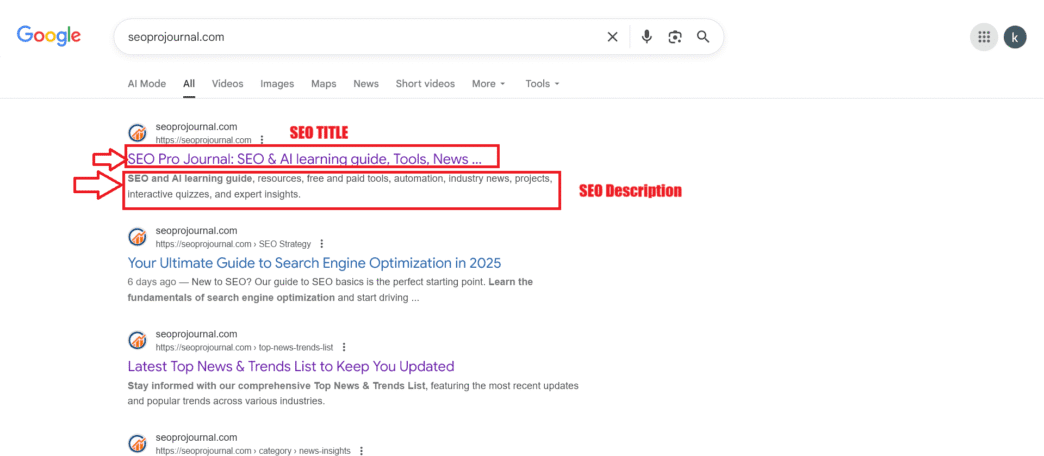
Title tags are HTML elements that define the title of your webpage. They show up in three critical places: search engine results pages (SERPs), browser tabs, and social media shares.
Think of them as your headline in Google’s newspaper. A compelling meta title can be the difference between someone clicking your link or scrolling past it. According to Backlinko’s research, title tags are one of the most important on-page SEO factors for ranking.
Google uses title tags to understand what your page is about. Get it right, and you’ll see better rankings and more clicks.
What Are Meta Descriptions and How Do They Work?
A meta description is a brief summary (usually 150-160 characters) that appears below your title tag in search results. While Google confirmed meta descriptions don’t directly impact rankings, they massively influence whether people click your result.
Think of meta descriptions as your sales pitch. You’ve got two lines to convince searchers that your page has exactly what they need. Make it count.
Here’s the catch: Google doesn’t always use your meta description. If it thinks another snippet from your page better matches the search query, it’ll pull that instead. Still, writing a strong meta description gives you the best shot at controlling your SERP appearance.
How Long Should Title Tags and Meta Descriptions Be?
Title tags should be 50-60 characters (or roughly 600 pixels). Any longer and Google truncates them with an ellipsis (…), which looks unprofessional and cuts off your message.
Meta descriptions work best at 150-160 characters on desktop and around 120 characters on mobile. Going over this limit means your description gets cut off, potentially losing your call-to-action or key selling point.
Pro Tip: Use tools like Moz’s Title Tag Preview Tool to check how your meta tags will appear in search results before publishing.
Title Tag Best Practices for Better Rankings
Should You Include Your Focus Keyword in Title Tags?
Absolutely. Your focus keyword should appear in your title tag, ideally near the beginning. This signals to both search engines and users that your page matches their query.
For example, if you’re targeting “vegan chocolate cake recipe,” a title like “Vegan Chocolate Cake Recipe (Easy & Delicious!)” is far better than “Delicious Cake You’ll Love.”
A 2023 study by Ahrefs found that pages with exact-match keywords in title tags tend to rank higher than those without.
How Do You Write Click-Worthy Title Tags?
Here’s the formula: Keyword + Benefit + Modifier
- Keyword: What people are searching for
- Benefit: What they’ll gain from clicking
- Modifier: Words like “ultimate,” “2025,” “free,” “easy,” “best”
Example:
- Boring: “Title Tags Guide”
- Better: “Title Tags 101: Boost Your CTR by 30% (2025 Guide)”
Use numbers, years, and power words to grab attention. Create curiosity gaps without being clickbait.
Can You Use Your Brand Name in Title Tags?
Yes, but strategically. For homepage and major landing pages, add your brand name at the end: “SEO Tools for Beginners | YourBrand”
For blog posts and deeper content, skip the brand name to save character space for keywords and benefits. Unless you’re Nike or Apple, most searchers won’t click just because they see your brand.
Meta Description SEO: Writing Descriptions That Convert
What Makes a Great Meta Description?
A killer meta description includes:
- Your focus keyword (Google bolds matching terms)
- A clear benefit (what’s in it for the reader)
- A call-to-action (learn, discover, get, download)
- Relevant LSI keywords naturally woven in
Example for “title tags and meta descriptions”: “Learn how to write optimized title tags and meta descriptions that boost SERP CTR and drive organic traffic. Includes examples, best practices, and common mistakes to avoid.”
Notice how it includes the main keyword, related terms (SERP CTR, organic traffic), and tells you exactly what you’ll get.
Should Every Page Have a Unique Meta Description?
Yes! Duplicate meta descriptions confuse search engines and waste your opportunity to highlight each page’s unique value. Even if you have hundreds of product pages, use templates with dynamic variables to create unique descriptions at scale.
According to Google’s Search Central documentation, unique and descriptive meta descriptions improve click-through rates significantly.
Common Mistakes That Kill Your Click-Through Rate
1. Keyword Stuffing Your Meta Tags
Cramming “best SEO tips best SEO guide best SEO 2025” into your title tag looks spammy and turns people off. Google’s algorithms are smart enough to penalize this. Write for humans first, search engines second.
2. Being Vague or Generic
“Welcome to Our Website” or “About Us” tells searchers absolutely nothing. Be specific about what makes your page valuable and different.
3. Ignoring Mobile Users
Over 60% of searches happen on mobile (Statista, 2024). Your truncated mobile meta tags might be losing half your potential clicks if you don’t test them.
4. Forgetting Emotional Triggers
Words like “proven,” “secret,” “mistake,” “warning,” and “surprising” trigger curiosity and urgency. Use them when they fit naturally.
Expert Opinion: “The best meta descriptions answer the searcher’s question before they even click. Show them you understand their pain point.” — Rand Fishkin, SparkToro
Title Tags and Meta Descriptions Tools You Should Use
| Tool | Purpose | Price |
|---|---|---|
| Yoast SEO | WordPress meta tag optimization | Free/$99/year |
| RankMath | Advanced on-page SEO for WordPress | Free/$59/year |
| Screaming Frog | Audit meta tags at scale | Free/£149/year |
| SEMrush | Analyze competitor meta tags | $119.95+/month |
These tools help you identify missing meta tags, check character counts, and spot duplicate descriptions across your site.
How Meta Tags Impact On-Page Optimization
Title tags and meta descriptions are foundational elements of on-page optimization. They work together with your content, headers, URL structure, and internal linking to signal relevance to search engines.
While they won’t single-handedly skyrocket your rankings, they’re the gateway that turns rankings into actual traffic. A well-optimized page at position 5 with great meta tags can often outperform a poorly optimized page at position 3.
For a deeper dive into all on-page elements, check out our comprehensive guide to mastering on-page SEO elements.
Real-World Example: Meta Tag Optimization in Action
A SaaS company noticed their blog post ranking #4 for “email marketing automation” was getting almost no clicks. The title tag read: “Email Marketing Automation | Company Blog”
After changing it to “Email Marketing Automation: 7 Tools That Save 10 Hours/Week,” their CTR jumped from 2.1% to 8.4% in just two weeks—without any ranking changes.
The lesson? Even perfect rankings mean nothing if your meta tags don’t compel clicks. This is where understanding SERP features and CTR optimization becomes crucial for modern SEO success.
Title Tag and Meta Description SEO Checklist
Before publishing any page, run through this quick checklist:
- ✅ Focus keyword appears in title tag (preferably near the beginning)
- ✅ Title tag is 50-60 characters max
- ✅ Meta description is 150-160 characters
- ✅ Both include a clear benefit or hook
- ✅ Both are unique (not duplicated elsewhere on site)
- ✅ Call-to-action included in meta description
- ✅ Tested on mobile preview
- ✅ No keyword stuffing
- ✅ Emotional trigger words used appropriately
- ✅ Brand name included (if relevant)
Following this checklist ensures your on-page optimization covers these critical meta tag elements.
Trending: How AI Is Changing Meta Tag Optimization
In 2025, AI tools like ChatGPT and Jasper are revolutionizing how marketers write meta tags. These tools can generate dozens of variations in seconds, A/B test different angles, and even predict which versions will get higher CTRs.
However, according to Search Engine Journal, human oversight remains critical. AI-generated meta tags often lack the nuance, brand voice, and emotional intelligence that converts casual browsers into engaged readers.
The smartest approach? Use AI for ideation and speed, then refine with human judgment and testing. Learn more about AI’s impact on SEO workflows in our pillar guide.
FAQ: Title Tags and Meta Descriptions
Q: Do meta descriptions directly affect SEO rankings? No, Google has confirmed meta descriptions don’t directly impact rankings. However, they heavily influence click-through rate, which indirectly affects rankings through user engagement signals.
Q: Should I update old meta tags on existing pages? Absolutely. Refreshing outdated title tags and meta descriptions can boost CTR without creating new content. Prioritize your top 20 pages by traffic first for maximum impact.
Q: What happens if I don’t write a meta description? Google will automatically pull text from your page content. This often results in less compelling snippets that don’t include your focus keyword or call-to-action, ultimately hurting your CTR.
Q: Can I use emojis in title tags and meta descriptions? Technically yes, but use them sparingly. Some emojis display in search results and can increase CTR, but Google may remove them if they seem spammy. Test carefully and monitor results.
Q: How often should I change my title tags and meta descriptions? Only change them if you’re seeing poor performance (low CTR, rankings dropping). If something’s working, don’t fix it. Use Google Search Console data to identify underperforming pages that need optimization.
Q: Are there character limits for non-English languages? Character limits work differently for languages with wider characters (like Chinese or Japanese). Focus on pixel width (600px for titles) rather than strict character counts. For more technical details on international SEO, explore our complete on-page SEO guide.
Final Thoughts: Your Meta Tags Are Your First Impression
Mastering title tags and meta descriptions isn’t rocket science, but it’s easily one of the highest-ROI SEO tasks you can do. These 160 characters can make or break your organic traffic, regardless of how well you rank.
Start by auditing your current meta tags. Find pages with missing, duplicate, or weak descriptions. Then rewrite them using the strategies in this guide: include your focus keyword, add compelling benefits, create curiosity, and always test mobile appearance.
Remember: your meta tags are competing against 9+ other results for attention. Make every character count, and watch your SERP CTR climb. For a complete blueprint covering title tags, meta descriptions, and every other on-page element, dive into our ultimate on-page SEO guide.
Now go optimize those meta tags and start stealing clicks from your competitors.
Related posts:
- Content Refresh and Update Strategy: Maximizing Existing Content Performance
- Internal Linking Strategy: The Hidden Power of On-Page SEO
- Mastering On-Page SEO Elements: Meta Tags, HTML, and Image Optimization Explained (Visual guide)
- What is Internal Linking? A Complete Beginner’s Guide to Boosting Your SEO


