



You publish a page with a carefully written HTML title, then Google shows different wording above the result. The two texts serve different roles. Your <title> element states the page title in its HTML. A Google title link is the clickable heading that Google generates for a search result.
Google does not promise to reproduce the <title> element word for word. Its systems use the title element alongside visible headings, prominent text, anchor text and other signals. A changed title link is a diagnostic clue, not proof of a penalty.
Find which signals disagree, correct the parts you control and wait for Google to recrawl and reprocess the page.
Table of Contents
ToggleTitle tag and title link describe different outputs
SEO teams commonly call the <title> element a “title tag,” although HTML defines title as an element. It belongs in the document <head> and represents the document’s title or name.
<head>
  <title>Emergency Plumbing in Bristol | North Street Plumbing</title>
</head>
The title link exists on Google’s results page. Google describes it as the title of a search result that links to the web page. Generation is automated; publishers can influence the output but cannot set it directly. Google’s title-link documentation lists the sources its systems can use.
| Item | Where it exists | Who controls the final text? | Main purpose |
|---|---|---|---|
HTML <title> element | Page <head> | Publisher | Name the HTML document |
| H1 or main visual title | Visible page body | Publisher | Identify the page’s main subject for readers |
| Google title link | Google Search result | Represent the result for a search context | |
og:title | Open Graph metadata | Publisher sets it; consuming platforms decide presentation | Suggest a social-sharing title |
A title-link change does not mean Google altered your HTML. The difference occurs in Google’s presentation layer.
This distinction sits within the wider relationship between metadata, visible HTML and search presentation explained in Mastering On-Page SEO Elements. Diagnosing a title rewrite requires comparing those layers rather than editing the SEO-title field in isolation.
Google can draw from several title sources
Google lists nine possible inputs for title-link generation:
the
<title>element;the page’s main visual title;
heading elements such as
<h1>;the
og:titlemeta tag;other large or visually prominent text;
other text on the page;
anchor text on the page;
text in links pointing to the page; and
WebSitestructured data, which can help Google understand the site name.
The audit must extend beyond the document head. A valid <title> can compete with an outdated H1, a hero banner styled like a main heading or links that frame the destination differently.
The result is automated and considers page content plus references across the web. No single edit forces a chosen title link. The title element, visible page title and link context should describe the same subject without matching every character.
Rewrite patterns point to specific conflicts
Google documents recurring title problems. Each pattern suggests a different check.
Half-empty titles
A template variable can fail and leave only punctuation or a brand name:
<title> | AISEOjournal</title>The visible H1 may still contain the article name, so Google can use that text. Fix the template or missing field. Do not treat the generated title link as the defect; it is evidence that the supplied title was incomplete.
Obsolete dates
An evergreen URL can retain an old year in the HTML title while the visible content has been updated:
<title>Technical SEO Checklist for 2025 | Example</title>
<h1>Technical SEO Checklist for 2026</h1>
Google documents this type of date disagreement and may select the current date from the visible title. Confirm that the body was substantively updated before changing the year. A cosmetic date change without corresponding content review creates a different quality problem.
Inaccurate or over-specific titles
A category title might name products no longer present, or a programmatic title might attach the wrong location. Compare the title’s claims with the rendered main content. Remove unsupported qualifiers and make the primary subject identifiable near the beginning.
Repeated boilerplate
Boilerplate consumes space while failing to distinguish pages. Consider this family of titles:
Blue Widgets — Buy Online, Free Advice, Reviews, Deals and More | Brand
Red Widgets — Buy Online, Free Advice, Reviews, Deals and More | Brand
Green Widgets — Buy Online, Free Advice, Reviews, Deals and More | Brand
The colour changes, but most of each title repeats. A tighter pattern gives the unique page topic more weight:
Blue Widgets: Sizes and Specifications | Brand
Red Widgets: Sizes and Specifications | Brand
Green Widgets: Sizes and Specifications | Brand
The revised pattern removes text that adds little page-specific meaning, without guaranteeing Google’s wording.
Competing prominent headings
Page builders can place a campaign heading, template title and article H1 above the same content. If two headings have equal visual prominence, the main title becomes ambiguous.
<h1>Summer Learning Centre</h1>
<h1>GCSE Mathematics Revision Courses in Leeds</h1>
The first heading might come from a reusable hero template and the second from the post. Give the page one unmistakable visual title, then demote or restyle supporting copy according to its structural role. Google’s guidance cites the first visible H1 as one way to make the main title distinct, but it does not declare that every page with multiple H1 elements will receive a penalty.
Language or writing-system mismatch
The title element should use the primary language and writing system of the page. An English title attached to a Hindi-language page creates a conflict that Google can resolve by selecting Hindi text from the body. Check multilingual templates, translation fields and language-specific brand rules.
A page-level diagnostic workflow
Capture evidence before editing. Results change by query, country, device, time and user context, so one manual search is not a stable record.
1. Record the affected result
Save the query, country, device, date and displayed title link. Confirm that the result points to the expected canonical URL rather than a duplicate, translation or parameter version.
Use Google Search Console’s Performance report to identify queries and pages with impressions. The report supports query, page, country, device and date dimensions, which helps define the context in which the URL is appearing. Search Console does not provide a dedicated “rewritten title” report, so pair its query evidence with observed results.
2. Extract every controllable source
Build one row for the affected URL and capture the following fields:
| Source | What to capture | Where to inspect it |
|---|---|---|
| HTML title | Exact rendered <title> text | Browser source, crawler or DevTools |
| Main visual title | Text readers see as the page title | Rendered page at desktop and mobile sizes |
| H1 and prominent headings | Text, order and visual weight | Rendered DOM and computed styles |
og:title | Exact content value | HTML source or crawler |
| Internal anchors | Wording of links pointing to the URL | Site crawler and key templates |
| External anchors | Available examples, without assuming completeness | Backlink tools or known referring pages |
| Site name | Visible result label and structured-data value | Search result and homepage markup |
Check rendered output, not only the WordPress field. A theme, plugin, cache layer or script can change what reaches the browser.
3. Compare meaning before character count
Mark disagreements in subject, intent, date, location, product status and brand. These conflicts are more useful than an arbitrary character threshold.
Google states that the <title> element has no fixed length limit and that title links are truncated as needed to fit device width. Pixel previews can help editorial review, but they cannot predict every result. A concise title is one that names the page accurately without repetitive or uninformative wording.
4. Inspect internal anchor text
Internal links can reinforce or contradict the page title. A product page titled “Noise-Cancelling Headphones” might receive navigation and article links labelled “Wireless Headsets.” Both descriptions can be valid, yet a dominant alternate label gives Google another candidate.
Do not convert every link to exact-match text. Update misleading anchors, menu labels or breadcrumbs that describe an earlier version of the page.
5. Classify the probable cause
Assign the case to one or more categories: incomplete title, stale date, inaccurate description, boilerplate, competing headings, language mismatch, site-name duplication or conflicting link context. A classification turns a vague complaint into an editable requirement.
If every source agrees and the generated title suits the query, record the case and leave the page unchanged. Google may select a query-relevant variation even when the HTML title is sound.
Correct the signal, not the search-result screenshot
Start with the strongest discrepancy. A useful correction order is:
Fix missing, stale or inaccurate information in the
<title>element.Align the H1 and main visual title with the page’s actual topic.
Remove equal-weight headings that compete for the main-title role.
Shorten repeated boilerplate and place distinctive information first.
Align
og:titlewhen it describes a different subject or outdated offer.Correct misleading internal anchor text on navigation, hub and high-context pages.
Confirm that Google can crawl the page and its title sources.
The title and H1 do not need an exact text match. They should agree on identity and intent. This pairing is coherent:
<title>Google Title Link Rewrites: Diagnosis and Fixes | AISEOjournal</title>
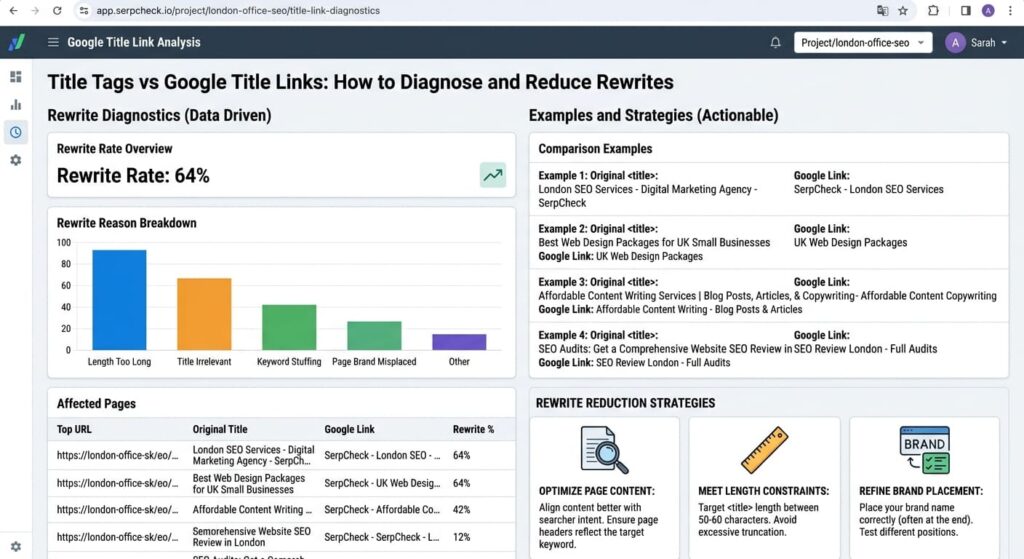
<h1>Title Tags vs Google Title Links: How to Diagnose and Reduce Rewrites</h1>
The title is compact for browser and search presentation; the H1 gives readers more context. Neither contradicts the other.
Avoid changing unrelated elements after observing one result. For template faults affecting hundreds of pages, test the rule on a controlled set, validate the rendered output and then expand the correction.
Robots.txt deserves a separate check. Google warns that a URL blocked from crawling can still be indexed through links, while the blocked page content remains unavailable for title generation. In that state, Google can rely more heavily on off-page text. Permit crawling if the page is intended to appear with its current content. Use noindex, not robots.txt, when the goal is to keep an accessible page out of Google Search.
Recrawl, reprocess and monitor the result
Publish the corrections, purge relevant caches and verify the live HTML. Then inspect the URL in Search Console. For a small set of important pages, use URL Inspection to request indexing. For larger changes, maintain accurate sitemaps and internal links rather than submitting URLs one by one.
Google says title-source updates require recrawling and reprocessing and can take a few days to a few weeks. An indexing request does not guarantee inclusion. Set the review date far enough from publication to avoid reacting to an old version.
Monitor three evidence sets:
Crawl evidence: last crawl information and the HTML served to Google;
presentation evidence: title links observed for priority queries, devices and countries;
performance evidence: impressions, clicks, CTR and average position in Search Console.
Do not assign a CTR change to the title edit without accounting for position, query mix, SERP features, seasonality and other page changes. Search Console reports can compare periods, but they do not establish that the title wording caused the difference.
The broader on-page SEO visual guide can serve as the parent audit when the investigation exposes related heading, HTML or image issues. Keep this title-link log focused on title sources so the diagnosis remains auditable.
Title-link rewrite checklist
Confirm the ranking URL and canonical page.
Record query, country, device, date and displayed title link.
Capture the live
<title>, H1, main visual title andog:title.Review large or prominent text above the main content.
Compare internal anchors and known external link wording.
Check for missing text, obsolete dates and inaccurate claims.
Reduce boilerplate that overwhelms the page-specific topic.
Keep the title language and writing system aligned with the page.
Make the main visual title distinct from supporting headings.
Verify crawl access and purge stale caches.
Request indexing for a small set of priority URLs.
Allow a few days to a few weeks for recrawl and reprocessing.
Recheck several relevant query contexts rather than one personalised search.
Record the outcome without treating a chosen title link as guaranteed.
Questions about Google title-link changes
Why does Google rewrite a title tag?
Google generates title links automatically from several sources. It can choose alternate text when the HTML title is incomplete, obsolete, inaccurate, repetitive, inconsistent with the page language or unclear beside other prominent headings. It can also select wording that it considers more suitable for the search context.
Is a rewritten title link a Google penalty?
No. A changed title link is a search-presentation decision, not evidence of a manual action. Review the conflicting signals and check Search Console separately for security issues or manual actions if other evidence points to a wider problem.
Should the title element and H1 match exactly?
No exact match is required. Both should identify the same page and satisfy the same core intent. The HTML title can be more compact and include concise branding, while the H1 can give readers added context.
Can Search Console show which titles Google rewrote?
Search Console has no dedicated rewrite report. Use its page and query data to identify important search contexts, then compare the observed Google title link with the page’s title sources.
How long does a title update take to appear?
Google states that recrawling and reprocessing can take a few days to a few weeks. Requesting indexing can prompt consideration for another crawl, but it does not force a crawl, indexing or a chosen title link.
Make title sources agree before requesting another crawl
The most defensible response to a title-link rewrite is a source comparison. Confirm what the page supplies, identify contradictions and change the smallest set of signals that misrepresents the page. Accurate titles, one distinct visual heading, concise branding and descriptive link context give Google consistent evidence.
Some title links will still differ because Google owns the final presentation and can adapt it to the result context. Treat that outcome as acceptable when the displayed wording is accurate. Continue editing only when the chosen text exposes a correctable conflict or misrepresents the page.
References
Google Search Central. Influencing your title links in search results. Updated 10 December 2025.
Google Search Central. Ask Google to recrawl your URLs.
Google Search Console Help. Performance report: Overview and basic setup.
WHATWG. HTML Standard: The
titleelement.Google Search Central. Introduction to robots.txt.