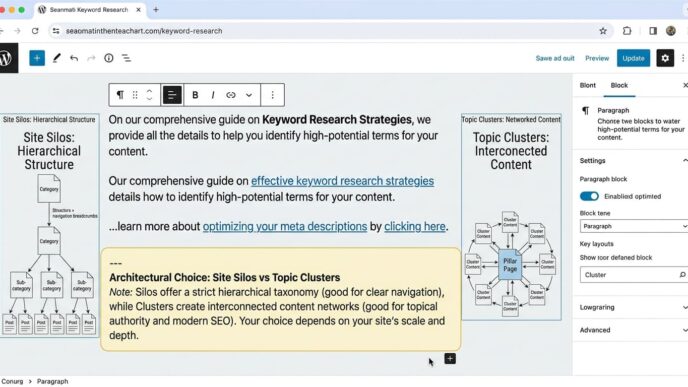




A link-editing review often finds the same problem in different forms: “click here”, “learn more”, a page title copied into every anchor, or an image link with no usable label. The destination may be valuable, but the wording gives readers little reason to trust the route.
Internal link anchor text is the visible, clickable wording inside an HTML anchor. Its job is to set a destination promise: enough information for a reader to predict what will happen after activation. Search systems can also use the anchor and surrounding text to understand the relationship between linked pages.
That makes anchor writing an editorial decision inside a wider internal linking strategy. It is not a percentage exercise. The useful question is whether the wording, sentence and destination agree.
Table of Contents
ToggleAnchor text labels a destination
Google defines anchor text as the visible text of a link and recommends wording that is descriptive, reasonably concise, and relevant to both the source page and destination. Its link best-practices documentation also says that links help Google find pages and understand their relevance.
A standard crawlable internal link uses an <a> element with an href value:
<a href="/technical-seo-audit/">technical SEO audit checklist</a>The URL supplies the route. The anchor supplies the label. The surrounding sentence explains why the route is useful now.
A JavaScript click handler on a <span> may behave like a link for a mouse user but lacks the same native link semantics and is less dependable for crawling and accessibility. Build navigation as an anchor with a resolvable href, then enhance it only when the interaction requires enhancement.
Evaluate each link through three connected tests:
Destination promise: Does the anchor predict the target?
Sentence context: Does nearby text explain the relationship?
Accessible name: Can the link be identified through assistive technology and keyboard navigation?
Passing only one test is not enough. A keyword-rich anchor attached to the wrong destination remains misleading.
Descriptive anchors reduce guesswork
Generic anchors depend heavily on nearby text. Descriptive anchors can carry their purpose when skimmed, tabbed through or shown in a list of links.
| Weak version | Improved version | Reason |
|---|---|---|
| Read more | Read the canonical URL guide | Names the subject of the destination |
| Click here | Compare site silos and topic clusters | Predicts the task on the next page |
| This article | Image SEO for Google Images | Identifies the resource |
| Learn more | Learn how breadcrumb links support navigation | States the promised information |
| Guide | WordPress internal-link editing guide | Distinguishes it from other guides |
The improved text does not need to reproduce the destination’s full H1. It needs to distinguish that destination from other reasonable choices.
Compare these sentences:
Before: For details about canonical tags, [click here].
After: Check the [canonical tag troubleshooting guide] before consolidating duplicate URLs.
The second version communicates subject and purpose while remaining part of a natural sentence.
Another example shows why adding keywords without repairing meaning fails:
Before: Our [best internal linking SEO strategy guide for links] explains more.
After: Use the [internal linking strategy guide] to define page roles and maintenance rules.
The revised anchor is shorter, while the sentence supplies the intended action. Descriptive does not mean long.
Exact-match wording is not automatically harmful
An exact-match anchor uses the destination’s target phrase or title wording. If the phrase accurately labels the destination and fits the sentence, there is no editorial reason to avoid it.
For a page titled “Internal PageRank Analysis”, this sentence is clear:
Use internal PageRank analysis when you need a graph model rather than an anchor-writing review.
The exact phrase describes the page. Replacing it with “click here” to create variation would reduce meaning.
Problems begin when an editor forces the same phrase into unrelated sentences, adds words the reader does not need, or changes an accurate label to meet an invented distribution target. Google advises writers to avoid cramming every related keyword into anchor text. Its spam policies also treat keyword stuffing as a misuse of terms, not as a numeric threshold that editors should reverse-engineer.
Do not set an “ideal” ratio for exact, partial, branded and generic internal anchors. A site contains navigation labels, article citations, calls to action, related-post cards and image links with different purposes. One percentage cannot judge all those contexts.
Use the destination promise instead:
exact wording is suitable when it is the clearest label;
a partial phrase works when the sentence already establishes the subject;
a title can work in a resource list;
a brand name works when the destination is the organisation or product;
generic wording needs enough programmatically associated context to identify the purpose.
Surrounding text can complete the link purpose
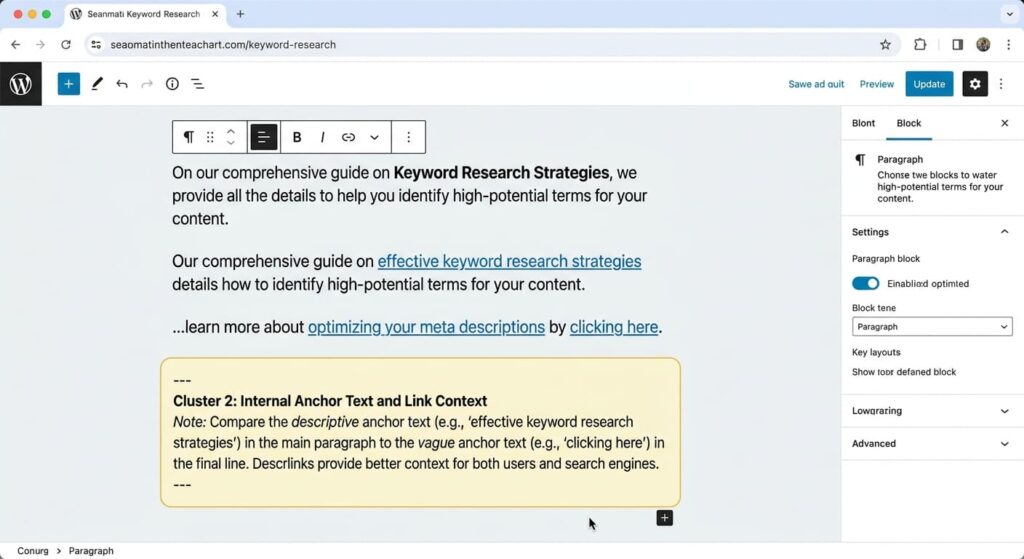
Google states that words before and after a link matter. WCAG 2.2 Success Criterion 2.4.4 also permits link purpose to be determined from the link text alone or from the text together with its programmatically determined context.
The W3C explanation of link purpose in context identifies the same sentence, paragraph, list item or table cell as forms of associated context. Context placed before an ambiguous link can be easier to encounter in reading order.
Consider a news-card pattern:
<article>
  <h3>Search Console adds a crawl report</h3>
  <p>The report separates discovery and fetch errors.</p>
  <a href="/search-console-crawl-report/">Read the crawl-report analysis</a>
</article>
The anchor works by itself and the card adds detail. If the design requires “Read more”, the heading and paragraph may provide sufficient programmatic context when the elements are correctly associated. Yet repeated “Read more” links remain harder to interpret in a link list and less distinctive for sighted scanning.
“Read more” is therefore not always inaccessible. W3C includes news summaries followed by “Read more” as an example where the current paragraph can establish purpose. A descriptive alternative is still preferable when it fits the interface without adding repetition.
Avoid chains of adjacent links such as:
Read our <a href="/titles/">titles</a>,
<a href="/snippets/">descriptions</a>,
<a href="/headings/">headings</a> and
<a href="/images/">images</a> guides.
The individual labels are short and the sentence supplies a shared subject, but dense link chains can be difficult to distinguish. Split destinations into a list or explain the purpose of each route.
Repeated destinations need consistent but contextual labels
A page may link to the same destination from a breadcrumb, body paragraph and related-content card. The visible wording does not have to be identical in every position, but each label should communicate the same destination purpose.
For a canonicalisation guide, these anchors can coexist:
breadcrumb: Canonicalisation;
body: diagnose conflicting canonical signals;
resource card: Canonical URL troubleshooting guide.
All three set compatible expectations. A fourth anchor reading fix index bloat instantly would introduce an unsupported promise even if it points to the same URL.
Use a repeated link when it supports a separate decision point. Remove it when it repeats the same route within a few sentences without adding navigation value. The aim is not a minimum or maximum count; it is a useful choice at the moment a reader may need the destination.
When two links sit next to each other and lead to the same URL—an image followed by its caption, for example—consider combining them into one anchor. W3C technique H2 addresses adjacent image and text links for the same resource. One combined link reduces duplicate tab stops and gives the elements a shared purpose.
Linked images get their label from alternative text
When an image is the only content inside a link, its alt text contributes the link’s accessible name. Google also says it uses the image’s alt attribute as anchor text for image links.
This linked logo needs a destination-based label:
<a href="/">
  <img src="logo.svg" alt="AI SEO Journal home">
</a>
The purpose is going home, not viewing “blue letters on a white background”.
For a linked report cover:
<a href="/reports/internal-linking-benchmark/">
  <img
    src="internal-linking-report-cover.webp"
    alt="Internal Linking Benchmark report">
</a>
If visible text inside the same anchor already names the destination, the image can be decorative to avoid repetition:
<a href="/reports/internal-linking-benchmark/">
  <img src="report-icon.svg" alt="">
  Internal Linking Benchmark report
</a>
An empty alt is wrong when the image is the link’s only content. W3C identifies the absence of an accessible name for an image-only link as a failure affecting link purpose and name. The H30 anchor-text technique includes alternative text for images used inside links.
Do not depend on the title attribute as the main label. It is inconsistently available across touch, keyboard and assistive-technology use. Put the meaningful name in visible text or the image’s appropriate alternative.
Test link purpose without an SEO scoring tool
An editorial accessibility test can expose weak anchors before publication.
Test 1: Read anchors without their paragraphs
Copy the page’s link text into a plain list. Ask what each destination is likely to contain. Labels such as “here”, “website”, “article” and repeated “learn more” usually fail this isolation test.
Google recommends a comparable check: read only the anchor text and decide whether the linked subject remains understandable.
Test 2: Tab through the rendered page
Use the keyboard to move through links in order. Check that focus is visible, the sequence is sensible and repeated links can be distinguished. A descriptive anchor is not accessible if keyboard focus is hidden.
Test 3: Inspect the accessibility tree
Browser developer tools can show the computed accessible name. Check image-only links, icon links and controls that add aria-label. The announced name should agree with the visible purpose.
Test 4: Compare promise with destination
Open each edited link. Compare its anchor, surrounding sentence, destination H1 and actual content. Rewrite exaggerated, outdated or ambiguous promises.
Test 5: Inspect the published HTML
Confirm that Elementor or another builder produced a real <a href="…"> element. When JavaScript inserts the anchor text, Google recommends using URL Inspection to check the rendered HTML.
An editing checklist for descriptive internal links
Before publishing, check each important internal route:
the anchor predicts the destination;
the wording fits naturally within the source sentence;
the sentence explains why the destination helps;
the anchor is concise without becoming generic;
exact-match language appears only where it is the clearest label;
repeated destinations keep compatible promises;
different destinations do not share misleadingly identical labels;
adjacent image and text links to one URL are combined where suitable;
an image-only link has an
altvalue that describes its purpose;visible text and accessible name do not contradict each other;
the link uses a crawlable anchor element with a resolvable
href;the live destination returns the intended page.
Return to the internal linking strategy pillar when the anchor review exposes a wider issue involving page roles, hierarchy, orphan pages or maintenance ownership.
Questions about internal anchor text
What is the best anchor text for internal links?
The best anchor accurately predicts the destination, fits the surrounding sentence and remains understandable when links are skimmed or announced separately. No single phrase pattern suits every internal link.
Is exact-match internal anchor text harmful?
Not when it is accurate and natural. Problems arise when the wording is forced, misleading or repeated to satisfy an artificial target. Choose the clearest destination label rather than manufacturing variation.
Is “read more” always poor link text?
No. A programmatically associated heading, sentence or paragraph can establish its purpose. Descriptive wording is easier to distinguish in link lists and repeated-card layouts.
Does the text around an internal link matter?
Yes. Google advises writers to consider the words before and after a link. WCAG also recognises programmatically associated context when users can determine link purpose without losing their place.
What alt text should a linked image use?
When the image is the link’s only content, write alt text that identifies the destination or action. When visible text inside the same link already supplies that name, use empty alt text for a decorative image to prevent repetition.
Write the promise a destination can keep
Useful anchor text is neither a keyword container nor a forced synonym. It is a compact promise about the next page. The sentence supplies the reason to follow it, and the HTML supplies a crawlable, accessible route.
Edit anchors by reading them alone, testing them in context and comparing them with their destinations. That process improves navigation without invented ratios or claims that one phrase controls rankings.