You’ve built amazing content. Published it perfectly. Optimized every detail. Then accidentally told Google not to show it to anyone.
Meta robots tags are power tools in your SEO arsenal—capable of protecting your site from duplicate content disasters or accidentally nuking your rankings overnight. The difference between strategic implementation and catastrophic mistakes often comes down to understanding two tiny attributes: noindex and nofollow.
According to Ahrefs’ 2024 technical SEO analysis, 34% of websites have at least one critical meta robots tag error—pages that should be indexed but aren’t, pages that shouldn’t be indexed but are, or conflicting directives that confuse search engines entirely. These mistakes cost real traffic. Real rankings. Real revenue.
Consider this: A single misplaced noindex tag on your homepage can remove your entire site from Google within days. A missing nofollow on user-generated content sections can tank your domain authority through link spam. These tags wield enormous power—which makes understanding them non-negotiable.
Table of Contents
ToggleWhat Are Meta Robots Tags?
Meta robots tags are HTML elements placed in a page’s <head> section that give search engines instructions about how to treat that specific page. They’re like private messages to crawlers—invisible to users but crucial for SEO.
The basic structure looks like this:
<meta name="robots" content="noindex, nofollow">
This tag tells all search engine bots (the “robots”) to apply specific directives: noindex means “don’t include this page in search results” and nofollow means “don’t follow links on this page.”
Unlike robots.txt which controls crawling at the site level, robot meta tags control indexing at the page level. Robots.txt says “don’t crawl this page.” Meta robots say “crawl this page, but don’t index it” or “index this page, but don’t follow its links.” The distinction matters enormously.
Your technical SEO fundamentals must include proper meta robots implementation—it’s foundational to controlling how search engines interact with your content.
Noindex Tag Explained
What Noindex Does
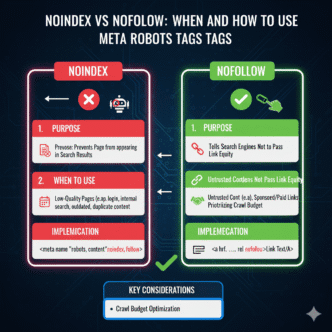
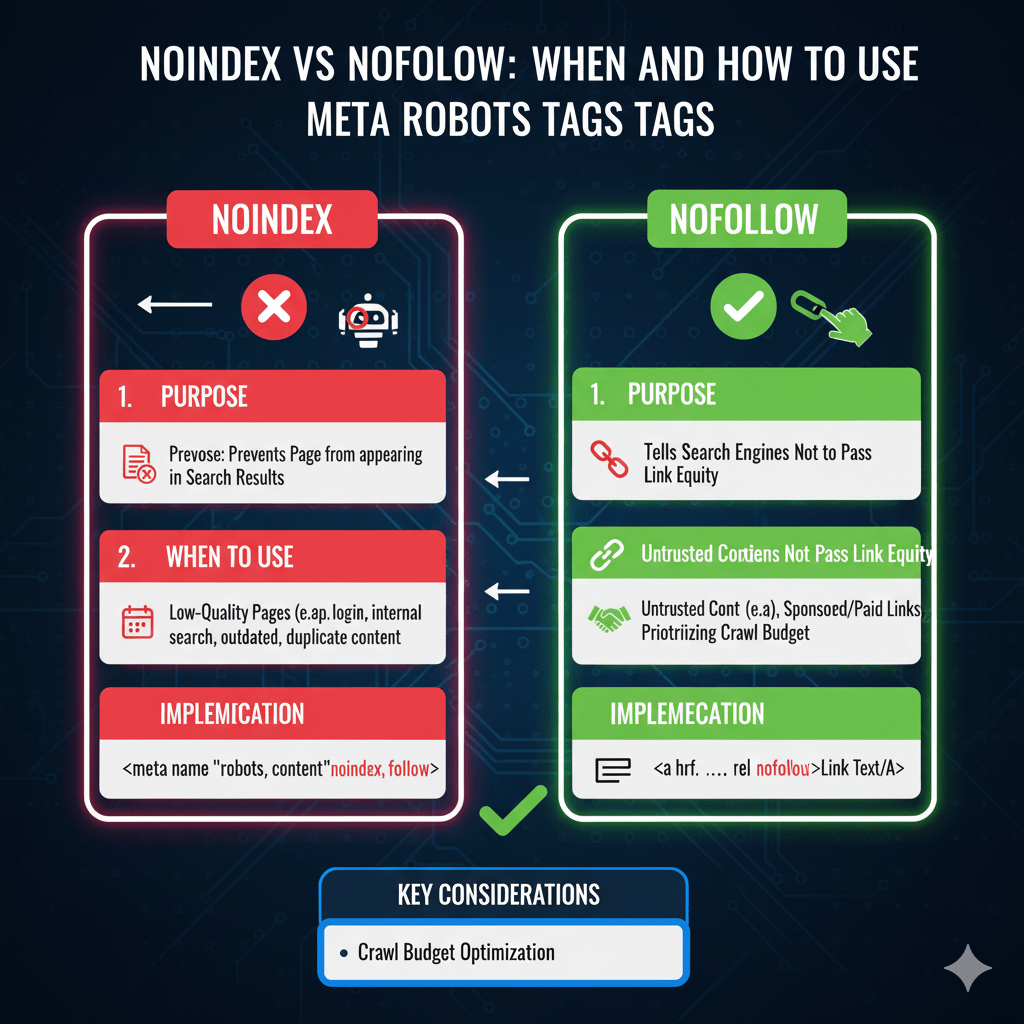
The noindex tag tells search engines “crawl this page if you want, but don’t include it in search results.” The page remains accessible to visitors who have direct links, but won’t appear when people search.
<meta name="robots" content="noindex">
This directive prevents the URL from appearing in search engine indexes. Google can still crawl the page to discover outbound links and understand site structure, but won’t display it in search results.
Noindex is permission-based. Search engines respect it voluntarily—it’s not legally binding. Well-behaved bots like Googlebot honor noindex religiously, but malicious scrapers ignore it completely.
When to Use Noindex Tag
Use noindex strategically for thin or duplicate content pages, internal search result pages, admin and login areas (combined with access restrictions), staging and development content, thank you and confirmation pages, and filtered or faceted navigation combinations.
E-commerce sites with extensive filtering create thousands of URL combinations. Noindexing filter variations while indexing main category pages prevents duplicate content chaos:
<!-- On filtered product page -->
<meta name="robots" content="noindex, follow">
The “follow” part (we’ll cover this next) lets search engines discover products through filtered pages while preventing the filter combinations themselves from indexing.
According to Moz’s indexing research, proper noindex implementation on low-value pages can improve crawl efficiency by 40%+ on large sites. Googlebot stops wasting time indexing junk and focuses on valuable content.
Common Noindex Mistakes
The catastrophic error: accidentally noindexing important pages. This happens more often than you’d think—template-level noindex tags applied during development and never removed, plugin conflicts creating unexpected noindex tags, or staging site tags copied to production.
Always audit for accidental noindex on revenue pages, homepage, key category pages, best-performing blog content, and pages with valuable backlinks.
Google Search Console’s Coverage report flags “Excluded by ‘noindex’ tag” issues. Check this weekly during site changes, monthly otherwise. A Search Engine Journal 2024 study found that 23% of e-commerce sites accidentally noindex at least one important product category.
Nofollow Tag Explained
What Nofollow Does
The nofollow tag tells search engines “don’t follow or credit any links on this page.” It prevents link equity from flowing through outbound links on that page.
<meta name="robots" content="nofollow">
This differs from link-level nofollow (<a href="url" rel="nofollow">) which applies to individual links. Page-level nofollow applies to every link on the page—a nuclear option that’s rarely optimal.
Google’s current stance (as of their 2024 link attribute update) treats nofollow as a “hint” rather than absolute directive for ranking purposes, but still respects it for crawling decisions.
When to Use Nofollow
Page-level nofollow has limited legitimate uses: user-generated content pages with unmoderated links, guestbook or comment sections before you can review links, temporary pages during contests or events with external links, or untrusted affiliate-heavy pages.
Most modern use cases favor link-level nofollow over page-level. Rather than nofollow an entire page, nofollow specific untrusted or paid links:
<!-- Better approach: selective link nofollow -->
<a href="paid-link.com" rel="nofollow sponsored">Sponsored Link</a>
Your technical SEO strategy should minimize page-level nofollow in favor of granular link-level control for better crawl efficiency.
Nofollow Misconceptions
Myth one: nofollow “saves PageRank” for internal linking. This “PageRank sculpting” strategy died in 2009 when Google changed how nofollow works. Nofollowed internal links don’t redistribute their equity to other links—the equity simply evaporates.
Myth two: nofollow prevents penalties. While nofollow helps with spammy user content, Google can still penalize sites with excessive low-quality links even if nofollowed. Quality matters more than attributes.
Myth three: nofollow hides links from Google. Google still sees nofollowed links and may use them for discovery, just not for ranking credit. Nofollow isn’t cloaking or concealment.
Combining Noindex and Nofollow
The Noindex, Follow Combination
This powerful combination says “don’t index this page, but do follow and credit its links.” Perfect for pages that serve as navigation hubs but don’t need to rank themselves.
<meta name="robots" content="noindex, follow">
Use cases include filter pages leading to products, category archives leading to blog posts, tag pages linking to related content, and internal search results showing product links.
This lets you create useful navigation structures without creating indexation bloat. The pages serve visitors and help search engines discover content without competing in search results themselves.
The Noindex, Nofollow Combination
Maximum restrictiveness—don’t index AND don’t follow links. This completely isolates a page from search engine consideration.
<meta name="robots" content="noindex, nofollow">
Appropriate for login pages, checkout pages, private member areas (with server-level restrictions too), and admin dashboards.
However, this blocks search engines from discovering outbound links. If your page links to other valuable pages you want indexed, use “noindex, follow” instead.
Default Index, Follow
Pages without meta robots tags default to “index, follow”—search engines can index the page and follow all links. This is what you want for 90%+ of your content.
<!-- Explicit default (usually unnecessary) -->
<meta name="robots" content="index, follow">
Explicitly stating the default is usually redundant. Absence of meta robots tags achieves the same result with cleaner code.
Noindex vs Disallow in Robots.txt
Critical Differences
Robots.txt disallow prevents crawling. Meta robots noindex prevents indexing. They’re fundamentally different:
Robots.txt: "Don't crawl this page"
Noindex tag: "Crawl this page, but don't index it"
Here’s the catch: if you disallow a page in robots.txt, search engines can’t crawl it to see the noindex tag. This creates a paradox where you’re trying to tell Google “don’t index this” but blocking them from seeing that instruction.
Result: The URL might still appear in search results (without description) based on external links, even though you tried to prevent indexing via disallow. According to Google’s documentation, this is a common source of confusion.
When to Use Each
Use robots.txt disallow for pages you never want crawled—protecting server resources, blocking spam content, or hiding low-value pages. Accept that disallowed pages might still appear in results based on external signals.
Use noindex meta tags for pages that need crawling for link discovery or understanding but shouldn’t index. This keeps pages out of results while maintaining their value for site architecture.
Never use both simultaneously. If a page shouldn’t be indexed, allow crawling so search engines can see the noindex tag. Remove any robots.txt blocks preventing them from reading your indexing directives.
X-Robots-Tag HTTP Headers
What Are X-Robots-Tag Headers?
X-Robots-Tag headers accomplish the same goals as meta robots tags but work at the HTTP header level rather than in HTML. This makes them perfect for non-HTML files like PDFs, images, or dynamically generated content.
HTTP/1.1 200 OK
X-Robots-Tag: noindex, nofollow
Content-Type: application/pdf
Search engines check both HTTP headers and HTML meta tags. If both exist with conflicting directives, the more restrictive one typically wins.
When to Use HTTP Headers
Use X-Robots-Tag for PDFs you don’t want indexed, images that shouldn’t appear in image search, XML or JSON API responses, and any non-HTML content requiring indexing control.
Also valuable for dynamically generated pages where injecting HTML meta tags is difficult. Server-side code can add headers easily:
header('X-Robots-Tag: noindex, follow');
Your CMS or server configuration can set X-Robots-Tag headers based on URL patterns, content types, or other logic—providing flexible control without modifying individual files.
Bot-Specific Directives
Targeting Individual Bots
Meta robots tags can target specific bots rather than all crawlers:
<!-- General directive for all bots -->
<meta name="robots" content="noindex">

<!-- Specific directive for Googlebot -->
<meta name="googlebot" content="index, follow">
This allows nuanced control: maybe you want Google to index your content but not Bing, or you want to block aggressive crawlers while allowing major search engines.
Common bot names: googlebot (Google), bingbot (Bing), slurp (Yahoo), and duckduckbot (DuckDuckGo). Using “robots” targets all bots universally.
Managing AI Crawler Access
2024 brought explosion of AI training crawlers. Control them using bot-specific meta tags:
<meta name="GPTBot" content="noindex, nofollow">
<meta name="CCBot" content="noindex, nofollow">
This blocks OpenAI’s GPTBot and Common Crawl from indexing content for AI training while allowing traditional search engine access. Your willingness to feed AI training data is a strategic decision with no universal right answer.
Implementing Meta Robots Tags
HTML Implementation
Add meta robots tags in your page’s <head> section, preferably near other meta tags:
<!DOCTYPE html>
<html>
<head>
  <meta charset="UTF-8">
  <meta name="robots" content="noindex, follow">
  <title>Page Title</title>
</head>
<body>
  <!-- Page content -->
</body>
</html>
Placement in <head> is crucial—tags in <body> may be ignored. Keep tags above any JavaScript that might cause rendering delays.
WordPress Implementation
WordPress SEO plugins (Yoast, Rank Math, All in One SEO) provide interfaces for setting meta robots tags without touching code.
In Yoast, edit any page and find the “Advanced” tab in the Yoast meta box. Set “Allow search engines to show this page in search results?” to “No” for noindex. Most plugins default to “index, follow” unless you change it.
For programmatic control, use WordPress functions:
// Add noindex to specific page types
function custom_noindex() {
    if (is_search() || is_404()) {
        echo '<meta name="robots" content="noindex, follow">';
    }
}
add_action('wp_head', 'custom_noindex');
Testing and Validation
Google Search Console’s URL Inspection tool shows exactly how Google interprets your meta robots tags. Enter any URL to see if noindex or nofollow directives are detected.
View page source in browsers to verify tags exist and are formatted correctly. Look for typos—”no-index” with a hyphen doesn’t work; it must be “noindex” as one word.
Use crawling tools like Screaming Frog to audit meta robots tags site-wide. Export reports showing all noindexed pages, all nofollowed pages, and any conflicting directives needing resolution.
Strategic Indexing Control
Crawl Budget Optimization
Large sites with limited crawl budgets benefit from strategic noindex on low-value pages. Noindexing thin content, parameter variations, and duplicate pages focuses Googlebot’s time on valuable content.
A site with 50,000 pages but only 20,000 worth indexing should noindex the remaining 30,000. This improves crawl efficiency and prevents thin content from diluting site quality signals.
Monitor crawl stats in Search Console. Proper indexing control should reduce wasted crawl requests while maintaining or improving indexation of priority pages.
Duplicate Content Management
When similar content exists across multiple URLs, canonical tags are usually better than noindex. Canonicals consolidate authority to one URL while noindex simply hides duplicates without consolidation.
<!-- Better for duplicates: canonical -->
<link rel="canonical" href="https://example.com/original">

<!-- Not ideal: noindex doesn't consolidate authority -->
<meta name="robots" content="noindex">
Use noindex when pages genuinely shouldn’t rank (filters, search results). Use canonicals when one version should rank and duplicates should consolidate to it.
Your technical SEO implementation should establish clear rules determining when to canonical versus noindex based on content purpose and duplication patterns.
Real-World Meta Robots Impact
An enterprise SaaS company experienced mysterious traffic declines—35% drop over eight weeks with no clear cause. Rankings didn’t fall significantly, but clicks from search results plummeted.
Investigation revealed a plugin update added noindex tags to their entire blog—over 400 posts. The posts remained technically indexed in Google’s database briefly, but results gradually disappeared as Google processed the noindex directives.
<!-- Accidentally added by plugin update -->
<meta name="robots" content="noindex, follow">
The company didn’t notice for weeks because internal searches still worked and direct traffic continued. Only when organic traffic dropped significantly did they investigate and discover the rogue noindex tags.
Removing the tags required another plugin update and requesting re-indexing via Search Console. Full traffic recovery took six weeks—two weeks for Google to recrawl and process tag removal, plus four weeks for rankings to stabilize.
Cost: approximately $180,000 in lost leads during the 14-week total impact period. All from a single line of code added accidentally during a routine plugin update.
Lesson: Audit meta robots tags after any template, theme, or plugin changes. A simple check could have caught this on day one instead of week eight.
Meta Robots Best Practices Checklist
- Never noindex important revenue or ranking pages
- Use “noindex, follow” for navigation pages without rank value
- Audit for accidental noindex tags monthly minimum
- Don’t combine robots.txt disallow with noindex directives
- Test meta tags using Search Console URL Inspection
- Use X-Robots-Tag headers for non-HTML content
- Apply bot-specific directives only when needed
- Prefer canonical tags over noindex for duplicate management
- Document why each noindex tag exists for future reference
- Monitor Index Coverage report for unexpected exclusions
- Test in staging before deploying meta robots changes to production
Monitoring and Maintenance
Search Console Coverage Reports
Google Search Console’s Index Coverage report shows pages excluded by noindex under the “Excluded” section. Review this regularly to ensure only intended pages appear.
Sudden increases in excluded pages signal problems. If your excluded count jumps from 500 to 5,000 overnight, investigate immediately—something probably went wrong.
Compare excluded URLs against your intended noindex strategy. If important pages appear as excluded by noindex, fix immediately and request re-indexing.
Regular Tag Audits
Quarterly audits using Screaming Frog or similar tools catch implementation drift. Crawl your site and export meta robots data showing which pages have noindex, nofollow, or both.
Review the list critically. Should those pages be noindexed? Are any noindex tags outdated or no longer necessary? Clean up old directives that no longer serve their original purpose.
FAQ: Meta Robots Tags
What’s the difference between noindex in meta tags and robots.txt?
Meta robots noindex tells search engines “don’t show this page in results” but allows crawling. Robots.txt disallow blocks crawling entirely, preventing search engines from seeing noindex tags. If you want pages excluded from search results, use meta robots noindex and allow crawling—never block with robots.txt because that prevents search engines from seeing your indexing directive.
Will noindex tags remove pages from Google immediately?
No, removal takes time. Google must recrawl the page to see the noindex tag, then process that directive. Typically takes 2-4 weeks for pages to fully disappear from results. High-priority pages might be removed within days; low-priority pages could take months. Use URL Inspection tool in Search Console to request immediate recrawling and faster processing.
Can I use noindex and canonical tags together?
Technically yes, but it’s usually contradictory. Canonical tags say “this content duplicates that URL—credit the canonical” while noindex says “don’t index this at all.” If a page truly duplicates another, use canonical only. If it genuinely shouldn’t index, use noindex only. Combining them sends mixed signals search engines may interpret unpredictably.
Does nofollow on a page affect internal links?
Yes, page-level nofollow prevents link equity from flowing through any links on that page, including internal links to other pages on your site. This is why page-level nofollow is rarely recommended—it cuts off your own site architecture. Use link-level nofollow on specific untrusted external links instead, leaving internal links normal.
How do I remove noindex if I change my mind?
Simply remove the meta robots tag from your page’s HTML. On next crawl, search engines will see the tag is gone and resume normal indexing. Request re-indexing via Search Console’s URL Inspection tool to speed up the process. Full recovery takes 2-6 weeks typically as search engines recrawl, reindex, and re-rank the page.
Final Verdict: Control Your Index Destiny
Meta robots tags grant surgical control over what appears in search results and how search engines navigate your site. This power demands respect—use it strategically, never carelessly.
The rules are simple: noindex for pages that shouldn’t rank but need crawling, nofollow for pages with untrusted links (though link-level nofollow is usually better), and “noindex, follow” for navigation structures without rank value. Default to “index, follow” for actual content unless specific reasons demand otherwise.
Audit regularly. Test thoroughly. Document decisions. Monitor coverage reports. These habits prevent the accidental noindex disasters that cost real money through lost rankings and traffic.
Your competitors make meta robots mistakes. They noindex important pages accidentally. They misuse robots.txt disallow. They fail to audit after site changes. This creates opportunity—not through their failures, but through your meticulous correctness.
Master meta robots tags as part of comprehensive technical SEO fundamentals, and you’ve eliminated an entire category of ranking obstacles. Small technical details, massive compounding impact.