You optimized your content for voice search. It works great on Google Home. Then customers try finding you through CarPlay while driving, and you’re invisible. Different devices, different rules, different results.
Device-specific voice search optimization isn’t optional anymore—it’s essential. With voice queries happening across smart speakers, smartphones, smartwatches, car systems, and smart displays, each device type has unique characteristics, user contexts, and optimization requirements that demand tailored strategies.
According to NPR and Edison Research data, 53% of smart speaker owners also use voice on mobile, and 35% use in-car voice systems. Your customers search across multiple devices—your optimization must follow.
Table of Contents
ToggleWhy Does Device Type Matter for Voice Search?
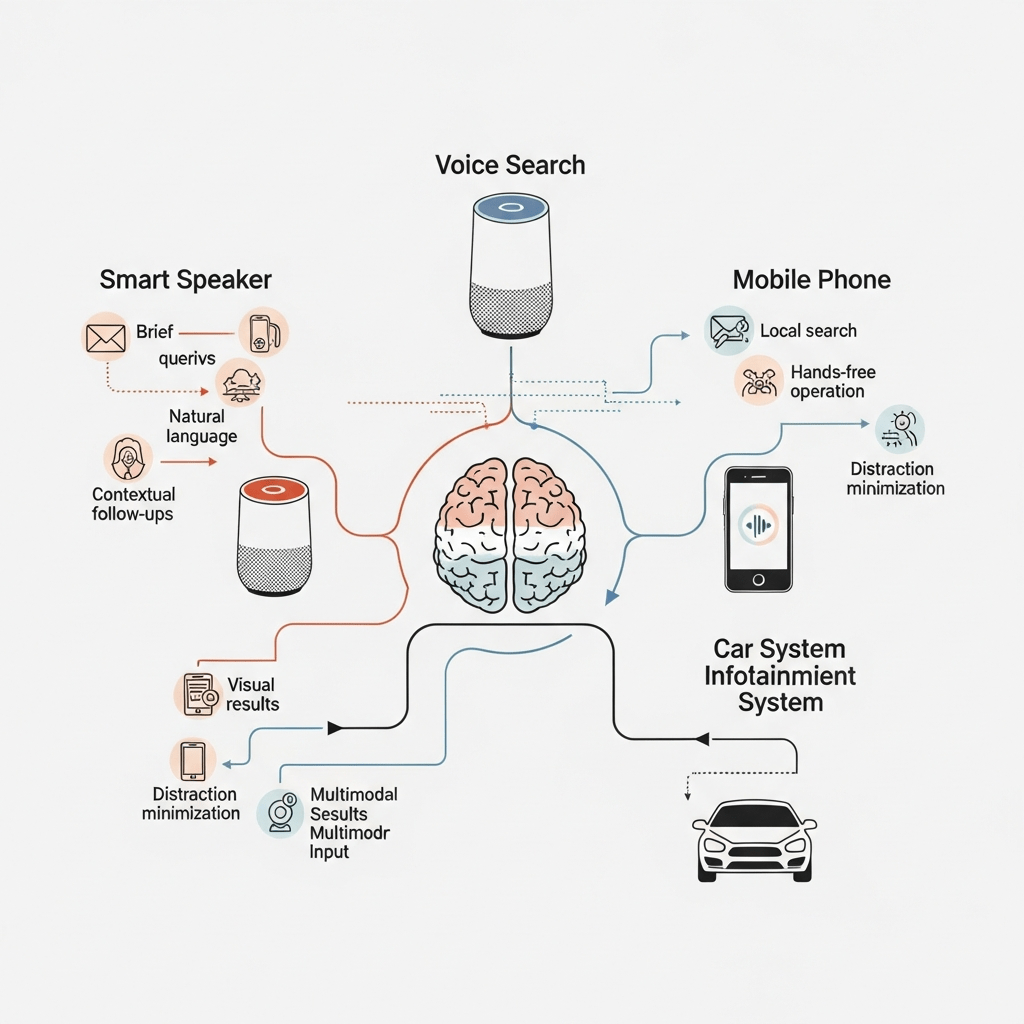
Context drives everything in voice search, and device type determines context. Someone using a smart speaker at home has completely different needs than someone using voice in a car or walking with a smartphone.
Smart speaker optimization targets stationary users at home with hands-free needs—cooking, multitasking, entertainment, smart home control. Queries tend toward information, shopping, and home automation.
Mobile voice search captures on-the-go users needing immediate answers—local businesses, directions, quick facts while multitasking. These represent the highest commercial intent searches.
Car voice search focuses on navigation, safety, and convenience—directions, nearby services, hands-free communication. Users literally cannot look at screens, making voice the only interface.
According to Voicebot.ai’s consumer adoption report, 62% of smartphone users engage with voice assistants monthly, while 35% of smart speaker owners use them daily. Different devices, different usage patterns, different optimization priorities.
How Do Smart Speakers Handle Voice Search Differently?
Smart speakers represent pure voice interfaces—no screens (except smart displays), no keyboards, only spoken interaction. This creates unique optimization challenges and opportunities.
Smart Speaker User Context
Typical use cases:
- Kitchen assistance while cooking
- Music and entertainment control
- Smart home device management
- General information queries
- Shopping and reordering
- Setting timers and reminders
- News and weather briefings
Users stand in one location with hands occupied. They want concise, actionable answers without visual browsing.
Smart Speaker Query Characteristics
Platform-specific voice SEO for speakers requires understanding query types:
Information queries: “How do I remove red wine stains?” Shopping queries: “Order paper towels” Local queries: “What’s the phone number for [business]?” Entertainment: “Play jazz music” Smart home: “Turn off living room lights”
Queries tend longer and more conversational than mobile because users aren’t rushing. They’re comfortable speaking naturally at home.
Optimizing Content for Smart Speakers
Best practices:
Concise audio-friendly answers: 30-40 seconds maximum reading time Clear pronunciation: Avoid complex terminology requiring visual reference Actionable information: Answers users can act on without seeing Sequential instructions: “First, second, third” structure for steps Brand name clarity: Make your business name easy to pronounce and remember
Content structure example:
Q: How do I unclog a drain naturally?

A: You can unclog most drains with baking soda and vinegar. First, pour half a cup of baking soda down the drain. Second, add half a cup of white vinegar and cover the drain. Third, wait 30 minutes, then flush with hot water. For stubborn clogs, call a professional plumber like [Your Business] at [Phone Number].
This structure works perfectly when read aloud—clear steps, specific measurements, natural flow.
Smart Speaker Commerce Optimization
Voice shopping through Alexa and Google requires specific tactics:
For Amazon Alexa:
- Optimize Amazon product listings completely
- Earn Amazon’s Choice badge
- Voice-friendly product titles
- Clear, specific descriptions
- Enable Alexa Shopping features
For Google Assistant:
- Complete Google Merchant Center listings
- Implement Product schema markup
- Clear pricing and availability
- Multiple high-quality product images
- Customer reviews and ratings
According to eMarketer voice commerce data, voice shopping reached $19.4 billion in 2023, with smart speakers driving 65% of voice commerce transactions.
For comprehensive smart speaker strategies, see our complete voice search guide.
What Makes Mobile Voice Search Unique?
Mobile devices represent the largest voice search platform—billions of smartphones with built-in assistants used constantly throughout the day.
Mobile Voice Search Context
Typical scenarios:
- Walking and need directions
- Driving and can’t type safely
- Hands full with shopping bags or children
- Multitasking while exercising
- Quick lookups during conversations
- Immediate local business needs
Users want instant, actionable answers they can act on within minutes or seconds.
Mobile Query Patterns
Mobile voice search queries show distinct characteristics:
High local intent: “Near me” searches dominate Immediate time frame: “Open now,” “available today” Action-oriented: “Call,” “directions,” “hours” Shorter sessions: Quick answer and move on Follow-up common: Multi-turn conversations while on-the-go
According to Google’s mobile search insights, 76% of people who search for something nearby on their smartphone visit a business within 24 hours, and 28% result in purchases.
Mobile-First Optimization Requirements
Technical priorities:
Page speed: Sub-3-second load times mandatory Mobile-responsive design: Flawless display on all screen sizes Click-to-call: Phone numbers automatically clickable Tap-to-navigate: Addresses linking to maps Thumb-friendly buttons: Minimum 48×48 pixel touch targets Minimal scrolling: Key information above fold Fast forms: Autofill-enabled, minimal required fields
Test with actual devices across different carriers and conditions—not just WiFi.
Featured Snippets for Mobile Voice
Mobile voice searches pull heavily from featured snippets. Structure content for position zero:
Paragraph snippets: 40-60 words answering questions List snippets: 5-8 item numbered or bulleted lists Table snippets: Comparison data in simple tables
Place answers immediately after question-format H2/H3 headings for optimal extraction.
Local Mobile Voice Optimization
Critical elements:
Google Business Profile: Complete, accurate, updated constantly Local schema markup: Precise geo-coordinates and address Mobile-optimized directions: Clear, easy-to-follow Real-time information: Current hours, wait times, availability Review presence: 4.0+ stars across platforms
Mobile voice users making local queries convert immediately—optimize aggressively for these high-value searches.
Our local voice search optimization guide covers mobile-local tactics comprehensively.
How Do In-Car Voice Systems Change Optimization?
Car voice search represents the most constrained environment—users literally cannot look at screens or type while driving safely. Voice becomes the only viable interface.
Automotive Voice Assistant Platforms
Major systems:
Apple CarPlay: Integrates iPhone Siri into car displays Android Auto: Brings Google Assistant to vehicles Amazon Alexa Auto: Standalone or integrated Alexa Native systems: BMW, Mercedes, Tesla built-in assistants Aftermarket: Garmin, Kenwood voice systems
Each has different capabilities, data sources, and optimization requirements.
Car-Specific Voice Query Types
Navigation-focused:
- “Navigate to [business/address]”
- “Find gas stations on my route”
- “What’s traffic like to [destination]?”
- “Are there rest stops nearby?”
Communication:
- “Call [contact name]”
- “Read my messages”
- “Send text to [person]”
Information:
- “What’s the weather at my destination?”
- “Find restaurants near [location]”
- “When does [business] close?”
Entertainment:
- “Play [music/podcast]”
- “Continue my audiobook”
Safety restrictions limit interaction complexity—systems favor simple, direct commands with minimal back-and-forth.
Optimizing for CarPlay and Android Auto
Both systems pull from their respective mobile ecosystems—iOS for CarPlay, Android for Android Auto.
Optimization strategies:
For CarPlay (Siri):
- Complete Apple Maps business listing
- Optimize Yelp profile (Siri’s local data source)
- Ensure accurate address and phone
- Add clear, simple business categories
- High-quality photos showing exterior/entrance
For Android Auto (Google Assistant):
- Complete Google Business Profile meticulously
- Accurate real-time hours
- High-quality exterior photos
- Clear parking instructions
- Voice-friendly business description
Car Voice Search Safety Considerations
Automotive systems prioritize safety over comprehensiveness:
Design principles:
- Minimize driver distraction
- Limit interaction complexity
- Favor audio-only responses
- Quick, simple results
- No visual browsing required
Optimize content for audio-only delivery—users can’t read paragraphs while driving.
Voice-Activated Navigation Optimization
When users say “Navigate to [your business],” several factors determine selection:
Ranking signals:
- Business name recognition accuracy
- Address database presence
- Map listing completeness
- Historical navigation data
- User correction patterns
Ensure your business name is easily spoken and understood. “AAA Lock & Key” works better than “A-Plus-Plus Lock and Key Services LLC” for voice.
What About Smartwatches and Wearables?
Wearable devices represent emerging voice search platforms with ultra-constrained interfaces.
Wearable Voice Characteristics
Apple Watch (Siri): iOS integration, fitness focus, ultra-brief responses Wear OS watches (Google): Android integration, notification handling Fitness trackers: Limited voice, workout-specific queries
Users want instant micro-answers—no time for elaboration while exercising or checking quick facts.
Optimizing for Wearable Voice
Content requirements:
Ultra-concise answers: 15-20 words maximum Action-oriented: “Call,” “navigate,” “message” Time-sensitive: “Hours,” “wait time,” “availability” Fitness context: “Nearest water fountain,” “distance to [place]”
Featured snippets optimized for brevity perform best on wearables.
How Do Smart Displays Combine Voice and Visual?
Devices like Google Nest Hub, Echo Show, and Facebook Portal blend voice interfaces with screens—creating multimodal optimization opportunities.
Smart Display Advantages
Multimodal presentation:
- Voice answer plus visual content
- Product images during shopping
- Video recipes while cooking
- Maps with voice directions
- Charts and graphs for data
Users can speak queries and receive both audio answers and visual supplements.
Optimizing for Smart Displays
Content requirements:
High-quality images: Display alongside voice responses Video content: Embedded YouTube or hosted videos Structured data: Tables, charts, comparison content Clear visual hierarchy: Scannable when displayed Mobile-responsive: Displays use mobile rendering
Implement speakable schema plus image optimization for dual-channel delivery.
Example rich content:
{
  "@context": "https://schema.org/",
  "@type": "HowTo",
  "name": "How to Change a Tire",
  "image": "https://example.com/tire-change-steps.jpg",
  "step": [
    {
      "@type": "HowToStep",
      "name": "Secure the Vehicle",
      "text": "Park on level ground and engage parking brake",
      "image": "https://example.com/step1.jpg"
    }
  ]
}
Smart displays show step images while reading instructions aloud.
What Device-Specific Content Strategies Work Best?
Device optimization voice requires creating content that performs across device types without duplication.
The Universal + Specific Approach
Core content foundation:
- Comprehensive, authoritative base content
- Question-format structure
- 40-60 word featured snippet answers
- Detailed elaboration for depth
- Proper schema markup
Device-specific enhancements:
Smart speakers: Audio-friendly instructions, pronunciation guides Mobile: Click-to-call, tap-to-navigate, location emphasis Car systems: Ultra-simple directions, safety-focused Wearables: Micro-answers, action buttons Smart displays: Rich media, visual supplements
One piece of content serves multiple devices with appropriate formatting.
Responsive Voice Content Framework
Structure content in layers:
Layer 1 – Core Answer (all devices):
40-60 words answering the main question
Optimized for featured snippets and voice reading
Layer 2 – Mobile Enhancement (smartphones, tablets):
Additional context, local information, CTAs
Click-to-call, directions, booking links
Layer 3 – Visual Enrichment (smart displays, mobile):
Images, videos, charts, tables
Visual demonstrations and examples
Layer 4 – Deep Dive (desktop, research context):
Comprehensive details, case studies
Related resources, downloads
This layered approach ensures every device gets appropriate content depth.
Platform-Specific Landing Pages
For businesses with device-specific offerings, create targeted pages:
Example: Smart home installer
/smart-speakers/ - Alexa/Google Home installation services
/mobile-controls/ - Smartphone app setup and training
/car-integration/ - Vehicle system integration services
Each page optimized for that device’s user context and query patterns.
How Do You Track Device-Specific Performance?
Measurement reveals which devices drive your results and where to focus optimization.
Google Analytics Device Segmentation
Custom segments:
- Mobile (iOS vs Android)
- Tablet
- Desktop
- Unknown (often smart speakers/wearables)
Compare:
- Traffic volume by device
- Bounce rates across devices
- Conversion rates by device type
- Page load speed per device
- User flow differences
“Unknown” device traffic often indicates smart speaker or wearable voice searches.
Voice-Specific Traffic Indicators
Signals suggesting voice search:
Mobile + direct traffic: Voice often appears as direct Question-format queries: Search Console shows questions Long-tail queries: 7+ word searches Local + immediate intent: “Near me,” “open now” Time patterns: Evening (home) vs midday (mobile) traffic
Cross-reference these signals with device type for attribution insights.
Google Business Profile Insights
Track how customers find you across devices:
Metrics by device:
- Discovery searches (mobile dominant)
- Direction requests (mobile + car systems)
- Phone calls (mobile primary)
- Website visits (desktop + mobile)
Most local voice queries happen on mobile—this should show clearly in Business Profile data.
Platform-Specific Analytics
Amazon Alexa Skill analytics: User engagement, session duration, retention Google Assistant analytics: Action usage, conversation paths Apple SiriKit metrics: Shortcut usage, success rates
These platform-specific tools reveal voice engagement patterns beyond web analytics.
What Common Device-Specific Mistakes Hurt Performance?
Even sophisticated voice strategies fail when ignoring device nuances.
Desktop-First Design
Optimizing primarily for desktop while treating mobile as afterthought kills voice visibility. Voice searches happen overwhelmingly on mobile devices.
Mobile-first mandate: Design, test, and optimize for mobile before desktop.
Ignoring Screen-Free Context
Creating content requiring visual reference fails for smart speakers and car systems.
Poor: “As shown in the diagram below…” Better: “Following these three steps in order…”
Audio-only delivery must work perfectly without visual aids.
Slow Mobile Load Times
Fast desktop but 6-second mobile load times = voice search invisibility. Test on actual devices with real cellular connections.
According to Google’s research, every second of mobile delay decreases conversions 20%. Voice users tolerate even less delay.
Universal CTAs Across Devices
“Click here” makes no sense in voice context. Use device-appropriate calls-to-action.
Better CTAs:
- Mobile: “Tap to call,” “Get directions”
- Smart speaker: “Say ‘call [business name]'”
- Car: “Navigate to [business name]”
- Wearable: Action buttons, not instructions
Neglecting Cross-Device Journey
Users start searches on one device, continue on another. Ignoring this breaks conversion paths.
Example journey:
- Smart speaker: “What’s the best pizza place nearby?” (research)
- Mobile: “Navigate to Joe’s Pizza” (action)
- Desktop: Online order for future delivery (conversion)
Optimize for the complete journey, not individual touchpoints.
Pro Tip: According to Google’s multi-device research, 90% of users switch between devices to accomplish tasks. Voice optimization must support seamless cross-device experiences, not siloed device-specific strategies.
Real-World Device-Specific Optimization Success
A restaurant chain optimized differently across devices:
Smart speakers: Recipe tips and food trivia Alexa Skill driving brand awareness Mobile: Location-based ordering with voice pickup confirmation Car systems: Navigation optimization with parking instructions Smart displays: Menu photos with nutritional info and ordering
Result: 45% increase in voice-driven orders, with clear attribution showing 60% mobile, 25% smart speaker, 15% car system origins. Each device type served different customer journey stages.
A home services company created device-specific content:
Mobile focus: Emergency service, “open now,” click-to-call optimization Smart speaker: How-to advice establishing expertise, branded skill for estimates Car optimization: Simple navigation, parking/access instructions
Voice search leads increased 78% with mobile driving 71% of inquiries but smart speaker interactions showing 3x higher lifetime value—different devices, different customer quality.
Frequently Asked Questions About Device-Specific Voice Search
Do I need completely different content for each device type?
No—create one comprehensive content foundation that works across devices, then add device-specific enhancements. Use responsive design principles: core answer for all devices, progressive enhancement for capable devices. Avoid duplicating content across multiple pages targeting different devices.
Which device type should I prioritize for voice optimization?
Mobile devices drive 60-70% of voice searches and highest commercial intent. Prioritize mobile optimization first, then smart speakers (home context, shopping), then car systems (navigation, local). Wearables currently represent smallest segment but growing. Start where your customers search most frequently.
How do I optimize for car voice systems if I can’t test in every vehicle?
Focus on Apple CarPlay and Android Auto since they dominate aftermarket integration. Optimize for their respective ecosystems (iOS/Siri and Android/Google). Ensure business name is easily spoken, address is accurate in all map databases, and phone number connects reliably. Audio-only content delivery works universally across car systems.
Can voice search analytics distinguish between device types?
Not perfectly—Google Analytics shows device categories (mobile, desktop, tablet, unknown) but doesn’t separate smart speakers from wearables explicitly. Use inference: “unknown” device traffic with evening peaks suggests smart speakers, midday “unknown” with location queries suggests wearables/car. Platform-specific analytics (Alexa Skills, Google Actions) provide clearer device data.
Should smart speaker content be shorter than mobile content?
Not necessarily shorter, but structured differently. Smart speakers need clear, sequential information deliverable audio-only. Mobile content can leverage visual elements (click-to-call, maps, images). Both need concise answers but smart speakers require complete audio-only comprehension while mobile supports visual supplementation.
How important are smart displays versus audio-only speakers?
Smart displays (screens + voice) represent 30% of smart speaker market and growing. They enable richer content presentation—combine voice optimization with high-quality images, videos, and visual data. Don’t ignore audio-only optimization, but increasingly leverage multimodal opportunities where screens supplement voice.
Final Thoughts on Device-Specific Voice Search Optimization
Voice search isn’t one channel—it’s multiple channels requiring coordinated but differentiated strategies. The user on a smart speaker at home has different needs than someone using voice in a car or walking with a smartphone.
Device-specific voice search optimization means understanding these contexts and optimizing appropriately. Mobile demands speed, local relevance, and immediate action. Smart speakers need audio-friendly, comprehensive answers. Car systems require safety-first simplicity.
Start with mobile—it drives the majority of voice searches and highest commercial value. Build comprehensive content working across devices, then add device-specific enhancements progressively.
The businesses winning voice search optimize for user context, not just keywords. They understand that the same person asking the same question on different devices has different immediate needs and optimize accordingly.
Your customers use voice across multiple devices daily. Your optimization must follow them everywhere they search.
For comprehensive strategies covering all voice search aspects, explore our complete voice search optimization framework.
Citations & Sources
- NPR & Edison Research – “Smart Audio Report” (2020) – https://www.npr.org/2020/03/11/812781183/npr-edison-research-release-2020-smart-audio-report
- Voicebot.ai – “Voice Assistant Consumer Adoption Report” (2024) – https://voicebot.ai/voice-assistant-consumer-adoption-report-2024/
- eMarketer – “Voice Commerce Sales Forecast” – https://www.emarketer.com/content/voice-commerce-sales-forecast
- Google Think with Google – “Mobile Search Trends & Consumer Behavior” – https://www.thinkwithgoogle.com/consumer-insights/consumer-trends/mobile-search-trends/
- Google Think with Google – “Mobile Page Speed Benchmarks” – https://www.thinkwithgoogle.com/marketing-strategies/app-and-mobile/mobile-page-speed-new-industry-benchmarks/
- Google Think with Google – “Multi-Device Marketing Strategy” – https://www.thinkwithgoogle.com/marketing-strategies/app-and-mobile/multi-screen-marketing-strategy/
- Stone Temple (Perficient Digital) – “Digital Assistant Voice Search Study” – https://www.stonetemple.com/digital-assistant-study/
- BrightLocal – “Voice Search for Local Business Study” – https://www.brightlocal.com/research/voice-search-for-local-business-study/
- Statista – “Smart Speaker Market Statistics” – https://www.statista.com/statistics/973815/worldwide-digital-voice-assistant-in-use/
- Search Engine Journal – “Voice Search Device Statistics” – https://www.searchenginejournal.com/voice-search-stats/
Related posts:
- Google Assistant SEO: Voice Search Optimization for Android & Google Home
- Voice Search Optimization for Smart Assistants: Alexa, Siri, Google Assistant Strategy
- What is Voice Search SEO? Understanding Voice Search Optimization Fundamentals
- Natural Language Patterns in Voice Search: Understanding How People Speak to Devices (Visualization)