

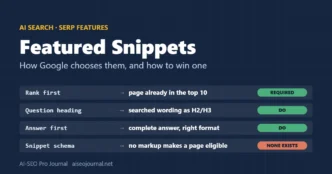
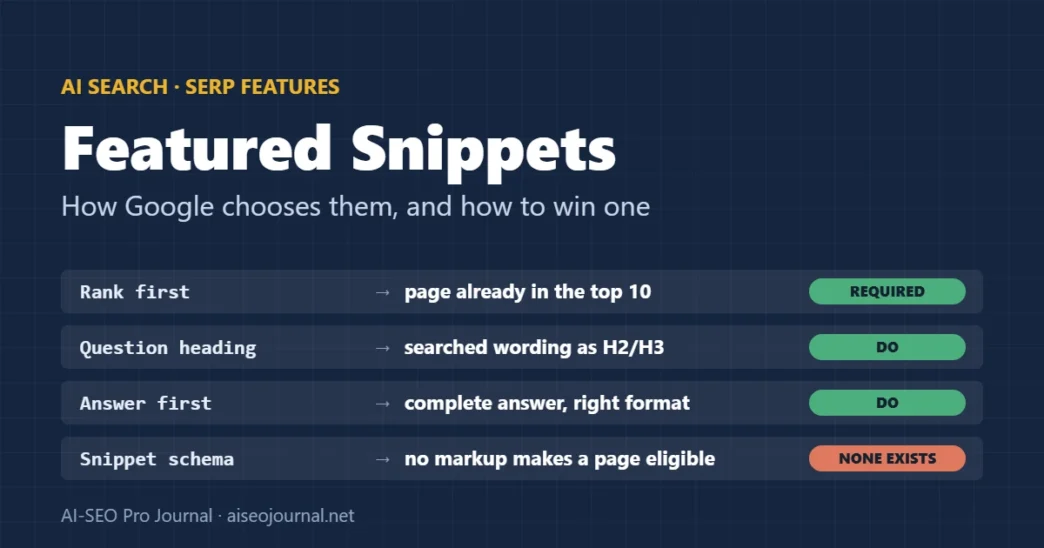
A featured snippet is the answer Google sometimes shows above the regular results, quoted from one web page with a link to it. There is no markup, schema type or setting that puts a page there. Google’s own documentation answers the question “How can I mark my page as a featured snippet?” with “You can’t” [1]. Its systems decide whether a page would make a good snippet, usually choosing from pages that already rank on the first page.
The previous version of this guide claimed otherwise in several places, along with statistics we could not trace to their stated sources. This rewrite starts from what Google documents and the largest published study of snippets, and it is the hub for our featured snippet guides. It sits within our coverage of Google AI Overviews and AI search features, which now share the same results page.
Key takeaways
- Featured snippets are chosen automatically. No structured data, FAQ markup or speakable tag makes a page eligible.
- In Ahrefs’ 2017 study, 99.58% of featured snippets came from pages already ranking in the top 10, so ranking comes first.
- The best-supported tactic is a clear question in a heading followed immediately by a complete, plain answer in the format the query needs.
- Since January 2020 a page shown in the featured snippet is not repeated in the first page of regular results.
- Snippets can take clicks or give them. In the same study the snippet earned fewer clicks than a normal first result.
- The same page-level controls (
nosnippet,max-snippet,data-nosnippet) govern featured snippets and Google’s AI features.
Table of Contents
ToggleWhat is a featured snippet?
A featured snippet is a search result shown in a larger box at or near the top of the page, with the answer text quoted first and the source page’s title and link underneath. Google says it shows them when people are likely to want an answer that can be found in a short piece of a website, and that they are especially useful on phones and when people talk to their devices [2]. Usually there is one, but sometimes there are more [2].
Featured snippets can also appear inside “People also ask” boxes [1]. When someone clicks one, Google scrolls them straight to the quoted section of the page where it can, without the site doing anything [1].
How is a featured snippet different from an AI Overview?
A featured snippet quotes one page. An AI Overview is a generated summary that links to several pages. Both can appear for the same query. Google says there are no additional requirements to appear in AI Overviews or AI Mode beyond being indexed and eligible to be shown with a snippet, and no special structured data to add [5]. In practice, the work that makes a page a good featured snippet candidate (a clear answer in a crawlable, indexable page) is the same baseline for AI features.
| Featured snippet | AI Overview | Regular result | |
|---|---|---|---|
| Text shown | Quoted from one page | Generated summary | Title and snippet |
| Sources linked | One | Several | One |
| Special markup needed | None possible [1] | None [5] | None |
| Search Console position | Standard rules; typically position 1 [9] | One position shared by all its links [9] | Its position |
| Opt-out | nosnippet or a low max-snippet [1] | nosnippet, max-snippet [6] | noindex |
How does Google choose a featured snippet?
Google picks featured snippets from pages it has crawled, based on how well a passage answers the question and how helpful it is [2]. It does not publish a scoring formula, and there is no way to apply. Three documented facts shape the practical approach.
- You have to rank first. Ahrefs’ study of about 2 million featured snippets found that 99.58% of them came from pages already ranking in the top 10 for that query [7]. The study dates from 2017, but nothing Google has said since suggests the link to ranking has gone. Danny Sullivan put it simply in 2020: to be a featured snippet, a page had to rank in the top results, and was then elevated [8].
- Policies apply. Google removes snippets that break its policies, and if a site has many snippets that break the rules it can stop showing featured snippets from that site at all [2].
- Google can decline to show one. In 2018 Google said it had made changes so it may not show a snippet when it detects low-quality content, after high-profile wrong answers [3].
From our own site: In November 2026 we audited the 16 featured snippet posts on aiseojournal.net, all published in December 2025. They repeated figures such as “featured snippets capture 35.1% of mobile clicks”, credited to an Ahrefs 2024 study. The Ahrefs study we could find is from 2017 and reports 8.6% for the snippet [7]. The posts also included three detailed case studies of companies we could not verify, and advice that FAQ schema makes a snippet 3.7 times more likely. We merged the 16 posts into five and rewrote this guide from primary sources.
Which types of featured snippet are there?
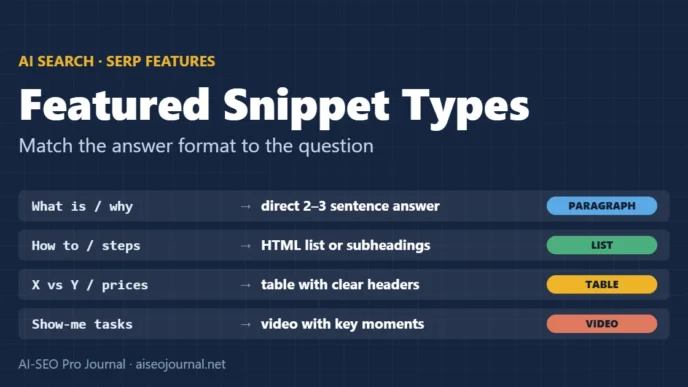
Google shows four main formats. The format follows the question, so the right one for a query is whichever Google is already showing for it, or the one the answer naturally takes.
| Type | Typical queries | What the page needs |
|---|---|---|
| Paragraph | What is, why, who, definitions | A direct two-to-three-sentence answer under a matching heading |
| List (numbered or bulleted) | How to, steps, types, ideas | A real list, or clearly sequenced subheadings |
| Table | Comparisons, prices, specifications, timetables | An HTML table with clear column headers |
| Video | How-to tasks shown better than told | A video Google can index, ideally with key moments marked [10] |
Our featured snippet types guide covers how to format the answer for each one.
How do you get a featured snippet?
Answer the question directly, early and in the right format, on a page that already ranks on page one for it. Everything else is detail. The method below is the one we use when we update a page with snippet potential.
Winning a featured snippet in five steps
- Find queriesYour page ranks 1-10 and a snippet is shown
- Match the questionUse the searched wording as an H2 or H3
- Answer firstComplete answer in the first lines, in the format shown
- Add depthExamples, steps and caveats below the answer
- Check accessAnswer in the HTML; no nosnippet, low max-snippet or data-nosnippet
1. Find queries where you already rank
Start from queries where your page is in positions 1 to 10 and a featured snippet is shown, because almost every snippet comes from that group [7]. Search Console’s Performance report gives you the queries and average positions. Check each results page by hand, or with a rank tracker that records SERP features. Our guide to finding featured snippet keywords covers this step in detail.
2. Put the question in a heading
Use the wording people search with as an H2 or H3, for example “How long does a passport renewal take?”. A heading that mirrors the query makes the answer that follows easy to locate. It is not a rule Google publishes, but it is what most featured answers on a results page have in common.
3. Answer in the first lines under it
Write the complete answer straight after the heading, before background or caveats. For a paragraph snippet, two or three plain sentences that make sense on their own are enough. There is no official word count; long answers are simply cut off with an ellipsis in the box. For a list or table, start the list or table directly under the heading and keep each item short.
4. Then add the detail
Below the short answer, explain properly: examples, exceptions, steps in more detail. The snippet only needs the first lines; the page still has to be the best result for someone who clicks.
5. Make sure Google can read and quote it
The answer must be in the indexed HTML and the page must be allowed to show snippets. A nosnippet robots tag, a very low max-snippet value or a data-nosnippet wrapper around the answer all prevent it being quoted [1] [6]. Our guide to meta descriptions and snippet controls explains each directive.
Professional tip: Before rewriting anything, search the query and read the current snippet. Note its format and roughly how much of the answer fits in the box. Then make your answer more complete or more precise in that same format. A different format only makes sense when the current one clearly does not suit the question.
Does schema markup help you win a featured snippet?
No. Google’s featured snippet documentation says a page cannot be marked as a featured snippet [1], and its AI features documentation says no special structured data is needed for AI Overviews or AI Mode either [5]. Structured data still has jobs: it can make a page eligible for rich results and helps describe the page. It is not a snippet lever.
Two schema types are often recommended for snippets on old advice:
- FAQPage and HowTo. Since August 2023 FAQ rich results are shown only for well-known, authoritative government and health websites, and HowTo rich results were deprecated in September 2023 [4]. Neither was ever a route into the featured snippet box.
- Speakable. A beta feature for news publishers, used for topical news on Google Assistant devices in the US [11]. It does nothing for most sites.
Are featured snippets worth winning?
Often, but not always. In Ahrefs’ 2017 click-through test, a featured snippet received about 8.6% of clicks. The first regular result underneath it received about 19.6%, while a first result on a page without a snippet received about 26% [7]. A snippet that fully answers a simple question can satisfy the searcher without a click.
Since January 2020, a page in the featured snippet is not repeated in the first page of regular results, and the snippet counts as one of the ten listings [8]. Holding the snippet therefore replaces your regular listing rather than adding to it. Google’s own position is that featured snippets do drive traffic to publishers [3].
The trade-off is clearest for short factual answers, such as a date, a conversion or a definition. There, a snippet can mean visibility without visits. Questions whose full answer needs more than the box, such as processes, comparisons or decisions, are where a snippet is most likely to send traffic.
Professional tip: If you suspect a snippet is costing clicks, test it rather than guess. A
max-snippetornosnippetchange applies to every snippet for the page, including the normal one and AI features [6]. So use it only on a page where you can measure the effect in Search Console for several weeks, and note the date you changed it.
How do you track featured snippets?
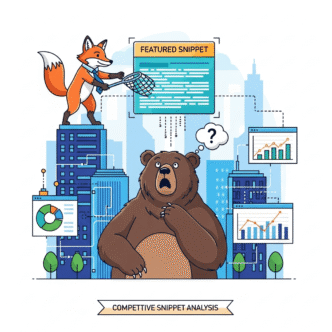
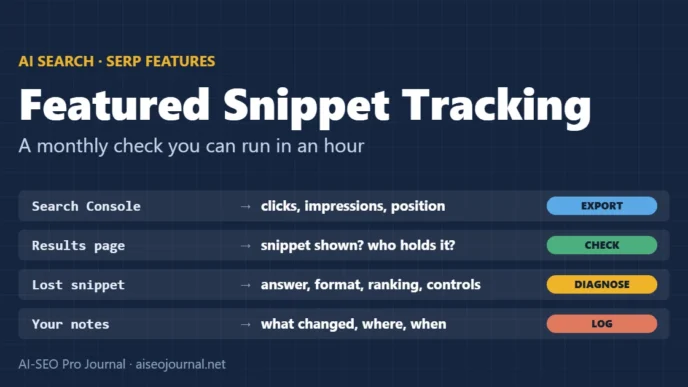
Search Console counts a featured snippet with the standard position rules, so a query where your page holds the snippet typically shows position 1 [9]. To know which queries show a snippet and who holds it, check the results page or use a rank tracker that records SERP features. Our featured snippet tracking guide sets out a simple monthly routine, including what to do when you lose one. To work out why a competitor holds a snippet you want, see competitive snippet analysis.
I want to improve one section of my page so it answers a search question clearly.
Question (as people search it): [paste query]
Format Google currently shows for it: [paragraph / list / table / none]
My current section: [paste heading and text]

1. Rewrite the heading as the question, in natural wording.
2. Write a direct answer to go immediately under the heading, in the same format Google shows (2-3 sentences for a paragraph; a short numbered or bulleted list; or a table with clear column headers).
3. List anything my section is missing that the answer needs.
Use only facts from my text. If a fact is missing, write [MISSING] instead of guessing. Do not add statistics or claims I have not given you.
Featured snippet guides on this site
- Featured snippet types: paragraph, list, table and video, and how to format each answer.
- Featured snippet keywords: finding queries where a snippet is within reach.
- Competitive snippet analysis: comparing your answer with the one Google shows.
- Tracking and keeping featured snippets: checking, measuring and defending them.
Frequently asked questions
Can I mark my page as a featured snippet?
No. Google’s documentation says site owners can’t mark a page as a featured snippet. Google’s systems decide automatically whether a page would make a good one, and no structured data changes that.
How long should a featured snippet answer be?
Google publishes no length. Write a complete answer in two or three plain sentences directly under the question heading, then expand below it. Very long paragraphs are cut off in the box, which makes the answer less useful.
Do I need to rank on page one to get a featured snippet?
Almost always. In Ahrefs’ study of about 2 million featured snippets, 99.58% came from pages already ranking in the top 10 for the query.
Will my page still appear in the normal results if it wins the snippet?
Not on page one. Since January 2020 Google does not repeat a page that is shown in the featured snippet in the first page of regular results; the snippet counts as one of the ten listings.
How do I stop Google showing my page as a featured snippet?
Use the nosnippet robots meta tag, which removes all snippets for the page, or lower max-snippet. Google says a low max-snippet doesn’t guarantee removal from featured snippets, and both settings also limit how the content is used in AI Overviews and AI Mode.
Does FAQ schema help me get featured snippets?
No. FAQ markup was never a route into the featured snippet box, and since August 2023 FAQ rich results are shown only for well-known, authoritative government and health websites.
Start with the pages that already rank
Pick ten queries where one of your pages ranks in the top ten and a featured snippet is showing. For each one, check that the page asks the question in a heading and answers it in the first lines below. Fix the pages that do not, note the date, and check the results page again a few weeks later. Then repeat with the next ten.
For the next step, the featured snippet types guide shows how to format paragraph, list, table and video answers.
Sources
- Google Search Central — Featured snippets and your website
- Google Search Help — How Google’s featured snippets work
- Google (Danny Sullivan) — A reintroduction to Google’s featured snippets, 30 January 2018
- Google Search Central Blog — Changes to HowTo and FAQ rich results, 8 August 2023 (updated 14 September 2023)
- Google Search Central — AI features and your website
- Google Search Central — Robots meta tag, data-nosnippet and X-Robots-Tag specifications
- Ahrefs (Tim Soulo) — Study of 2 million featured snippets, 29 May 2017
- Search Engine Journal — Google: webpages with featured snippets won’t appear twice on page 1, 22 January 2020
- Search Console Help — What are impressions, position and clicks?
- Google Search Central — Video SEO best practices
- Google Search Central — Speakable structured data (beta)