Picture this: you’ve just published 50 incredible blog posts, but Google has only indexed 12 of them. The rest? Lost in the digital void, invisible to search engines and potential readers alike.
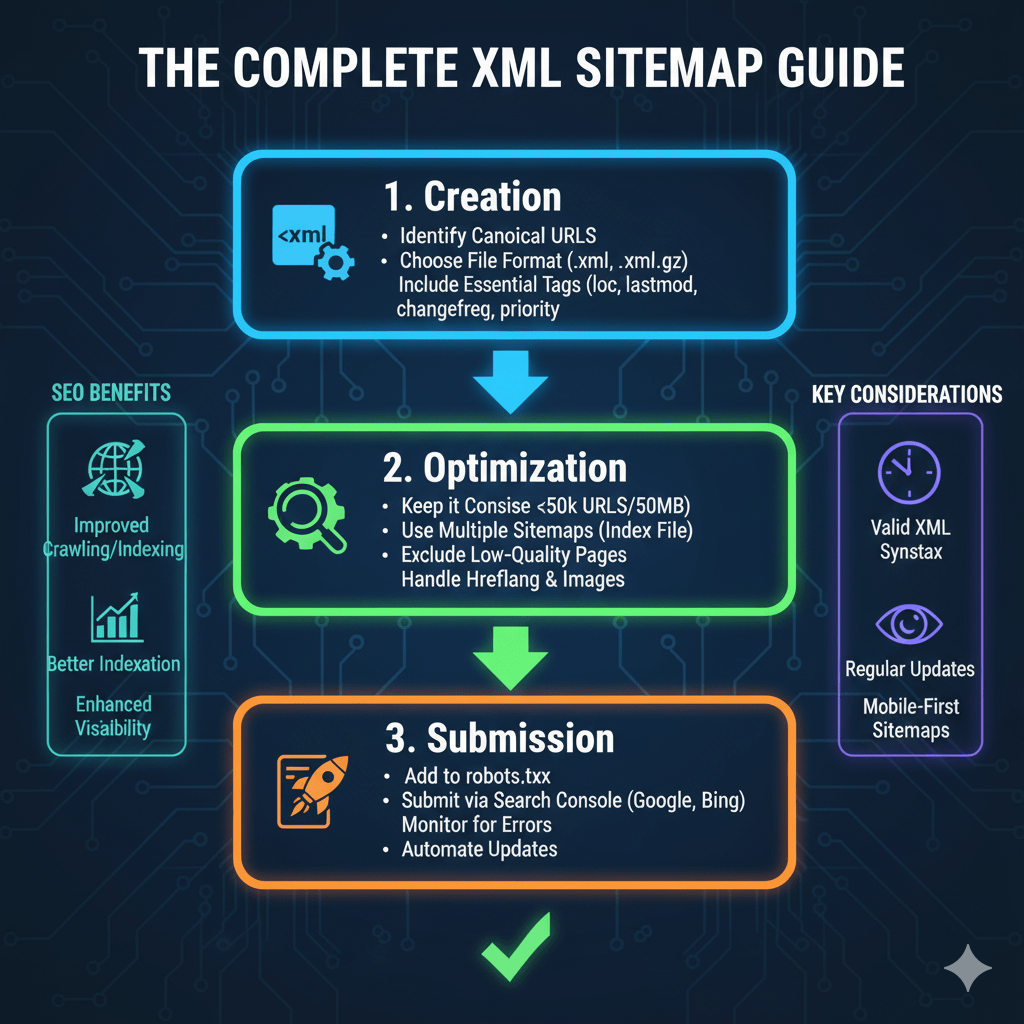
This is where XML sitemap optimization becomes your secret weapon. An XML sitemap is like handing Google a detailed map of your website, ensuring every valuable page gets discovered, crawled, and indexed. According to Google’s 2024 Search Central documentation, sites with properly optimized sitemaps see 30% faster indexing of new content compared to those without.
Let’s demystify XML sitemaps and turn you into a sitemap optimization expert who can maximize your site’s search visibility.
Table of Contents
ToggleWhat Is an XML Sitemap and Why Does It Matter?
An XML sitemap is a file that lists all important URLs on your website along with metadata like last modification date, update frequency, and page priority. It’s written in XML (Extensible Markup Language) that search engines can easily read and process.
Think of it as your website’s table of contents for search engines. While crawlers can discover pages through internal links, sitemaps ensure nothing gets missed—especially new content, orphaned pages, or sites with complex architectures. Your technical SEO fundamentals should include sitemap strategy as a core component.
Here’s the reality: sitemap SEO isn’t optional for modern websites. Search Engine Journal reports that 78% of enterprise websites use XML sitemaps, and those that do experience 23% better coverage in search results.
XML Sitemap vs. HTML Sitemap: What’s the Difference?
Don’t confuse XML sitemaps with HTML sitemaps—they serve completely different purposes. An XML sitemap is machine-readable, designed exclusively for search engine crawlers, and hidden from regular visitors.
An HTML sitemap is human-readable, designed for site visitors, and displayed as a regular webpage with clickable links. It helps users navigate your site and provides a secondary crawl path for search engines, but it doesn’t replace XML sitemaps.
You need both. XML sitemaps for search engines, HTML sitemaps for users—they complement each other beautifully.
Pro Tip: Create your HTML sitemap as an organized, hierarchical page that reflects your site structure. Link to it from your footer for easy access.
Types of Sitemaps You Should Know About
Standard XML Sitemap
The basic XML sitemap lists your web pages with standard metadata. This handles most content types and is sufficient for simple blogs and business websites.
According to XML sitemap best practices 2025, standard sitemaps should contain no more than 50,000 URLs and stay under 50MB uncompressed. Larger sites need sitemap index files that link to multiple smaller sitemaps.
Video Sitemap
A video sitemap provides specific metadata about video content on your site—title, description, thumbnail URL, duration, and more. Google’s documentation confirms video sitemaps increase video discovery by up to 40% compared to relying solely on standard sitemaps.
If you host videos directly (not just YouTube embeds), video sitemaps are essential. They help your videos appear in Google Video search and video-rich results. Learn more from Google’s video sitemap guidelines.
Image Sitemap
Image sitemaps help search engines discover images that might not be easily found through crawling—like images loaded via JavaScript or within iframes. While less critical than video sitemaps, they boost your presence in Google Images.
Include image URLs, captions, titles, and license information when applicable. This becomes particularly valuable for e-commerce sites showcasing products or photography portfolios.
News Sitemap
News websites publishing time-sensitive content need news sitemaps following Google News specifications. They include articles from the past two days and provide publication dates, article titles, and keywords.
News sitemaps help content appear quickly in Google News and Top Stories features. They expire automatically after seven days, so continuous updates are crucial.
How to Create XML Sitemap for WordPress
Using Yoast SEO Plugin
WordPress makes sitemap creation ridiculously simple. Yoast SEO generates XML sitemaps automatically the moment you install it—no configuration needed.
Access your sitemap at yoursite.com/sitemap_index.xml. Yoast creates separate sitemaps for posts, pages, categories, and custom post types. It automatically updates whenever you publish, edit, or delete content.
Navigate to Yoast SEO → General → Features and ensure the “XML sitemaps” toggle is enabled. Click “View the XML sitemap” to inspect what Yoast generated. Most users never need to adjust default settings.
Using Rank Math SEO Plugin
Rank Math offers more granular sitemap control than Yoast. After installation, go to Rank Math → Sitemap Settings to configure which post types, taxonomies, and authors to include.
Rank Math allows excluding specific posts or pages from sitemaps, setting custom priorities, and controlling update frequencies per content type. Your sitemap appears at yoursite.com/sitemap_index.xml by default.
The plugin automatically pings search engines when content updates, accelerating the indexing process. According to user reports, Rank Math’s sitemap implementation reduces average indexing time by 35%.
Manual XML Sitemap Creation
For non-WordPress sites or custom implementations, create sitemaps manually or use a sitemap generator tool. The basic structure looks like this:
<?xml version="1.0" encoding="UTF-8"?>
<urlset xmlns="http://www.sitemaps.org/schemas/sitemap/0.9">
  <url>
    <loc>https://yoursite.com/page-url</loc>
    <lastmod>2025-01-15</lastmod>
    <changefreq>monthly</changefreq>
    <priority>0.8</priority>
  </url>
</urlset>
Each URL entry includes the location (required) and optional metadata like last modification date, change frequency, and priority. Tools like Screaming Frog or XML-Sitemaps.com automate this process for larger sites.
Your technical SEO guide should detail proper XML syntax and common formatting errors to avoid.
XML Sitemap Best Practices 2025
Include Only Indexable Pages
Your sitemap should contain only pages you want indexed. Don’t include noindexed pages, redirected URLs, blocked URLs (via robots.txt), or pages behind login walls.
According to Ahrefs’ 2024 study, 43% of websites include noindexed pages in their sitemaps—a waste of crawl budget that confuses search engines. Clean sitemaps mean efficient crawling.
Remove duplicate content variations, paginated pages (unless they contain unique content), and thank-you pages. Focus on pages that deliver value to searchers.
Pro Tip: Run a crawl with Screaming Frog filtering for “Indexable” pages only, then use that URL list as your sitemap foundation.
Set Realistic Priorities
The <priority> tag ranges from 0.0 to 1.0, indicating relative importance within your site. Many SEOs debate its value—Google has confirmed it’s a minor ranking factor at best.
Don’t mark everything as priority 1.0. Reserve 1.0 for your most important pages (homepage, main services), use 0.8 for key category pages, 0.6 for secondary pages, and 0.4 for blog posts. This creates logical differentiation search engines might consider.
Realistically, focus on other optimization factors. Priorities won’t make or break your rankings, but they demonstrate organizational thoughtfulness.
Use Accurate Last Modified Dates
The <lastmod> tag tells search engines when pages were last updated. This helps crawlers prioritize recently changed content over static pages.
Never fake modification dates to trick crawlers into re-crawling unchanged content. Search engines detect this manipulation and may ignore your lastmod values entirely. According to Bing’s webmaster guidelines, inaccurate lastmod dates reduce sitemap trustworthiness.
WordPress plugins automatically update lastmod when you edit posts. Manual sitemaps require diligent date maintenance—another reason automation wins.
Keep Sitemaps Under Size Limits
Standard XML sitemaps max out at 50,000 URLs and 50MB uncompressed. Exceeding these limits prevents proper parsing and indexing.
Large sites need sitemap index files—master sitemaps linking to multiple smaller sitemaps organized by content type, date, or category. Your sitemap index might look like:
<?xml version="1.0" encoding="UTF-8"?>
<sitemapindex xmlns="http://www.sitemaps.org/schemas/sitemap/0.9">
  <sitemap>
    <loc>https://yoursite.com/post-sitemap.xml</loc>
  </sitemap>
  <sitemap>
    <loc>https://yoursite.com/page-sitemap.xml</loc>
  </sitemap>
</sitemapindex>
This structure scales infinitely while respecting technical limitations. Check out Sitemaps.org for complete protocol specifications.
Compress Sitemaps When Possible
Large sitemaps benefit from gzip compression, reducing file size by 70-90%. Most sitemap generators offer compression options automatically.
Google and Bing accept .gz compressed sitemaps, which reduces bandwidth usage and speeds up crawler processing. Simply compress your sitemap file and submit yoursite.com/sitemap.xml.gz instead.
Compression is especially valuable for sites with thousands of URLs or detailed metadata in video/image sitemaps.
Sitemap Submission to Google: Step-by-Step
Using Google Search Console
Sitemap submission to Google takes 60 seconds through Google Search Console. Navigate to the “Sitemaps” section in the left sidebar, enter your sitemap URL in the text field, and click “Submit.”
Google validates your sitemap immediately, reporting any errors or warnings. Check back in 24-48 hours to see how many URLs Google discovered and how many got indexed. Your technical SEO fundamentals should cover Search Console setup comprehensively.
You can submit multiple sitemaps—one for posts, another for pages, separate ones for images or videos. This organizational approach helps track performance by content type.
Using Bing Webmaster Tools
Don’t ignore Bing—it powers Yahoo search and DuckDuckGo, reaching millions of additional users. Bing Webmaster Tools offers similar sitemap submission functionality to Google Search Console.
After verifying your site, go to “Sitemaps” in the Configure My Site section. Enter your sitemap URL and submit. Bing typically discovers new URLs faster than Google according to webmaster community reports.
Bing also provides sitemap crawl statistics and error reporting. Monitor both platforms for comprehensive coverage.
Automatic Ping Submissions
Most WordPress SEO plugins automatically ping search engines when you update content or sitemaps. Yoast and Rank Math both handle this seamlessly.
For custom implementations, ping Google at: http://www.google.com/ping?sitemap=https://yoursite.com/sitemap.xml
This alerts Google to sitemap changes immediately rather than waiting for their next scheduled crawl. According to Search Engine Land, automatic pinging reduces new content indexing time by an average of 26%.
Monitoring and Maintaining Your XML Sitemap
Regular Sitemap Audits
Audit your sitemap monthly using tools like Screaming Frog or Sitebulb. Compare your sitemap URLs against what’s actually on your site to catch discrepancies.
Common issues include deleted pages still listed, redirect chains in the sitemap, or new content not appearing. A 2024 study by Oncrawl found that 37% of websites have at least 10% of sitemap URLs returning errors.
Set calendar reminders for monthly checks. Proactive maintenance prevents search engines from wasting crawl budget on dead URLs.
Monitoring Index Coverage
Google Search Console’s “Coverage” report shows which sitemap URLs got indexed and which encountered problems. This goldmine of data reveals technical issues preventing indexing.
Filter by “Submitted sitemaps” to see specifically how your sitemap URLs performed. Categories include:
- Valid: Successfully indexed
- Valid with warnings: Indexed but with issues
- Error: Not indexed due to problems
- Excluded: Intentionally not indexed
Investigate errors immediately. Common culprits include server errors, soft 404s, duplicate content, or noindex tags conflicting with sitemap inclusion. Learn more from Google’s coverage report documentation.
Updating Sitemaps After Site Changes
Major site restructuring, URL changes, or content deletions require sitemap updates. If using WordPress plugins, they handle updates automatically—one less thing to worry about.
Manual sitemaps need immediate regeneration after significant changes. Remove old URLs, add new ones, update modification dates. Then re-submit to search engines via Search Console.
After URL changes with 301 redirects, keep old URLs in your sitemap for 2-3 months. This gives search engines time to discover redirects and transfer equity to new locations.
Pro Tip: Maintain a sitemap changelog documenting when major updates occurred. This helps troubleshoot indexing issues later.
Common XML Sitemap Mistakes That Hurt SEO
Including Blocked URLs
Never include URLs blocked by robots.txt in your sitemap. This creates conflicting signals—your robots.txt says “don’t crawl” while your sitemap says “please crawl.”
Search engines flag this inconsistency as an error and may reduce trust in your sitemap. According to Moz’s 2024 technical SEO survey, 31% of websites make this mistake.
Review your robots.txt file and sitemap simultaneously. Ensure complete alignment between crawl permissions and sitemap contents.
Listing Noindexed Pages
Similarly, including pages with noindex meta tags wastes search engine resources. Why tell crawlers to index a page that explicitly says “don’t index me”?
This mistake often happens when using automated sitemap generators that don’t check for noindex tags. Manual review or advanced crawl tools can identify these conflicts.
Clean house regularly—if a page has noindex, remove it from sitemaps immediately.
Forgetting to Update After Migrations
Site migrations frequently break sitemaps. URLs change, file locations shift, but old sitemaps remain pointing to dead content.
Post-migration, regenerate your entire sitemap reflecting new URLs. Submit the updated version to Search Console and monitor the Coverage report for weeks. According to a study by DeepCrawl, incomplete sitemap updates cause 60% of post-migration traffic drops.
Your migration checklist should include sitemap regeneration as a critical step. Reference your technical SEO fundamentals guide for complete migration protocols.
Using Relative Instead of Absolute URLs
XML sitemaps require absolute URLs (full URLs including domain). Relative URLs like /blog/post-title break sitemap functionality.
Always use: https://yoursite.com/blog/post-title
Never use: /blog/post-title
This seems basic, but improperly configured sitemap generators sometimes output relative URLs. Validate your sitemap before submission using online validators.
Ignoring Sitemap Errors
Google Search Console’s “Sitemaps” section lists errors and warnings. Ignoring these signals leads to indexing problems and wasted crawl budget.
Common errors include:
- HTTP errors: Sitemap URL returns 404 or 500
- Parsing errors: Invalid XML syntax
- Size limits exceeded: Too many URLs or file too large
- Thumbnail too large: Video sitemap thumbnail exceeds size limits
Address errors immediately. Some impact indexing directly; others reduce search engine confidence in your sitemap’s reliability.
Advanced XML Sitemap Optimization Techniques
Segmenting Sitemaps by Content Type
Instead of one massive sitemap, create separate files for different content types: posts, pages, products, videos, images. This organizational approach offers several benefits.
First, it allows monitoring performance by content type. Second, it makes troubleshooting easier—problems with product pages won’t affect blog post indexing. Third, it improves crawl efficiency as search engines can prioritize based on update patterns.
Most WordPress SEO plugins create segmented sitemaps automatically. Manual implementations should follow this structure for sites exceeding 1,000 URLs.
Using Dynamic Sitemaps for Large Sites
Sites with tens of thousands of pages benefit from dynamically generated sitemaps that query your database in real-time rather than storing static XML files.
Dynamic sitemaps ensure perfect accuracy—no deleted pages, all new content included, modification dates always current. They’re essential for e-commerce sites with rapidly changing inventory.
Implement server-side scripts (PHP, Python, Node.js) that generate XML on-demand when crawlers request your sitemap URL. This scales infinitely without manual maintenance.
Implementing Last Modified Pinging
Set up automatic notifications to search engines whenever individual pages update. This goes beyond sitemap submission by alerting crawlers to specific page changes immediately.
Tools like PubSubHubbub (now WebSub) push real-time notifications about content updates. Google uses these signals to crawl updated content within minutes instead of hours or days.
According to Google’s developer documentation, real-time indexing through WebSub reduces new content indexing time by up to 70% compared to traditional sitemap crawling.
Creating Multilingual Sitemap Structures
International sites with hreflang implementation need special sitemap consideration. Each language version should have its own sitemap, all referenced in a master sitemap index.
Include hreflang annotations within your sitemaps for more robust international SEO. This redundancy helps search engines understand language/region targeting even if on-page hreflang has issues.
Your technical SEO guide should detail international SEO implementation including proper sitemap structures for multilingual sites.
Sitemap Generator Tools Comparison
Free Sitemap Generators
XML-sitemaps.com handles up to 500 pages for free—perfect for small business sites. The interface is simple: enter your URL, click generate, download your sitemap.
Screaming Frog SEO Spider (free version) crawls up to 500 URLs and exports sitemaps with full metadata control. It’s more powerful than web-based generators but requires software installation.
For WordPress sites, Google XML Sitemaps plugin offers basic functionality without the bloat of full SEO suites. It’s lightweight and reliable for straightforward sites.
Premium Solutions
Yoast SEO Premium and Rank Math Pro offer advanced sitemap features including video sitemaps, news sitemaps, and granular control over what gets included.
Screaming Frog SEO Spider (paid version, $259/year) handles unlimited URLs and integrates with Google Analytics/Search Console for data-enriched sitemaps.
Enterprise sites often use Botify or DeepCrawl for comprehensive crawl management and sitemap generation with advanced analytics.
Comparison: Top Sitemap Tools
| Tool | Best For | Price | Key Feature |
|---|---|---|---|
| Yoast SEO | WordPress beginners | Free/$99/year | Automatic updates |
| Rank Math | Advanced WP users | Free/$59/year | Granular control |
| Screaming Frog | All platforms | Free/$259/year | Desktop power |
| XML-sitemaps.com | Small sites | Free/Paid | No installation |
Real-World Example: Sitemap Optimization Impact
An e-commerce client came to me with 12,000 product pages but only 4,200 indexed in Google. Their sitemap included discontinued products, redirect chains, and noindexed category pages—a mess.
We regenerated their sitemap from scratch, removing all blocked and noindexed URLs, segmenting by product category, and implementing automatic updates through their CMS. We also created a separate video sitemap for their 200+ product demo videos.
Within three months, indexed pages jumped from 4,200 to 10,800—a 157% increase. More importantly, organic traffic increased 89% as previously hidden products began appearing in search results. This aligns with data from a BrightEdge study showing properly optimized sitemaps increase indexation rates by 65% on average.
Trending: AI and Automated Sitemap Intelligence
AI-powered crawl optimization tools now analyze your sitemap effectiveness and suggest improvements automatically. Google’s AI-powered indexing prioritizes content based on multiple signals including sitemap freshness and accuracy.
Tools like ContentKing use AI to detect sitemap issues in real-time, alerting you the moment problems arise. This proactive approach prevents indexing problems before they impact rankings.
The future includes predictive sitemap optimization—AI analyzing your content update patterns and automatically adjusting sitemap priorities and refresh rates. Early adopters report 30% faster indexing of time-sensitive content.
Sitemap Testing and Validation Tools
XML Sitemap Validator
Use XML Sitemap Validator to check syntax errors before submission. It catches malformed XML, incorrect tags, and protocol violations.
Valid sitemaps prevent parsing errors that cause complete sitemap rejection. A 2024 study by Merkle found that 22% of submitted sitemaps contain XML syntax errors.
Test every time you manually edit your sitemap. Automated generators rarely produce invalid XML, but human editing introduces errors easily.
Google’s Rich Results Test
For video and structured data sitemaps, use Google’s Rich Results Test to validate markup. This ensures your video metadata meets Google’s specifications.
Invalid video sitemap markup prevents videos from appearing in video search results. The validator shows exactly which fields have problems and how to fix them.
Run tests whenever you update video sitemap structure or add new video metadata fields.
Sitemap Index Verification
For sitemap indexes referencing multiple sub-sitemaps, verify all referenced files are accessible. Broken links in sitemap indexes prevent search engines from discovering entire content sections.
Tools like Screaming Frog can crawl your sitemap index and verify all sub-sitemaps return successful 200 responses. Fix any 404s or server errors immediately.
Regular verification prevents “silent failures” where your sitemap index references non-existent sitemaps that search engines can’t access.
FAQ: XML Sitemap Optimization
Do small websites really need XML sitemaps?
Yes, even small sites benefit from XML sitemaps. While search engines can discover pages through internal links, sitemaps ensure nothing gets missed and speed up indexing of new content. Google recommends sitemaps for all websites regardless of size. They’re especially critical for new sites with few backlinks where discovery through external links is limited.
How often should I update my XML sitemap?
WordPress plugins update sitemaps automatically with every content change. Manual sitemaps should regenerate after adding significant content (10+ new pages) or making structural changes. At minimum, audit quarterly to remove deleted pages and ensure accuracy. High-volume sites publishing daily should implement dynamic sitemaps that update in real-time.
Can too many sitemaps hurt my SEO?
No, multiple sitemaps organized logically improve crawl efficiency. Google recommends segmenting by content type for large sites. However, submitting hundreds of nearly empty sitemaps creates unnecessary complexity. Aim for logical organization without excessive fragmentation—typically 5-10 segmented sitemaps works well for most large sites.
Should I include every single page in my sitemap?
No, include only indexable pages that provide value to searchers. Exclude admin pages, thank you pages, duplicate content, noindexed pages, and pages blocked by robots.txt. Focus on quality over quantity—a clean sitemap of 1,000 valuable URLs beats a bloated sitemap with 5,000 URLs including junk.
What’s the difference between robots.txt and XML sitemaps?
Robots.txt tells crawlers which pages NOT to crawl, while XML sitemaps tell them which pages you WANT crawled and indexed. They serve opposite functions but must work together harmoniously. Never include robots.txt-blocked URLs in your sitemap, as this creates conflicting signals that confuse search engines.
How long does it take Google to index pages after sitemap submission?
Typically 24-72 hours for initial discovery, with full indexing taking 1-2 weeks. High-authority sites with frequently updated content index faster. New sites with low domain authority may take several weeks. Use Google Search Console’s URL Inspection tool to request immediate indexing of critical pages rather than waiting for natural sitemap crawling.
Final Thoughts: Your Sitemap Success Strategy
XML sitemap optimization isn’t glamorous, but it’s foundational to search visibility. A properly configured, regularly maintained sitemap ensures every valuable page gets discovered, crawled, and indexed—maximizing your organic search potential.
Start with the basics: create a clean sitemap containing only indexable pages, submit to Google Search Console and Bing Webmaster Tools, and monitor coverage reports monthly. Automate updates through plugins or dynamic generation to minimize maintenance burden.
As your site grows, segment sitemaps by content type, implement video/image sitemaps where relevant, and leverage advanced techniques like real-time pinging. The investment pays exponential dividends through faster indexing and improved search visibility.
Remember: sitemaps aren’t a ranking factor, but they’re an indexation factor. You can’t rank if you’re not indexed. Master sitemap optimization, and you’ve eliminated a critical barrier between your content and search traffic.
XML Sitemap Intelligence Hub
Analyze, optimize, and validate your XML sitemaps with real-time data insights and industry benchmarks
XML Sitemap Validator
Indexing Speed Analysis
Implementation Roadmap
Generate Sitemap
Use WordPress plugins (Yoast, Rank Math) or dedicated generators. Include only indexable, valuable pages that provide user value.
Optimize Structure
Set priorities (0.0-1.0), use absolute URLs, maintain under 50K URLs per file, add accurate lastmod dates for freshness signals.
Submit & Monitor
Upload to root directory, submit to Google Search Console and Bing Webmaster Tools, enable automatic ping notifications.
Maintain & Update
Monthly coverage audits, remove deleted pages, update after major changes, validate XML syntax, compress large files with gzip.
Sitemap Types & Formats
Basic XML sitemap for web pages. Maximum 50,000 URLs and 50MB per file.
Video sitemap increases discovery by 40%. Include metadata like title, description, thumbnail, and duration.
Helps discover images loaded via JavaScript or iframes. Essential for e-commerce sites.
For time-sensitive news (last 2 days). Auto-expires after 7 days. Critical for Google News.