



A topic cluster becomes useful only when its pages are connected according to their editorial roles. Publishing a pillar and ten related articles does not, by itself, create a coherent internal-link structure. The links between those pages determine whether readers and crawlers can move from the broad subject to narrower questions and back again.
Pillar cluster internal linking connects a parent pillar with its supporting cluster pages and adds selective sibling links where one article leads naturally to another. The objective is not to make every page link to every other page. It is to create predictable relationships that can be specified during briefing, checked before publication and maintained as the cluster grows.
This article turns that structure into practical templates and publishing rules. It applies the wider principles from Internal Linking Strategy: The Hidden Power of On-Page SEO to the operational work of building and maintaining content clusters.
Table of Contents
TogglePost Summary
A pillar should provide deliberate routes to the cluster pages that develop its major subtopics.
Each cluster page should link back to its parent pillar where that relationship is useful to the reader.
Sibling links should connect adjacent reader tasks rather than form an all-to-all network.
Internal-link requirements are easier to enforce when they are written into the content brief before drafting begins.
Unpublished cluster URLs should not be linked as placeholders.
New cluster pages should trigger a review of the parent pillar and the siblings most closely related to the new topic.
How Should Pillar and Cluster Pages Link Together?
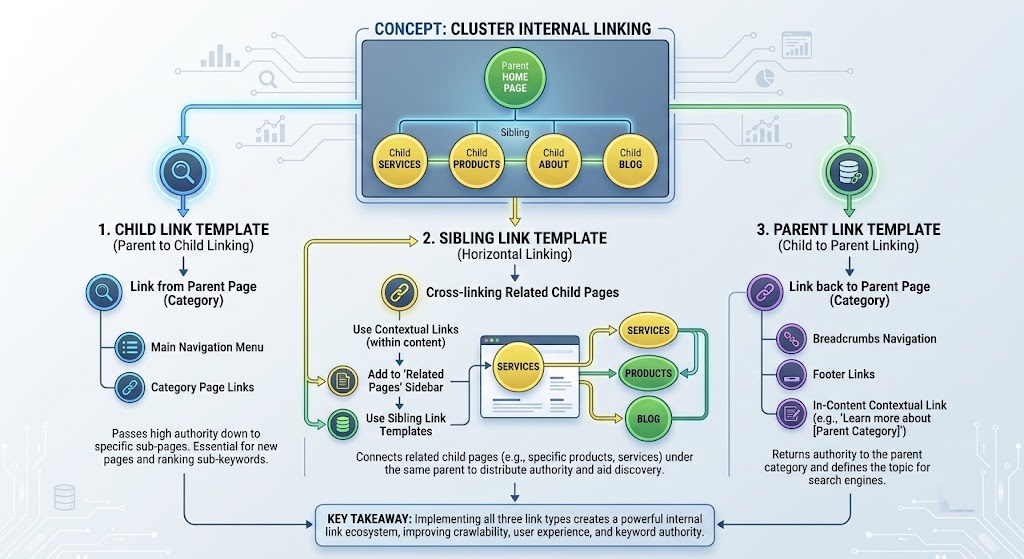
A pillar–cluster structure works as a set of editorial relationships rather than a collection of pages sharing similar keywords.
The parent pillar covers the broad subject and directs readers towards narrower tasks. Cluster pages develop those narrower tasks and return readers to the broader framework when that context is useful.
A basic relationship model looks like this:
                         PILLAR
                           │
          ┌────────────────┼────────────────┐
          │                │                │
          ▼                ▼                ▼
      Cluster A        Cluster B        Cluster C
          │                │                │
          └───────► related sibling ◄───────┘
The useful relationships are:
Pillar → child cluster
Cluster → parent pillar
Cluster → relevant sibling
Those relationships do different jobs.
A parent-to-child link moves the reader from overview to detail.
A child-to-parent link reconnects the specialised article with the broader topic.
A sibling link supports an adjacent question or next task.
Google recommends organising sites logically and linking to relevant resources from useful pages rather than designing structures around arbitrary search-engine assumptions (Source: Google Search Central, n.d.).
Parent-to-child links should represent genuine subtopics
A pillar should link to cluster pages that expand sections of the parent topic.
For example:
Internal Linking Strategy
        │
        ├── Internal PageRank
        ├── Anchor Text and Link Context
        ├── Site Silos vs Topic Clusters
        ├── Crawl Budget and Internal Links
        ├── Topical Relevance Mapping
        ├── Orphan Pages
        └── Click Depth and Crawl Paths
The relationship is editorial: each child develops one defined part of the parent subject.
A cluster should not be attached to the pillar merely because both contain the same keyword family.
Child-to-parent links restore context
A cluster article deals with a narrower task.
A reader entering through search may never have seen the parent pillar. Linking back to the parent gives that reader access to the wider framework.
The link should appear where the broader context helps.
For this article, the introduction links to the parent because readers need to understand that parent, child and sibling links belong to a wider internal-linking architecture.
The parent link does not need to appear mechanically in the same sentence position across every article.
Where Should Parent and Child Links Appear?
Placement should follow the point at which the destination helps the reader.
The content brief can specify a preferred relationship without prescribing an artificial paragraph number.
Parent links usually fit near the introduction
For cluster content, a parent link is useful near the opening when the article needs to establish its place within a larger subject.
A reusable editorial template is:
This article focuses on [specific cluster topic] within the broader
[parent topic], covered in [descriptive parent anchor].
Example:
This article focuses on operational pillar–cluster linking within the broader internal linking strategy used to organise page relationships.
The anchor describes what the destination provides.
Parent-to-child links belong near the relevant pillar section
Suppose the parent pillar contains a section on orphan pages.
The cluster link should sit inside or immediately after that discussion:
PILLAR SECTION
"Finding disconnected pages"

Brief explanation
        ↓
Contextual link
        ↓
Detailed orphan-page cluster
Placing every cluster link in a detached list at the bottom of the pillar can weaken the relationship between the link and the section that creates the reader’s need for it.
A content hub or related-reading block can still provide useful navigation, but it serves a different purpose from a contextual link.
Link templates should describe the destination promise
The brief can record:
Required internal link
Source: Parent pillar
Destination: Cluster article
Relationship: This cluster expands the parent section on [topic]
Preferred context: Immediately after the parent introduces [specific issue]
Anchor direction: Describe the specific task solved by the destination
This gives the writer enough direction without requiring an identical anchor phrase across multiple pages.
Must Every Cluster Page Link to Every Sibling?
No.
A cluster can remain coherent without creating an all-to-all link network.
Consider six supporting pages:
                 PILLAR
             /  /  |  \  \  \
            A  B   C   D  E   F
An all-to-all model would attempt to connect:
A ↔ B ↔ C ↔ D ↔ E ↔ Fplus many additional cross-links.
That can produce links whose only justification is cluster membership.
A better model connects siblings when the destination represents a useful next step.
Use the adjacent-reader-task test
Before adding a sibling link, ask:
After reading this section, is the destination one of the reader’s likely next questions or actions?
For example:
Orphan Pages
     ↓
"After restoring a page to the graph,
how easily can it be reached?"
     ↓
Click Depth and Crawl Paths
That sibling link has a specific editorial reason.
Another relationship could be:
Topical Relevance Mapping
     ↓
"Which related destination should receive this link?"
     ↓
Anchor Text and Link Context
The first page selects the destination. The second addresses how the link should be labelled.
The relationship follows the user’s task rather than a requirement to interlink every article.
Sibling links can be one-way
Internal links do not need to be reciprocal.
If Article A creates a natural need for Article B, but Article B has no useful reason to send the reader back to Article A, a one-way relationship can be appropriate.
The test is contextual relevance, not symmetry.
Avoid link quotas
A rule such as “every cluster article must contain three sibling links” can force weak connections.
The brief should instead require:
Sibling links:
Add only where another published cluster article directly extends
the reader's current task.
That keeps the relationship editorial rather than numerical.
How Do You Put Pillar–Cluster Linking Into a Content Brief?
Internal linking becomes easier to maintain when it is defined before the article is drafted.
Adding links only after publication turns architecture into repair work.
A cluster brief can contain a small link specification.
Cluster-page brief template
PARENT RELATIONSHIP

Parent pillar:
[Exact title]

Parent URL:
[Canonical live URL]

Required relationship:
This article develops the parent's section on [specific subject].

Child-to-parent link:
Required: Yes
Preferred context:
[Explain where broader context becomes useful]

Anchor direction:
Describe the parent topic naturally.


SIBLING OPPORTUNITIES

Sibling 1:
[Published URL]

Relationship:
[What question or task connects these pages?]

Preferred context:
[Section where the destination becomes useful]

Sibling 2:
[Published URL]

Relationship:
[Specific connection]

Do not add:
Unpublished URLs or unrelated sibling links.
This format records the reason for each relationship.
Parent-pillar brief template
The pillar also needs maintenance instructions:
CLUSTER CHILD

Cluster title:
[Exact title]

Cluster URL:
[Canonical live URL]

Parent section:
[Specific H2/H3]

Purpose of link:
Moves reader from overview to detailed treatment.

Status:
Draft / Scheduled / Published

Link activation:
Add only after destination is live.
The status field prevents scheduled or planned content from being treated as an active destination.
Cluster map
A simple cluster map gives editors a compact view of the relationships:
| Page | Role | Parent link | Parent links to child | Selective sibling route |
|---|---|---|---|---|
| Internal Linking Pillar | Parent | — | — | — |
| Internal PageRank | Child | Pillar | Yes | Click Depth where relevant |
| Orphan Pages | Child | Pillar | Yes | Click Depth |
| Click Depth | Child | Pillar | Yes | Orphan Pages where relevant |
| Topical Relevance Mapping | Child | Pillar | Yes | Anchor Text where relevant |
The table records relationships, not quotas.
What Should Happen Before and After Publication?
A repeatable publication process prevents cluster architecture from drifting as new articles are added.
Pre-publication checklist
Before publishing a cluster page, verify:
the parent pillar URL is live;
the cluster page links to the parent where the relationship is useful;
the parent already links to the new child, or an update is scheduled for publication;
sibling links point only to published URLs;
each sibling link has a contextual reason;
anchor text describes the destination;
internal links resolve directly to the intended canonical URLs;
no required destination leads through an unnecessary redirect.
Google recommends using crawlable links with <a> elements and resolvable href attributes so search systems can reliably discover linked pages (Source: Google Search Central, n.d.).
Do not publish placeholder sibling links
A planned article does not yet provide a usable destination.
Avoid links such as:
<a href="/future-cluster/">Coming soon</a>if the URL does not contain a published page.
Keep the intended relationship in the editorial brief, then activate it when the destination becomes live.
Add the child to the pillar when it becomes available
When a new cluster is published, review the section of the parent that owns that subtopic.
Ask:
Does the parent already introduce the subject?
Is that section the best source for the new cluster link?
Does the new child change any wording in the parent?
Do previously published siblings now have a useful route to the new article?
The publication of one child can create maintenance work across several pages.
How Do You Repair an Existing Cluster With Weak Internal Links?
Older clusters often contain content relationships that were never formally mapped.
Repair starts with roles rather than link counts.
Step 1: Identify the parent and children
Create an inventory:
Parent pillar
Cluster A
Cluster B
Cluster C
Cluster D
Confirm which page owns the broad topic and which pages support narrower tasks.
Step 2: Check parent-to-child coverage
For each child, locate the parent section that introduces its topic.
Record:
Child URL
Relevant parent section
Parent currently links to child? Yes / No
If no relevant section exists, the problem may be content architecture rather than a missing hyperlink.
Step 3: Check child-to-parent relationships
Open each cluster page.
Confirm that the parent is referenced where broader context benefits the reader.
Do not add an identical boilerplate link solely to satisfy the audit.
Step 4: Map sibling opportunities
For each cluster, identify likely next questions.
Example:
Source:
Orphan-page repair

Reader's next task:
Measure how far repaired pages sit from important entry points

Destination:
Click-depth analysis
The relationship itself justifies the link.
Step 5: Remove obsolete routes
Check for links that now point through redirects, outdated articles or pages whose topic ownership has changed.
When a URL has permanently moved, Google recommends permanent server-side redirects for the move and updating links where practical to reference the final destination (Source: Google Search Central, n.d.).
Step 6: Recrawl the cluster
After the repair, crawl the relevant content area again.
Confirm:
Pillar → each intended child
Child → parent where appropriate
Sibling → relevant sibling where justified
The audit should verify relationships rather than chase a target link count.
Editorial FAQs About Pillar–Cluster Internal Linking
How should pillar and cluster pages link?
The pillar should link to supporting cluster pages where those pages provide deeper treatment of a parent subtopic. Cluster pages should link back to the parent where the broader framework helps the reader.
Sibling links should be added only where another cluster answers a useful next question or supports the next task.
Where should the parent-pillar link appear in a cluster article?
A parent link often fits naturally in the introduction or early body because it establishes the cluster page’s relationship with the wider topic.
The exact position should follow reader context rather than a fixed paragraph rule.
Must every sibling article interlink?
No. Cluster membership alone is not enough reason for a sibling link.
Link siblings when the destination directly extends the reader’s current question, comparison or implementation task.
When should the pillar add a newly published child?
Add the child when the cluster article is live and the parent has a section that creates a relevant route to it.
The link should normally sit near the parent discussion that the cluster expands rather than being added solely to a generic link list.
How should unpublished cluster articles be handled?
Keep planned relationships in the content brief or cluster map until the destination is published.
Do not create internal links to unpublished placeholder URLs merely to complete the planned architecture.
Maintain the Cluster as an Editorial System
Pillar–cluster linking works best when relationships are defined during briefing, checked during publishing and reviewed whenever the cluster changes.
Give every child a documented parent relationship. Add parent-to-child links where the pillar introduces that subtopic. Add child-to-parent links where broader context helps. Use sibling links only when one article supports the reader’s next task.
When a new cluster goes live, update the parent first, then inspect the siblings most closely related to the new topic. That habit keeps the internal linking strategy aligned with the content architecture instead of relying on periodic link-count repairs.
References
Links Crawlable by Google — Google Search Central, n.d.
https://developers.google.com/search/docs/crawling-indexing/links-crawlableSEO Starter Guide — Google Search Central, n.d.
https://developers.google.com/search/docs/fundamentals/seo-starter-guideRedirects and Google Search — Google Search Central, n.d.
https://developers.google.com/search/docs/crawling-indexing/301-redirectsUnderstanding Success Criterion 2.4.4: Link Purpose (In Context) — W3C Web Accessibility Initiative, n.d.
https://www.w3.org/WAI/WCAG22/Understanding/link-purpose-in-context.html