

On 25 November 2026 we changed 71 URLs on aiseojournal.net in one day. We merged 68 overlapping posts into stronger guides and renamed three slugs. Every old URL got a 301 redirect, and every internal link to it was rewritten. Then we checked each redirect landed on the right page.
We still found problems. Older redirect rules still pointed at URLs we had just renamed, which would have created two-step chains. And old URLs lived on in self-pingback comments. Small move, small misses: a full site migration multiplies both. This checklist, part of our technical SEO fundamentals guide, is the order of work we follow, built from Google’s site-move guides.
At a glance
| When | What to do | Done when |
|---|---|---|
| Before launch | Export every old URL, build the URL map, verify both sites in Search Console, save a baseline | Every old URL has a new home or a reason to 404 |
| Launch day | Turn on 301s, remove staging blocks, update links, canonicals and sitemaps | A sample of old URLs each returns one 301 to the right page |
| After launch | Monitor weekly, fix stray 404s, keep redirects | Traffic has moved to the new URLs; redirects stay at least a year |
Table of Contents
ToggleWhat is a site migration, and which kind is yours?
A site migration is any change that moves pages to new URLs, or moves the whole site to a new domain, protocol or server. The work you need depends on which of those is changing. Google treats moves with URL changes and moves without them as two different jobs[1][3].
Use the decision tree to find your branch. Moving hosting with the same URLs needs no redirects at all. Moving to a new domain needs everything in this checklist, plus Search Console’s Change of Address tool[2].
Large or enterprise sites: Google recommends moving small and medium sites all at once, but says larger sites can move one section at a time[1]. A staged move lets you check rankings and redirects on one section before the next. After a migration Google will temporarily crawl the new site more heavily than usual, so make sure your server has the capacity for it[1].
Read the decision tree as text
- Domain or subdomain (example.com to example.org): Full checklist. URL map, 301s, sitemaps, Change of Address tool, keep redirects 1 year+.
- Protocol or www (http to https, or www to non-www): Redirects only. Site-wide 301s, canonicals, sitemap. No Change of Address.
- Paths on same domain (/blog/post to /guides/post): URL map + redirects. Map every URL, 301s, update internal links. No Change of Address.
- Hosting or CDN only (URLs stay exactly the same): No redirects. Test the new server, expect a short dip in crawl rate.
Before launch: the URL map and the baseline
Most migration damage is decided before launch, in the URL map. Google says it’s important to map every old URL to its new equivalent, and lists where to find old URLs: sitemaps, server logs, analytics and your CMS[1]. Include images, videos, CSS and JavaScript too.
- Export every old URL. Combine all four sources, because each one misses something. Logs catch URLs that still get crawled but aren’t in the sitemap.
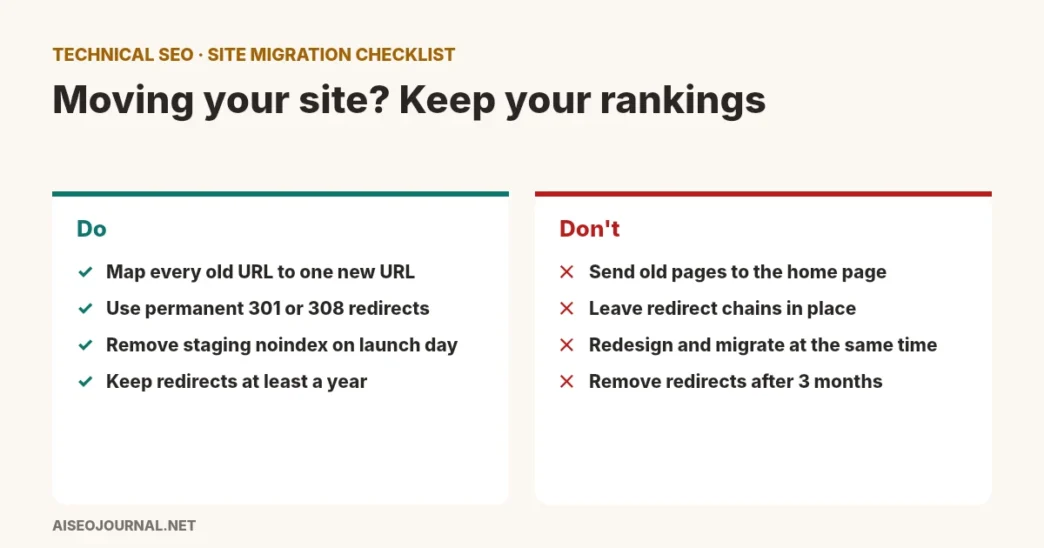
- Build the URL map. One row per old URL, one new URL each. Don’t send many old pages to one unrelated page, such as the new home page[1].
- Verify both sites in Search Console, with every variant (www and non-www, http and https)[1].
- Save a baseline. Export your top pages and queries from Search Console, and landing pages from analytics. Use our SEO audit checklist for the full pre-move check.
- List every staging block. Write down each noindex tag and robots.txt rule you add for the staging site, so you can remove them on launch day.
Here is what a URL map looks like. The URLs are example values written for this guide.
| Old URL (example) | New URL (example) | Action | Note |
|---|---|---|---|
| /blog/log-files | /guides/log-file-analysis/ | 301 | Same topic, new folder |
| /blog/log-files-2 | /guides/log-file-analysis/ | 301 | Duplicate merged into the same guide |
| /images/crawl.png | /assets/img/crawl.png | 301 | Images need mapping too |
| /old-offer-2019/ | (none) | 410 | Gone for good: no matching page |
| /?p=123 | /guides/log-file-analysis/ | 301 | Old query-string URL still linked from other sites |
Watch out
Don’t redirect pages with no real match to your home page. Google advises against sending many old URLs to one irrelevant destination[1]. If nothing matches, a 404 or 410 is the honest answer. See our guide to HTTP status codes for when to use which.
Launch day: redirects, blocks, links and sitemaps
On launch day, switch on the redirects first, then clear every leftover staging block. Google recommends permanent server-side redirects, such as 301 or 308, and redirecting straight to the final destination[1]. Permanent redirects don’t lose PageRank[1].
Here is the same redirect written for Apache and for nginx. Swap in your own paths.
# Apache (mod_alias), in the site config or .htaccess
Redirect 301 /blog/log-files /guides/log-file-analysis/
# nginx, inside the server block
location = /blog/log-files {
return 301 /guides/log-file-analysis/;
}Apache documents the Redirect directive[5], and nginx the return directive[6]. Then work through the rest of launch day:
- Remove migration-only blocks. Google’s own checklist warns not to forget any noindex or robots.txt blocks that were only there for the move[1].
- Set self-referencing canonicals on every new URL[1].
- Update internal links from old URLs to new ones[1]. Our internal link audit guide shows how to find them in bulk.
- Submit the new sitemap in Search Console. Remove the old one once Google is using the new one[1].
- Domain moves only: use Change of Address. It needs the same Google account to own both properties and a 301 from the old home page to the new one[2].
Check redirects from the command line as you go. This shows the status code and where each URL points:
curl -sI https://example.com/blog/log-files | grep -i -E '^HTTP|^location'
# Good: one line with 301, and a location that is the final URL.
# Bad: the location returns another 301 (a chain), or a 404.
From our own site
On 25 November 2026 we redirected 71 URLs and checked every one by requesting the old address and recording where it landed. All 58 URLs in the second batch returned the right page. Then we changed three more slugs and found older Rank Math rules still pointing at the old addresses, which would have made two-step chains. We repointed them straight at the new URLs. We also repointed internal links in three batches (27, 62 and 12 posts) so none relied on a redirect.
What it means: check old redirect rules, not just new ones. Every migration on a site with history inherits earlier redirects. Limitation: these were URL changes inside one domain, not a domain move.
Check how ready your migration is
Tick each task you have finished. The meter shows your progress, and the result lists what to do next, in checklist order.
0 of 15 done
After launch: what to watch, and for how long
After launch, expect some movement and a slow handover. Google says to expect temporary fluctuation in rankings during the move. It adds that a small to medium-sized site can take a few weeks for most pages to move, and larger sites take longer[1]. The move only counts as complete once Googlebot has visited every old and new URL at least once[1].
- Watch three places weekly: Search Console, analytics and your server logs[1]. Traffic to old URLs should fall as traffic to new URLs rises.
- Read sitemap counts. The new sitemap starts with no indexed pages and climbs, while the old one falls[1].
- Ignore one kind of warning. Search Console warns about the old URLs redirecting. Google says that is normal[1].
- Keep the redirects. Google’s guide says as long as possible, generally at least a year[1]. After a domain move, the Change of Address notice lasts 180 days[2].
Expert quote
“3 months is too short for a site-move.” — John Mueller, Search Advocate, Google, on X, 18 March 2022[4]
Common migration problems and how to fix them
Most migration problems show up in the first few weeks. This table matches what you’ll see to the usual cause.
| What you see | Likely cause | What to do |
|---|---|---|
| Old URLs return 404 | Missing rows in the URL map | Add the missing redirects; check logs for other unmapped URLs |
| Old URL redirects twice before landing | Redirect chain from older rules | Point every old rule straight at the final URL |
| New pages not indexed after weeks | Staging noindex or robots.txt block left in place | Remove it, then request indexing for key pages. See our crawled – currently not indexed guide |
| Images lost from Google Images | Image URLs changed but weren’t redirected | Redirect old image URLs too. See our image SEO guide |
| Traffic split between old and new domain for months | Redirects removed early, or not site-wide | Restore them and keep them a year or more |
When traffic drops after launch, work in this order, and stop when you find the cause:
- Test a sample of old URLs. Each should return one 301 to the matching page.
- Check robots.txt and noindex on the new site. Leftover staging blocks are the fastest way to lose a site.
- Check canonicals. New pages must point to themselves, not the old URLs.
- Compare with your baseline. A drop on a few pages points to mapping errors. A drop everywhere points to a site-wide block.
- Then give it time. If all four checks pass, Google says some fluctuation is normal[1]. Re-check weekly rather than changing things daily.
Professional tip
Don’t combine a migration with a redesign or a content rewrite if you can avoid it. When traffic moves after launch, you’ll want to know which change caused it. One change at a time keeps the cause clear.
Tools for a site migration, and their limits
| Tool | Use it for | What it can’t do |
|---|---|---|
| Google Search Console | Change of Address, sitemaps, Page indexing report, before-and-after queries[2] | Show every redirect or every crawl |
| A site crawler (list mode) | Checking that each old URL returns one 301 to the right page | Find old URLs it was never given |
| curl | Quick checks of single URLs and headers | Check thousands of URLs without a script |
| Server access logs | Seeing which old URLs Googlebot still requests | Explain why a page dropped in rankings |
| Web analytics | Landing-page traffic before and after | Tell redirected visits from direct ones without set-up |
Professional tip
Keep your URL map after launch. It’s the fastest way to answer “where did this page go?” a year later, and it tells you which redirects are safe to retire once their traffic has stopped. For keeping the new structure clean, see our site architecture guide.
Frequently asked questions
What is a site migration?
A site migration is any change that moves pages to new URLs or moves the site to a new domain, protocol or server. Google treats moves with URL changes and moves without them as different jobs, and the work needed depends on which kind you have.
What are the steps of a site migration?
Before launch, export every old URL, map each one to a new URL and save a baseline. On launch day, switch on permanent redirects, remove staging blocks and update links, canonicals and sitemaps. After launch, monitor weekly and keep the redirects for at least a year.
How long does a site migration take for Google?
Google says a small to medium-sized site can take a few weeks for most pages to move, and larger sites take longer. The move is complete once Googlebot has visited every old and new URL at least once.
How long should you keep redirects after a migration?
Google’s site move guide says as long as possible, generally at least a year. Remove them only when nothing, people or crawlers, still requests the old URLs.
Start with the URL map
Start with the URL map, today, even if launch is weeks away. Export your old URLs from all four sources and give each one a new home or a reason to return 404. Then run the readiness check above, and come back to it on launch day and one week after.
If you also need a full audit before you move, start with our SEO audit checklist.
How we checked this: we opened every source below on 26 November 2026, and read the “People also ask” box and top results for “site migration checklist” on Google UK the same day. The aiseojournal.net figures come from our own change log for 25 November 2026. They describe URL changes within one domain, not a domain move.
Sources
- Google Search Central — Site moves with URL changes. Read on 26 November 2026.
- Search Console Help — Change of Address tool. Read on 26 November 2026.
- Google Search Central — Site moves without URL changes. Read on 26 November 2026.
- Search Engine Roundtable — Google: Site moves with redirects in place only for 3 months is too short (John Mueller post on X, 18 March 2022). Read on 26 November 2026.
- Apache HTTP Server 2.4 documentation — mod_alias (Redirect directive). Read on 26 November 2026.
- nginx documentation — ngx_http_rewrite_module (return directive). Read on 26 November 2026.