

Eleven posts on this site were written to rank for some version of “search intent”. When we audited the Core AI-SEO Guides section in November 2026, three of them were worth keeping. Seven went into one guide behind 301 redirects. One turned out to be about semantic SEO, not intent at all. Nobody had planned eleven posts on one topic. There was just no record of which URL already owned the query when each new one was commissioned.
A keyword map is that record. It is the working document that sits underneath the research process in our keyword research and semantic SEO guide: one row per URL, one primary keyword per row, and an action for every row. This post shows how to build one for a site that already exists, using the decisions from our own clean-up as the worked example.
Key takeaways
- Keyword mapping assigns one primary keyword, and the intent behind it, to exactly one URL.
- Start from the URLs you already have and the queries Search Console says they earn, not from a fresh keyword list.
- Group keywords by what the results page shows, not by how similar the words look.
- Every row needs an action: keep, improve, merge, redirect, move or create.
- Map by what a page says, not by its title. Our audit found posts whose titles and content disagreed.
- The map only works if you check it before every new post is briefed.
Table of Contents
ToggleWhat is keyword mapping?
Keyword mapping is the practice of deciding which single URL on your site should rank for each keyword, then recording that decision so that nobody publishes a second page for the same query. Each row in the map holds a URL, its primary keyword, a few secondary keywords that share the same intent, and what you plan to do with the page.
The map is a decision log, not a research output. Keyword tools produce lists; the map is where you commit to one owner per query. That commitment is what stops a site drifting into eleven posts on one topic.
Why should each keyword have only one URL?
Because when two of your pages answer the same query, you are asking Google to choose between them, and it may not choose the page you would. Google treats very similar pages as duplicates and picks one as canonical, using signals such as redirects and rel="canonical" annotations, both of which it describes as strong signals [2]. Without those signals, the choice is Google’s.
There is a quieter cost too. Links, updates and editorial effort get split across two weaker pages instead of building one strong one. When we fixed overlap on this site, the fix was almost always to merge the better parts of both posts into one URL and redirect the other. A permanent redirect tells Google the target should become canonical [1].
The rule is one primary keyword per URL, not one keyword per page. A good page ranks for hundreds of related queries. The map only says which page is the intended answer for each main query.
From our own site: In November 2026 we reviewed all 183 posts in the Core AI-SEO Guides section. 65 of them overlapped with a stronger post. Each was merged into that post and the old URL was redirected with a 301. The page speed cluster went from 15 posts to 4, and the search intent cluster from 11 to 3. None of these posts were bad on their own. They existed because nothing showed the writer that the topic was taken.
How do you build a keyword map for an existing site?
Build it from the inside out: list what you have, find what each page already ranks for, group by intent, then assign owners. The six steps below are the order we followed. The template further down has the same columns.
Keyword mapping in six steps
- List URLsEvery page that can rank, with a one-line summary of its content
- Pull queriesTop queries per page from the Search Console Performance report
- Group by intentCompare results pages, not wording
- Assign ownersOne primary keyword per URL, two to five secondaries
- Set actionsKeep, improve, merge, redirect, move or create
- Apply and checkTitles, headings, internal links, then check the map before every brief
Step 1: List every URL that can rank
Export every published post and page with its URL, title, category and publish date. In WordPress, a crawler export or the REST API works. Leave out tag archives, attachment pages and anything set to noindex. They should not be competing for keywords anyway.
Add one column for what the page is actually about, written after reading it. That column matters more than the title column, as the next box shows.
From our own site: One of our posts was titled “Website Speed Metrics”, but its content was a guide to choosing fast hosting. We only caught it because we read the body text. Another post with a search intent title had exactly the same text as a semantic SEO post. Had we mapped by title, both would have been filed under the wrong keyword.
Step 2: Pull the queries each URL already earns
In Google Search Console, open the Performance report, filter to one page, then switch to the Queries tab. The report groups data by dimensions such as queries and pages, and its default view covers the last three months [4]. Widen the date range for a fairer picture. Record the two or three queries with the most impressions against the URL.
This is where cannibalisation shows itself: the same query appearing under two of your URLs. If you have not done this pass before, our guide to using Google Search Console for keyword research covers the filters in detail.
Professional tip: Pages with very few impressions will show almost no queries. Do not read that as “this page has no keyword”. Map those pages by their content and the query you intended. Then check them again after three months.
Step 3: Group keywords by intent, not by wording
Two keywords belong on the same URL when the same kind of page satisfies both. The quickest test is the results page itself. Search both keywords and compare. If the same pages, in the same format, rank for both, treat them as one intent and give them one URL. If one shows how-to guides and the other shows tools or product pages, they need separate pages.
As a working rule of thumb (not a Google rule): if three or more of the top five results are shared, group them. If none are, split them. Anything in between, decide by reading the pages. Our guide to reading SERP signals explains what each results feature tells you. The search intent guide covers the four intent types.
Step 4: Assign one primary keyword and a few secondaries
For each intent group, choose the URL that already serves it best. Usually that is the page with the most complete content, the most impressions or the most links. Its primary keyword is the clearest phrasing of the group. Secondary keywords are close variants and sub-questions the same page should answer: usually two to five. More than that, and you are often hiding a second intent inside the row.
Step 5: Give every row an action
A map without actions is a spreadsheet nobody opens again. Every row gets one of six actions:
| Action | Use it when | What happens to the URL |
|---|---|---|
| Keep | The page owns its intent and is in good shape | Nothing |
| Improve | The page owns its intent but is thin or out of date | Rewritten at the same URL |
| Merge | Two pages share an intent | The best parts move into the stronger page |
| Redirect | A page has been merged | Permanent 301 to the page that absorbed it |
| Move | The page is good but filed in the wrong section | Category changes; URL stays the same |
| Create | An intent you need has no page | A new row with a planned slug and date |
“Create” rows are your content plan. This post started as one: a gap the audit found, with nothing on the site that explained keyword mapping itself.
Step 6: Write the decisions back into the site
The map changes nothing until the site matches it. For each kept page, make sure the primary keyword appears naturally in the title and main heading. Give pages distinct titles. Google’s title-link guidance warns against repeated or boilerplate text in title elements [3]. Then update internal links, so that anchors about a topic point to the URL that owns it. Our internal linking strategy guide covers anchor choice.
From our own site: After the merges, internal links across about 860 posts still pointed to URLs that now redirected. We rewrote them so every link goes straight to the page that owns the topic. A redirect works for visitors, but a direct link is cleaner and leaves the map and the site in agreement.
A keyword map template you can copy
Seven columns cover what most sites need. Use the copy button in the step strip above for a CSV header you can paste into Google Sheets or Excel. Or copy the table below. The rows are real decisions from our own audit, written as map entries.
| URL | Primary keyword | Secondary keywords | Intent | Action | Notes |
|---|---|---|---|---|---|
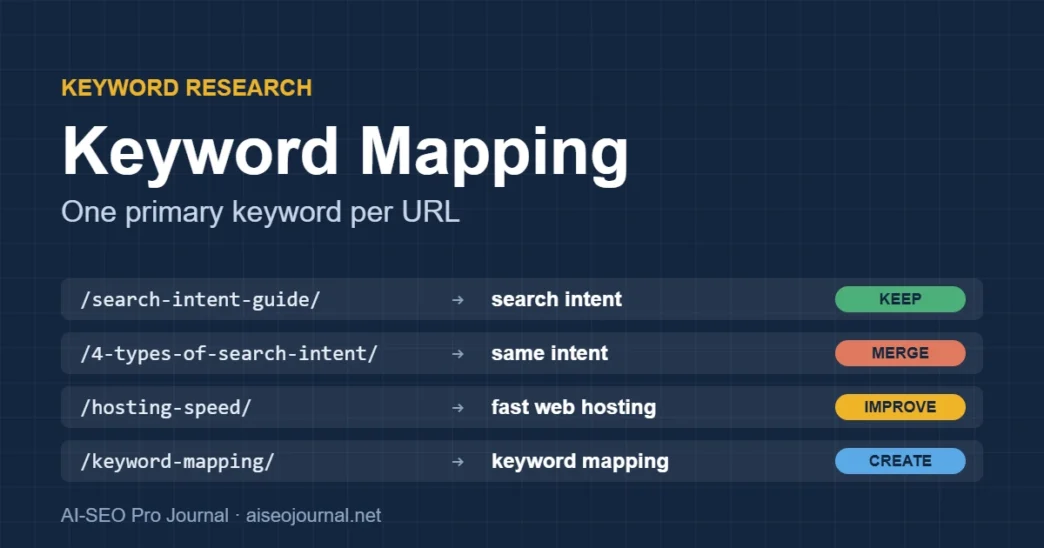
| /understanding-search-intent-a-guide-for-modern-seo-visual-guide/ | search intent | types of search intent; how to identify search intent | Informational guide | Keep and improve | Absorbed 7 overlapping posts |
| /4-types-of-search-intent-every-beginner-should-know/ | (none: same intent as above) | – | Informational | Merge, then redirect | 301 to the search intent guide |
| /hosting-speed-choose-fast-web-hosting/ | fast web hosting | hosting speed; hosting and Core Web Vitals | Informational / commercial | Improve (retitled) | Old title said “Website Speed Metrics”; content was about hosting |
| /how-to-identify-keyword-cannibalization/ | keyword cannibalisation | fix keyword cannibalisation; cannibalisation in Search Console | Informational how-to | Keep | A second cannibalisation post was merged into it |
| /keyword-mapping/ | keyword mapping | keyword map template; one keyword per page | Informational how-to | Create | Gap found in the audit: this post |
Add a Status column (Planned, Composing, Done, Scheduled, Published) if writers work from the same file. We use that column ourselves, so a topic already being written cannot be picked up twice.
Which overlaps need a merge, and which can stay?
Not every pair of similar pages is a problem. Use the intent test from Step 3, then this table:
| Situation | Decision |
|---|---|
| Same intent, same format, both thin | Merge into one, redirect the other |
| Same intent, one page clearly stronger | Move anything unique into the stronger page, redirect the weaker |
| Same topic, different intents (for example, a guide and a tool comparison) | Keep both; give each a distinct primary keyword and link them |
| A broad guide and a narrow sub-topic post | Keep both if the narrow post goes deeper than the guide’s section; the guide links down to it |
| Good page, wrong section of the site | Move it; keep the URL |
The broad-guide-plus-narrow-post case is why the rule is “one primary keyword per URL” and not “one topic per site”. A pillar and its cluster posts share a topic on purpose. They stay healthy as long as each post owns a narrower query than the pillar. Our keyword cannibalisation guide covers what to do when they start competing anyway.
Professional tip: Before you redirect a merged page, copy anything unique from it into the target first: a table, an example, a good FAQ answer. Keep the old post as a draft until the target has been live for a few weeks. That way the merge can be undone if it goes wrong.
Common keyword mapping mistakes and their fixes
- Mapping by title. Titles drift away from content over time. Fix: read the body and write a one-line summary before you assign a keyword.
- Starting from a keyword tool instead of your own URLs. You end up planning pages you already have. Fix: inventory first (Step 1), research gaps second.
- Treating every similar keyword as a new page. “Search intent types” and “types of search intent” need one page, not two. Fix: the SERP test in Step 3.
- Cramming unrelated keywords into one row. Ten secondaries usually means two intents. Fix: split the row and check whether the second intent deserves its own page.
- Leaving out non-blog pages. Category pages, tools and landing pages compete for queries too. Fix: include every indexable URL type.
- Building the map once. A map that is not checked before every brief is out of date by the next post. Fix: make the map check the first step of every brief.
Professional tip: Note in each row where the primary keyword came from: Search Console data, a SERP check or a tool estimate. When you review the map later, you will know which decisions rest on real data and which were guesses.
Using an AI assistant for the first pass
An AI assistant is useful for the tedious first grouping, as long as you treat the result as a draft for you to check against real results pages. Paste your URL list with titles, one-line summaries and top queries, then use a prompt like this:
You are helping me build a keyword map for my website.
Below is a list of my URLs. Each line has: URL | title | one-line summary of the content | top Search Console queries.

1. Group the URLs by search intent: URLs whose content would satisfy the same searcher go in the same group.
2. For each group, suggest which URL should own it and propose one primary keyword and two to five secondary keywords, using only phrases from my data.
3. Flag every group with more than one URL and suggest an action for each URL: keep, improve, merge, redirect, move.
4. Flag any URL whose title does not match its summary.
Do not invent search volumes, rankings or traffic figures. If you are unsure about a grouping, say so and tell me which two searches I should compare on Google to decide.

[paste URL list here]
Frequently asked questions
How many keywords should one page target?
One primary keyword and usually two to five secondary keywords with the same intent. The page will still rank for many more queries than that. Search Console will show them. The map records only the main ones you are deliberately targeting.
Is a keyword map the same as a topic cluster map?
No. A topic cluster map shows how pages relate and link: pillar, cluster posts, siblings. A keyword map records which URL owns which query. Most sites need both, and the keyword map is what keeps the cluster from competing with itself.
How often should a keyword map be updated?
Check it before every new piece of content is briefed, and update it whenever a page is merged, moved or created. A fuller review once a quarter, with fresh Search Console data, catches new overlap that has crept in.
Do I need a paid tool to build a keyword map?
No. A spreadsheet and Search Console are enough for most sites; we keep ours as a spreadsheet. Paid tools help with search volumes and finding gaps, but the decisions in the map are editorial. A tool cannot make them for you.
What should I do if two of my pages already rank for the same keyword?
Decide which page better serves the intent, merge anything unique from the other into it, and redirect the weaker URL with a 301. If the two pages actually serve different intents, keep both and give each a distinct primary keyword.
Check the map before you brief the next post
The map pays off at one moment: just before a new post is commissioned. On this site, every new brief now starts by searching the map and the live site for the focus keyword. If a URL already owns it, we improve that page instead of writing a new one. That single check targets exactly the kind of overlap that was behind the 65 merges we have just finished.
Start with your own section that feels most crowded. Map it this week using the six steps, and fix the overlaps it shows. Then add the map check to your brief template. For the recurring version of this work, our monthly keyword research SOP shows where the map review fits each month.