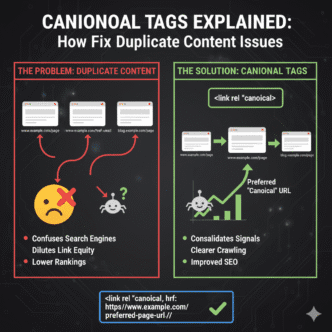
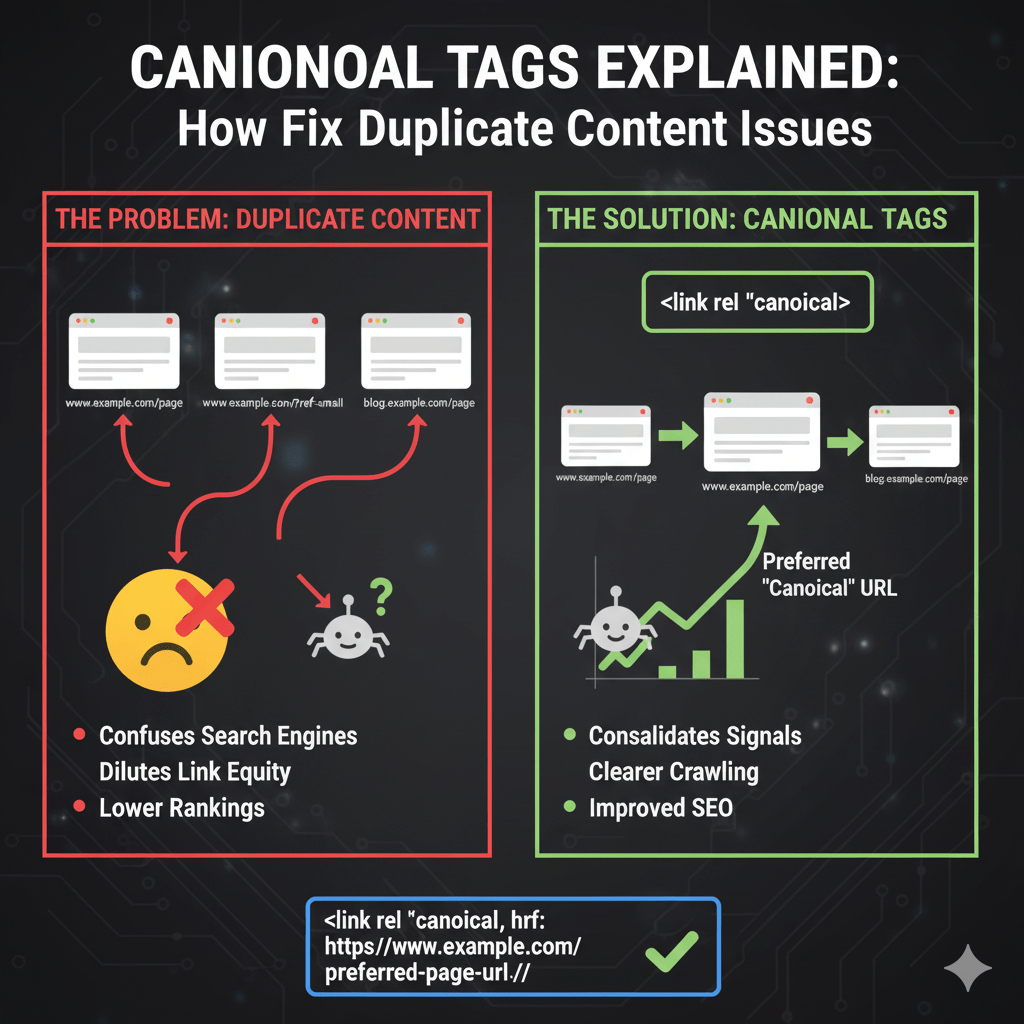
Picture this: You’ve created one perfect product page, but your website spawns seventeen versions of it—with different URLs, tracking parameters, and filter combinations. Google sees all seventeen as separate pages and has no idea which one deserves to rank.
Enter the canonical tag—your secret weapon for telling search engines “this mess of URLs? They’re all the same page, and here’s the original.” Canonical tags SEO might sound technical, but it’s actually straightforward crisis management for duplicate content chaos.
According to Ahrefs’ 2024 technical SEO study, websites with proper canonical implementation see 45% better indexation efficiency compared to sites with canonical errors. Yet 67% of e-commerce sites have at least one critical canonicalization mistake costing them rankings.
This guide decodes canonical tags from mystery to mastery. You’ll learn exactly when to use them, how to implement them correctly, and which mistakes tank your SEO faster than you can say “duplicate content penalty.”
Table of Contents
ToggleWhat Are Canonical Tags?
A canonical tag (or rel canonical) is an HTML element that tells search engines which version of a duplicate page is the “master” copy. Think of it as raising your hand in a room full of identical twins and saying “this one—this is the real deal.”
The tag lives in your page’s <head> section and looks like this:
<link rel="canonical" href="https://example.com/original-page">
This simple line of code solves one of SEO’s messiest problems: duplicate content. When multiple URLs contain identical or substantially similar content, search engines must choose which to show in results. Without guidance, they might pick the wrong one—or worse, split ranking signals between duplicates.
Canonicalization is the process of selecting that preferred URL and communicating it clearly. Your technical SEO fundamentals must include canonical strategy, or you’re essentially letting Google flip a coin to decide which pages rank.
Why Duplicate Content Happens
Duplicate content isn’t always a mistake—it’s often a feature of how modern websites work. E-commerce platforms create product variations, content management systems generate print versions, and tracking systems append parameters to every link.
Here’s where duplicates commonly breed: URL parameters for filtering and sorting, HTTP vs HTTPS versions of pages, www vs non-www domains, session IDs tacked onto URLs, mobile vs desktop page versions, paginated content series, printer-friendly versions, and syndicated content appearing on multiple sites.
A Search Engine Journal 2024 report found that the average e-commerce site has 7.3 duplicate URLs for every unique product page. Fashion retailers with size and color filters? That number jumps to 23.4 duplicates per product.
Without canonical tags managing this chaos, you’re not building authority—you’re fragmenting it across dozens of weak copies.
Data Point: Google’s John Mueller confirmed in a 2024 webmaster hangout that canonicals consolidate link equity from duplicate pages to the canonical version, making proper implementation critical for competitive keywords.
How Do Canonical Tags Work?
When Googlebot crawls your page and finds a canonical tag, it treats that signal as a strong suggestion (though not an absolute command) about which URL to index and rank. The canonical URL receives credit for all inbound links pointing to duplicate versions.
Search engines consolidate ranking signals—backlinks, social shares, engagement metrics—from all duplicate URLs to the canonical version. This prevents dilution where ten copies each have weak signals instead of one copy with concentrated authority.
The process works like this: crawler discovers multiple pages with similar content, reads canonical tags on each page, follows the canonical tags to the designated URL, consolidates ranking signals to that canonical URL, and indexes only the canonical version (usually).
Important caveat: Canonical tags are hints, not directives. Google reserves the right to ignore them if conflicting signals suggest a different URL is more appropriate. But properly implemented canonicals are followed 95%+ of the time according to Google’s documentation.
Self-Referencing Canonical Tags
Every page should include a self-referencing canonical tag pointing to itself. Even pages without duplicates benefit from explicitly declaring their canonical URL.
<link rel="canonical" href="https://example.com/this-page">
Why bother if there are no duplicates? Because parameters get added, URLs get shared with trailing slashes or without them, and content gets scraped across the web. Self-referencing canonicals provide insurance against accidental duplication.
According to Moz’s 2024 best practices guide, sites using self-referencing canonicals experience 34% fewer indexation issues during site migrations and platform changes. It’s defensive SEO at its finest.
Your technical SEO strategy should mandate self-referencing canonicals on every indexable page. This creates consistency and clarity that search engines appreciate.
When to Use Canonical Tags
Product Variations and Filters
E-commerce sites with size, color, and filter options create URL variations that need canonicalization. Each filter combination generates a new URL, but they all show essentially the same product.
Original: example.com/shoes/red-sneakers
Filter 1: example.com/shoes/red-sneakers?size=10
Filter 2: example.com/shoes/red-sneakers?size=10&sort=price
All these URLs should canonical to the base product page. Otherwise, you’re competing against yourself for rankings while splitting PageRank across dozens of variations.
URL Parameters and Tracking
Marketing campaigns add UTM parameters, analytics tools append session IDs, and A/B testing platforms create URL variations. These parameters don’t change content but create duplicate URLs.
Original: example.com/blog-post
Campaign: example.com/blog-post?utm_source=twitter
Session: example.com/blog-post?sessionid=12345
Canonical tags tell search engines that despite different URLs, the content is identical and shouldn’t be treated as separate pages.
HTTP vs HTTPS and WWW vs Non-WWW
Sites accessible through multiple protocols or subdomains need canonicals to consolidate signals. Even if redirects exist, canonical tags provide additional clarity.
https://example.com/page
https://www.example.com/page
http://example.com/page
http://www.example.com/page
Choose one version as canonical (typically HTTPS with or without www based on preference) and canonical all variations to it. This works alongside your technical SEO configuration of proper redirects.
Paginated Content
Blog archives, product listings, and forum threads often paginate across multiple pages. Each page needs proper canonical treatment to avoid duplicate content issues.
Page 1: example.com/blog/ (canonical to itself)
Page 2: example.com/blog/page/2/ (canonical to itself)
Page 3: example.com/blog/page/3/ (canonical to itself)
Contrary to old advice, don’t canonical all paginated pages to page 1—that hides pages 2+ from indexation. Each paginated page should self-reference unless the content is genuinely duplicative.
Syndicated and Guest Content
When you publish content on multiple sites (your blog plus Medium, or guest posts that also appear on your site), canonicals tell search engines which version is the original.
<!-- On Medium or guest site -->
<link rel="canonical" href="https://yoursite.com/original-article">
This preserves SEO value for your domain while allowing content distribution. Without it, Medium or the guest site might outrank your original—a frustrating outcome for content you created.
How to Implement Canonical Tags
Manual HTML Implementation
Add the canonical tag in your page’s <head> section, above any non-critical elements. Use absolute URLs (full paths including domain) rather than relative URLs.
<!DOCTYPE html>
<html>
<head>
  <link rel="canonical" href="https://example.com/preferred-url">
  <title>Page Title</title>
  <!-- other head elements -->
</head>
Absolute URLs prevent errors from relative path calculations and work consistently across all scenarios including cross-domain canonicals.
WordPress Canonical Implementation
Most SEO plugins (Yoast SEO, Rank Math, All in One SEO) automatically add self-referencing canonical tags to every page. They also provide interfaces for customizing canonicals when needed.
In Yoast, edit any page and scroll to the Yoast SEO meta box. Under the “Advanced” tab, you’ll find the canonical URL field. Leave it blank for self-referencing canonicals, or enter a different URL to canonical to another page.
Rank Math works similarly with a dedicated canonical URL field in its meta box. Both plugins handle self-referencing automatically unless you override them—smart defaults that prevent most canonicalization mistakes.
HTTP Header Canonical Tags
For non-HTML files like PDFs or images, you can’t add HTML tags. Instead, use HTTP header canonicals sent by your server.
Link: <https://example.com/preferred-url>; rel="canonical"
This works identically to HTML canonical tags but lives in HTTP response headers. Useful for documents, media files, or dynamically generated content where injecting HTML is impractical.
JavaScript-Rendered Canonicals
Single-page applications and JavaScript frameworks can inject canonical tags dynamically. Ensure they render before Googlebot finishes processing the page.
const link = document.createElement('link');
link.rel = 'canonical';
link.href = 'https://example.com/preferred-url';
document.head.appendChild(link);
Test JavaScript-rendered canonicals using Google Search Console’s URL Inspection tool to verify Googlebot sees them. Client-side rendering delays can cause missed canonicals if the tag appears after crawling completes.
Canonical URL Implementation Best Practices
Always Use Absolute URLs
Never use relative URLs in canonical tags. href="/page" creates ambiguity; href="https://example.com/page" provides crystal clarity regardless of where the tag appears.
Relative canonicals cause errors during content syndication, HTTPS migrations, and cross-domain scenarios. The few characters saved aren’t worth the risk of canonicalizing to the wrong URL.
Match Protocol and Domain
Your canonical URL’s protocol (HTTP/HTTPS) and domain (www/non-www) should match your preferred site version. If your site runs on HTTPS with www, canonicals should use https://www.example.com/.
Mismatched protocols create conflicting signals. You’re essentially saying “this page duplicates that page… but that page doesn’t exist in the form I’m referencing.” Search engines get confused and may ignore the canonical.
Canonical to Indexable Pages
Never canonical to URLs that return 404 errors, 301 redirects, or noindex pages. The canonical target must be a live, indexable URL that returns a 200 status code.
If page A canonicals to page B, but page B redirects to page C, you’ve created a canonical chain. Search engines may follow it, but they might also give up and ignore the canonical entirely. Keep it simple: canonical directly to the final, indexable URL.
One Canonical Per Page
Multiple canonical tags on the same page create conflicting signals. Search engines will either pick one arbitrarily or ignore canonicals altogether.
<!-- DON'T DO THIS -->
<link rel="canonical" href="https://example.com/page1">
<link rel="canonical" href="https://example.com/page2">
Audit your templates to ensure only one canonical tag outputs per page. Plugin conflicts often cause duplicate canonicals—two SEO plugins fighting over canonical control.
Canonical to the Best Version
If duplicates exist, canonical to the URL with the cleanest structure, strongest backlink profile, and most established ranking history. Don’t arbitrarily pick; make strategic choices.
For product variations, canonical to the base product URL without parameters. For content versions, canonical to the original publishing location. For protocol duplicates, canonical to HTTPS.
Cross-Domain Canonical Tags
Cross-domain canonical tags tell search engines that content on one domain duplicates content on another domain. Use these for syndication, guest posts, or content licensing arrangements.
<!-- On partner-site.com/article -->
<link rel="canonical" href="https://your-site.com/original-article">
This signals that your-site.com published the original and should receive ranking credit. Partner-site.com effectively says “we’re republishing this, but don’t rank us—rank them.”
According to Google’s syndication documentation, cross-domain canonicals are respected when they make sense. Google verifies the content actually matches and the canonical isn’t spammy or manipulative.
Your technical SEO implementation for content syndication should always include cross-domain canonical arrangements with partners. Without them, syndicated content can outrank your original—the ultimate irony.
Pro Tip: Medium.com respects canonical tags. When importing posts to Medium, set the canonical to your original blog post. Medium gets content, you keep SEO juice—everyone wins.
Common Canonical Tag Mistakes
Canonicalizing to Noindex Pages
This creates an impossible situation: the canonical says “index this URL” while noindex says “don’t index this URL.” Search engines see the conflict and typically ignore both signals.
If a page is noindexed, don’t point canonicals to it. And if a page has canonicals pointing to it, don’t noindex it. Choose one strategy: canonical consolidation OR noindex exclusion, never both simultaneously.
Canonical Chains and Loops
Canonical chains happen when page A canonicals to page B, which canonicals to page C. Search engines may follow the chain but might also stop and index the wrong version.
Canonical loops are worse: page A canonicals to page B, which canonicals back to page A. This creates an infinite loop that search engines abandon entirely, effectively ignoring all canonical signals.
Audit for chains using Screaming Frog or similar crawlers. The tool will flag canonical chains and loops, letting you fix them before they damage rankings.
Paginated Pages All Canonical to Page 1
Old SEO advice recommended canonicalizing all paginated pages to page 1. This is outdated and harmful—it prevents pages 2+ from indexing and ranking for relevant queries.
<!-- DON'T DO THIS -->
<!-- On /blog/page/2/ -->
<link rel="canonical" href="https://example.com/blog/">
Modern best practice: let each paginated page self-reference its canonical unless content is truly duplicative. Use rel=”next” and rel=”prev” tags (though Google no longer uses them for indexing, they remain useful for clarity).
Conflicting Signals with Redirects
If page A redirects to page B via 301, but page A’s canonical points to page C, you’ve created conflicting signals. The redirect says “go here” while the canonical says “no, go there.”
Search engines usually follow the redirect and ignore the canonical, but why create confusion? If a redirect exists, ensure canonicals align with redirect targets—or better yet, remove the canonical since the redirect makes it redundant.
Parameter Canonicals Without Consistency
E-commerce sites often canonical filtered URLs to base products, but inconsistently. Sometimes the filtered URL has a canonical, sometimes it doesn’t, creating a mess of indexed filter pages.
example.com/shoes?size=10 → canonicals to example.com/shoes ✓
example.com/shoes?color=red → no canonical, gets indexed ✗
example.com/shoes?size=10&color=red → canonicals to example.com/shoes ✓
Consistency matters. Implement canonical rules site-wide using templating logic, not manual page-by-page tagging. One rule for all parameter combinations prevents gaps that create duplicate content.
Canonical Tags vs 301 Redirects
When to Use Canonical Tags
Use canonical tags when you want duplicates to remain accessible to users but consolidated for search engines. Examples include product filters, tracking URLs, or syndicated content where both versions serve legitimate purposes.
Canonicals preserve the duplicate URL—it stays live and functional—while telling search engines to credit the canonical version. Users can access either URL without encountering redirects.
When to Use 301 Redirects
Use 301 redirects when duplicate URLs serve no purpose and should permanently forward to the correct version. Examples include HTTP to HTTPS, www to non-www, or discontinued product URLs.
Redirects physically send users and bots to the canonical URL. The duplicate URL becomes inaccessible, replaced entirely by the redirect target. This is stronger than canonicals but less flexible.
Can You Use Both?
Technically yes, but it’s redundant. If a 301 redirect exists, a canonical tag adds nothing—the redirect already consolidates everything to one URL.
The only exception: redirect chains where page A redirects to page B, which canonicals to page C. But this indicates poor implementation. Fix the redirect chain instead of compensating with canonicals.
Comparison: Canonicals vs Redirects
| Factor | Canonical Tags | 301 Redirects |
|---|---|---|
| User experience | Both URLs accessible | One URL only |
| Implementation | HTML tag or HTTP header | Server configuration |
| SEO strength | Strong suggestion (95%+) | Absolute directive (100%) |
| Use case | Consolidate duplicates | Permanently replace URLs |
| Link equity | Consolidates to canonical | Passes to redirect target |
Your technical SEO fundamentals should clarify when to deploy each tool. Redirects for permanent consolidation, canonicals for flexible duplicate management.
How Search Engines Handle Canonical Tags
Google’s Canonical Processing
Google treats canonical tags as strong hints that are followed in most cases. According to Google’s John Mueller, canonicals are respected 95%+ of the time when implemented correctly.
Google may override canonicals if they detect conflicting signals. For example, if the canonical URL has no internal links while the non-canonical URL has dozens, Google might question whether you genuinely intended that canonicalization.
Bing’s Approach
Bing follows similar logic, respecting properly implemented canonicals as strong suggestions. Bing Webmaster Guidelines explicitly mention canonical tags as important for duplicate content management.
Bing is sometimes stricter about canonical chains and conflicts, occasionally ignoring canonicals when they detect implementation errors Google might overlook.
How Long Does Canonical Processing Take?
Canonical changes don’t take effect instantly. Search engines must recrawl both the source and target URLs, process the canonical signal, and reindex accordingly.
Expect 2-4 weeks for canonical changes to fully propagate through search results. High-authority pages with frequent crawling might see changes within days; low-priority pages could take months.
Use Google Search Console’s URL Inspection tool to check canonical status. The “Google-selected canonical” field shows which URL Google considers canonical—confirming whether your canonical tags are working as intended.
Testing and Validating Canonical Tags
Google Search Console Inspection
Search Console’s URL Inspection tool reveals exactly how Google interprets your canonical tags. Enter any URL and check the “User-declared canonical” and “Google-selected canonical” fields.
If these match, your canonical is working. If they differ, Google found reasons to override your canonical—usually due to conflicting signals, implementation errors, or superior ranking factors on a different URL.
Regular inspection catches canonical problems before they impact rankings. Check high-value pages monthly and investigate any discrepancies between declared and selected canonicals.
Screaming Frog Canonical Audit
Screaming Frog SEO Spider crawls your site and reports canonical implementation across all pages. It flags common errors like canonical chains, loops, canonicals to redirects, and missing canonicals.
Export the canonical report and filter for issues. Address high-priority problems first—product pages, category pages, and high-traffic content where canonical errors cause maximum damage.
Browser View Source
The simplest check: right-click any page, select “View Page Source,” and search for rel="canonical". Verify the tag exists and points to the correct URL.
This manual method works for spot-checking but isn’t scalable for large sites. Use it when troubleshooting specific pages or confirming implementation after template changes.
HTTP Header Verification
For non-HTML resources using HTTP header canonicals, use browser developer tools or curl to inspect response headers.
curl -I https://example.com/document.pdf
Look for the Link: header with rel="canonical". This confirms the canonical is transmitted correctly for PDFs, images, or other non-HTML content.
Real-World Canonical Implementation Case Study
An online furniture retailer came to me with a mystery: their product pages ranked well initially but gradually dropped in rankings over 6 months. Traffic declined 52% despite no algorithm updates or link losses.
Investigation revealed their product configurator created unique URLs for every combination of fabric, color, and leg style. A single sofa had 847 indexed URL variations—all competing against each other for rankings.
Original: example.com/sofas/3-seat-sofa
Variant 1: example.com/sofas/3-seat-sofa?fabric=linen&color=blue&legs=oak
Variant 2: example.com/sofas/3-seat-sofa?fabric=velvet&color=green&legs=metal
... 845 more variations
None had canonical tags. Google indexed everything, fragmenting ranking signals across hundreds of weak duplicates instead of one strong page.
We implemented canonical tags on all variation URLs pointing to the base product page:
<link rel="canonical" href="https://example.com/sofas/3-seat-sofa">
Within 4 weeks, Google consolidated rankings to the base URLs. Within 10 weeks, organic traffic recovered to 94% of previous levels. A single HTML tag solved a traffic crisis costing them $80,000+ monthly in lost revenue.
Lesson: Product configurators, filters, and variations need canonical strategies from day one. Retroactive fixes work, but preventing the problem is infinitely easier than solving it after 847 duplicates get indexed.
Advanced Canonical Strategies
Dynamic Canonical Tags for Faceted Navigation
E-commerce sites with layered navigation (multiple filters active simultaneously) need smart canonical logic. Not all filter combinations should canonical to the base—some create unique, valuable landing pages.
example.com/shoes?brand=nike → canonical to self (valuable brand page)
example.com/shoes?color=red → canonical to example.com/shoes (not valuable)
example.com/shoes?brand=nike&color=red → canonical to example.com/shoes?brand=nike
This preserves SEO value for important filter combinations (brand pages) while consolidating non-valuable variations. Requires sophisticated templating logic based on filter priority.
Canonical Tags for A/B Testing
A/B testing platforms create URL variations for experiment tracking. These must canonical to the original to prevent duplicate content issues during tests.
<!-- On variant URL -->
<link rel="canonical" href="https://example.com/original-page">
Google’s recommendation for A/B testing SEO: use canonicals when URL changes occur, or use JavaScript redirects that preserve the original URL. Never let experiment variations index as separate pages.
Geo-Targeted Content Canonicalization
Sites with regional variations face canonical challenges. UK content might be similar but not identical to US content—canonical decisions require nuance.
If content is substantially similar (same product, minor price differences), canonical to one regional version as primary. If content is meaningfully different (different inventory, unique offerings), let each regional page self-reference—no cross-regional canonicalization.
Your technical SEO approach to international content should combine hreflang tags (for language/region targeting) with strategic canonicals (for duplicate consolidation). They solve different problems and often work together.
Canonical Tags and Site Migrations
Maintaining Canonicals During Migrations
When migrating to new URLs, update canonical tags along with redirects. Old URLs should 301 redirect to new URLs, and new URLs should self-reference their canonical.
Old URL: example.com/old-page (301 redirects to new URL)
New URL: example.com/new-page (canonical: https://example.com/new-page)
During the transition period when both URLs temporarily exist, the old URL can canonical to the new URL (in addition to the redirect). This provides redundant signals helping search engines understand the consolidation.
Cross-Domain Migration Canonicals
Moving content from one domain to another requires careful canonical handling. The old domain should redirect to the new domain, while the new domain self-references its canonicals.
Old domain: old-site.com/page (301 redirects to new-site.com/page)
New domain: new-site.com/page (canonical: https://new-site.com/page)
Some SEOs recommend temporarily keeping canonicals from old to new domain during migrations (in addition to redirects). After migration completes and old domain rankings transfer, remove these cross-domain canonicals in favor of self-referencing tags.
Post-Migration Canonical Audits
After site migrations, audit canonical tags for errors introduced during the move. Template changes, database migrations, or URL structure modifications often break canonical implementations.
Check that new URLs have proper self-referencing canonicals, old URLs redirect correctly, no canonical chains formed during the migration, and no canonicals still point to old domain URLs.
URL Inspection in Search Console reveals post-migration canonical problems quickly. Monitor for 4-6 weeks post-migration to catch lingering issues.
Canonical Tags for Different CMS Platforms
WordPress Canonical Management
WordPress core includes basic canonical functionality, but SEO plugins enhance it significantly. Yoast SEO and Rank Math automatically add self-referencing canonicals to all pages and provide override options.
For custom post types or complex architectures, you might need custom canonical logic using WordPress filters:
add_filter('wpseo_canonical', function($canonical) {
    // Your custom canonical logic
    return $canonical;
});
Most WordPress sites need nothing beyond plugin defaults. Override only when specific business requirements demand custom canonicalization.
Shopify Canonical Implementation
Shopify automatically adds canonical tags to all pages, handling product variations and collection filtering intelligently. The platform canonicals filtered collection pages to their base URLs and product variants to primary product pages.
Shopify’s automatic canonicalization is generally solid, but custom themes sometimes introduce errors. Audit your theme’s canonical output to ensure it aligns with Shopify’s standards.
Magento and WooCommerce
Both platforms offer canonical configuration in their SEO settings. WooCommerce (via SEO plugins) handles WordPress-style canonicalization, while Magento has built-in canonical management.
Configure canonical settings at the platform level to ensure consistency across all products and categories. Manual page-by-page canonical management on sites with thousands of products isn’t scalable.
Monitoring Canonical Tag Performance
Index Coverage Analysis
Search Console’s Index Coverage report shows which pages Google indexes and which it excludes. Filter by “Excluded” and look for “Duplicate, submitted URL not selected as canonical.”
This status means Google found your page but chose a different URL as canonical—either one you specified via canonical tag or one Google selected independently. Investigate to ensure Google’s choice aligns with your intent.
Organic Traffic by Canonical Groups
Group URLs by canonical destination in Google Analytics to measure traffic consolidation. If non-canonical URLs receive significant organic traffic, your canonicals might not be working.
Ideally, 90%+ of organic traffic should land on canonical URLs. If duplicates receive substantial traffic, either canonicals aren’t implemented properly or Google is overriding them due to conflicting signals.
Ranking Consolidation Tracking
Track keyword rankings for both canonical and non-canonical URLs. Proper canonicalization should consolidate rankings to the canonical version, with duplicates dropping from search results.
If duplicates rank while canonicals don’t, investigate why Google ignores your canonical signals. Common causes include superior backlinks to the duplicate, stronger internal linking to the duplicate, or canonical implementation errors.
FAQ: Canonical Tags SEO
What’s the difference between canonical tags and 301 redirects?
Canonical tags tell search engines which version to index while keeping all URLs accessible to users. 301 redirects physically send users and bots to one URL, making duplicates inaccessible. Use canonicals when duplicates serve a purpose (filters, tracking), use redirects when duplicates should be permanently eliminated (protocol changes, discontinued URLs). Redirects are stronger but less flexible than canonicals.
Can I use canonical tags to fix duplicate content penalties?
Google doesn’t technically penalize duplicate content in most cases—they simply choose one version to rank and ignore the rest. Canonical tags help you control that choice rather than letting Google decide. If your duplicate content problem stems from malicious scraping or thin doorway pages, canonicals won’t fix the underlying issue. They’re for managing legitimate duplicates, not escaping quality penalties.
Do canonical tags pass PageRank like redirects do?
Yes, canonical tags consolidate link equity (PageRank) from duplicate URLs to the canonical version, similar to 301 redirects. Google’s John Mueller confirmed this in multiple webmaster hangouts. However, canonicals are suggestions while redirects are commands, so redirects might pass slightly more equity in practice. For most SEO purposes, the difference is negligible when canonicals are implemented correctly.
Should every page have a self-referencing canonical tag?
Yes, every indexable page should include a self-referencing canonical tag pointing to itself. This prevents accidental duplication from parameters, trailing slashes, or content scraping. It’s defensive SEO that provides clarity regardless of how URLs get shared or modified. The only exceptions are pages you explicitly don’t want indexed—those should use noindex tags instead of canonicals.
How long does it take for canonical tags to take effect?
Canonical changes typically process within 2-4 weeks as search engines recrawl pages and reindex according to new canonical signals. High-priority pages with frequent crawling might show changes within days, while low-priority pages could take months. Use Google Search Console’s URL Inspection tool to check canonical status and confirm Google recognizes your changes before ranking consolidation occurs.
Can I use canonical tags across different domains?
Yes, cross-domain canonical tags work for content syndication, guest posts, or licensed content appearing on multiple sites. The syndication site includes a canonical tag pointing to the original publisher’s URL. Google respects these when the content genuinely matches and the canonical makes sense. This lets you distribute content while preserving SEO value for the original version on your domain.
Final Verdict: Master Canonicals or Watch Rankings Fragment
Canonical tags SEO isn’t glamorous. Nobody brags about their canonical implementation at conferences. But this invisible technical detail determines whether your authority consolidates or fractures across duplicate URLs.
Here’s your action plan: Audit your site for duplicate content using Screaming Frog or Search Console. Implement self-referencing canonicals on every indexable page. Add strategic canonicals for product variations, URL parameters, and filtered pages. Verify implementation using URL Inspection and fix any canonical chains or loops.
Monitor Index Coverage reports monthly for unexpected duplicate issues. Update canonical strategies when launching new features, adding filters, or changing URL structures. Test canonical tags during staging before deploying template changes.
The websites that dominate competitive niches don’t just have great content and strong backlinks—they have technical foundations that consolidate authority instead of fragmenting it. Your canonical tag implementation determines which side of that divide you’re on.
E-commerce sites with complex filtering, content publishers syndicating articles, and any site with URL parameters need canonical strategies yesterday. The longer duplicate content indexes without proper canonicalization, the harder recovering consolidated rankings becomes.
Review your canonical implementation today. Check for errors. Fix problems. Verify Google respects your canonicals. Your future organic traffic depends on these invisible tags working correctly—even though users never see them and competitors rarely notice. That’s the nature of excellent technical SEO fundamentals: invisible when done right, devastating when done wrong.