

Last Updated: 27 November 2026 | Originally Published: 2 August 2025
Multimodal SEO is making your content findable when people search with more than typed text: a photo through Google Lens, a circled image with Circle to Search, a video, or their voice. Google says Lens handles more than 25 billion queries a month, and that 1 in 5 Lens searches shows commercial intent[4].
You don’t need paid tools to start. This guide covers five free ones, all from Google, and what each tells you.
In short
Measure multimodal search with Search Console’s search type filter, including the Web: multimodal option for Lens and Circle to Search. Then fix images with descriptive filenames and alt text, give each video its own watch page, and test markup with the Rich Results Test. Voice has no separate report.
Table of Contents
ToggleMultimodal SEO starts with measuring it
Search Console separates searches by type. Press Replay to draw them.
Read the search types as text
- Web: text-based: Typed searches
- Web: multimodal: Lens, Circle to Search, uploaded images
- Image: The Google Images tab
- Video: The Google Videos tab
- News: The News tab
5 free multimodal SEO tools
1. Search Console: the Web: multimodal search type
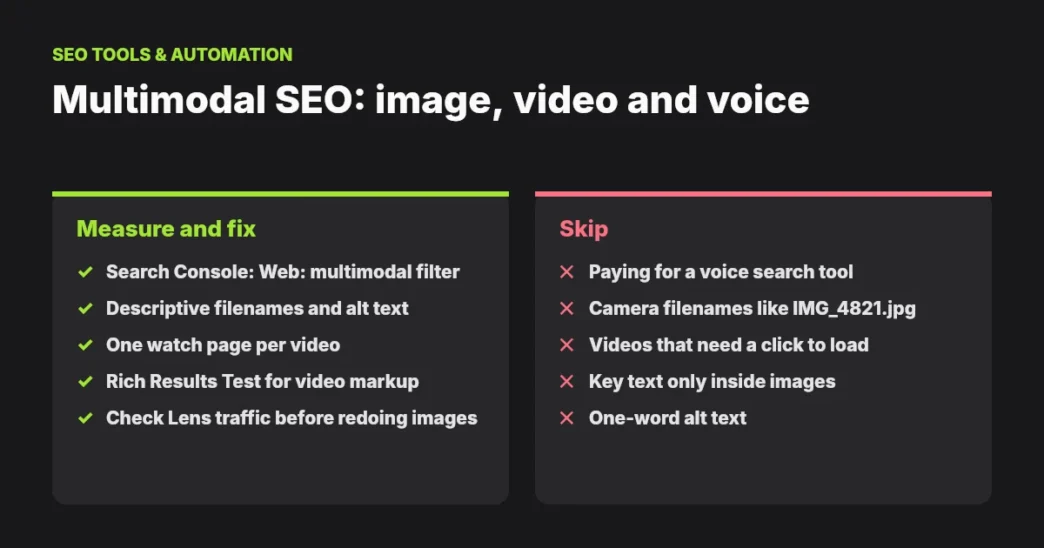
In the Performance report, set Search type to Web: multimodal to see traffic from image-based searches, including Google Lens, Circle to Search on Android, uploaded images and Chrome image search[1]. Compare it with Image and Video to see which formats bring visitors.
2. Search Console: Video indexing report
Shows which of your videos Google has indexed and why others weren’t. Google says each video needs a dedicated watch page where it is the main content[3].
3. Rich Results Test
Validates structured data such as VideoObject or Product markup while you build[6]. Google says the image property is required for image rich results[2].
4. Google Lens itself
Search with a photo of your own product or diagram and see what comes up. It is the quickest way to see whether Google connects your images to your pages.
5. URL Inspection
Confirms Google has found your structured data on a page[6], and shows the page as Google rendered it, so you can check images and videos load without a click.
Professional tip
Before you redo every image, check Web: multimodal for your top pages over three months. If a product or guide already gets Lens traffic, fix those images first; the rest can wait.
Images: what Google reads
For images, Google uses alt text together with computer vision and the page content to understand what an image shows[2]. Use descriptive filenames, a supported format such as WebP or AVIF, and responsive images with an img fallback. The tool below shows the difference.
Slide to compare the same image, described two ways.
Before
<img src="IMG_4821.jpg" alt="shoes">
A camera filename and a one-word alt text. Google has little to go on.
After
<img src="black-leather-chelsea-boots-side.webp" alt="Black leather Chelsea boots, side view, with elastic panel">
A descriptive filename and alt text that says what the image shows, in context. This is what Google's image guidance asks for.
Video and voice
There is no voice search report. Voice queries reach Google as searches like any other. Google’s one voice-specific feature, speakable markup, is in beta, works only for English-language publishers and US users of Google Assistant devices, and is aimed at news[5]. For most sites, voice optimisation means clear, direct answers under each heading.
Watch out
Don’t require clicks, swipes or typing to load a video. Google says videos should load without them, and need stable URLs for the file and thumbnail[3].
Related guides: Article and ImageObject schema, our schema markup guide and how Google BERT and MUM work, which covers MUM, Google’s model that understands text and images together.
Frequently asked questions
What is multimodal SEO?
It is optimising content for searches that use images, video or voice as well as typed text, such as Google Lens and Circle to Search.
Multimodal SEO: how do you measure visual search?
In Search Console’s Performance report, set Search type to Web: multimodal for Lens and Circle to Search, and to Image or Video for those tabs.
What are the top free tools for multimodal SEO?
Search Console’s Performance report and Video indexing report, the Rich Results Test, URL Inspection and Google Lens itself.
Is there a voice search report?
No. Voice searches are counted with other searches. Speakable markup exists but is in beta, for English news publishers and US Google Assistant devices.
Check one filter today
Related guides: free AI SEO tools, site architecture for AI search and how search engines crawl and index.
Open Search Console today and switch Search type to Web: multimodal. If you see any traffic, note the pages and fix their images first, using the before-and-after above as your model.
How we checked this: we rewrote this guide on 27 November 2026. We opened every source below that day and read the “People also ask” box and top results for “multimodal seo tools” on Google UK. We did not run lab tests beyond what is described. We list only Google’s free tools, because they report on Google’s own data.
Sources
- Search Console Help — Performance report (Search results): search type. Read on 27 November 2026.
- Google Search Central — Google Images SEO best practices (updated 2 Mar 2026). Read on 27 November 2026.
- Google Search Central — Video SEO best practices. Read on 27 November 2026.
- Think with Google — Search trends and marketing takeaways (3 Dec 2025). Read on 27 November 2026.
- Google Search Central — Speakable structured data (beta, updated 8 Sep 2026). Read on 27 November 2026.
- Google Search Central — Introduction to structured data markup (updated 10 Dec 2025). Read on 27 November 2026.