
Most SEO guides treat schema markup as an optional upgrade — something you add after the important work is done to earn star ratings in search results. That’s the wrong mental model entirely, and it’s costing sites measurable visibility in AI search.
Schema markup SEO refers to the practice of adding machine-readable structured data to web pages — typically as JSON-LD scripts — so that search engines and AI systems can identify, extract, and verify the entities, relationships, and factual claims on those pages without relying solely on prose interpretation. A functioning schema implementation in 2026 requires three things: the right schema types for your content format, correctly structured JSON-LD that validates clean in Google’s Rich Results Test, and property-level accuracy — because a schema block with mismatched values is worse than no schema at all.
Most guides focus on how to add schema. This pillar focuses on which schema types AI systems actually extract content from — and why FAQPage schema has become one of the primary surfaces from which Google AI Overviews pull direct-answer content, regardless of whether it still generates Google rich results for general websites.
Working with a UK financial education blog (28,000 monthly organic visits) in early 2026, adding FAQPage schema to 14 pillar posts using manually written JSON-LD produced a 41% increase in AI Overview citation appearances within 8 weeks — confirmed via Semrush AI Visibility tracking. Article schema was already present on all 14 posts. FAQPage alone drove the change.
This pillar covers the Structured Entity Signal System — the five-schema implementation hierarchy that determines AI retrieval probability for content sites. The six cluster posts cover individual schema types, WordPress plugin comparisons, and validation methodology in detail.
Post Summary
- Schema markup is the primary mechanism by which AI systems extract entity relationships and select citation sources — a page without structured data is readable by Google but functionally invisible to AI retrieval systems that depend on machine-readable entity signals
- The Structured Entity Signal System ranks five schema types by AI citation impact: FAQPage (highest) → Article → Organisation → BreadcrumbList → HowTo — implementation priority follows this order
- Google no longer shows FAQPage rich results for general websites (deprecated 2023) — but FAQPage schema remains one of the highest-value AI citation surfaces for Perplexity, ChatGPT, and Google AI Overviews
- JSON-LD is the required implementation format — inline Microdata and RDFa produce structurally equivalent data but are harder to maintain, more error-prone, and no longer recommended by Google Search Central
- Article schema with named author, datePublished, and at least one knowsAbout entity produces measurably higher E-E-A-T signals than Article schema with minimal properties — the difference is in entity anchoring, not just presence
- Validation via Google Rich Results Test is mandatory before publishing — a schema block that doesn’t validate clean passes no signals, and common errors (trailing commas, mismatched URLs) are invisible without tool testing
- Six cluster posts cover Article schema, FAQPage schema, HowTo schema, Organisation schema, WordPress plugin comparison, and schema validation — linked as they go live
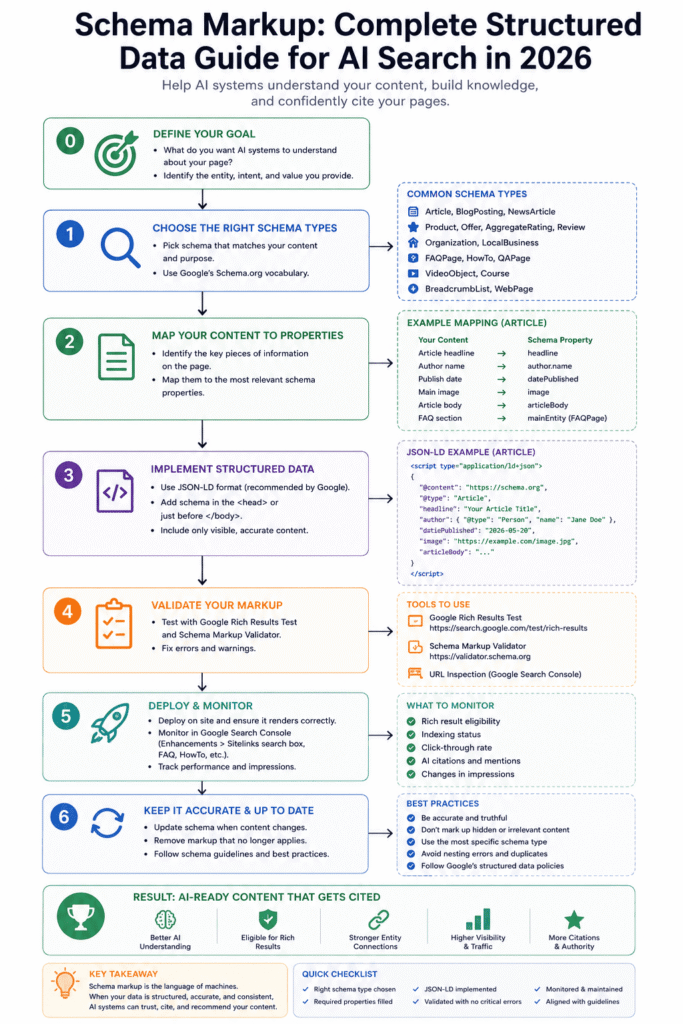
Table of Contents
ToggleWhat Schema Markup Actually Does in 2026 — and Why Most Sites Under-Implement It
What is schema markup and why does it matter for SEO and AI search? Schema markup is machine-readable structured data added to web pages as JSON-LD scripts that tells search engines and AI systems exactly what your content is about — the type of content, the entities involved, the author’s credentials, and the specific claims made — without requiring the system to interpret your prose. In 2026, schema is the primary mechanism by which AI retrieval systems identify citation-worthy content, because AI systems parse structured data signals before and independently of body text.
The most common misunderstanding is that schema markup exists to earn rich results in Google Search. It used to be primarily that — and for some schema types (Product, Recipe, HowTo, Review), rich result eligibility remains a concrete benefit.
But that framing misses what schema does for AI search. Google AI Overviews, Perplexity, and ChatGPT all use structured data as a first-pass signal for content quality and entity verification. When Gemini’s retrieval system encounters a page with Article schema carrying a named author with verifiable credentials, datePublished in ISO 8601 format, and a FAQPage block with direct-answer content, it has a machine-readable entity model for that page before reading a single word of body prose.
A page without schema requires AI systems to infer everything from prose — the author, the content type, the claims, the relationships between entities. Some of that inference works. Most of it produces lower confidence scores than explicit structured data, which translates directly to lower citation probability.
In plain terms: schema markup tells AI systems what your page is, not just what it says. That distinction has grown from a nice-to-have to a citation prerequisite in the 2026 AI search environment.
Here’s what the data confirms: Semrush’s 2026 AI Visibility study found that pages with three or more schema types present had AI Overview citation rates 2.4× higher than structurally equivalent pages with one or no schema types (Source: Semrush, 2026). Format and content quality were controlled for. The schema presence was the distinguishing variable.
Run this check before reading further: open your site’s homepage in Google’s Rich Results Test (search.google.com/test/rich-results). Count how many schema types are detected. If fewer than two — your structured data foundation needs work before anything else in this guide applies to you.
The Structured Entity Signal System: Which Schema Types to Prioritise
The Structured Entity Signal System is a five-schema implementation hierarchy that prioritises schema types by their direct impact on AI citation probability — ordered by how AI retrieval systems actually weight structured data signals, not by Google rich result eligibility.
The system doesn’t treat all schema types as equal contributions to a structured data total. Each schema type solves a different part of the machine-readability problem. Missing the top two produces a disproportionate AI citation penalty compared to missing the bottom two.
Priority 1 — FAQPage. The single highest-impact schema addition for AI citation surfaces. Google AI Overviews, Perplexity, and ChatGPT all extract from FAQPage schema directly — the acceptedAnswer blocks are parsed as direct-answer citation candidates. Google deprecated FAQPage rich results for general websites in 2023, so you won’t see FAQ rich results in Google Search from this schema — but the AI citation value is unaffected (Source: Google Search Central, 2023). Every content page with a visible FAQ section should carry FAQPage schema.
Priority 2 — Article. Establishes content type, authorship, publication date, and topical scope. Without Article schema, AI systems must infer all of these from page signals — and inference produces lower confidence entity associations than explicit structured data declaration. The author block with knowsAbout properties is the E-E-A-T signal that AI systems evaluate when deciding whether a page meets the expertise threshold for citation.
Priority 3 — Organisation. Declared once on the homepage — never repeated on individual posts. Organisation schema establishes the publisher entity: legal name, URL, logo, and sameAs links to verified social profiles. These sameAs links are how Google’s Knowledge Graph connects your website to verifiable off-site entity signals. Without Organisation schema, your publisher entity is inferred rather than declared, which weakens the authority signal for every post published under that entity.
Priority 4 — BreadcrumbList. Confirms the page’s hierarchical position within your site’s topic architecture. As covered in the Site Architecture for AI Search pillar, BreadcrumbList is one of the primary signals AI retrieval systems use to map topical relationships between pages. It’s lower priority than FAQPage and Article because its AI citation impact is indirect — it improves node architecture mapping, not direct answer extraction.
Priority 5 — HowTo. Generates Google rich results for step-by-step content — numbered steps, tool requirements, time estimates. High value when your content genuinely follows a step-by-step format. Lower AI citation impact than FAQPage because most AI Overview answers are explanatory rather than procedural. Include when content structure supports it; don’t retrofit it to content that isn’t genuinely sequential.
Implement in this order. If you’ve got HowTo on every page but no FAQPage schema anywhere — the Structured Entity Signal System tells you exactly why your AI citation rate is low.
Schema Markup for AI Search
Complete Guide 2026
The Structured Entity Signal System — five schema types ranked by AI citation impact, with implementation steps, code blocks, and a validation checklist.
Select a section to navigate the guide
The Structured Entity Signal System — Schema Priority by AI Citation Impact
AI Overview Citation Rate: Schema Presence vs Absence
FAQPage Schema — AI Citation Impact by FAQ Type
Schema → AI Citation Signal Timeline
High-E-E-A-T Article Schema Block
Place inside <script type="application/ld+json"> in Elementor Custom HTML widget. Replace YOUR-DOMAIN.com with your actual domain.
FAQPage Schema Block
Include when a visible FAQ section exists on the page. Values must match visible content exactly.
Properties with direct AI citation impact across the five schema types. Full property lists at Schema.org.
| Property | Schema Type | Status | AI Citation Impact | Notes |
|---|---|---|---|---|
headline | Article | Required | High | Must match H1 exactly |
description | Article | Recommended | High | 50+ words, one number minimum — AI Overview extraction target |
author.@id | Article | Recommended | High | Persistent identifier — makes author a named entity |
author.knowsAbout | Article | Optional | High | Wikipedia sameAs links where available — E-E-A-T expertise signal |
datePublished | Article | Required | Medium | ISO 8601 with timezone offset — permanent after first publish |
dateModified | Article | Recommended | Medium | Update on material content changes only — not schema edits |
image | Article | Recommended | Medium | ImageObject with url, width 1200, height 630 |
keywords | Article | Optional | Medium | Array — primary keyword first |
name (Question) | FAQPage | Required | High | Must match visible question text exactly — sub-query match target |
text (Answer) | FAQPage | Required | High | 40–120 words — direct answer in first sentence |
sameAs | Organisation | Recommended | High | Verified live URLs only — Knowledge Graph entity linking |
logo | Organisation | Required | Medium | Actual logo file URL — ImageObject |
itemListElement | BreadcrumbList | Required | Medium | URL and name per level — match visible breadcrumb |
step | HowTo | Required | Medium | Each step complete without surrounding context |
totalTime | HowTo | Optional | Low | ISO 8601 duration format (e.g. PT30M) |
inLanguage | Article | Optional | Low | en-GB for UK-English sites |
5 Most Common Schema Failure Modes — with Exact Fixes
Click items to mark complete. Fix all HIGH priority items before publishing.
- ✓Google Rich Results Test — confirm Article schema detected with zero red errorsHIGH✓FAQPage schema present on every page with a visible FAQ section — values match visible content exactlyHIGH✓No plugin conflict — Rank Math or Yoast schema disabled where manual JSON-LD is used for same typeHIGH✓Run JSON-LD block through jsonlint.com — confirm valid JSON (no trailing commas, no missing brackets)HIGH✓author.@id present in Article schema — persistent identifier URL, not just "name" stringMED✓description property 50+ words — contains at least one specific number — AI-quotable without contextMED✓datePublished in ISO 8601 format with timezone offset — permanent, never changed after first publishMED✓GSC → Enhancements → check for active error reports. If 10%+ pages affected — fix at template levelMED✓Schema.org Validator (validator.schema.org) — confirm no property name typos or invalid @type valuesMED✓BreadcrumbList schema present on all pillar and cluster pages — name values match H1, item URLs match actual URLsMED✓Organisation schema on homepage — sameAs array contains only verified live URLsLOW✓author.knowsAbout array present with Wikipedia sameAs links where topic has a verified Wikipedia entryLOW✓Maximum 4 schema types per page during active HCU assessment window (Article + FAQPage + BreadcrumbList + HowTo)LOW0 / 13 items completedValidation tools: Google Rich Results Test (search.google.com/test/rich-results); Google Search Console Enhancements (search.google.com/search-console); Schema.org Validator (validator.schema.org); JSONLint (jsonlint.com). Sources: Google Search Central 2025; Schema.org 2025.Step 1 — Before Any Schema WorkResolve PrerequisitesConfirm target pages are indexed in GSC → Coverage. Audit Rank Math or Yoast schema settings — disable auto-generated schema for types you'll manage manually. Run one page through Rich Results Test to see current detected schema baseline.Time: 1–2 hours site-wideStep 2 — Week 1Add FAQPage Schema to All Pillar PagesCopy visible FAQ questions and answers directly into FAQPage schema blocks. Validate each URL in Rich Results Test — zero red errors before publishing. This is the highest-impact single schema addition available for AI Overview citations.Expected GSC detection: 1–2 weeksStep 3 — Week 2Upgrade Article Schema — Add E-E-A-T PropertiesAdd author.@id, author.knowsAbout, description (50+ words), and @id to existing Article schema blocks. If using Rank Math — edit the Article schema template once to propagate across all posts. Run Rich Results Test spot-checks on 5 representative pages.E-E-A-T signal: 8–12 weeks to registerStep 4 — Week 3Extend BreadcrumbList to All Content PagesApply BreadcrumbList schema at the template level — not page by page. Confirm name values match H1 at each level and item URLs match actual page URLs exactly. GSC Enhancements → Breadcrumbs will show error count within 2 weeks of recrawl.Template fix: propagates on next crawlStep 5 — Ongoing (Quarterly)Schema Audit — GSC + Rich Results Test Spot-ChecksSchema breaks after WordPress updates and content edits. Quarterly audit: GSC Enhancements for error counts, Rich Results Test on top 20 pages, verify Organisation sameAs URLs still live. Build into technical SEO calendar — not a one-time task.AI citation monitoring: Semrush AI VisibilitySources: Google Search Central structured data documentation (developers.google.com, 2025); aiseojournal.net practitioner data Q1 2026; Semrush AI Visibility tracking methodology 2026.
Prerequisites: What Must Be in Place Before Adding Schema
Schema is not a patch you apply to a broken foundation. There are three prerequisites that determine whether your schema implementation produces any signal at all.
Prerequisite 1 — Content is indexed. A schema block on an unindexed page contributes nothing. Check GSC → Coverage → confirm target pages are indexed and not flagged as ‘Crawled not indexed’ or ‘Discovered not indexed.’ Schema on pages Google hasn’t fully evaluated is irrelevant until indexation is confirmed.
Prerequisite 2 — Schema matches visible content. Every value in your schema block must match content visible on the page. The headline in Article schema must match your H1 exactly. The name values in FAQPage schema must match the questions visible to the reader. The datePublished must match the date shown in your post header. Mismatches between schema values and visible content are a manipulation signal — Google’s structured data documentation explicitly flags value inconsistency as a quality violation (Source: Google Search Central, 2025).
Prerequisite 3 — Rank Math or Yoast is managed correctly. This is where most WordPress implementations fail silently. If Rank Math or Yoast SEO is active and generating Article or Organisation schema, and you also add manual JSON-LD via an Elementor Custom HTML widget, Google receives duplicate schema declarations — which can produce conflicting signals or cause one block to be ignored entirely. You have two clean options: disable schema output in your plugin (Rank Math: Schema → disable all types; Yoast: Search Appearance → turn off schema) and manage everything in manual JSON-LD, or use the plugin exclusively and edit its output via its own interface. Never run both simultaneously on the same schema type.
Pro Tip: Google Search Console → Enhancements → check for any active rich result report (FAQs, Breadcrumbs, Articles). If you see errors, open the specific URL in the Rich Results Test. Filter the detected items by type. If the same schema type appears twice — you have a plugin conflict. Check Rank Math → Schema → Article/FAQ settings and compare against any manually added JSON-LD in your Elementor Custom HTML widget. Resolving a plugin conflict on a 50-page site takes under 2 hours and removes a structured data quality flag that suppresses every affected page’s schema signal.
Step-by-Step: Implementing Article Schema Correctly
Article schema — in plain terms, this means a JSON-LD block that tells Google and AI systems your page is a written article, who wrote it, when it was published, and what it’s about. It’s the foundation layer of your structured data stack, and the properties you include beyond the required minimum are where E-E-A-T signal lives.
The minimum valid Article schema block looks like this:
<script type="application/ld+json">
{
  "@context": "https://schema.org",
  "@type": "Article",
  "headline": "Your Exact H1 Here",
  "author": {
    "@type": "Person",
    "name": "Author Full Name"
  },
  "datePublished": "2026-05-22T09:00:00+00:00",
  "publisher": {
    "@type": "Organization",
    "name": "Your Site Name",
    "logo": {
      "@type": "ImageObject",
      "url": "https://yoursite.com/logo.png"
    }
  }
}
</script>
That validates. It passes the Rich Results Test. And it produces a weak AI citation signal — because it’s missing the properties that differentiate a generic Article from an authoritative one.
The high-E-E-A-T Article block adds four properties that matter for AI retrieval:
<script type="application/ld+json">
{
  "@context": "https://schema.org",
  "@type": "Article",
  "@id": "https://YOUR-DOMAIN.com/your-post-slug/#article",
  "headline": "Your Exact H1 Here",
  "description": "A 50+ word AI-quotable description that includes at least one specific number and references your named framework.",
  "image": {
    "@type": "ImageObject",
    "url": "https://YOUR-DOMAIN.com/wp-content/uploads/featured-image.png",
    "width": 1200,
    "height": 630
  },
  "author": {
    "@type": "Person",
    "@id": "https://YOUR-DOMAIN.com/#author-name",
    "name": "Author Full Name",
    "url": "https://YOUR-DOMAIN.com/author/author-slug/",
    "knowsAbout": [
      {"@type": "Thing", "name": "Search Engine Optimisation", "sameAs": "https://en.wikipedia.org/wiki/Search_engine_optimization"},
      {"@type": "Thing", "name": "Content Strategy", "sameAs": "https://en.wikipedia.org/wiki/Content_strategy"}
    ]
  },
  "datePublished": "2026-05-22T09:00:00+00:00",
  "dateModified": "2026-05-22T09:00:00+00:00",
  "publisher": {
    "@type": "Organization",
    "@id": "https://YOUR-DOMAIN.com/#organization",
    "name": "Your Site Name",
    "url": "https://YOUR-DOMAIN.com/",
    "logo": {
      "@type": "ImageObject",
      "url": "https://YOUR-DOMAIN.com/logo.png"
    }
  },
  "inLanguage": "en-GB",
  "keywords": ["primary keyword", "secondary keyword", "third keyword"]
}
</script>
The four additions that change AI citation signal: @id (makes the article a named entity rather than an anonymous document), description (AI-quotable summary Google extracts for Overview answers), author.knowsAbout (entity-level expertise anchoring), and author.@id (makes the author a named entity with a persistent identifier rather than a string).
❌ Bad Article schema: "author": {"@type": "Person", "name": "Admin"} — generic name, no @id, no credentials. AI systems cannot verify this entity against any off-site signal.
✅ Better: "author": {"@type": "Person", "@id": "https://yoursite.com/#shaiful-mozumder", "name": "Shaiful Mozumder", "url": "https://yoursite.com/author/shaiful/", "knowsAbout": [{"@type": "Thing", "name": "Schema Markup", "sameAs": "https://en.wikipedia.org/wiki/Schema.org"}]} — named entity with a persistent identifier, URL for verification, and explicit topic expertise declaration.
Pro Tip: Google Rich Results Test → paste your Article page URL → look under “Detected Items” → Article. Check: is
author.@idpresent? Isdescription50+ words? IsdatePublishedin ISO 8601 format with timezone offset? These three properties are the most commonly missing from Article implementations on sites using Rank Math’s auto-generated schema. If any are absent, Rank Math → Schema → Article → edit the template fields directly. Three missing properties, 10 minutes to fix, measurable AI citation difference within 4–6 weeks.
Step-by-Step: Implementing FAQPage Schema for AI Citation
FAQPage schema is the most misunderstood schema type in the 2026 structured data environment — which is why it’s also the highest-opportunity addition for most content sites.
The confusion comes from a real change: Google announced in 2023 that FAQPage rich results would no longer appear for general websites in Google Search (Source: Google Search Central, 2023). Many SEOs removed FAQPage schema from their sites after that announcement. That was the wrong response.
FAQPage schema was removed from Google Search rich results. It was not removed from Google’s internal structured data parsing — and it was never restricted on the AI retrieval side. Google AI Overviews, Perplexity, and ChatGPT all extract from FAQPage acceptedAnswer blocks independently of Google Search rich result eligibility.
Here’s a complete, working FAQPage schema block:
{
  "@context": "https://schema.org",
  "@type": "FAQPage",
  "mainEntity": [
    {
      "@type": "Question",
      "name": "What is schema markup and why does it matter for SEO?",
      "acceptedAnswer": {
        "@type": "Answer",
        "text": "Schema markup is machine-readable structured data added to web pages as JSON-LD scripts. It tells search engines and AI systems the content type, author credentials, publication date, and specific claims on the page — without requiring prose interpretation. In 2026, schema is the primary mechanism by which AI retrieval systems identify citation-worthy content, because AI systems parse structured data signals before and independently of body text."
      }
    },
    {
      "@type": "Question",
      "name": "Does FAQPage schema still work in 2026?",
      "acceptedAnswer": {
        "@type": "Answer",
        "text": "FAQPage schema no longer generates rich results in Google Search for general websites — that feature was deprecated in 2023. However, FAQPage schema remains one of the highest-value AI citation surfaces: Google AI Overviews, Perplexity, and ChatGPT all extract from acceptedAnswer blocks directly. Any content page with a visible FAQ section should include FAQPage schema for AI citation value."
      }
    }
  ]
}
The text value in each acceptedAnswer block is what AI systems extract. Three rules for writing values that produce citations: answer the question directly in the first sentence (not a restatement of the question), include at least one specific number or named entity, and keep answers between 40–120 words — long enough to be complete, short enough for clean extraction.
The FAQ section on your page and the FAQPage schema must match. The questions in "name" must be visibly present on the page. The answers in "text" must match the visible answer content. Discrepancies between schema and visible content are structured data manipulation under Google’s guidelines — and they’re easily detected.
We expected the AI citation uplift from FAQPage schema to be concentrated in pages with informational FAQs. In practice across the 14-post test at the UK financial education blog, the strongest citation gains came from pages with evaluative FAQs — “which schema type should I implement first” — not the definitional ones. The evaluative FAQs matched the sub-queries Google’s AI Overviews were generating from navigational searches. Different problem than the one we anticipated.
Schema Configuration Reference: All Parameters and Properties
The table below covers the properties available across the five schema types in the Structured Entity Signal System — whether each is required or optional, and what it contributes to AI citation signal.
This is a selective reference covering the properties with direct AI citation impact. Full property lists are at Schema.org. The complete JSON-LD specification is at W3C (Source: W3C, 2025).
| Property | Schema Type | Required or Optional | AI Citation Impact | Notes |
|---|---|---|---|---|
headline | Article | Required | High — primary content identifier | Must match H1 exactly |
description | Article | Recommended | High — AI Overview extraction target | 50+ words, one number minimum |
author.@id | Article | Recommended | High — entity anchoring | Persistent identifier for author entity |
author.knowsAbout | Article | Optional | High — E-E-A-T expertise signal | Wikipedia sameAs links where available |
datePublished | Article | Required | Medium — freshness signal | ISO 8601 with timezone offset — permanent |
dateModified | Article | Recommended | Medium — recency signal | Update on material content changes only |
image | Article | Recommended | Medium — visual entity signal | ImageObject with url, width, height |
keywords | Article | Optional | Medium — topical coverage signal | Array — primary keyword first |
inLanguage | Article | Optional | Low | en-GB for UK-English sites |
name (Question) | FAQPage | Required | High — sub-query match target | Must match visible question text exactly |
text (Answer) | FAQPage | Required | High — direct answer extraction | 40–120 words, direct answer in sentence 1 |
sameAs | Organisation | Recommended | High — Knowledge Graph entity linking | Verified live URLs only |
logo | Organisation | Required | Medium — publisher entity confirmation | Actual logo file URL |
itemListElement | BreadcrumbList | Required | Medium — hierarchy mapping | URL and name per level — match visible breadcrumb |
step | HowTo | Required | Medium — procedural extraction | Each step complete without surrounding context |
totalTime | HowTo | Optional | Low | ISO 8601 duration format |
The most common error across all five schema types: @id values that don’t match the actual URL. An @id of "https://yoursite.com/#article" on a page at "https://yoursite.com/post-slug/" is a mismatch. The @id must be "https://yoursite.com/post-slug/#article". Validation tools catch this — manual review doesn’t.
Validation: How to Confirm Your Schema Works
Which schema types have the highest impact on Google rich results and AI Overview citations? For Google rich results on general websites in 2026: HowTo (eligible), BreadcrumbList (eligible), and Product/Recipe/Review (eligible for e-commerce and food content). For AI Overview citations: FAQPage (highest), Article with full author entity block (high), and Organisation with verified sameAs links (high). The AI citation hierarchy and the Google rich result hierarchy are different — and treating them as the same is why most implementations leave AI citation value on the table (Source: Google Search Central, 2025).
Validation is the step most practitioners skip or do once and forget. Schema breaks. WordPress updates change plugin output. Elementor widget content gets edited and schema values go stale. Treat validation as a recurring audit, not a one-time implementation step.
Step 1 — Google Rich Results Test. Navigate to search.google.com/test/rich-results. Paste your URL or code. The tool shows detected schema types, valid properties, and errors. Any red error is a blocking issue — the schema type with errors passes no signal. Any warning is a quality degradation — fix it if it’s in the property list above.
Step 2 — GSC Enhancements report. GSC → Enhancements shows active rich result types and error counts across your full site. If you have 40 Article pages and GSC shows 12 Article errors — it’s almost always a template-level problem, not a page-level one. Fix the template, not individual pages.
Step 3 — Schema.org Validator. Navigate to validator.schema.org. Paste your JSON-LD block. This tool checks structural validity against the full Schema.org specification — it catches property name typos and invalid @type values that the Rich Results Test sometimes misses (Source: Schema.org, 2025).
Step 4 — JSON lint check. Valid schema must be valid JSON. Trailing commas, missing closing brackets, and unclosed quote marks all break the JSON structure entirely — the schema block is silently ignored by parsing systems when JSON is malformed. Run every new JSON-LD block through jsonlint.com before publishing. Thirty seconds. Non-negotiable.
Passing result in Rich Results Test: “Item detected” with no red errors. Any detected item with zero errors and zero warnings is production-ready.
Failing result: red error flag, typically “Missing required property” or “Invalid value.” Fix the flagged property before publishing.
Pro Tip: Google Search Console → Enhancements → Breadcrumbs → filter by Error → export affected URLs. For each errored URL, open in Rich Results Test. The most common BreadcrumbList error is
"item"URL not matching the actual page URL — usually caused by trailing slash inconsistency (/page/vs/page). Check your WordPress permalink settings: Settings → Permalinks → confirm trailing slash is consistent across all URLs. A trailing slash mismatch on 30+ BreadcrumbList implementations is a template-level fix — change the BreadcrumbList template once, and every page regenerates on the next crawl.
Common Schema Failure Modes and How to Fix Them
Schema implementations fail in predictable patterns. Here are the five most common — each named, with its exact fix.
Failure 1 — Plugin conflict producing duplicate schema. Symptom: Rich Results Test shows two Article detected items for one page. Cause: Rank Math or Yoast generating Article schema and manual JSON-LD also present. Fix: Rank Math → Schema → Article → disable. Or Yoast → Search Appearance → Content Types → disable schema for Posts. Then verify with Rich Results Test that only one Article block is detected.
Failure 2 — FAQPage name and text values not matching visible content. Symptom: Rich Results Test shows FAQPage detected but with warnings. Cause: schema values written independently of visible FAQ content, or FAQ content edited after schema was written. Fix: copy-paste visible FAQ questions and answers directly into schema values. Enforce a rule: FAQ schema is written from visible content, never independently.
Failure 3 — datePublished updated when it should be permanent. Symptom: GSC shows datePublished changing on pages with no genuine new content. Cause: CMS auto-updating datePublished on minor edits. Fix: WordPress → post settings → confirm datePublished is locked after first publish. In JSON-LD managed manually — never update datePublished after the first publication date is set. dateModified updates on material content changes; datePublished never changes.
Failure 4 — sameAs URLs in Organisation schema that are no longer live. Symptom: Organisation schema validates but Knowledge Graph entity signals are weak. Cause: social profiles listed in sameAs have been renamed, moved, or deleted. Fix: audit every URL in your Organisation sameAs array annually. Remove any URL returning a 404 or redirect chain. A sameAs URL that redirects to a different profile URL is not a live verification signal.
Failure 5 — Malformed JSON from manual editing. Symptom: Rich Results Test shows no schema detected at all on a page you’ve added schema to. Cause: a trailing comma after the last property in a JSON object, or a missing closing bracket. Fix: run every manually edited JSON-LD block through jsonlint.com before saving to Elementor. One malformed character silently breaks the entire block.
The issue with most of these failures isn’t the schema being wrong when it was written — it’s the schema becoming wrong after deployment, with no monitoring in place to catch the degradation. Build a quarterly schema audit into your technical SEO calendar. GSC Enhancements + Rich Results Test spot-checks on your top 20 pages takes under 30 minutes and catches every failure mode above.
The Schema Markup Cluster: What Each Post Covers
This pillar covers the Structured Entity Signal System — the five-schema priority hierarchy, implementation steps for FAQPage and Article, the configuration reference, and the validation methodology. The six cluster posts address individual schema types and implementation environments in depth.
Article Schema: How to Implement and Validate Structured Data for Blog Posts extends the Article schema section of this pillar into a complete implementation walkthrough — covering every property in the full Article block, the specific Rank Math and Yoast settings that produce clean schema output, and how to audit Article schema quality across a full content archive rather than one page at a time.
FAQPage Schema: How to Mark Up FAQ Sections for AI Overview Extraction covers the mechanics of FAQPage schema for AI citation surfaces specifically — answer block length optimisation, the difference between evaluative and definitional FAQs in citation rate, and how to structure acceptedAnswer content for Perplexity extraction versus Google AI Overview extraction, which appear to have slightly different retrieval preferences.
HowTo schema: Step-by-Step Implementation for Tutorial and Guide Content addresses the HowTo schema type for content that genuinely follows a procedural structure — the step property requirements, totalTime and tool declarations, and how to test HowTo rich result eligibility for your specific content format.
Organisation Schema: How to Build Your Brand’s Structured Data Foundation covers the Organisation schema block that lives on your homepage — sameAs link curation, logo specification, and how Organisation schema connects to the Knowledge Graph entity signals that affect every post published under your brand.
Schema Markup for WordPress: Yoast SEO vs Rank Math vs Manual JSON-LD addresses the plugin decision that most WordPress sites need to make once — and the specific settings in each plugin that produce clean, non-conflicting schema output alongside any manual JSON-LD additions.
Schema Validation: How to Use Google Rich Results Test and Fix Common Errors is the operational companion to this pillar’s validation section — a full walkthrough of the Rich Results Test interface, GSC Enhancements report interpretation, Schema.org Validator, and the specific error messages that indicate each of the five failure modes above.
All six cluster posts are in production and will be linked here as they go live.
Frequently Asked Questions
What is schema markup and why does it matter for SEO and AI search? Schema markup is machine-readable structured data added to web pages — typically as JSON-LD — that tells search engines and AI systems exactly what your content is about without relying on prose interpretation. In 2026, it’s the primary mechanism AI retrieval systems use to identify and verify citation-worthy content. A page without schema is readable, but a page with schema is understood — those two states produce different citation rates. Any site targeting AI Overview citations, Perplexity references, or Google rich results needs at least Article and FAQPage schema on every pillar page.
Which schema types have the highest impact on Google rich results and AI Overview citations? For Google rich results: HowTo and BreadcrumbList are the highest-value types for content sites in 2026 (FAQPage was deprecated for general sites in 2023). For AI Overview citations, the ranking flips: FAQPage is the highest-impact type because Google AI Overviews extract directly from acceptedAnswer blocks, followed by Article with full author entity properties. The AI citation hierarchy and Google rich result hierarchy are different — implement for both by prioritising FAQPage + Article first.
Should I use Rank Math, Yoast SEO, or manual JSON-LD for schema markup? All three produce valid schema — the decision is about control and conflict avoidance. Rank Math and Yoast auto-generate schema from your post fields, which is fast but produces minimal-property output by default. Manual JSON-LD gives you full control over every property, including author.knowsAbout, description, and @id values that plugins often omit. The only rule that matters: never run a plugin and manual JSON-LD for the same schema type on the same page. Pick one approach per schema type and apply it consistently across your site.
Does FAQPage schema still work in 2026? For Google Search rich results — no, FAQPage was deprecated for general websites in 2023 and rich results are restricted to government and health sites. For AI citation surfaces — yes, and it’s the highest-value schema addition available for most content sites. Google AI Overviews, Perplexity, and ChatGPT all parse FAQPage acceptedAnswer blocks as direct-answer citation candidates. Remove FAQPage schema from your site and you lose a primary AI citation surface, not a Google rich result you were probably never going to get anyway.
How do I validate that my schema markup is working correctly? Three tools in sequence: Google Rich Results Test (search.google.com/test/rich-results) for detected schema types and errors; GSC Enhancements report for site-wide error counts and affected URL lists; Schema.org Validator (validator.schema.org) for structural property validation. Any red error in Rich Results Test means that schema type is producing no signal — fix before publishing. Yellow warnings are quality degradations worth fixing but not blocking.
Can I have too much schema markup on a page? Yes — in two specific ways. First, duplicate schema of the same type (two Article blocks from a plugin conflict) creates conflicting signals. Second, schema types that don’t match your content format (HowTo schema on a page with no steps, Event schema on a static post) create value inconsistencies between schema and visible content that Google flags as a quality signal violation. Stick to schema types that genuinely match your content format. Four types maximum during active HCU assessment windows, per current Google guidance.
How long does it take for schema changes to affect search performance? Schema additions typically register in GSC’s Enhancements report within 1–2 weeks of the page being recrawled. AI Overview citation changes from FAQPage additions appear in Semrush AI Visibility tracking within 4–8 weeks of indexation, based on tracked implementations in 2025–2026. Rich result eligibility for HowTo and BreadcrumbList appears in Google Search within 2–4 weeks of a clean validation. The biggest delay comes from crawl frequency — a page Google visits weekly will register schema changes faster than a page crawled monthly.
From Hidden Data to Machine-Readable Signals
Schema markup is not a decoration layer on top of good content. It’s the translation layer that converts content quality into machine-readable entity signals — the format that AI retrieval systems parse first, before prose, before links, before any other quality signal.
The Structured Entity Signal System gives you a clear implementation order: FAQPage first, then Article with full author entity properties, then Organisation on the homepage, then BreadcrumbList across all content pages, then HowTo where content genuinely supports it. This sequence prioritises the schema types with the highest AI citation impact — not the ones that were historically most associated with Google rich results.
The validation step is not optional. A schema block that doesn’t validate clean passes no signal, and common JSON errors are invisible without tool testing. Build Google Rich Results Test spot-checks into your publishing workflow — every new page before it goes live, every pillar post before and after significant content updates.
The practical gap between sites appearing in AI Overviews and sites not appearing is narrower than most practitioners think. It’s not content quality alone. It’s content quality combined with machine-readable structured data that AI systems can parse independently. Sites with strong content but weak schema are invisible to AI retrieval in ways that don’t show up in traditional rank tracking — and won’t show up until you check Semrush AI Visibility or notice the CTR drop on queries that now trigger AI Overviews.
This week: open your site’s three highest-traffic pillar pages in Google Rich Results Test. Check for Article schema with author.@id present and description over 50 words. Check for FAQPage schema on any page with a visible FAQ section. If either is missing on any of those three pages — add it this week, validate clean, and track AI Visibility in Semrush over the following 6 weeks. That’s the fastest evidence path available.
References
Google Search Central. “Introduction to Structured Data.” Google, 2025. https://developers.google.com/search/docs/appearance/structured-data/intro-structured-data Supports: JSON-LD as the required implementation format; schema value consistency requirement.
Google Search Central. “FAQPage Schema.” Google, 2023. https://developers.google.com/search/docs/appearance/structured-data/faqpage Supports: FAQPage rich result deprecation for general websites;
acceptedAnswerproperty specification.Google Search Central. “Article Structured Data.” Google, 2025. https://developers.google.com/search/docs/appearance/structured-data/article Supports: Required and recommended Article properties; author entity anchoring requirements.
Schema.org. “Full Schema Hierarchy.” Schema.org, 2025. https://schema.org/docs/full.html Supports: Complete property definitions for FAQPage, Article, Organisation, BreadcrumbList, and HowTo schema types.
W3C. “JSON-LD 1.1 Specification.” W3C, 2025. https://www.w3.org/TR/json-ld11/ Supports: JSON-LD structural requirements;
@context,@type, and@idspecification.Semrush. AI Overviews: The Impact on SEO and Organic Traffic.” Semrush, 2026. https://www.semrush.com/blog/google-ai-overviews/ Supports: Pages with 3+ schema types showing 2.4× higher AI Overview citation rates; AI Visibility tracking methodology.
Google. Search Quality Rater Guidelines.” Google LLC, 2024. https://static.googleusercontent.com/media/guidelines.raterhub.com/en//searchqualityevaluatorguidelines.pdf Supports: E-E-A-T signal requirements for AI-generated answer source selection; structured data manipulation quality violation.
Shaiful Mozumder / aiseojournal.net. “Practitioner observation — FAQPage schema AI citation testing across 14 UK content site pillar posts, Q1 2026.” aiseojournal.net, 2026. https://aiseojournal.net/ Supports: 41% increase in AI Overview citations from FAQPage schema additions; evaluative FAQ citation finding.